
What is Vidu Q2 Reference-to-Video Pro
Vidu Q2 Reference-to-Video Pro is the world's first "reference anything" video model. By supporting multimodal input (2 videos and 4 images), the model provides creators with powerful capabilities. It enables one-click replication of character expressions, complex actions, special effects, scenes, and textures, achieving fine-grained editing. The model requires no professional skills, and even beginners can instantly become special effects masters and create high-quality video content. Vidu Q2 Reference-to-Video Pro meets multi-scenario needs and is a truly production-grade video creation engine that empowers creators, letting creativity extend infinitely.
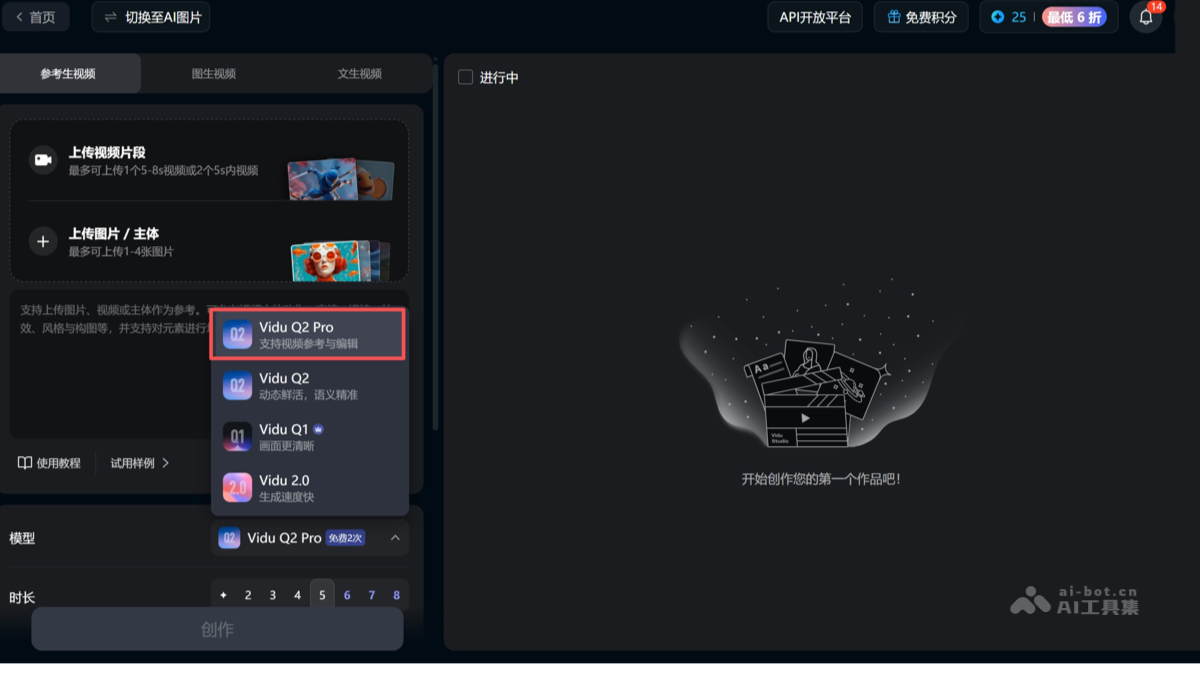
Main features of Vidu Q2 Reference-to-Video Pro
-
Multimodal reference input: Supports 2 videos and 4 images as references, providing richer creative materials.
-
Six major reference types: Covers characters, scenes, special effects, expressions, actions, and textures, meeting diverse creative needs.
-
Fine-grained video editing: Supports adding, deleting, modifying, and replacing video content, enabling precise and controllable creation.
-
One-click special effects replication: No professional tools required; quickly generate the same special effects by referencing a video.
-
Expression and action transfer: Supports natural replication of complex expressions and highly difficult actions, enhancing the realism of AI performances.
-
Free scene replacement: No green screen keying required; scenes can be changed using background images, adapting to various shooting needs.
-
Smart beauty and hairstyling: One-click adjustment of beauty and hairstyling effects, no frame-by-frame retouching needed, maintaining a natural texture.
-
One-click style switching: Supports switching between live-action footage and comic drama style, reducing the cost of producing multiple versions.
-
Aspect ratio adaptation: Flexibly adjust video ratios to fit mainstream social platforms, improving content distribution efficiency.
How to use Vidu Q2 Reference-to-Video Pro
-
Register and log in: Visit theViduofficial website or https://platform.vidu.cn, complete account login and registration. Select Reference-to-Video.
-
Upload materials: Upload 2 videos and/or 4 images as reference materials, ensuring the materials are clear and highly relevant.
-
Select reference types: In the editing interface, select the six major reference types such as characters, scenes, and special effects, matching reference materials with creative needs.
-
Edit and create: Use functions such as special effects replication, expression transfer, and action replication to finely edit the video, such as adding, deleting, or modifying elements.
-
Adjust and optimize: Use the video magic brush function to adjust details, switch styles, adapt aspect ratios, and optimize the final result.
-
Export and share: After editing is complete, export the video and publish it to social media or other platforms.
Application scenarios of Vidu Q2 Reference-to-Video Pro
-
Film and television production: Used for special effects generation, action guidance, and scene replacement, improving production efficiency and reducing shooting costs.
-
Short drama and comic drama creation: The model can achieve expression replication and style switching, meeting different creative needs and reducing the cost of producing multiple versions.
-
Advertising and marketing: Used for quickly generating creative advertising videos, adapting to multiple platforms, and enhancing brand image and communication efficiency.
-
Education and Training: Produce vivid instructional videos and use virtual demonstrations to enhance teaching effectiveness.
-
Self-Media and Content Creation: Used to efficiently generate personalized content, adapt to multiple platforms, and improve creation and communication efficiency.