
What is Tolaria
Tolaria is an open-source local note-taking tool for the AI era, created by Luca, author of Refactoring, based on 5 years of full-time writing and experience managing 9,000+ notes. The tool blends Notion's block editing experience with Obsidian's philosophy of local data sovereignty, storing notes as pure Markdown + YAML files, with built-in Git version control, supporting bidirectional links and Type category views. Through a native MCP server, Tolaria can seamlessly connect to Claude Code and other external AIs, allowing users to have a highly free knowledge management system without cloud lock-in or subscription lock-in.
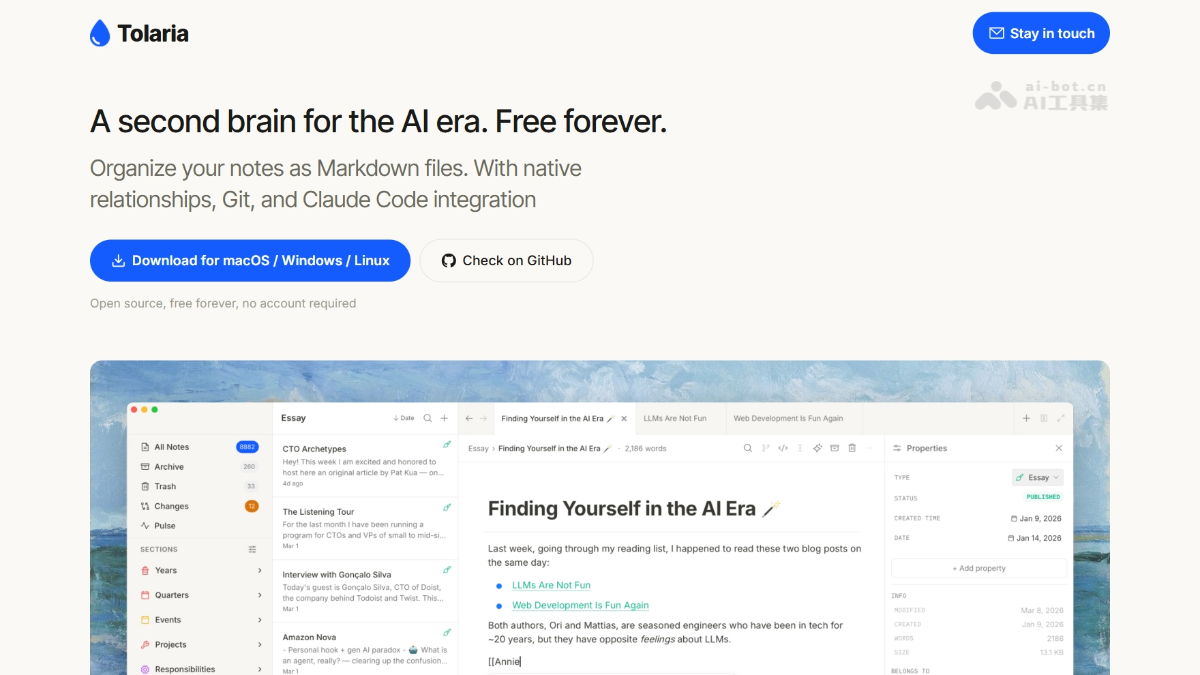
Tolaria's main features
-
Block editing experience: Supports Notion-style
/commands, drag-and-drop images, and modular layout, with all content written to pure Markdown in real time. -
Bidirectional link network: Through
[[wikilinks]]to establish note associations, automatically tracking backlinks and reference relationships. -
Lightweight Type classification: Mark notes with types (such as Project, Essay) and assign color icons, serving only as a visual lens without forcing field completion.
-
Built-in Git version control: Manages the entire note library as a Git repository, supporting commits, pushes, history browsing, and Diff comparison, replacing the traditional recycle bin.
-
AI-native integration: Built-in MCP server, allowing external AIs such as Claude Code to directly read directories, search notes, and create or modify files.
-
Query views: Filter notes by type, date, tags, and other conditions and save them as custom views, achieving lightweight database functionality.
Tolaria's technical principles
- Local-first file architecture: Tolaria abandons black-box databases; each note is an independent
.mdfile, accompanied by YAML frontmatter for storing metadata, and can be directly read and searched with system text editors or terminal tools. - Git as the underlying storage engine: The note library is a Git repository; all add, delete, and modify operations automatically generate commit records, using mature version control to achieve cross-device synchronization and historical rollback.
- MCP open protocol connecting to AI: Built-in Model Context Protocol server, exposing the note library as a standardized context interface, enabling external AI Agents to directly operate the file system, avoiding locking AI capabilities inside its own paywall.
How to use Tolaria
-
Visit the official website to download: Visit the Tolaria official website https://tolaria.md/ to download and install the corresponding macOS / Windows / Linux client.
-
Create a local Vault: When opening for the first time, choose or create a local directory as the note library; all data will be saved in that folder.
-
Write and format: After creating a new note, use
/to bring up the command menu and insert text, code blocks, tables, images, and other modules. -
Establish associations: In the body text, enter
[[to search for and link other notes; the system automatically maintains bidirectional references. -
Classification and views: In the properties panel on the right, select the Type and status for the note, then create a filter view in the left sidebar to aggregate notes of a specific type.
-
Version commit: After editing, click the Git status bar at the bottom, fill in the commit message, and push to the remote repository to back up.
-
Connect AI tools: Make sure Claude Code or Codex is installed locally, connect with one click via MCP configuration, and use natural language instructions to let AI organize, query, or rewrite notes.
Key information and usage requirements of Tolaria
-
Open source and free: The project is open source, no account registration required, no subscription fees, no cloud lock-in.
-
Bring your own AI: No closed AI is built in; users need to install tools such as Claude Code themselves and connect via MCP.
-
Platform support: The official website provides downloads for macOS, Windows, and Linux (the current version iterates quickly, and some platforms may have minor bugs).
-
Data format: Strictly uses standard Markdown + YAML, ensuring any tool can read it, with zero-cost migration.
-
Ecosystem status: There is currently no private plugin marketplace; functionality relies on the official core implementation and coordination with external AI tools.
Core advantages of Tolaria
-
Absolute data sovereignty: Pure local file storage; even if Tolaria stops being maintained, the knowledge base remains fully usable.
-
Professional version control: Built-in Git replaces the crude recycle bin, providing programmer-level history tracking and branch management capabilities.
-
Open AI strategy: Through MCP, it becomes a friendly container for external AI, does not bundle a specific model, and users always retain the right to choose AI.
-
Lightweight classification philosophy: Type serves only as a navigation lens, avoiding the upfront setup burden brought by Notion-style "structure first".
-
Modern editing experience: Retains Notion's block editing and keyboard-first interaction, while landing in the universal Markdown format.
Tolaria project address
- Project official website:https://tolaria.md/
- GitHub repository:https://github.com/refactoringhq/tolaria
Comparison of Tolaria with similar competitors
| Dimension | Tolaria | Notion | Obsidian |
|---|---|---|---|
| Data storage | Pure local Markdown files | Cloud proprietary database | Local files + optional cloud sync |
| Version control | Built-in Git, complete Diff history | Page history (paid) | Relies on third-party Git plugins |
| AI integration | Open MCP protocol, bring your own AI | Built-in closed AI (paid subscription) | Open interface, AI plugins need to be configured by yourself |
| Classification method | Type lens, fields not mandatory | Database Schema, structure first | Tags + folders + links, flexible but loose |
| Collaboration capability | No native collaboration yet, relies on Git | Powerful real-time multiplayer collaboration | Collaboration requires third-party services |
| Open source status | Open source and free | Closed-source commercial software | Free to use, closed source, open plugin ecosystem |
| Suitable audience | Technical users who value local sovereignty and Git | Users who pursue out-of-the-box use and team collaboration | Users who love high customization and plugin extensions |
Tolaria's Application Scenarios
-
Personal Knowledge Base Construction: Suitable for knowledge workers who need long-term accumulation, cross-platform synchronization, and place extreme importance on data autonomy.
-
Writing and Content Creation: Authors can use Type to manage topics, materials, and drafts, leveraging Git to track the entire article revision process.
-
Technical Documentation and Notes: Developers can use Git to manage technical documentation versions, and use AI to automatically organize scattered debugging records and solution comparisons.
-
AI-Assisted Knowledge Organization: Hand off fragmented notes to external AI for summarization, generate structured long-form articles, and automatically archive them to specified directories.
-
Academic and Research Management: Use local files + YAML metadata to manage literature and experiment records, and quickly filter research topics with query views.