
What Is ToClaw
ToClaw is an AI intelligent assistant deeply customized by ToDesk based on OpenClaw, integrating remote control capabilities and focusing on "one sentence on your phone, your computer executes automatically." ToClaw requires no environment configuration or coding knowledge, works right after download, and supports cloud computing. ToClaw supports cross-device collaborative operation, enabling functions such as intelligent file transfer, system diagnosis and optimization, office document generation, and data analysis, positioned as a 24/7 digital employee. ToClaw is currently open for free public beta.
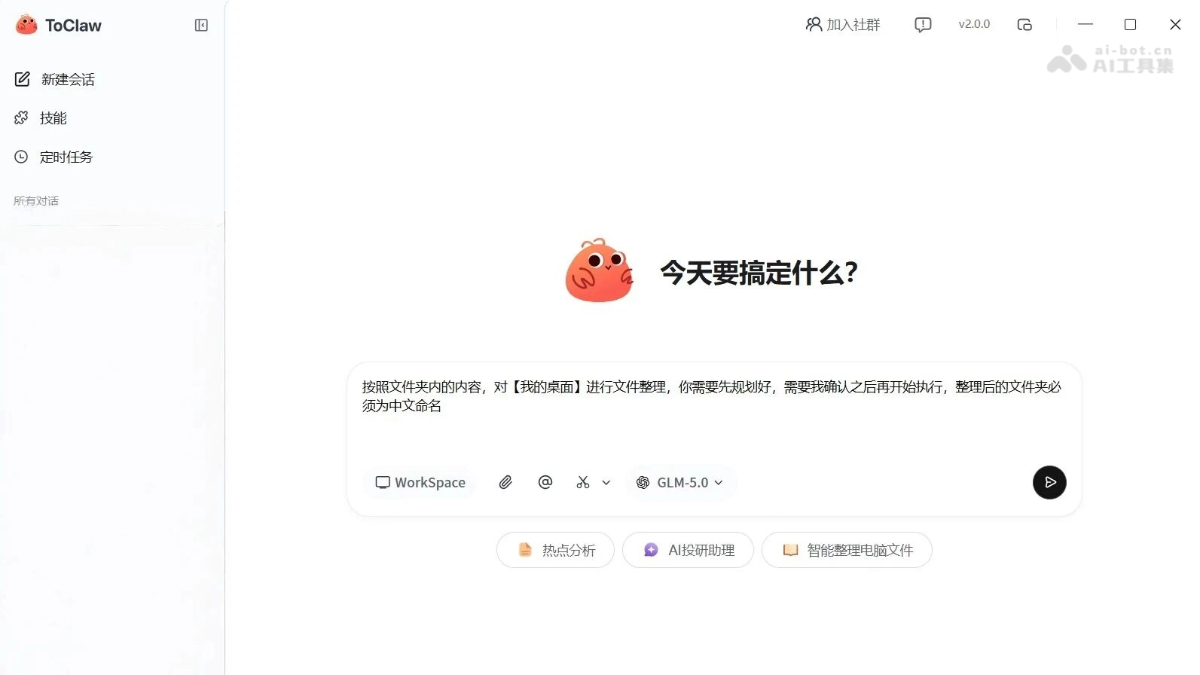
Main Features of ToClaw
-
Intelligent File Management: Supports cross-device fuzzy search and precise location, automatically penetrating directory levels to complete file transfer and batch renaming.
-
System Optimization and Operations: One-click diagnosis of CPU, memory, and disk status, generating visualized cleanup plans, with measured results releasing tens of GB of storage space.
-
Office Automation: Automatically generates weekly reports, meeting minutes, PPTs, and technical documents based on topics, and supports Excel data analysis and visualized chart creation.
-
Content Creation and Operations: Quickly generates copy and formatting for Xiaohongshu and WeChat Official Accounts, and provides video material search, background rendering, and poster design solutions.
-
Investment Research Data Analysis: Automatically collects in-depth research information, monitors competitor prices, screens influencer quality, and filters out paid posters, outputting structured scoring reports.
-
Cross-Device Collaboration: Enables linkage among multiple devices under the same account, supports remote automatic execution of instructions, allowing users to command a "device cluster" to complete various tasks anytime and anywhere.
Key Information and Usage Requirements for ToClaw
- Product Positioning: An AI intelligent assistant deeply customized based on OpenClaw, integrating remote control capabilities
- Core Features: One sentence on your phone, your computer executes automatically; cloud computing allows even old devices to run smoothly
- Developer: ToDesk (a well-known remote control software vendor)
- Current Status: Public beta in China has opened
- Computing Method: Complex calculations are completed on cloud servers, and only the results are displayed locally
- Installation Requirements: Download the latest version of the ToDesk client
- Technical Threshold: No need to configure Python, no need to understand code, no need for an API Key
Core Advantages of ToClaw
- Extremely Low Usage Threshold: No need to configure a Python environment, no need to write code, and no need to apply for an API Key. It can be used after download, installation, and login, truly achieving a zero technical threshold for getting started.
- Cloud Computing Power Support: All complex operations are completed on cloud servers, while local devices are only responsible for displaying results. A five-year-old laptop can also run smoothly, completely breaking hardware limitations.
- Seamless Multi-Device Collaboration: All devices under the same account can be used as clones, supporting a cross-terminal collaboration model in which Computer A searches for files, Computer B runs tasks, and Computer C performs operations and maintenance, building a personal device cluster.
- Deeply Integrated Remote Control: Based on ToDesk's mature remote control capabilities, it can remotely and automatically execute instructions, transfer files, and diagnose systems, realizing "while you are out, your home computer moves on its own."
How to Use ToClaw
-
Obtain the Installation Package: Visit the official ToDesk website https://www.todesk.com/ to download the client installation package.
-
Install the software: Double-click to run the installer and follow the prompts to complete the installation and deployment of the ToDesk client.
-
Log in to your account: After opening the software, log in with an existing account, or register a new account to complete identity verification.
-
Claim credits: Enter the ToClaw feature interface and click the daily check-in button to claim free usage credits.
-
Start using: Enter task requirements in natural language in the dialog box, and ToClaw will automatically understand and execute the corresponding operations.
Comparison of ToClaw with similar competing products
| Product | Developer | Core features | Usage threshold | Free policy |
|---|---|---|---|---|
| ToClaw | ToDesk | Deeply integrated remote control, cross-device collaborative operations and maintenance | Ready to use after download, no environment configuration required | Daily check-in gives credits |
| QClaw | Tencent | WeChat Mini Program entry, file transfer and multimodal interaction | Official website download → install → scan code login → apply for invitation code | – |
| JVS Claw | Alibaba | Alibaba Cloud ecosystem integration, enterprise-level application scenarios | Official website download → install → scan code login → apply for invitation code → fill out questionnaire | 8000 Credits, valid for 14 days |
ToClaw application scenarios
- Office scenarios: Automatically generate weekly reports, meeting minutes, and technical document drafts, process Excel data reports and complete analysis and visualization, and automatically create PPTs and complete formatting based on a one-sentence instruction.
- Content creation and operations scenarios: Generate Xiaohongshu or official account copy and formatting based on topics, automatically find video materials and complete backend rendering production, and generate poster design plans and product detail page copy.
- Investment research and finance scenarios: Automatically collect in-depth research information and organize structured reports, monitor competitor developments and price changes in real time and sync them to groups, monitor the market and summarize policy information and extract key investment data.
- IT operations scenarios: Diagnose the causes of computer lag and generate visualized optimization plans, automatically execute network troubleshooting commands and output diagnostic reports, and remotely clean up system junk to free up storage space.