
What is T2V-01-Director?
T2V-01-Director is a text-to-video generation tool launched by Hailuo AI (MiniMax)text-to-video generation tool, focused on achieving precise camera movement control through natural language instructions. It supports users in easily achieving cinematic-level camera movements when generating videos through simple text descriptions or preset templates, such as truck left, pan right, push in, pull out, etc. Multiple camera movements can be combined to complete shots of complex scenes.
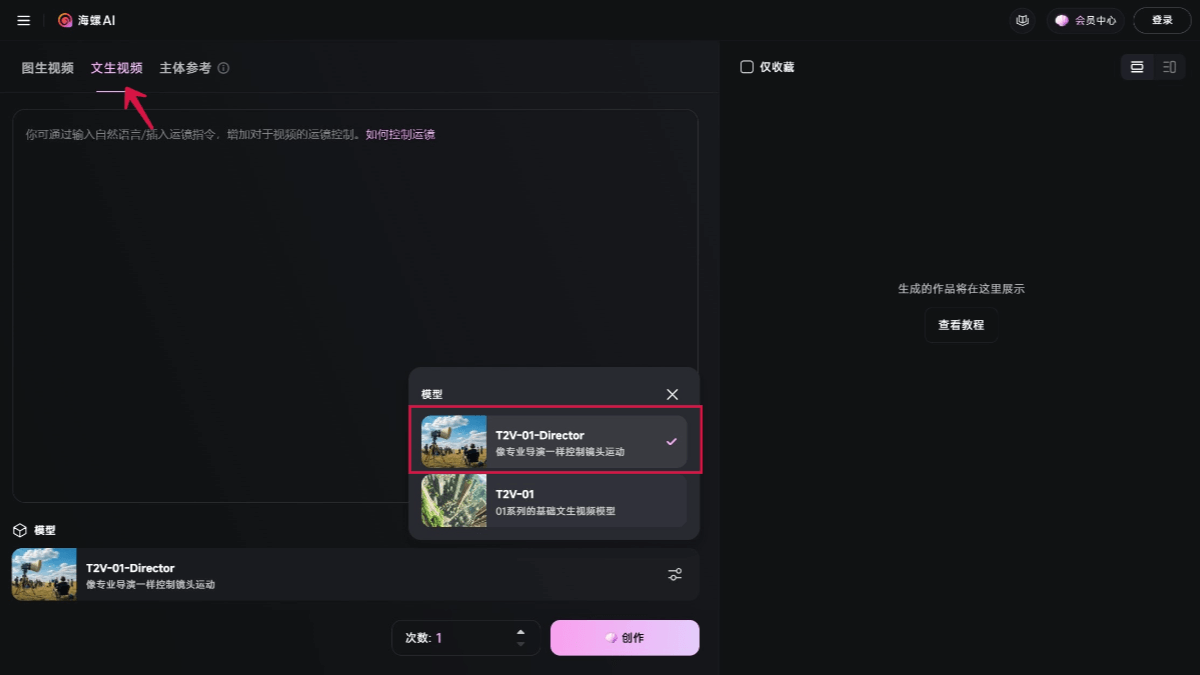
Main features of T2V-01-Director
- Precise camera movement control: Users can control camera movement through natural language or specific camera movement instructions (such as pan left, truck right, push in, pull out, etc.).
- Supports multiple camera movement methods: Including truck left/truck right, pan left/pan right, push in/pull out, pedestal up/pedestal down, zoom in/zoom out, shake, tracking shot, and static shot, etc.
- Combined camera movements: Users can combine multiple camera movements to achieve more complex cinematic-level camera effects.
- Preset templates: Provides commonly used camera movement templates, such as arc left, tracking left, etc., making it easy for beginners to get started quickly.
- Natural language support: Users can directly add camera movement instructions in the prompt, such as "pan the camera left, then push in". The tool will generate the corresponding video effect according to the instructions, without complex operations.
- High-quality video generation: The generated videos have high image quality and smoothness, and can meet the usage needs of various scenarios, such as advertising, short dramas, animation, etc.
How to use T2V-01-Director
- Visit Hailuo AI: Visit theHailuo AIofficial website, select the "text-to-video" feature, and choose the T2V-01-Director model in the model list.
- Enter description: Enter the prompt describing the video content, and select the camera movement method by clicking the camera icon.
- Select camera movement: Click the camera icon at the bottom right of the prompt input box to enter the camera control feature. You can choose the following camera movement methods:
- Truck Left/Truck Right
- Pan Left/Pan Right
- Push In/Pull Out
- Pedestal Up/Pedestal Down
- Tilt Up/Tilt Down
- Zoom In/Zoom Out
- Shake
- Tracking Shot
- Static Shot.
- Use camera terms: You can directly insert camera terms into the prompt to control the order or combination of camera movements. For example:
[左摇]: Single camera movement.[左摇, 右移]: Execute two camera movements at the same time.xxx[左摇],xxx[右移]: First pan left, then truck right.
- Apply preset templates: T2V-01-Director provides a variety of preset camera movement templates, such as arc left, tracking left, rise, etc., suitable for beginners to get started quickly.
- Natural language description: You can use natural language to describe camera movement, for example: "The camera pans left and tilts up at the same time, starting from a little rabbit looking up and turning left, then slowly moving toward the sky".
- Generate Video: After completing the settings, click the "Generate" button and wait for the video creation to finish. The generated video can be downloaded for use in projects.
Application Scenarios of T2V-01-Director
- Film and Television Production and Advertising: T2V-01-Director supports a variety of professional camera movements, such as dolly in, tracking shots, and panning shots, and can generate smooth and cinematic transitions.
- Creative Video Production: Creators can generate suspenseful or dramatic shots through simple text instructions, such as "the camera pushes in while following the character's movement."
- Animation and Artistic Creation: Artists and designers can use it to transform static artworks into dynamic visual stories, bringing new possibilities to artistic creation.
- Education and Training: In the field of education, teachers can use T2V-01-Director to quickly generate instructional videos, helping students better understand complex concepts.
- Personal Content Creation: Creators can use the tool to produce personalized video content, such as travel records and personal stories.