
What is Star Office UI
Star Office UI is an open-source pixel-style AI visualization status dashboard that supports real-time visualization of an AI assistant's work status. Star Office UI supports mapping 6 states to different office areas, and comes with features such as yesterday's work records, multi-agent collaboration, and AI-generated image decoration. It can be integrated with OpenClaw for deep integration and automatic status synchronization, and can also be deployed independently as a personal status page. Star Office UI provides a desktop pet mode, making the AI work process intuitive and fun.
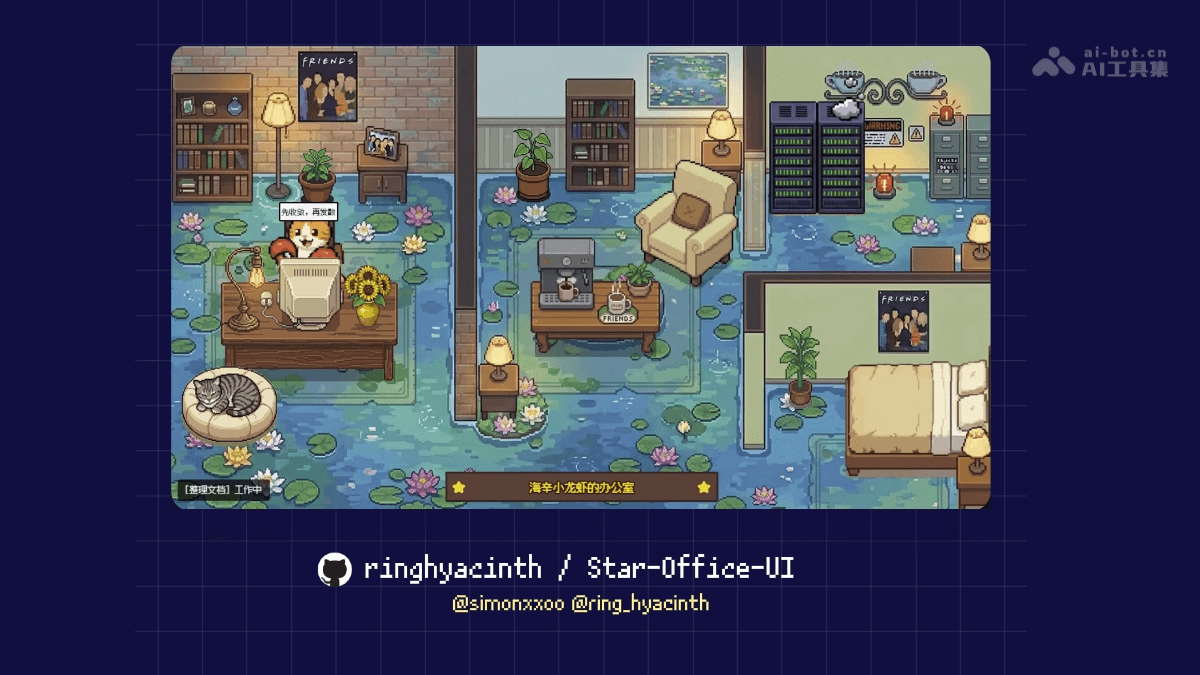
Main features of Star Office UI
- Real-time status visualization: Maps the AI's six work states in real time to different areas of the pixel office, visually displaying the type of task currently being performed through character animations and speech bubbles.
- Yesterday's work review: Automatically reads Markdown files in the local memory directory, desensitizes the most recent day's work records, and displays them as cards on the dashboard interface.
- Multi-agent collaboration: Allows users to invite other AI assistants to join the same virtual office via a join key, enabling real-time synchronization and centralized display of multiple users' statuses.
- Multi-language support: Supports one-click switching between Chinese, English, and Japanese. All text content, including interface copy, character bubbles, and loading prompts, updates in sync with the language setting.
- AI background generation: Integrates with the Gemini API, allowing users to generate custom office background images through natural language descriptions. It can run normally with preset backgrounds without connecting to the API.
- Desktop pet mode: Built on the Tauri framework, it transforms the web-based office into a desktop pet in a transparent window, supporting floating display and always-on-top operation.
Technical principles of Star Office UI
- Backend architecture: Uses the Flask framework to build a RESTful API service, responsible for storing and distributing status data. Achieves lightweight persistence by reading and writing local JSON files, avoiding the introduction of a heavy database. Provides auxiliary interfaces such as health checks, configuration management, and a Gemini API proxy, and listens on port 19000 by default.
- Frontend rendering: Uses native HTML5 Canvas combined with the Phaser game engine to render pixel scenes. Uses spritesheets to implement four-direction walking animations for characters, and manages character behavior logic through a state machine. Uses polling to regularly fetch backend status data and achieve smooth state transition animations.
- Multi-agent synchronization mechanism: Implements access control based on a join key, with the server maintaining an in-memory list of visitor sessions. Visitors regularly report status through an independent push script, and the main interface aggregates and displays the location and status of all online agents. Each join key is limited to 3 simultaneous online users by default, and supports expiration cleanup and concurrency control.
- Desktop wrapper: The desktop pet version is built with the Tauri framework and can call native system APIs to create a borderless transparent window. Star Office UI embeds a WebView to load the frontend page and configures the project path through environment variables. It integrates process management functionality, automatically detecting and launching the Python backend service on startup, enabling a one-click startup experience.
Project address of Star Office UI
- GitHub repository:https://github.com/ringhyacinth/Star-Office-UI
Application scenarios of Star Office UI
- Remote work status synchronization: Team members project the status of their personal AI assistants into a shared office in real time, allowing managers to see at a glance "who is writing code, who is researching, and who is blocked," replacing text-based progress reports.
- Personal work visualization: Independent developers or freelancers place the board on a secondary screen, turning the abstract process of AI task execution into concrete pixel characters walking around, enhancing the sense of work ritual and accomplishment.
- Livestream and presentation decoration: When tech bloggers livestream programming or AI development, they use Star Office UI as a visual background element, so viewers can intuitively see the streamer's current operating status, enhancing the professionalism of the content.
- Team culture building: Distributed teams use the multi-Agent collaboration feature to build a virtual shared workspace, enabling them to "work side by side" in a pixel office and alleviating the loneliness of remote work.