
What is Typeframes
Typeframes is an innovative AI online video creation platform that allows users to quickly generate professional product introduction videos through simple text input. The core advantage of this tool lies in its convenience and ease of use. Without mastering complex video editing software, even users without video production experience can easily create high-quality video content using artificial intelligence, turning text into engaging product videos.
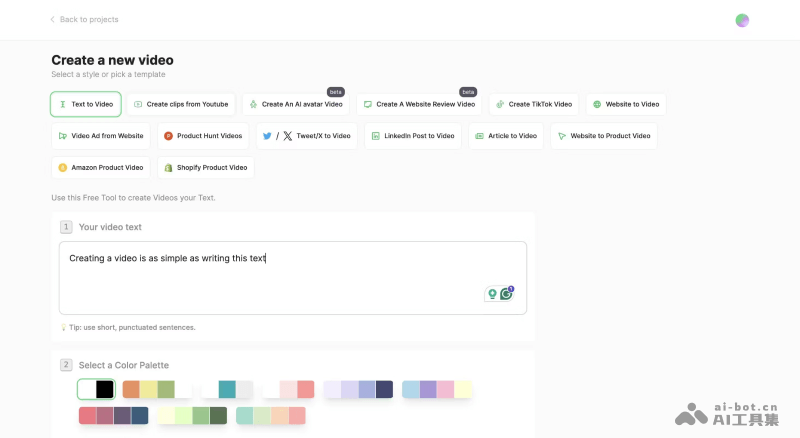
Main features of Typeframes
- Text-to-video conversion: One of the core features of Typeframes, it allows users to input product introduction text, and then the platform automatically converts it into a video. During this process, users can choose different visual effects and animations to enhance the expressiveness of the text.
- Rich visual effects: Typeframes provides a series of preset visual effects and animations. Users can choose suitable effects based on the theme and style of the video to attract the audience's attention.
- Customization options: Users can customize the video's colors, fonts, layout, etc., according to their brand and design needs to ensure that the video remains consistent with the brand image.
- Multi-platform support: Videos generated by Typeframes support multiple formats, aspect ratios, and quality levels to adapt to different social media platforms and video-sharing websites (such as Tiktok, YouTube, Instagram, etc.).
- Export and share: After completing video production, users can export the video in multiple formats for easy sharing and playback on different platforms and devices.
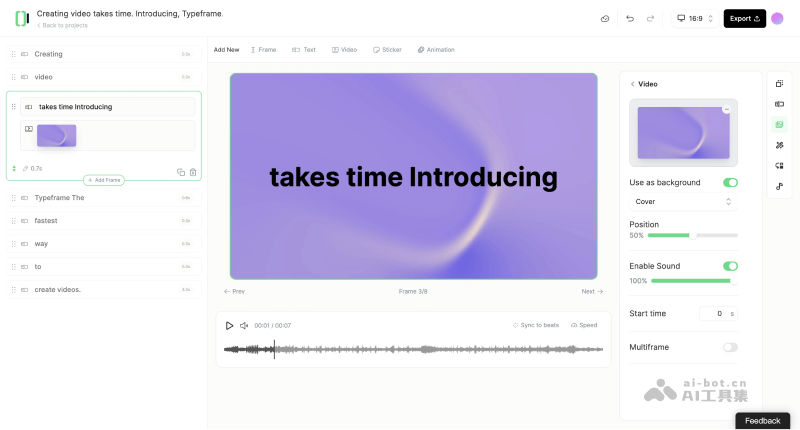
How to use Typeframes to generate videos
- Visit the Typeframes official website (typeframes.com), click Create Videos Now, and then log in or register
- After successful login, you will be automatically redirected to the video creation backend. Click New Video or press Enter to create a new project
- Select Text to Video or another video generation template, enter the video copy script, and choose a color theme and background sound effects
- Then click the Generate video button to generate the video. The generated video can be edited, adjusted, and exported
Typeframes product pricing
- Free version: provides 2 free AI credits, and exported videos have a watermark
- Hobby version: $39 per month (annual version $348, about $29 per month), providing unlimited exports and smart music synchronization, etc.
- Growth version: $49 per month (annual version $468, about $39 per month), all Hobby version features plus AI video generation, voice generation, automated video editing, and 100 AI credits per month
- Hand-made version: $1999 per single video, with videos handmade by professionals and unlimited revisions provided