

What is Preview
Preview is an AI video production platformthat integrates scripts, storyboards, AI generation, and review into a single infinite canvas workspace, with the built-in Preview Agent creative AI assistant to help with creation. Preview supports multi-model invocation, unified management of assets such as characters, props, and scenes, maintains visual consistency through @ references, and makes every frame's generation parameters traceable. Preview uses a pay-as-you-go credit system and supports team collaboration and external review.
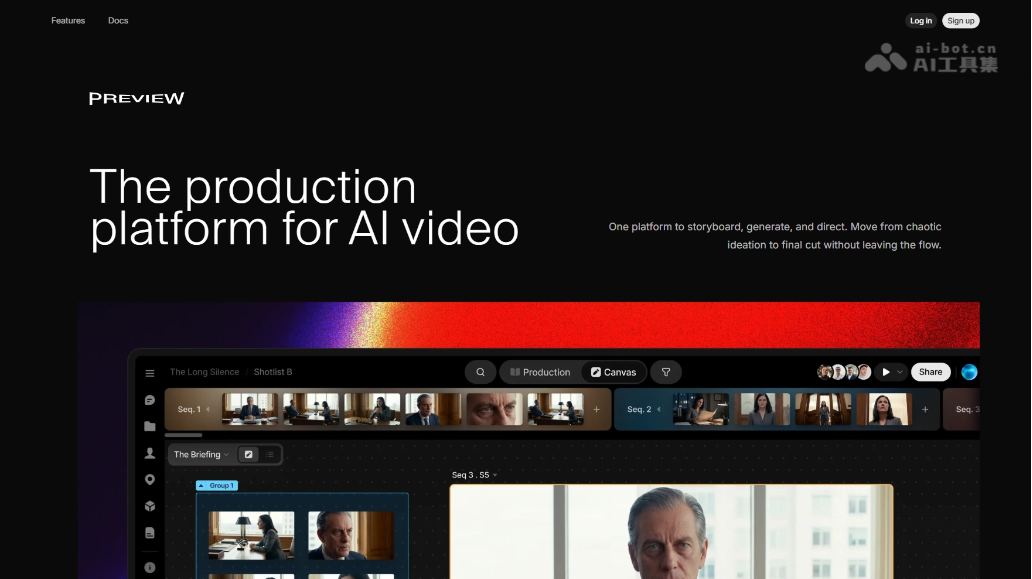
Preview's main features
-
Studio(Studio): An infinite canvas workspace, the starting point for all creation, arrangement, and workflows.
-
Preview Agent(Preview Agent): A creative AI partner that understands the full scope of the project and helps complete any task from shot lists to finished visuals.
-
Prompt Box(Prompt Box): Invoke the latest generation models to generate images and videos through prompts.
-
Quick Actions(Quick Actions): One-click tools that help quickly brainstorm and maintain consistency in generated content.
-
Sequence Timeline(Sequence Timeline): Assign files to specific shots and build a sequence timeline in real time at the top of the canvas.
-
Production(Production): A dedicated management view for all sequences, supporting metadata, progress status, and team collaboration.
-
Files view(Files view): Browse all content generated on the canvas in one place, filter it, and place it onto the canvas.
-
Groups(Groups): Divide areas on the canvas, organize content, and direct generation to specified locations.
-
Project Library(Project Library): Save characters, props, scenes, and files, create once, and reuse across the entire project.
-
@ Referencing(@ Referencing): Pull saved assets or previously generated content into any prompt by typing @.
-
Comments(Comments): Leave comments directly on the canvas and files to complete internal team feedback.
-
Sharing(Sharing): Invite collaborators to join the project, or send review links to external clients.
How to use Preview
-
Apply for access: Visit the Preview official website https://preview.io/ to complete account registration and login.
-
Log in to the workspace: Open the app through the official website entry point and enter a project to continue creating.
-
Create a canvas: Create a new infinite canvas in Studio as the starting point for all creation and workflows.
-
Summon the AI assistant: Invoke Preview Agent and let it help complete shot lists or visual creation based on the project context.
-
Generate content: Enter prompts in the Prompt Box and invoke the latest models to generate images or videos.
-
Iterate quickly: Use Quick Actions one-click tools to brainstorm quickly and maintain consistency in generated content.
-
Organize the canvas: Use Groups to divide areas on the canvas, categorize content, and direct generation to specified locations.
-
Browse assets: View all content generated on the canvas in a unified way in the Files view, and filter valuable assets to place onto the canvas.
-
Save Assets: Save characters, props, scenes, and more to the Project Library, enabling creation once and reuse across the entire project.
-
Maintain Consistency: Enter @ in the prompt to reference saved assets or historical generated content, ensuring a consistent visual style.
-
Build Sequences: Assign assets to specific shots via the Sequence Timeline, building the timeline in real time at the top of the canvas.
-
Production Management: Switch to the Production view to uniformly manage metadata, progress status, and team collaboration for all sequences.
-
Team Feedback: Use Comments to leave messages directly on the canvas or files, collecting internal revision feedback from the team.
-
External Review: Use Sharing to invite external collaborators to join the project, or send review links to clients.
-
Export and Delivery: After review is complete, export the final product from the canvas or hand it off to downstream production stages.
Preview's Core Advantages
-
Professional Workflow Integration: Put the entire process of script, storyboard, AI generation, and review into the same canvas, rather than piecing together scattered tools.
-
AI-Native Collaboration: The built-in Preview Agent understands project context, assisting creation throughout the process from shot list to final frames.
-
Unified Multi-Model Scheduling: Different generation models can be invoked simultaneously, flexibly choosing the optimal solution to complete each shot.
-
Asset Consistency Management: Characters, props, and scenes are saved once and reused across the entire project, with @ references ensuring visual style consistency.
-
Full-Chain Traceability: Each frame records the generator, the model used, and parameters, making retrospective review and version management easy.
-
Infinite Canvas + Sequence Timeline: A nonlinear creative space and a structured shot timeline coexist, balancing divergent thinking and delivery.
-
Production-Grade Collaboration: Supports team comments, external review links, and metadata management, adapting to the collaboration pace of professional studios.
Comparison of Preview with Similar Competitors
| Comparison Dimension | Preview | LTX Studio | Runway |
|---|---|---|---|
| Core Positioning | AI video production control console | AI filmmaking platform | AI video generation and editing tool |
| Workflow Coverage | Script → Storyboard → Generation → Review → Feedback full chain | Script → Storyboard → Scenes → Generation → Timeline | Single-clip generation → Editing → Transformation |
| Canvas Form | Infinite canvas + Sequence Timeline | Browser workspace | Clip editor |
| Multi-Model Scheduling | ✅ Uniformly invoke different models, with teams comparing prices and selecting the best | ⚠️ Integrates multiple models, but switching is relatively fixed | ❌ Mainly uses its own models |
| Asset Consistency | ✅ Characters/props/scenes are reused across the entire project, with @ references | ⚠️ Elements are reused across scenes | ❌ Only reference image tools |
| Generation Traceability | ✅ Records generator, model, parameters | ❌ Not explicitly supported | ❌ Not provided |
| AI Assistant | ✅ Preview Agent understands project context | ❌ No native Agent | ❌ No native Agent |
Preview use cases
-
Advertising production: End-to-end production of Fortune 500 brand ads from creative concept to final cut, with multi-model price comparison to generate the optimal shots.
-
Hollywood film pre-visualization: Film teams use AI to quickly generate pre-visualization (Pre-vis) before official shooting, unifying the tone of characters and scenes.
-
Independent short films/narrative videos: Directors complete everything from script and storyboard to final cut on an infinite canvas, without switching between 5 tools.
-
Creative agency pitches: Present interactive storyboards + AI-generated sample footage to clients, with review comments landing directly on the canvas.
-
Multi-model A/B testing: Production teams call models such as Kling, Veo, and Runway simultaneously to generate the same shot, then compare and choose the best.


