

What is Lumina
Lumina (ByteDance Lumina) is a one-stop AI creative platform launched by ByteDance's BytePlus (the international version of Volcano Engine), officially positioned as a full-chain visual content production tool "from inspiration to batch delivery." Lumina is built on ByteDance's Seedream image model and Seedance video model, and now supports Seedream 5.0 Proand Seedance 2.5. Its features cover text-to-image, text-to-video, a scenario-based AI application matrix, the Canvas infinite canvas, and reusable Canvas Pro workflows. It targets the enterprise and professional creator market, offering subscription plans, watermark-free commercial delivery, team collaboration, and API access.
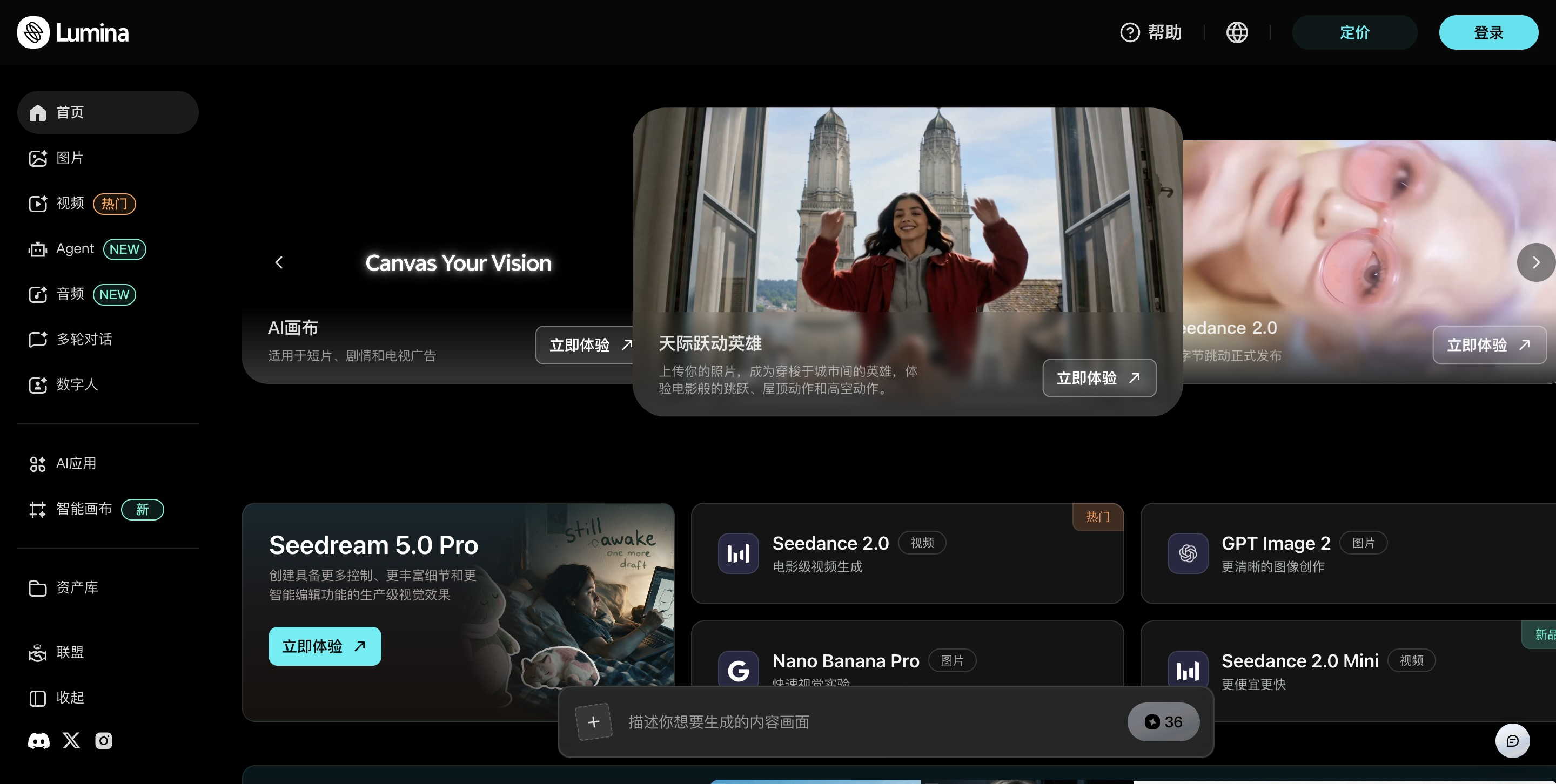
Lumina's main features
-
Text-to-image / image-to-image: Generate images by entering text descriptions or uploading reference images, with support for multiple reference images, style consistency, and multi-image group management.
-
Layer separation: Seedream 5.0 Pro can automatically split generated images into a background plus up to 20 independent element layers, exported as transparent PNGs, directly connecting to Photoshop / Figma design workflows.
-
Interactive precise retouching: Make local modifications through box selection, coordinate positioning, hexadecimal color codes, hand-drawn scribbles, and more, so editing a single element does not require regenerating the entire image.
-
Text-to-video / image-to-video: Generate cinematic videos from text or images with one click; Seedance 2.5 supports native generation of a single video up to 30 seconds long.
-
Full-modal reference input: Upload up to 50 mixed image, video, and audio references at a time to lock in consistency of characters, products, and scenes.
-
First and last frames and subject reference: Precisely control the video's starting and ending frames and the main subject's appearance, ensuring coherence in multi-shot narratives.
-
Precise video editing: Supports local repainting within a selected area, timestamp-based action direction control, and reference-to-video (R2V) consistency preservation, so modifications do not require re-rendering the entire video.
- Multilingual text rendering: Native support for text generation within images in 14 languages, suitable for commercial scenarios such as global posters and packaging.
- AI application matrix (ready to use): Built-in scenario-based one-click applications covering high-frequency scenarios such as commercial visuals, short video creation, digital human synthesis, e-commerce virtual try-on, and product display, with no need to build workflows from scratch.
- Canvas infinite canvas: A visual node-based creation space where you can arrange steps such as scripts, storyboards, and camera movement, and chain together multi-model pipelines (for example, first use Seedream to produce product images, then use Seedance to animate them into a promotional short video).
- Canvas Pro reusable workflows: Solidify an entire creative process into a reusable template, enabling batch generation that "design once, reuse thousands of times," and publish it as an API with one click to integrate into your own business systems.
- Multi-model aggregation: In addition to ByteDance's own models, the platform also aggregates third-party image models such as GPT Image 2 and Nano Banana, enabling cross-model creation within a single canvas.
- Enterprise-grade delivery and collaboration: Paid plans provide watermark-free commercial licensing, Team Plan team credit pools and permission management, and gateway-level content review filtering, with support for real-time review of prompts and generated content.
How to use Lumina
-
Register and choose a plan: Visit the Lumina official website https://ai.byteplus.com/lumina/ Register a BytePlus account, choose a monthly/yearly subscription plan or credit pack as needed, and new users can try it for free first.
-
Choose a creation entry point: In the left sidebar of the dashboard, select "Image" or "Video", and choose the desired model in the model selector (such as Seedream 5.0 Pro, Seedance 2.5).
-
Enter prompts and reference materials: Write a prompt (it is recommended to first describe the composition and visual hierarchy, then add detailed keywords), and upload reference images grouped by purpose (character reference, product image, style board, composition sketch). Seedance 2.5 supports up to 50 references.
-
Generate initial versions and select the best: Set parameters such as aspect ratio and duration, generate multiple variants at once, and lock in the best version for composition and subject as the "master version".
-
Precise iterative editing: For images, use layer separation and box selection/coordinates/scribbling for local modifications; for videos, use local redrawing, timestamp direction, or R2V for targeted corrections, avoiding full regeneration.
-
Batch versioning (optional): Based on the master version, generate multilingual and multi-size variants for different markets, SKUs, and channels; or solidify the process into a workflow in Canvas Pro for batch reuse.
-
Export and commercial use: After confirming the final cut, export without watermark, or publish it with one click as an API to integrate into your own business systems.
Lumina's core advantages
-
First-party model launch privileges: On ByteDance's official platform, the latest versions of Seedream / Seedance (such as Seedream 5.0 Pro) are globallylaunched on Lumina first, and are tuned for enterprise use cases, with traceable quality and compliance.
-
Seamless image↔video pipeline: Seedream 5.0 Pro text-to-image results can pass directly to Seedance 2.0/2.5 video generation without face review, forming a complete chain of "image generation → animation → final cut".
-
Strong subject consistency: The reference image mechanism can lock the consistency of characters, products, and brand VI across multiple shots. Seedance 2.5 maintains stable inheritance for complex assets such as 3D white models and product packaging, solving the pain point of AI video "subject deformation".
-
Outstanding long-video and retouching capabilities: 30-second native single generation + local redrawing turns the revision cycle from "full re-rendering" to "targeted correction", suitable for review-driven commercial revision workflows.
-
Upgrading from tools to workflows: Canvas Pro supports reusable workflows + one-click API conversion, allowing AI creation to be embedded in real production pipelines rather than one-off gacha-style generation.
-
Global localization capabilities: Generate multilingual, multi-size, and multi-style versions from a single asset with one click, suitable for multi-channel placement and cross-market distribution.
Lumina's comparison with similar competitors
| Comparison dimension | ByteDance Lumina | Runway | Kling AI |
|---|---|---|---|
| Company background | ByteDance BytePlus (international version) | Runway AI (United States) | Kuaishou |
| Underlying model | ByteDance first-party Seedream 5.0 Pro + Seedance 2.5, latest models launched first | Self-developed Gen-4.5 + Aleph, aggregating third-party models such as Veo 3.1, Seedance, Kling | Self-developed Kling series (latest 3.0 / O1) |
| Maximum video duration | 30 seconds (Seedance 2.5 native single pass) | Conventional per-second billing, mostly 5–10 second clips per generation | Typically 5–15 seconds, some channels support up to about 2 minutes |
| Multimodal reference | Up to 50 image/video/audio references per generation | Mainly reference images + brush tools | Mainly image-to-video, multi-reference capabilities are relatively limited |
| Image capabilities | Seedream 5.0 Pro: 20-layer separation, interactive refinement, 14 languages | Gen-4 image + third-party model aggregation | Image capabilities are not the core focus; primarily video |
| Refined editing | Image box selection/coordinates/color-code refinement; video local repainting + R2V | Widely regarded as the industry's strongest editor, motion brush, camera control | Motion Control, lip sync |
| Workflow/API | Canvas Pro workflows convert to API in one click; also BytePlus ModelArk official API | API limited to Enterprise contracts | Open API, billed per second (about $0.05–0.16/second) |
| Entry pricing | Free trial + subscription plans (monthly/yearly) + credit packs | Free (125 one-time credits); Standard $15/month; Pro $35/month; Max $95/month | Free version 66 points per day; Standard version about $10–15/month |
| Watermark-free commercial use | Paid/Team Plan provides watermark-free commercial delivery | Watermark-free starting from Standard | Free-tier generations are watermark-free |
| Positioning focus | Enterprise-grade one-stop visual production pipeline | Professional film/advertising creative toolkit | Cost-effective long video and character consistency |
Who Lumina is for
-
Advertising and marketing teams: Need to rapidly prototype commercials, social media campaigns, and creative storyboards, replacing part of live-action shooting at low cost.
-
Brands and e-commerce merchants: E-commerce product images, virtual try-on, SKU-level batch versioning, multi-market localized advertising materials.
-
Short video and self-media creators: Creators on platforms like YouTube and TikTok who need backgrounds, transitions, and cinematic clips that match their own visual brand tone.
-
Design teams and creative studios: Professional design departments that rely on "design-ready" output such as layer separation, color-code-level refinement, and brand color consistency.
-
Production companies and directors: Use AI storyboards to plan scenes, camera movement, and pacing, and produce 30-second narrative short films.
-
Going-global enterprises and globalization teams: Cross-border content production teams that need 14-language text rendering and multilingual video versioning capabilities.


