

What is OhYesAI
OhYesAI is an integrated audio-visual agent platform focused on AI music MV creation, letting every sound find its own imagery. Users only need to upload audio or enter natural language to generate original songs. OhYesAI, relying on its self-developed algorithms and mainstream video models such as Vidu, Kling, and Seedance, automatically completes the entire workflow of storyboard planning, audio-visual beat synchronization, video rendering, and lyric subtitles, generating a cinematic-level MV of up to 5 minutes with one click. Independent musicians, self-media creators, or ordinary users do not need any editing or music theory background. Through conversational interaction, they can precisely control visual style, character appearance, and storyboard details, achieving barrier-free creation from zero to finished film.
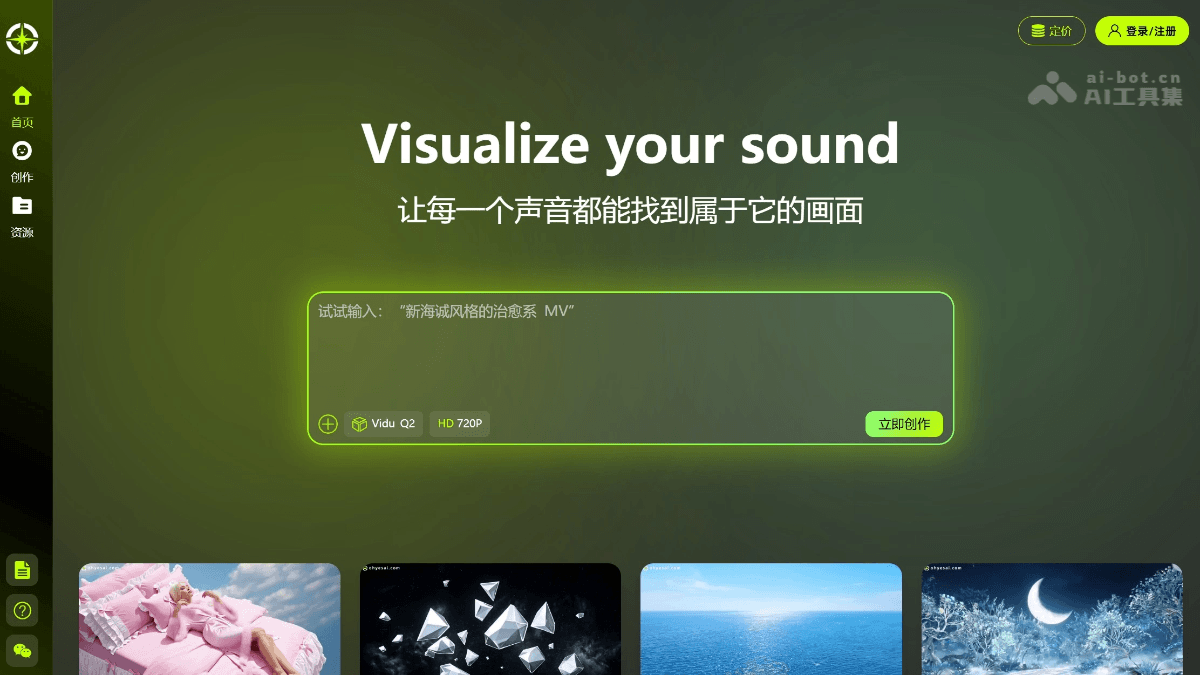
Main Features of OhYesAI
-
AI Original Music Generation: Enter a theme, mood, and style description, and AI automatically generates a complete song and lyrics, supporting multiple genres such as pop, rock, electronic, and R&B, and can seamlessly connect to the MV creation workflow with one click.
-
Audio-Driven MV Generation: Supports uploading audio in formats such as MP3/WAV/M4A, and AI automatically parses rhythm, mood, and lyrics to generate high-definition visual scenes that closely match the music beats.
-
Free Switching Between Multiple Models: Integrates mainstream video generation models such as Vidu Q2, Kling V3 Omni Pro, and Seedance 2.0, allowing users to switch at any time according to image quality and speed requirements.
-
Intelligent Storyboard Planning and Editing: The system automatically breaks down the music rhythm to generate a timestamped storyboard script, supporting single-shot replacement, redrawing, duration adjustment, and prompt refinement, enabling fully controllable fine-grained creation.
-
Reference Image Character Locking: Supports uploading 1-6 reference images of people, clothing, scenes, or props to ensure the protagonist's appearance and visual style remain consistent across multiple shots in the MV.
-
Millisecond-Level Audio-Visual Synchronization: Proprietary algorithms precisely parse BPM and audio waveforms, automatically aligning scene transitions, shot rhythms, and drum beats, with error controlled at the millisecond level.
-
Lyric Subtitles and Intelligent Lip Sync: Automatically generates and embeds lyric subtitles, supports free timeline calibration; when frontal shots of people are included, intelligent lip sync can be enabled to precisely match characters' lip movements with lyrics.
-
Conversational Collaborative Creation: Fully natural language interaction, capable of generating music and visuals through text, and also directly issuing editing commands such as "move the 8th storyboard to the 9th position."
How to Use OhYesAI
- Visit the Platform: Visit the OhYesAI official website https://ohyesai.com/ to register or log in to your account.
-
Select Video Model and Canvas: Switch the generation model in the lower-left corner of the conversation interface (Vidu Q2, Kling V3 Omni Pro, Seedance 2.0, etc.), and send instructions in the dialog box to set the aspect ratio (16:9 landscape or 9:16 portrait).
-
Prepare Music Material: Choose "Local Upload" to import MP3/WAV/M4A audio (up to 6 minutes), or enter requirements in the dialog box to have AI generate an original song, and select one version to proceed to MV production.
-
Upload Subject Reference Images(Optional): Upload 1-6 images to lock in people, clothing, scenes, or props, ensuring each image contains only one person with a clear face; without images, you can also generate directly through text descriptions.
-
Establish Visual Style: Send style prompts in the dialog box, such as "anime style", "realistic style", or "ethereal dreamy", to let the AI clearly define the visual tone.
-
Confirm the subject and scene design: The system renders visual reference images based on the music, reference images, and prompts. You can zoom in to view and edit unsatisfactory parts, and once satisfied, send "confirm and continue".
-
Review and modify the storyboard script: The system automatically generates timestamped storyboard descriptions based on the music rhythm and lyrics (this step does not consume credits). You can directly make modification requests in the dialog box or click on the storyboard frames to edit, and once confirmed, send "confirm and generate".
-
Shot-by-shot review and refinement: After the storyboard videos are generated, you can quickly give adjustment instructions in the dialog box, or click "Edit Storyboard" to open a pop-up for prompt rewriting, replacing reference images, or even independently switching to a more powerful model to redraw a single shot.
-
Add subtitles and lip sync: Before exporting, enable "Lyric Subtitles" to automatically embed the lyrics. If the timeline is not aligned, you can have the AI recalibrate it for free. When there are frontal singing shots of characters, you can enable "Smart Lip Sync".
-
One-click final video and download: After rendering is complete, click "Download" in the upper right corner to save the video. All works can be viewed in the [Resources] section of the sidebar and shared with friends.
OhYesAI's core advantages
-
One-click full-process generation: After uploading audio or an AI-generated song, the system automatically completes the entire process from storyboard planning and audio-visual synchronization to high-definition rendering, producing a finished video directly without manual editing.
-
Conversational natural language interaction: The entire process is controlled through text conversation. It can generate music and visuals, and can also precisely execute specific editing instructions such as "move the 8th shot to position 9", making it easy to get started with zero barriers.
-
Millisecond-level audio-visual synchronization: Relying on a proprietary audio-visual synchronization algorithm, it precisely analyzes the audio BPM and rhythm waveform to ensure that visual transitions, shot movements, and drum beats are highly aligned, achieving professional-level beat-matching effects.
-
Free switching among multiple models: The platform integrates industry-leading video models such as Vidu Q2, Kling V3 Omni Pro, and Seedance 2.0. Users can switch at any time according to image quality, speed, and cost needs, and can even independently change the model for a single shot.
-
5-minute complete narrative capability: Breaking through the limits of short videos, it supports generating high-definition MV finished videos up to 5 minutes long, capable of fully telling the visual story of a song.
-
Fine-grained controllable storyboard editing: The system automatically generates a timestamped storyboard script (without consuming credits), supports single-shot replacement, redrawing, prompt refinement, and duration adjustment, avoiding unusable footage and keeping creation fully controllable.
-
Smart subtitles and lip sync: Automatically generates and embeds lyric subtitles, with free timeline calibration; when frontal character shots are included, smart lip sync can be enabled to precisely match the character's lip movements with the lyrics, enhancing the sense of realism.
-
Character consistency assurance: Supports uploading 1-6 reference images to lock in characters, clothing, and scenes. Combined with AI intelligent planning, it ensures that the protagonist's appearance remains highly consistent across multiple shots.
Comparison of OhYesAI with similar competitors
| Comparison dimension | OhYesAI | Neural Frames | Kaiber AI |
|---|---|---|---|
| Product positioning | AI audio-video agent, a conversational MV creation platform focused on Chinese-speaking users | An audio-reactive AI MV generator built for musicians | A general-purpose AI animated video generation platform that supports music visualization |
| Core Creation Modes | Text-to-music + audio-driven MV + storyboard conversational editing | Audio upload + Autopilot one-click generation + storyboard fine-tuning | Text/image/audio-to-animated video, template-based style rendering |
| Audio Analysis Capabilities | Analyzes BPM, rhythm, and lyrical emotion, automatically matching visuals | 8-stem separation(drums/bass/vocals/melody, etc.), mapping visual triggers track by track | Supports audio input to drive visuals, but no deep stem-level analysis |
| Storyboard | Intelligently generates timestamped storyboard scripts, supports single-shot replacement, redrawing, and duration adjustment | Automatically generates 5-7 scene storyboards, supports frame-by-frame keyframe and video prompt editing | No clear storyboard script system, mainly continuous animated clips |
| Character Consistency | Supports 1-6 reference images to lock characters, clothing, and scenes | Supports uploading reference images, maintains character consistency across scenes and projects | No dedicated character consistency safeguard mechanism |
| Audio-Visual Sync Precision | Proprietary millisecond-level beat-matching algorithm, with beat sync error controlled within 50ms | Per-stem audio-reactive, can map drum hits to shot zoom and bass to color grading | Basic audio visualization, average rhythm-matching precision |
| Maximum Video Duration | Up to 5 minutesfinal cut, supports full-song storytelling | Supports Full Track, typically covering 3-5 minutes | No explicit limit, but better suited to short and medium-length videos |
| Integrated Video Models | Vidu Q2、Kling V3 Omni Pro、Seedance 2.0 | Multi-model integration including Kling, Seedance, Runway, etc. | Proprietary model, mainly stylized rendering |
| Interaction Method | Full conversational collaboration, natural language control of storyboards and editing | Autopilot two-key generation + DAW-style timeline editing + conversational modification | Clean Web/App interface, prompt-driven |
| Subtitles and Lip Sync | Automatically generates lyric subtitles,free calibration; supports intelligent lip sync | Supports Lip Sync; Lyric Showcase mode can display lyrics | No dedicated lyric subtitle or lip sync features |
OhYesAI Application Scenarios
-
Independent Music Promotion and Demo Teasers: Independent musicians and original singers can quickly produce high-quality teaser MVs or visualized album covers for new songs.
-
Short Video and Self-Media Mass Production: Creators on platforms such as Douyin, Bilibili, and Xiaohongshu can turn music, beat-synced videos, and audiobook content for novel recommendations into visual scenes matched to the rhythm with one click.
-
Brand Advertising and Marketing Promotional Films: Brands can turn product promotional copy or themed music into cinematic visual short films, for use in e-commerce detail pages, social media ad placements, or launch event warm-up videos.
-
Education and Knowledge Popularization Visualization: Educational institutions and science communicators can turn children's songs, historical stories, and audio explanations of scientific principles into animated MVs or cartoon-style short videos.
-
Gaming and Virtual Idol Content: Game companies can create exclusive MVs for character theme songs and version update PVs; virtual idol management teams can also quickly generate lip-synced, beat-matched performance videos.
-
Livestreaming and Stage Backgrounds: Streamers, DJs, and offline performance teams can turn real-time audio or setlists into dynamic visual backgrounds, replacing traditional VJ operations and achieving immersive stage effects with synchronized audio and visuals.


