

Morph Studio is a high-quality AI text-to-video generation tool. As the first text-to-video generation tool on the market open to the public for free testing, it not only supports 1080P high-definition picture quality, but can also create exciting video clips up to 7 seconds long. The generated videos have more delicate visuals and better lighting and shadow effects. With Morph Studio, the combination of text and visual art becomes simpler, the expression of creative videos is no longer limited, and stories are shown to the world in a more vivid way.
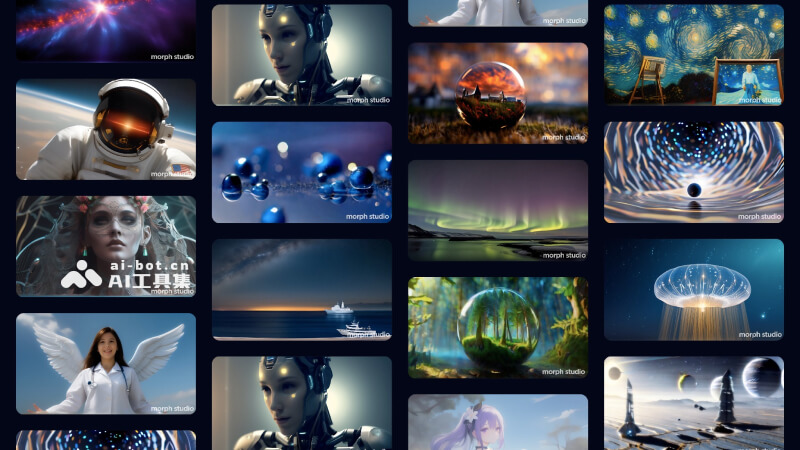
Main features of Morph Studio
- Fast AI text-to-video generation: simply enter a short prompt, and you can witness elements such as animals, architecture, people, and natural scenery turn into short videos on the screen
- Convert images/sketches into videos: users can upload images or hand-drawn sketches, and the intelligent recognition of image content turns them into coherent animation sequences, bringing static images to life
- Flexible control of camera lens movement: whether it is zoom, pan (up, down, left, or right), rotation (clockwise or counterclockwise), or a static shot, all can be adjusted according to the user's creative needs
- Ultimate presentation of high-definition picture quality: the 1080P image resolution ensures that every frame of the video is clear and delicate, with vivid colors, natural lighting, and rich details
- Diverse selection of video styles: from cinematic realism to comic style, from 3D effects to animation production, Morph Studio supports the generation of multiple video styles to meet the needs of different creators
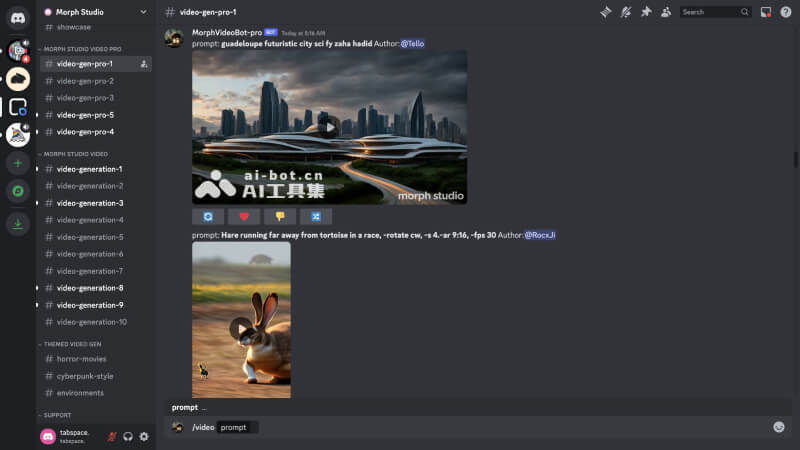
How to use Morph Studio
- Visit the Morph Studio official website (morphstudio.com) and click Join beta in Discord
- Accept the invitation to join the Discord server, then choose to enter
#video-gen-proor#video-generationany channel starting with - Enter
/video, then enter a prompt, click Enter to send, wait a moment, and Morph Studio will generate the video
Frequently asked questions
Is Morph Studio free?
Morph Studio is currently in free public beta and has not yet launched a paid version.
How many seconds of video can Morph Studio generate?
Morph Studio currently supports generating videos up to 7 seconds long.
What is the resolution of videos generated by Morph Studio?
The resolution of videos generated by Morph Studio is 1080P.
Can Morph Studio only be used through Discord?
Morph Studio does not yet provide a web-based interface, and currently videos can only be generated in the Discord server.


