

What is Zaoci
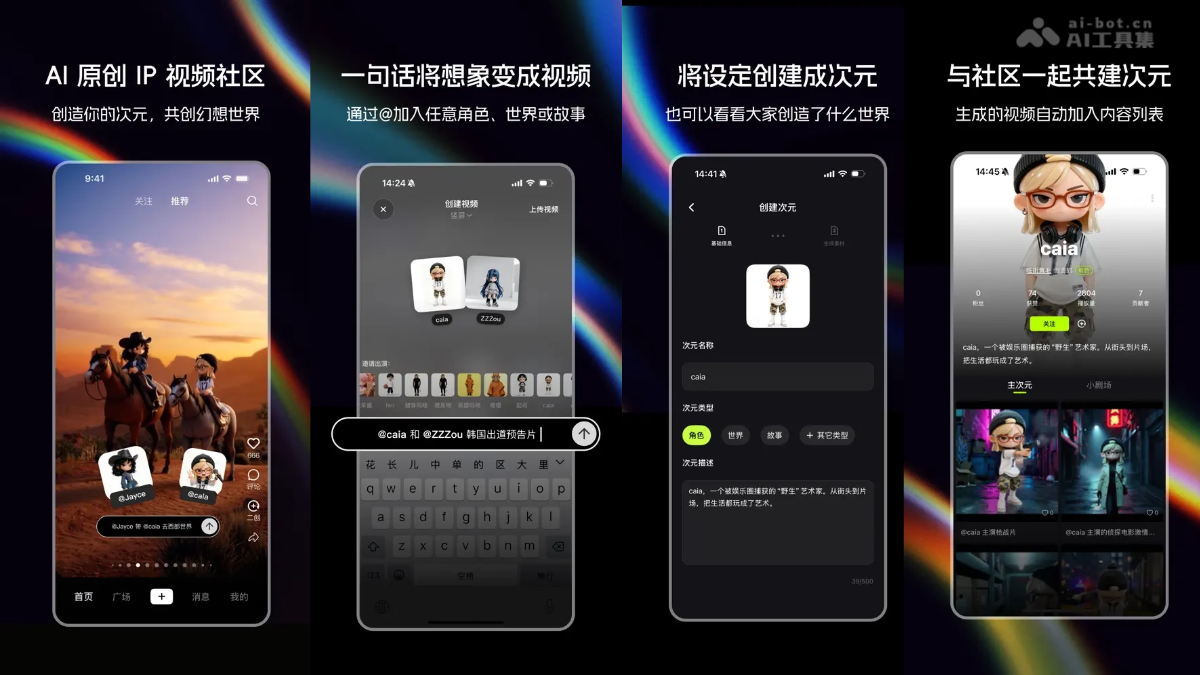
Zaoci is an AI original IP video community built specifically for creators. Users can quickly generate personalized IP videos through natural language descriptions. Zaoci breaks down the technical barriers of traditional animation and modeling, making it easy for everyone to create. Zaoci supports users in creating their own dimensions and co-building stories with other creators. It allows the OC community, dynamic comic creators, and brand operators to all find fun. With its "Main Dimension" and "Small Theater" features, Zaoci achieves true IP co-creation. Zaoci currently only supports access on iOS.
- Beta stage: Zaoci requires an invitation code to experience. Each user who successfully logs in has 1 invitation code that can be used 5 times, and currently only iOS users are supported.
- Zaoci invitation code: The AI Tool Collection official team provides a Zaoci invitation code mutual aid group, sharing invitation codes for free and helping each other unlock priority experience.

Main features of Zaoci
-
AI video generation: Users quickly generate personalized IP videos through natural language descriptions, without the need for complex animation or modeling technology.
-
IP creation and management: Users can create their own "dimension" (IP) and set detailed settings for it, including appearance, personality, background, etc.
-
Main Dimension and Small Theater: The Main Dimension is used to store the creator's "canon" videos, while the Small Theater supports other users in creating "fan-made" videos based on that IP, and creators can manage this content.
-
Style fusion: Supports integrating IP in multiple styles (such as anime, ink wash style, 3D, etc.) into different scenes, meeting diverse creative needs.
How to use Zaoci
- Download and register: Downloadthe Zaoci app, register an account with a mobile phone number or email, and during the beta period you need to enter an invitation code to access.
- Create a dimension: Open the app, tap the "Create Dimension" button, and enter the creation interface.
- Fill in dimension information: Enter the dimension name (such as "caia"), select the dimension type (such as character), and provide a dimension description (such as "a 'wild' artist captured by the entertainment industry").
- Complete creation: After confirming the information is correct, tap Complete Creation.
- Enter description: Enter the specific content of the video in the text box on the creation interface, such as the character's actions, dialogue, scene descriptions, etc.
- Associate dimension: Enter "@dimension name" in the input box to associate the created dimension character (such as "@caia"), ensuring the video revolves around that character.
- Choose style: Select the video style from the provided style options, such as anime, ink wash style, 3D, etc.
- Tap generate: Tap the "Generate" button to submit the task and wait for AI to complete video generation.
- Main Dimension management: View all videos you have published on the "Main Dimension" page, and edit, delete, or share videos to other platforms.
- Small Theater interaction: View videos created by other users based on dimensions on the "Small Theater" page, and you can like, comment, or "promote" them to the Main Dimension.
- Share works: Click the "Share" button in the upper right corner of the video to share the generated video to the community, social media, or save it locally.
Zaoci Application Scenarios
- Personal Entertainment and Creation: Users quickly transform personal imagination and creativity into video content for personal entertainment or social media sharing.
- IP Character Development: Creators build their own original IP characters or worldviews and generate videos through Zaoci, providing visual materials for character development.
- Storytelling and Animation Production: Writers, screenwriters, or animators use Zaoci to quickly produce storyboards or animated short films, accelerating the creative process.
- Education and Training: Educators use Zaoci to generate educational videos, such as historical reenactments, scientific experiment simulations, etc., enhancing the interactivity and fun of teaching.
- Advertising and Marketing: Enterprises use Zaoci to quickly generate advertising videos or marketing content, attracting target audiences and increasing brand awareness.


