

What is Zhipu Qingying
Zhipu Qingying is anAI video generationtool launched by Zhipu, capable of quickly generating dynamic video content based on text descriptions entered by users or uploaded images. Users only need to enter text of no more than 1,000 characters, and Qingying can generate videos that match the semantics, supporting switching between multiple styles. After users upload a static image, the AI can make the people in the image move or simulate scene changes. Zhipu Qingying provides an intelligent style transfer feature that can convert videos into artistic styles such as 3D cartoon and oil painting with one click, and supports multilingual voiceover synthesis and sound effect matching. The tool is based on Zhipu's self-developed CogVideoX model and can maintain the coherence and realism of video content, making it especially suitable for scenarios such as personal creation, marketing advertising, education and training, and film and television production.
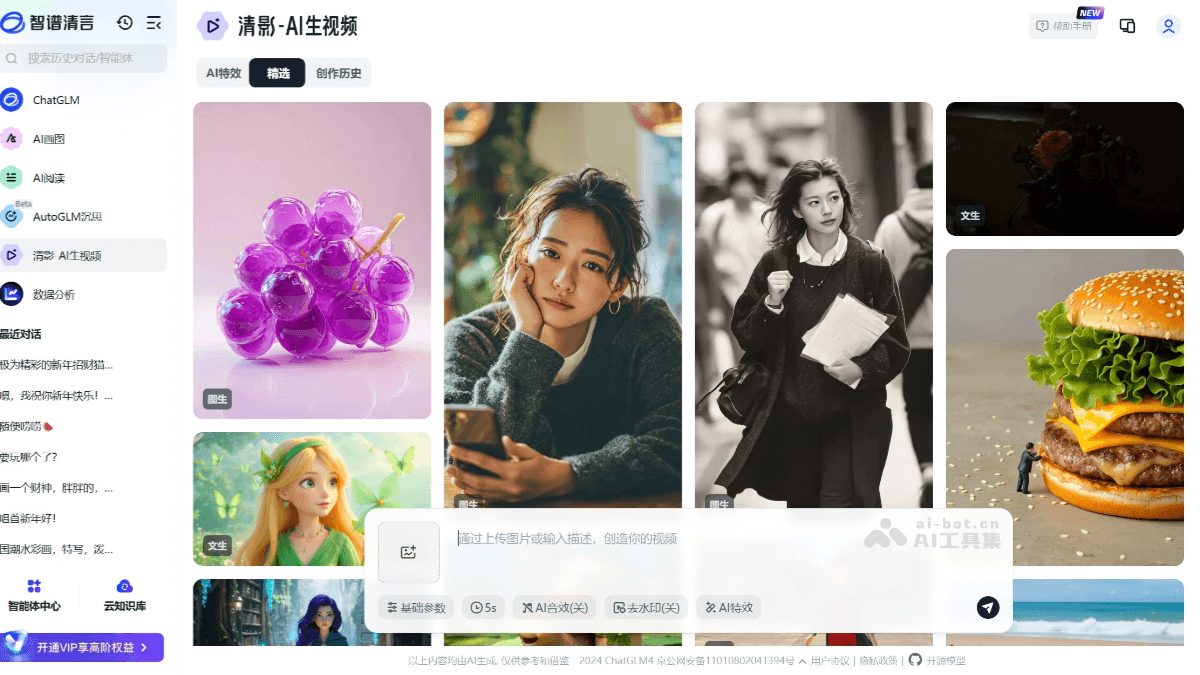
Main features of Zhipu Qingying
-
AI text-to-video: Users enter a text description, and Zhipu Qingying automatically generates a dynamic video that matches the semantics, supporting switching between multiple styles.
-
AI image-to-video: Upload a static image, and the AI can generate dynamic effects, such as character movements or scene changes.
-
Intelligent style transfer: Provides multiple artistic style templates, changing the overall visual effect of the video with one click.
-
Multilingual voiceover synthesis: Zhipu Qingying has a built-in AI voice library that supports voiceovers in multiple languages such as Chinese and English, and automatically generates professional narration.
-
Built-in sound effects: Zhipu Qingying can automatically generate matching sound effects based on video content to enhance the video atmosphere.
How to use Zhipu Qingying
-
Enter the interface: Through theZhipu Qingyan official website(or the Zhipu Qingying official website https://chatglm.cn/video ) enter the Qingying AI video generation page.
-
Select a mode: Select "Text-to-Video" or "Image-to-Video" mode, and enter text or upload an image as needed.
-
Adjust parameters: You can select advanced parameters such as video style, emotional atmosphere, and camera movement.
-
Submit for generation: After clicking submit, the system will automatically process and generate the video.
-
Preview and download: After generation is complete, preview the result, and download it in MP4 format or share it to social platforms.
Tips for using Zhipu Qingying
-
Text-to-video:
-
Be clear in descriptions: Enter clear and specific text descriptions, including key information such as scenes, characters, and actions, to help generate videos that better meet expectations.
-
Control length: Keep the text description under 1,000 characters to ensure the generated video content is compact and efficient.
-
Specify style: Indicate the desired video style in the text (such as realistic, cartoon, etc.) so that the model can better understand the creative intent.
-
Emphasize details: Highlight the details in the description, such as lighting effects and object textures, to improve the realism and artistic feel of the video.
-
-
Image-to-video:
-
Choose high-quality images: Upload clear, high-resolution images to achieve better generation results.
-
Supplementary description: When uploading an image, you can attach a brief description to further clarify the video's dynamic effects or direction of change.
-
Style Transfer: Use the intelligent style transfer feature to try different artistic styles and add creativity to your videos.
-
Prominent Subject: Ensure the subject in the image is clear, making it easier for AI to maintain coherence and naturalness when generating dynamic effects.
-
Product Advantages of Zhipu Qingying
-
Efficient Generation: It can quickly transform text or images into dynamic videos, greatly improving creative efficiency.
-
Multi-Style Support: It provides a variety of artistic style templates to meet the diverse needs of different scenarios and users.
-
Intelligent Coherence: Based on advanced models, it maintains the coherence and realism of video content and avoids a disjointed visual experience.
-
Multilingual Voiceover: It supports AI voiceovers in multiple languages and automatically matches the video rhythm to enhance professionalism.
-
Sound Effect Matching: It automatically generates sound effects that match the video content, enhancing the video's sense of immersion.
Application Scenarios of Zhipu Qingying
-
Personal Creation: It provides inspiration for creators, quickly generates video materials, and supports content creation.
-
Marketing Advertising: Create attractive advertising videos, improve marketing results, and enhance brand communication power.
-
Education and Training: Generate instructional videos, enhance the fun and interactivity of learning, and improve teaching effectiveness.
-
Film and Television Production: Assist film and television creation, generate preliminary video materials or special effects, and improve production efficiency.
-
Social Media: Quickly create short videos suitable for social media sharing, increasing user interaction and traffic.


