

What is Toast AI Erase
Toast AI Erase isToast TusiArtan AI erasure tool launched by the platform, mainly used to remove unwanted objects or elements from photos while keeping the background and other parts natural and intact. Users only need to upload an image and paint over the object they want to erase, and the tool automatically fills in the removed area based on intelligent algorithms to generate a natural, realistic effect. Toast AI Erase is widely used in scenarios such as photo restoration and background cleanup, helping users easily remove blemishes, clutter, or extra people, and improving the overall quality and aesthetics of the image.
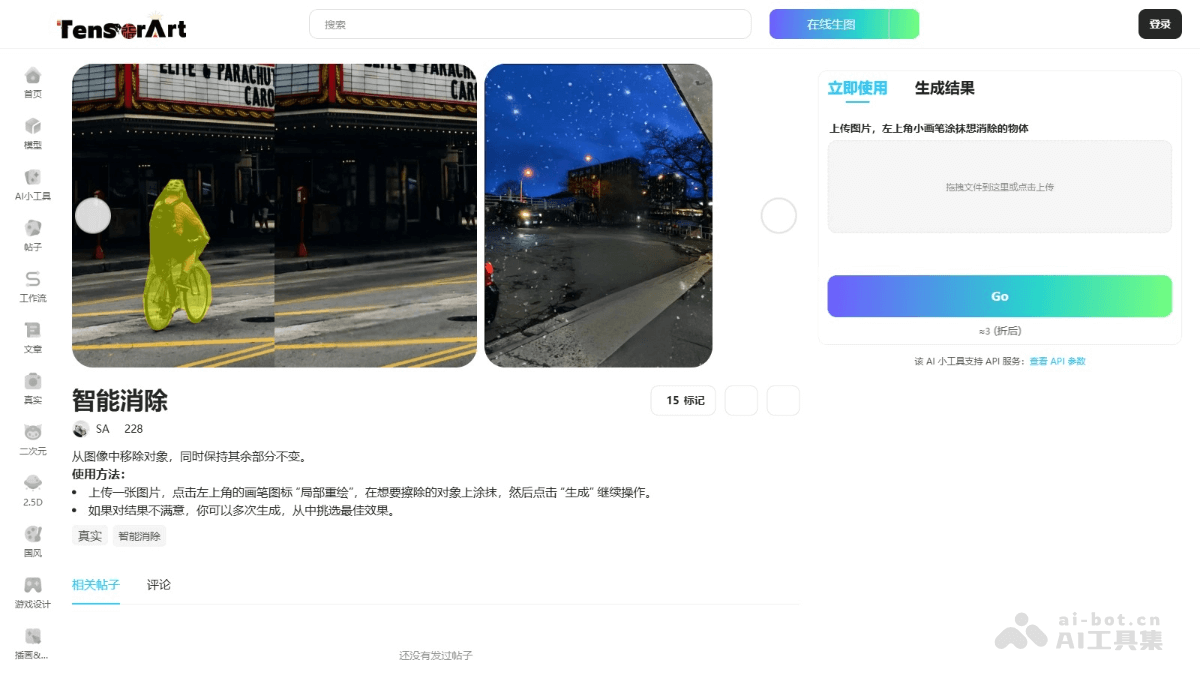
Main features of Toast AI Erase
- Object removal: Users mark the objects to be removed on the image (such as people, clutter, blemishes, etc.), and the intelligent algorithm automatically identifies and deletes them.
- Background repair and blending: Automatically repairs the background and fills in the removed parts, making the image look natural and complete.
- Multiple generations and selection: If users are not satisfied with the generated result, multiple generations of different repair effects are supported.
How to use Toast AI Erase
- Visit the platform: VisitToast AI Eraseand complete registration and login.
- Upload an image: Click upload or drag and drop the image directly into the designated area.
- Mark the objects to be erased: After the image is uploaded, click "Local Redraw" in the upper left corner of the tool interface, and use the mouse or touchscreen to paint over the objects or elements you want to remove on the image.
- Generate the result: After painting is complete, click the "Go" button. The tool automatically identifies and removes the marked objects based on AI algorithms while repairing the background.
- View and select the best effect: If you are not satisfied with the generated result, click "Local Redraw" to generate a new repair effect.
- Save or share:
- Click the "Save" button to save the processed image to your local device.
- Choose the "Publish" feature to share the image directly to the Tensor.Art community.
Toast AI Erase product pricing
- Users can get a certain amount of free computing power every day for image processing.
Application scenarios of Toast AI Erase
- Photo restoration: Repair damage or remove blemishes from old photos, restoring them to perfection.
- Background cleanup: Remove extra clutter or irrelevant people from photos to highlight the subject.
- Advertising design: Remove distracting elements from advertising images to improve visual effects.
- Creative design: Delete unnecessary parts in creative images to achieve unique visual effects.
- Document organization: Clean up shadows, creases, or borders in scanned documents to improve clarity.


