

What is Wenxin Kuaima
Wenxin Kuaima (Baidu Comate) is launched by BaiduAI programming tool, based on the Wenxin large model, provides real-time code continuation, code generation from natural language descriptions, code optimization suggestions, and other functions. Wenxin Kuaima supports more than 100 mainstream programming languages and seamlessly integrates with IDEs such as VS Code and IntelliJ IDEA, and can be installed and used with one click through a plugin. With 20 years of technical accumulation and big data analysis, Wenxin Kuaima helps developers improve programming efficiency and optimize code quality.

Product functions of Wenxin Kuaima
- Real-time continuation: During the code writing process, intelligently generates complete code blocks to help developers quickly complete coding tasks.
- Generate code from comments: By describing the required function in comments, Wenxin Kuaima can automatically generate the corresponding code implementation.
- Conversational code generation: Through natural language dialogue, directly generates the required code, improving coding efficiency.
- Generate unit tests: Generates unit tests for a single function, and can also generate them in batches, improving code quality.
- Generate comments: Automatically generates standardized documentation comments and inline comments, making the code easier to understand and maintain.
- Code optimization: Identifies redundant or inefficient parts in the code and proposes optimization suggestions, such as splitting overly long functions into smaller, clearly functional functions.
- Code explanation: Supports explaining complex function code or selected code segments, helping developers understand the code logic.
- Technical Q&A: By entering problems encountered in research and development in the dialog box, Wenxin Kuaima can provide timely answers.
- Multi-language support: Supports more than 100 mainstream programming languages, including but not limited to C/C++, Java, Python, Go, JavaScript, TypeScript, etc.
- IDE plugin: Provides plugins for various IDEs such as VS Code, IntelliJ IDEA, GoLand, PyCharm, WebStorm, CLion, PhpStorm, Android Studio, etc., with one-click installation and immediate use after installation.
- Powered by the Wenxin large model: Utilizes Baidu's Wenxin large model to comprehensively analyze code context, dependency files, and the logical relationships of adjacent files, so the generated code has more standardized syntax and more rigorous logic.
-
Added Zulu-CLI: Use Zulu's intelligent coding capabilities in the terminal without leaving the command-line interface. Users can install and use Zulu-CLI through specific commands, and the article also provides detailed information such as environment requirements, installation methods, usage methods, command details, environment variable settings, and best practices.
-
Enterprise Edition supports custom models: Enterprise Edition users can customize model providers and use other large models on the Qianfan platform. After adding models through the enterprise management platform and filling in the relevant information, users can choose to use different models in the IDE dialog window.
-
Zulu supports one-click setting for automatic execution and reuse of the same terminal: Zulu adds a one-click function to set subsequent tasks to execute automatically, in order to improve user work efficiency. In addition, it also supports continuously executing instructions in the same terminal session, reducing the frequent opening of new terminals.
-
Local codebase knowledge-enhanced indexing: This feature supports SVN repositories and can automatically identify version control tools, thereby providing users with more accurate code suggestions and generation services.
-
Supports exporting images from conversations: Users can now export architecture diagrams, flowcharts, and more generated in conversations as SVG or PNG files, making it easy to save and share.
How to use Wenxin Kuaima
- Product Official Website: Visit the Wenxin Kuaima official website comate.baidu.com to register and log in to your account.
- Install Plugins: Supports commonly used IDEs, including VS Code, IntelliJ IDEA, GoLand, PyCharm, WebStorm, CLion, PhpStorm, Android Studio, Xcode, iCoding, and other IDE plugins, with one-click installation and immediate use.
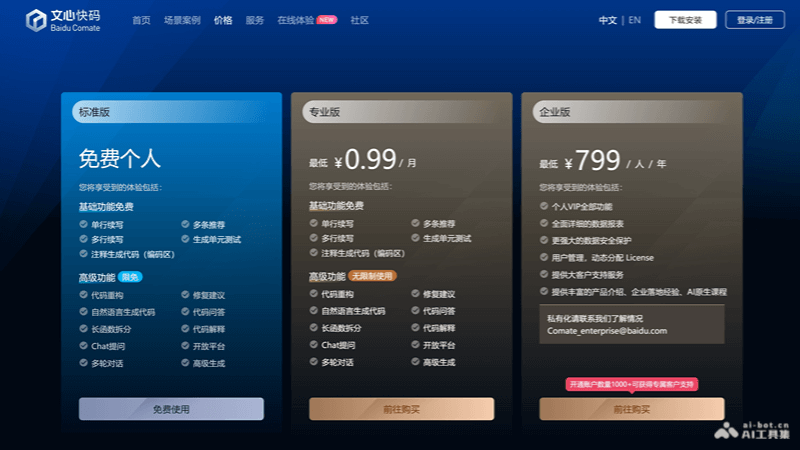
Wenxin Kuaima Product Pricing
- Standard Edition: Suitable for individual developers, provides basic features, with usage limits.
- Professional Edition: Aimed at professional developers, with unlimited basic and advanced features, and multiple plan options.
- Enterprise Edition: Provided for enterprises, includes Professional Edition features, with added enterprise-level security and management.
Who Wenxin Kuaima Is For
- Individual Developers: Independent programmers who need to improve coding efficiency and code quality.
- Professional Development Teams: Software development teams pursuing high efficiency and smooth collaboration.
- Enterprise R&D Departments: Enterprises looking to optimize R&D processes, improve code security, and reduce costs.
- Educational Institutions: Used for teaching assistance, helping students quickly learn and practice programming skills.

