

Label Studio is a free and open-source data annotation tool launched by Human Signal (formerly Heartex). The project has nearly 14,000 stars on GitHub and can help developers fine-tune large language models, prepare training data, or validate AI models.
Label Studio's features
- Supports labeling various types of data, including images, audio, text, time series, multi-domain, video, etc.
- Flexible and configurable, with configurable layouts and templates to combine with your own datasets and workflows
- Machine learning-assisted labeling, using predictions through ML backend integration to assist the labeling process, thus saving time
- Multiple projects and users, supporting multiple projects, use cases, and data types on one platform
- Integrates with your ML/AI pipeline, allowing you to use Webhooks, the Python SDK, and API for authentication, creating projects, importing tasks, managing model predictions, and more.
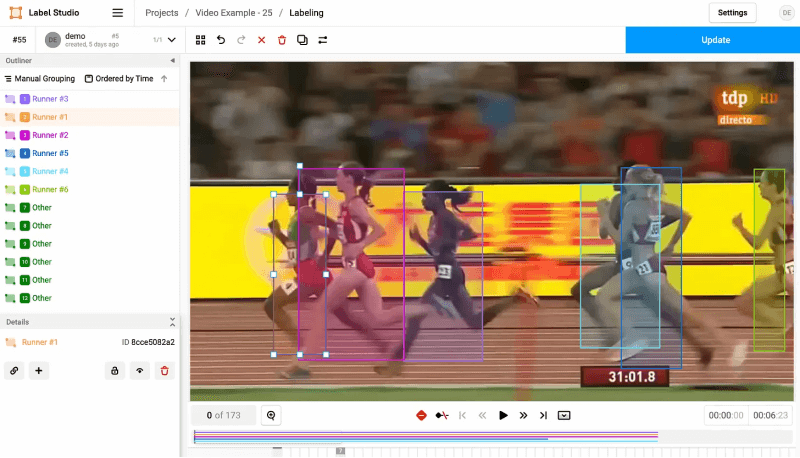
How to get started with Label Studio
- First confirm that it is already installed on your computer
libq-devandpython3-devdependencies - Then use
pip install label-studiocommand to install Label Studio - In the terminal/command line, use
label-studio startto start Label Studio - Via http://localhost:8080 open the Label Studio UI
- Register with the email address and password you created
- Click Create create a project and start labeling data
- Name the project, and you can enter a project description and choose a color
- Click Data Import and upload the data files you want to use. If you want to use data from a local directory, cloud storage, or database, you can skip this step for now
- Click Labeling Setup set and choose a template and customize the label name according to your use case
- Click Save to save your project
For more settings and related operations, please check the official documentationhttps://labelstud.io/guide/get_started.html

