

What is Bihun AI
Bihun AI is an AI image processing and design tool with a variety of AI-powered image processing features that simplify the daily image editing workflow. It providesAI cutout、AI lossless upscaling, smart outpainting,AI removal, and other features such as removing unwanted elements from images, helping users easily achieve image editing. Simple to operate, smart, and efficient, Bihun AI provides a one-stop solution, saying goodbye to cumbersome steps. Bihun AI meets the diverse image processing needs of everyone from professional designers to ordinary users.
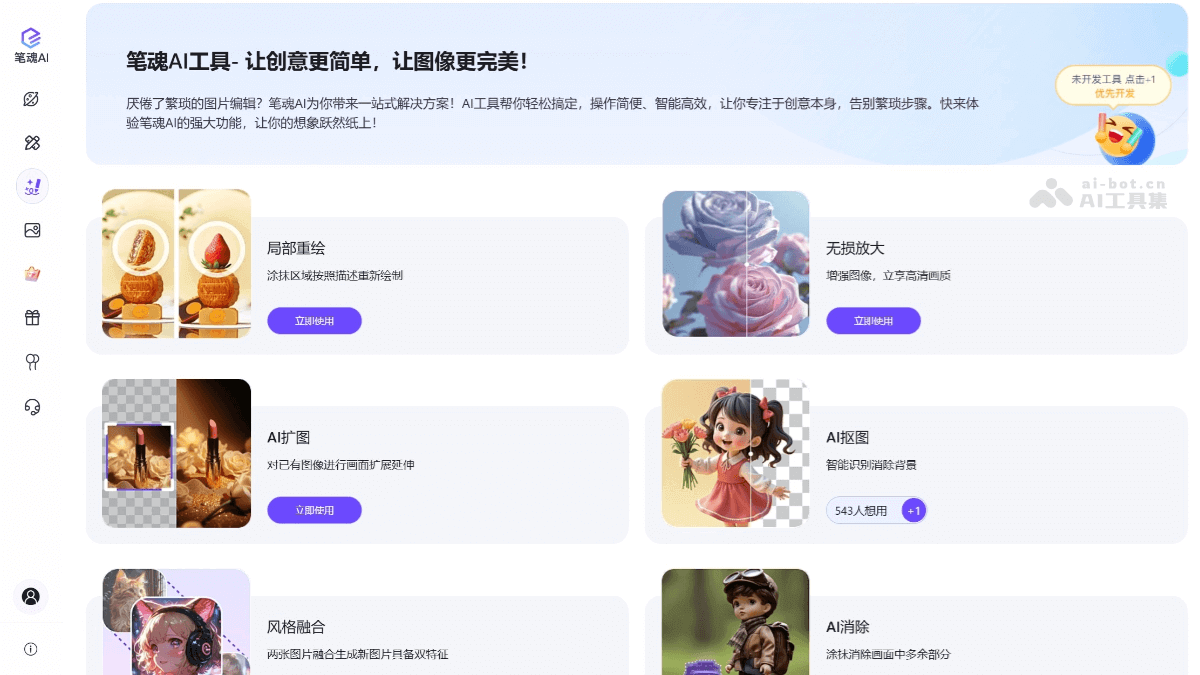
Main features of Bihun AI
- AI cutout: Based on artificial intelligence technology, it automatically identifies and separates the foreground and background in an image, enabling fast cutouts.
- AI outpainting: Intelligently enlarges images while maintaining image clarity and quality, suitable for scenarios where images need to be enlarged without losing detail.
- AI removal: Removes unwanted elements from images, such as watermarks and blemishes, and uses AI technology to clean and optimize images.
- Local redraw: Paint over the area of an image you want to modify, and the painted area is automatically redrawn according to instructions.
- Lossless upscaling: Supports 2x and 4x image upscaling, enlarging image dimensions while keeping image details clear.
- Style fusion: Fuses two images to generate a new image, specifically dual features (coming soon).
- Pose recognition: Extracts poses and actions and intelligently generates images with the same pose (coming soon).
- Depth detection: Performs depth detection and recognition on the input image and generates a new image (coming soon).
How to use Bihun AI
- Visit the official website: Visit Bihun AI'sofficial website。
- Register/Log in: Register an account or log in directly to use it.
- Choose a feature: You can see the various features provided by Bihun AI, such as AI cutout, smart outpainting, smart removal, etc. Choose the corresponding feature.
- Upload an image: After choosing a feature, upload the image to be processed according to the page prompts. Make sure the image format and size meet the requirements.
- Set parameters: Set the relevant parameters according to the selected feature. For example, in smart outpainting, set the upscaling ratio, etc.
- Start processing: After setting the parameters, click the start processing or similar button, and Bihun AI will automatically process the image.
- Preview and download: After processing is complete, you can preview the result. If satisfied, you can directly download the processed image.
- Explore more features: Bihun AI provides other design tools and features. You can explore and use these tools to enhance your design work.
Application scenarios of Bihun AI
- Advertising design: Fast cutouts and background replacement for producing advertising materials such as billboards, posters, and banners.
- E-commerce: Cut out product images for e-commerce platforms to achieve transparent backgrounds and create product display images.
- Social media content creation: When creating social media posts and stories, use Bihun AI to quickly edit and beautify images.
- Photo Post-Processing: Photographers can use Bihun AI for image cutouts, background replacement, removing distracting elements from photos, and more.
- Graphic Design: Designers can use Bihun AI to quickly complete complex image editing tasks and improve work efficiency.
- Personal Entertainment: Users can edit personal photos, such as removing backgrounds, adding special effects, etc., for sharing on personal social media.


