

Framer was originally an all-in-one web and mobileprototyping tool, later transformed into a no-code website design and publishing platform that helps users quickly launch high-aesthetic website pages. Framer has recently launched AI features: users only need to input a text description (Chinese supported), and it can automatically design, lay out, generate, and publish a website. It is currently free with unlimited generations. Based on testing by AI Tool Collection, Framer AI is among the best-performing batch of AI automatic website generators currently available.
Main Features of Framer AI
- Enter your website idea, and in just a few seconds, Framer AI can generate a beautifully designed webpage. The more details you provide in the description, the better the output. Each section of the generated page has a unique combination of layout, copy, and styling, which users can adjust freely according to their preferences.
- Customize combinations of different themes and styles. Users can mix and match display fonts, text fonts, and color palettes to build a custom theme for the website or choose Framer's built-in combinations.
- Provides built-in AI webpage copywriting functionality. With just one mouse click, Framer AI can improve the copy on your website pages, making them more attractive
How to Use Framer AI
- Click the Visit Official Website button above to jump to the Framer AI official website
- Type your desired webpage description in the input box, then click the Start with AI button
- If you are not logged in, Framer will require you to log in/register
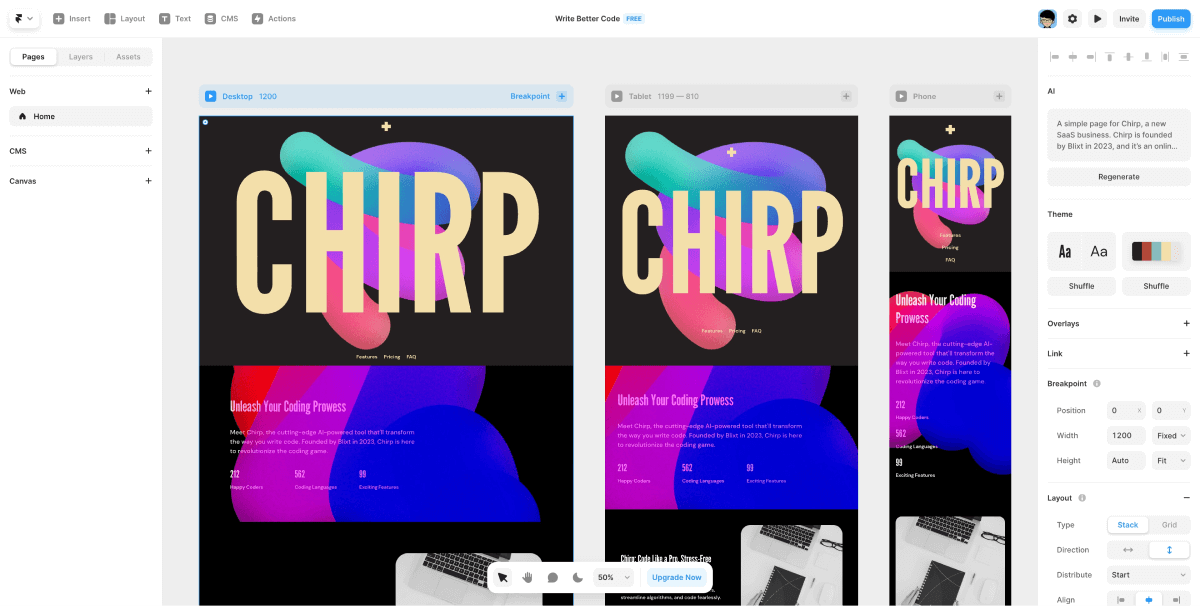
- After successful login, Framer will jump to the website editor page and begin automatically generating the webpage design
- Framer AI will generate responsive page designs for 3 different devices (including Desktop, Tablet, Mobile). You can click the corresponding elements to modify and adjust them
- After fine-tuning is complete, click the Publish button in the upper right corner, and the webpage can be launched and published!


