

What is EdrawMind
EdrawMind MindMaster is a cross-platformmind mappingsoftware launched by Wondershare Technology. The software supports multiple platforms such as Windows, macOS, Linux, Web, iOS, and Android, and files can be synchronized across multiple devices, making it convenient to use anytime and anywhere. The software integratesthe full version of DeepSeek-R1large model, which can intelligently generate and optimize mind maps, making creation more efficient. EdrawMind supports multiple file formats, such as Word, Excel, PDF, etc., and can convert them into mind maps with one click. The platform provides over 1 million high-quality templates, 26 layout modes, and 47 appearance styles, suitable for various scenarios such as learning, work, and brainstorming.

Main features of EdrawMind
- Multi-platform support: Supports Windows, macOS, Linux, Web, iOS, Android, and Xinchuang versions, enabling file synchronization across multiple devices.
- AI integration: Integrates the full version of the DeepSeek-R1 large model, which can intelligently generate and optimize mind maps and improve creation efficiency.
- Multi-format support: Supports multiple file formats such as Word, Excel, PDF, HTML, MP3/MP4, etc.
- Task management: Based on a task kanban view, making it convenient to assign project tasks and track progress.
- Rich template resources: Provides over 1 million high-quality templates, covering multiple fields such as education, the workplace, and self-improvement.
- Powerful performance: Supports 20,000 nodes without lag, suitable for creating very large mind maps.
- Multiple layouts and styles: Provides 26 layout modes and 47 appearance styles, supports mixed arrangement, and is suitable for different presentation scenarios.
- Global search: The search capability has been comprehensively upgraded, making it convenient to find files.
- AI image processing: Adds image editing functions, supportingobject removal, image sharpening, super-resolution, compression, and documentwatermark removaland background patterns, etc.
How to use EdrawMind
- Registration and login: Visit the EdrawMind MindMaster official website https://www.edrawsoft.cn/mindmaster/。
- Choose a platform: Choose to use it online or download the EdrawMind client. After the download is complete, complete account registration and login.
- Create a new mind map: After opening the software, click the "New" button and choose a blank template or select a template that suits your needs from the templates.
- Edit the mind map: Enter the topic in the central node, and add child nodes through shortcuts or the menu. Use the drag-and-drop function to adjust node positions, and use the right-click menu or toolbar for formatting settings (such as font, color, icons, etc.).
- Save and sync: Files are automatically saved to the cloud, or manually saved locally. Log in to your account on other devices to synchronize viewing and editing of the mind map.
- Share and collaborate: Click the "Share" button to generate a sharing link and share the mind map with others. Team members can edit and discuss on the same mind map.
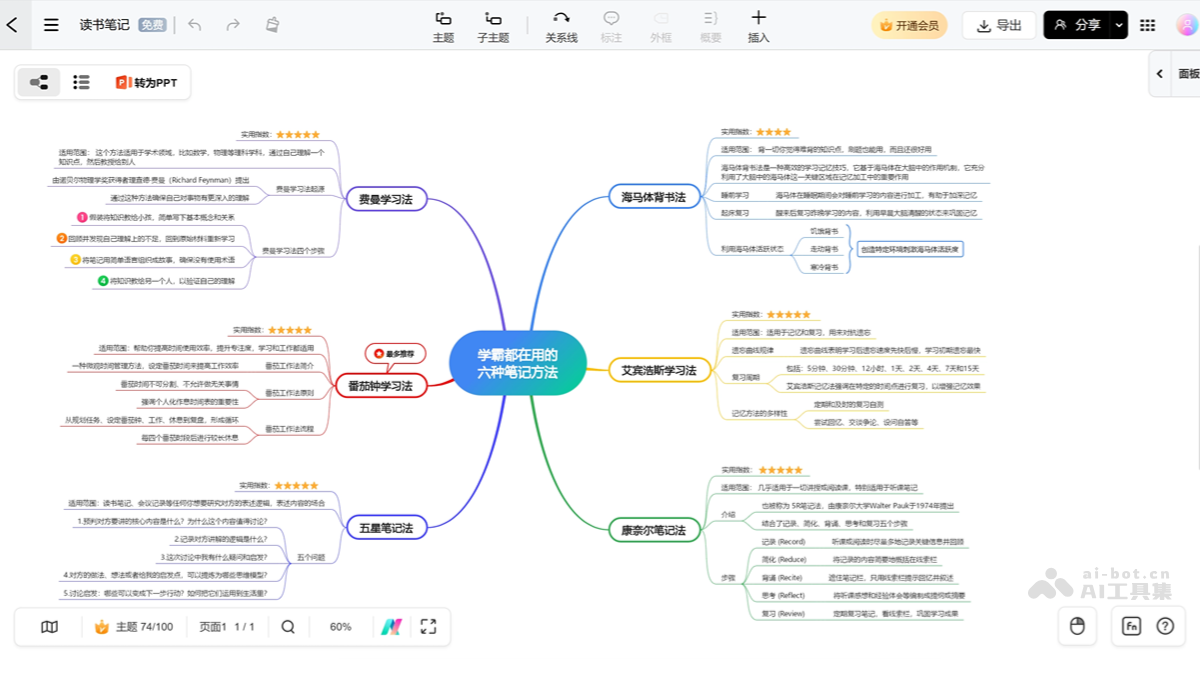
Application scenarios of EdrawMind
- Learning and education: Students organize course knowledge points, build a clear knowledge system, and improve learning efficiency.
- Work and project management: Team members efficiently allocate and track project task progress through the task board feature.
- Self-Improvement and Personal Management: Individuals set goal plans, reasonably arrange time, and improve self-management ability.
- Speech and Presentation: Speakers quickly generate structured speeches and PPTs.
- Knowledge Management: Users organize various notes and materials into mind maps for easy searching and review, improving knowledge management efficiency.

