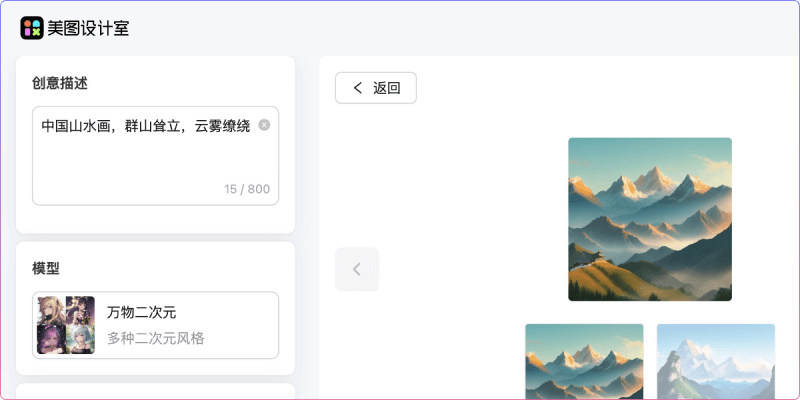
Meitu AI Text-to-Image was originally launched by the Meitu Creative PlatformAI image creation tool, and has now been integrated intoMeitu Design Studio. Users only need to enter a text description of their creative idea, choose their preferred model style, and click Generate Now to obtain a painting created by Meitu AI.
Main features of Meitu AI Text-to-Image
- Quickly generate high-quality images and illustrations through text descriptions, without the need for complex sentences. Users only need to use concise combinations of words to depict the creative idea they want to present, such as: "Chinese landscape painting, towering mountains, shrouded in mist."
- It has multiple built-in model styles to meet the needs of different art styles, including Everything Anime, Ultimate Scenery, Game CG, Guofeng Youth, Vintage Poster, Concept Design, Textured Game, Realistic Portrait, Exquisite Anime, Audio-Visual, Ice and Fire, Spirit Pupil, Playful 3D, Flat-Color Japanese Anime, and other styles.
- Flexible parameter settings. Users can choose the image size and ratio (common ones such as 1:1, 2:3, 3:4, 9:16, 3:2, 4:3, 16:9, etc.), and can also customize the pixel width and height and the number of images to generate.
How to use Meitu AI Text-to-Image
- Click the Visit Official Website button above, or click AI Text-to-Image on the homepage of "Meitu Design Studio" (Note: please use a domestic network to access it, otherwise the webpage may display blank)
- Log in or register your Meitu account
- In the area on the left, describe your creative idea and choose the model style you are interested in (such as anime, game CG, guofeng, anime, realistic portrait, and other styles)
- Set the image size ratio and pixel dimensions, and enter the number of images to generate
- Finally, click the blue Generate Now button