

What is AgentGPT
AgentGPT is an autonomous AI tool that runs in the browser. Users set goals (such as creating reports, planning trips, or making study plans), and AgentGPT automatically thinks through tasks, executes them, and learns from the results to achieve the goal. AgentGPT supports custom goals and offers strong flexibility and autonomy. AgentGPT's tech stack includes Next.js, FastAPI, Planetscale, and more, and it provides open-source code and detailed deployment guides, making it convenient for developers to deploy locally and build on, and suitable for all kinds of users.
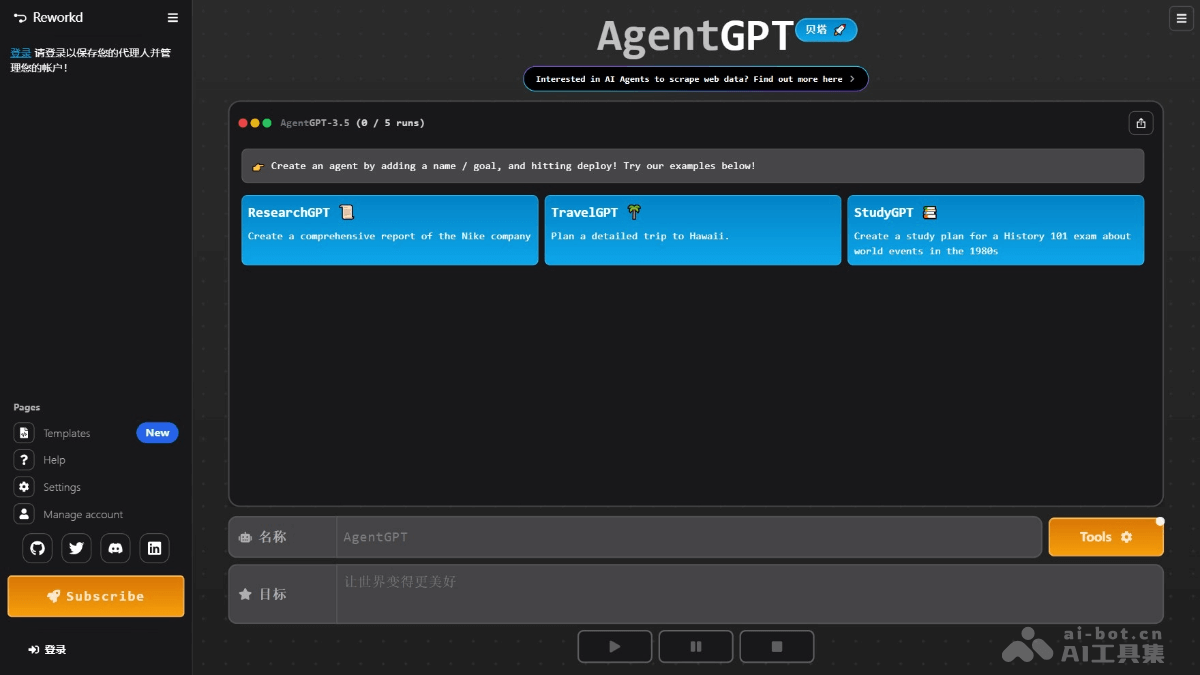
AgentGPT's main features
- Goal-driven task execution: Users use the Agent to set specific goals (such as creating reports, planning trips, or making study plans), and the Agent automatically breaks down tasks and executes them step by step.
- Autonomous learning and optimization: The Agent continuously learns while executing tasks and adjusts its strategy based on results to achieve goals more efficiently.
- Multilingual support: Supports multiple languages (such as English, Chinese, Hungarian, etc.), making it convenient for users from different language backgrounds.
- Flexible deployment methods: Provides an online platform and local deployment for user convenience.
- Task decomposition and management: Breaks down complex goals into multiple subtasks and executes them one by one, allowing users to view progress and results in real time.
- API integration support: Supports integration with external APIs (such as OpenAI, Serper, etc.) to extend the Agent's functionality.
How to use AgentGPT
- Online use:
- Visit the official website: Visit the AgentGPT official website.
- Create an agent: Enter the agent's name and goal on the page. Click the "Deploy" button and the agent will begin executing the task.
- View results: The agent automatically breaks down tasks and executes them step by step, and you can view the task progress and results in real time on the interface.
- Local deployment:
- Prepare the environment:Install the necessary tools.
- API keys:
- OpenAI API Key (required).
- Serper API Key (optional, used for search functionality).
- Replicate API Token (optional, used to extend functionality).
- Clone the project:
- Open a terminal or command-line tool. Clone the AgentGPT project locally:
git clone https://github.com/reworkd/AgentGPT.git
cd AgentGPT-
- Run the setup script
- For Mac/Linux users:
- Run the setup script
./setup.sh-
-
- For Windows users:
-
./setup.bat-
- Start the service: The script automatically installs dependencies, configures the database, and starts the service. After startup is complete, visit
http://localhost:3000to use AgentGPT locally.
- Start the service: The script automatically installs dependencies, configures the database, and starts the service. After startup is complete, visit
AgentGPT's application scenarios
- Travel planning: Plans detailed travel itineraries for users, covering attraction recommendations, dining and accommodation arrangements, and more, helping travelers efficiently create personalized travel plans.
- Study plan creation: Based on users' learning goals and time arrangements, creates scientific study plans, helping students prepare efficiently for exams and improve learning efficiency.
- Market research: Quickly collect and organize information about a specific company or industry, generate comprehensive market research reports, and provide strong support for market analysts and researchers.
- Content Creation: Write blog posts, generate creative stories or copy, help creators spark inspiration, quickly produce high-quality content, and improve creative efficiency.
- Personal Assistant: Create schedules and generate task lists for users, help reasonably manage time and tasks, and improve efficiency in life and work.

