What is MOKI
MOKI is launched by Meitu, Inc.AI short video creation platform, focusing on assisting video creators in producing animated short films, web fiction short dramas, story picture books, and music videos (MV). Based on Meitu's self-developed MiracleVision large model, through features such as intelligent editing, automatic music matching, sound effect addition, and subtitle generation, it greatly simplifies the video production process and improves creation efficiency. MOKI deeply understands creators' needs, achieves dual control over content and cost, and makes video creation simpler and more efficient.
Main features of MOKI
- AI short film creation: MOKI supports users in creating various types of video content, including animated short films, web fiction short dramas, story picture books, and music videos, meeting different creation needs. Through AI technology, MOKI provides creative ideation assistance, helping users quickly generate video scripts and storyboards.
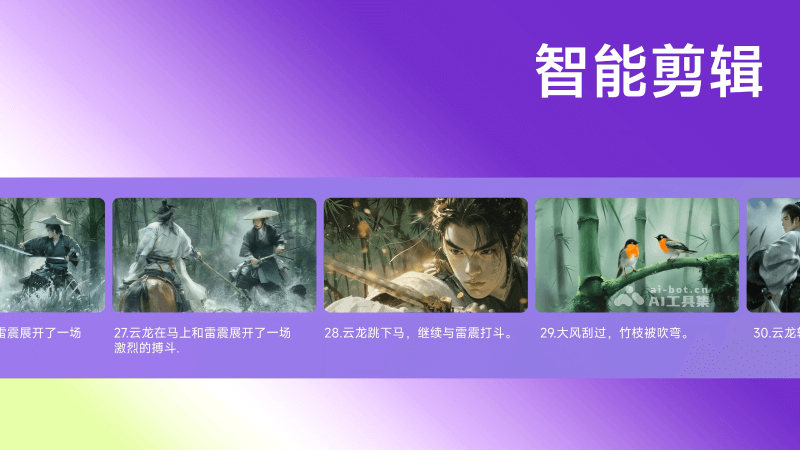
- Intelligent editing: MOKI uses AI algorithms to automatically identify key frames in videos, ensuring important content is not missed during editing. According to the rhythm and emotional changes of the video content, MOKI intelligently adjusts the editing rhythm, making the video smoother and more expressive.
- AI music matching: MOKI's AI music matching feature can automatically match suitable background music based on the video's theme and emotional atmosphere. It provides a rich library of licensed music, ensuring that the background music users use is legal and diverse.
- Sound effect addition: MOKI can automatically add environmental sound effects or specific action sound effects according to the specific scenes of the video, enhancing the video's realism. The platform provides extensive sound effect resources, and users can select and adjust sound effects as needed.
- Automatic subtitles: Through advanced speech recognition technology, MOKI automatically converts dialogue in videos into text, and supports subtitle generation in multiple languages, meeting the needs of users in different regions.
- Content controllability: Although MOKI provides an automated creation process, users can still finely edit and adjust the generated content. Users can customize various aspects of the video according to their own creativity and needs.
How to use MOKI
MOKI's official website (moki.cn) has officially launched, opening beta testing experience.
-
Apply for beta testing: Visit the official website, apply for beta testing, create an account and log in to the MOKI platform.
-
Preparation: Prepare the video script, determine the visual style and character settings.
-
Script input: Input the script into MOKI, either in text form or as a more detailed storyboard script.
-
Character and style settings: Set the character's appearance, actions, and expressions in MOKI, as well as the visual style of the entire video.
-
Automatically generate storyboards: Use MOKI's AI technology to automatically generate storyboards based on the input script and settings.
-
Video material generation: Convert storyboards into video materials. MOKI may provide some customization options to adjust the generated video effects.
-
Intelligent editing: Use MOKI's intelligent editing feature to automatically edit video materials to achieve the desired video length and rhythm.
-
AIMusic and sound effects: Based on the video content, MOKI automatically selects suitable background music and sound effects, and creators can also manually select or adjust them.
-
Automatic Subtitle Generation: MOKI automatically recognizes dialogue in the video and generates subtitles, and creators can edit and proofread the subtitles to ensure accuracy.
-
Detail Adjustment: Make detailed adjustments to the generated video, such as fine-tuning character movements, optimizing scenes, and so on.
-
Final Output: After completing all editing and adjustments, MOKI can output the final video file for creators to share or publish.
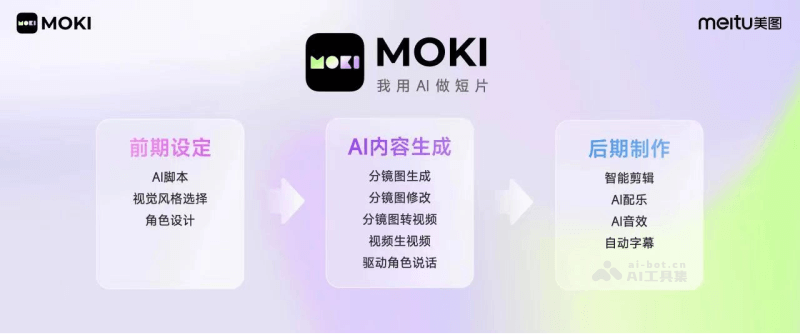
MOKI's Workflow
Compared with traditional video production workflows, MOKI's AI short film workflow achieves significant efficiency improvements in multiple aspects
- Pre-production Stage:
- Users first use MOKI's AI capabilities to quickly generate a video script, and this process can be completed quickly according to the user's needs and ideas.
- Next, users can choose the video's visual style and character design. MOKI provides diverse style options to suit different story backgrounds and user preferences.
- Storyboard and Video Material Generation Stage:
- After the script and visual elements are determined, MOKI's AI will intelligently generate continuous storyboards, which provide detailed visual planning for video production.
- Users can partially redraw and adjust the generated storyboards to ensure that each scene matches the creative vision.
- Using the powerful capabilities of the Meitu Qixiang large model, storyboards are transformed into video clips with dynamic effects, greatly reducing the time and cost of traditional filming and animation production.
- Post-production and Optimization Stage:
- Through MOKI's intelligent editing feature, users can smoothly connect all video materials together to form a preliminary video draft.
- The AI sound effects and AI music scoring features automatically add suitable sound effects and background music according to the video content, enhancing the video's auditory experience.
- The automatic subtitle feature ensures that the dialogue parts of the video have accurate text descriptions, improving the video's accessibility.
- If there are areas that need improvement, MOKI supports users in performing multiple rounds of refined editing and optimization until a satisfactory result is achieved.