

What is Dreamid
Dreamid AI is launched by Guangmo TechnologyAI video creation platform, through natural language processing technology, it supports users in entering text content to quickly generate videos, with a maximum video length of 6 minutes. The platform supports functions such as text-to-video, dynamic visuals, and AI character generation, and can maintain consistency of characters and scenes. Dreamid AI is especially suitable for creating children's picture books and comic strips, providing simple and easy-to-use creation tools that allow ideas to be quickly transformed into visualized video content. Whether it is a short and concise story or a long story with rich plot, Dreamid AI can easily handle it.
Dreamid's features
- Text-to-video conversion: Users only need to enter a text description, and the AI can understand its content and automatically generate a video. It can generate videos up to 6 minutes in length, without requiring users to have video production skills. Whether it is story plot, dialogue, or scene description, the AI can transform it into vivid video footage.
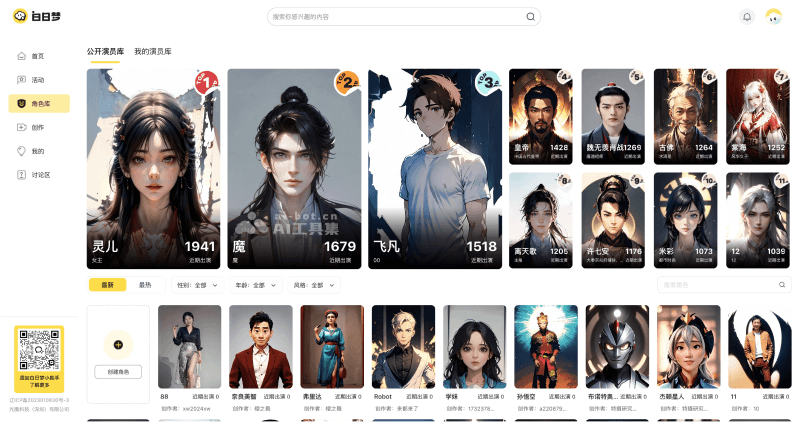
- Massive character actor library: Dreamid AI has a huge character library, including character images of various ages, genders, occupations, and styles. Users can choose suitable characters from the character library according to the needs of the video content, or customize and create their own.
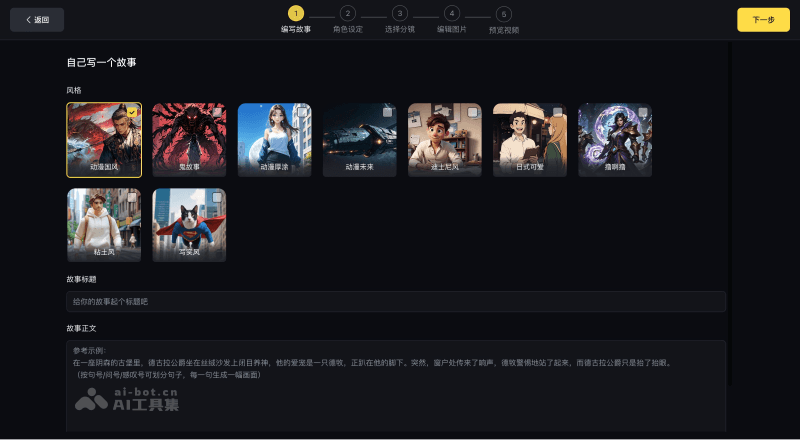
- Video generation in multiple styles: Dreamid AI's video creation platform supports the generation of multiple video styles, such as national-style xianxia, AI short dramas, cute pet planet, magical brainholes, fan fiction recreations, anecdotes and interesting history, children's stories, etc., meeting the needs of different scenarios.
- Character and scene generation: AI can automatically generate corresponding characters and scenes according to the descriptions in the text, such as character images, clothing styles, scene layouts, etc., greatly simplifying the video creation process and allowing creators to focus on the story itself.
- Automated storyboard generation: Dreamid AI can automatically generate video storyboards from the provided video script content. The AI will intelligently analyze the text and design reasonable shot transitions and scene transitions to adapt to the narrative needs of the story.
- Maintain character consistency: Throughout the entire video process, Dreamid AI will ensure the consistency of the selected characters. No matter how the scene changes, the appearance and characteristics of the characters will remain unchanged, helping to build the continuity and recognizability of the characters.
- Image-text mode output: In addition to video mode, Dreamid AI also provides image-text mode output. In image-text mode, users can enjoy the text and illustrations of the story just like reading a picture book, which is very suitable for children's picture book creation.
How to use Dreamid to generate AI videos
- Visit the platform: Visit the Dreamid AI official website aibrm.com , register and log in to your account.
- Create characters: Enter the character library. You can use images from the public actor library provided by the platform, or create your own actor images. When creating an actor, you need to fill in the relevant information of the character, such as character name, gender, age, and upload full-body and half-body photos of the character.
- Write a story: On the video creation page, you need to write your own story, such as novel recommendations, original stories, etc., and ensure that the story content is suitable for conversion into a video.
- Character settings: According to the written story, choose suitable character images. If needed, you can add new characters to the story.
- Choose storyboards: The system automatically generates sketches based on the story script, and you can modify the script, camera shots, sound, and even replace actors for each sketch individually.
- Edit images: During the image generation stage, you can edit the scene image corresponding to each storyboard.
- Preview video: After completing image editing, you can preview the video to see whether it meets the corresponding requirements.
- Generate video: If you are satisfied with the preview, you can click the “Generate video” button, and the system will generate a video based on the content you provided and the edits you made.
- Export and share: After the video is generated, you can export the video and share it to different platforms.
Application scenarios of 白日梦
- Children's stories and picture books: Create children's story videos or digital picture books to attract children's attention and provide content that combines education with entertainment.
- Novel promotion: Authors or promoters can use 白日梦AI to turn novel content into videos, increasing the appeal of the work and attracting more readers.
- Advertising and marketing: Enterprises can use 白日梦AI to quickly generate product introductions, advertising promotional videos, and more, creating attractive marketing content at a lower cost.
- Animation production: Animation enthusiasts can use 白日梦AI to generate animated videos, whether 2D animation or simulated 3D effects, all of which can be easily achieved.
- Artistic creation: Artists and designers can use 白日梦AI to explore new forms of artistic expression, such as generating art videos, short films, and more.


