

What is CodeRider
CodeRider is launched by JiHu GitLab as anAI programming and intelligent software development assistant, designed specifically to improve programmers' coding efficiency and R&D productivity. This AI programming tool is based on AIGC technology and provides powerful features such as code completion, generation, explanation, unit test generation, and intelligent Q&A. It supports native client-side deployment on PC, allows users to use it offline, and also offers private deployment options to ensure enterprise data security. CodeRider is deeply integrated with GitLab and supports intelligent DevOps workflows, helping handle issues and merge requests, and combining with CI/CD processes to achieve end-to-end AI enablement. In addition, it covers nearly a hundred programming languages and supports integration with mainstream IDEs, making it a preferred enterprise-level AI DevOps solution.
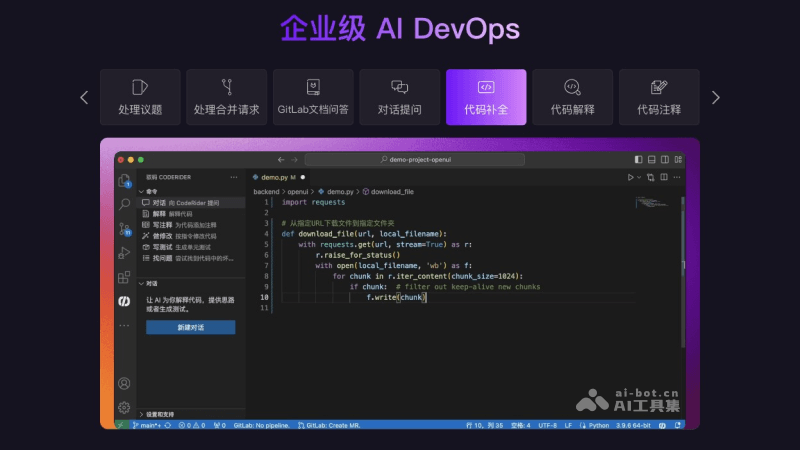
Main features of CodeRider
- Intelligent programming assistance: CodeRider uses advanced AI algorithms to generate high-quality code snippets according to users' actual R&D needs. This feature can greatly reduce coding time, improve coding efficiency, and at the same time ensure code quality.
- Code completion: While users are writing code, CodeRider can intelligently provide completion suggestions based on the context of the current code, reducing the amount of manual coding and accelerating development speed.
- Code explanation: CodeRider can recognize multiple programming languages and provide detailed explanations of code snippets, helping developers understand complex code logic and improving code readability and maintainability.
- Code comments: CodeRider automatically generates code comments to help developers quickly understand the function and purpose of code. Especially in team collaboration, comments can greatly improve code transparency.
- Code modification: CodeRider can automatically modify code according to users' instructions or needs, reducing the tediousness of manual modification and improving the efficiency and accuracy of code modification.
- Unit testing: CodeRider can generate unit test code for selected code segments, helping developers quickly verify code functionality and performance and ensure code quality.
- Code optimization: CodeRider provides code optimization suggestions to help developers improve code structure and enhance code readability, maintainability, and security.
- Intelligent Q&A: CodeRider supports natural language processing technology, can understand and answer technical questions, and even generate code examples. It supports multi-turn conversations to improve problem-solving efficiency.
- GitLab documentation Q&A: CodeRider integrates the GitLab documentation Q&A feature, allowing users to obtain help and best practices for using the GitLab platform by asking questions.
- IDE integration: CodeRider supports integration with mainstream integrated development environments (IDEs) such as Visual Studio Code, enabling developers to directly use CodeRider's features in a familiar development environment.
- Coverage of multiple programming languages: CodeRider supports nearly a hundred programming languages. Whether it is popular Java, Python, JavaScript, or domain-specific languages, CodeRider can provide support, meeting the needs of different developers.
- Private server deployment: Enterprises can choose to deploy CodeRider on private servers. This allows better control over data access permissions, protects core enterprise data from leakage, and enhances data security.
- On-device Deployment (AI PC): Users can install CodeRider on their local computers to enable on-device intelligent development. This deployment method supports offline work and can be used even without a network connection, increasing development flexibility.
- Enterprise Code and Document Security: CodeRider provides strict security measures to ensure that internal enterprise code and documents are not accessed or leaked without authorization, protecting the enterprise's intellectual property and trade secrets.
How to use CodeRider
For Visual Studio Code users:
- Open Visual Studio Code: Make sure you have installed the Visual Studio Code editor.
- Access Extensions: In the left navigation bar, click the "Extensions" icon.
- Search for the Plugin: In the search box, enter "CodeRider".
- Install the Plugin: After finding the plugin, click "Install".
- Log in to Your Account: After the plugin installation is complete, you need to log in to your JiHu GitLab account.
- Download Dependencies: After logging in, manually download the dependencies. Click the pop-up window in the lower right corner of the page to download the on-device components and models, including the on-device components, completion model, and chat model. Note that because the model files are large, you will need to wait for some time; the download progress will be displayed in the lower right corner.
Visual Studio Code plugin:https://marketplace.visualstudio.com/items?itemName=Jihu-GitLab.coderider
For JetBrains IDEs users (using IntelliJ IDEA as an example):
- Open IntelliJ IDEA: Make sure you have installed IntelliJ IDEA or another JetBrains IDE.
- Access the Plugin Marketplace: In the left navigation bar, click "Plugins".
- Search for the Plugin: In the search box of the plugin marketplace, enter "CodeRider".
- Install the Plugin: After finding CodeRider, click "Install".
- Restart the IDE: After the installation is complete, restart IntelliJ IDE.
- Log in to Your Account: After a successful restart, log in to your JiHu GitLab account.
- Download Dependencies: After logging in, you also need to manually download the on-device components and models; the steps are the same as for Visual Studio Code users.
JetBrains plugin address:https://plugins.jetbrains.com/plugin/24510-coderide-
CodeRider Product Pricing
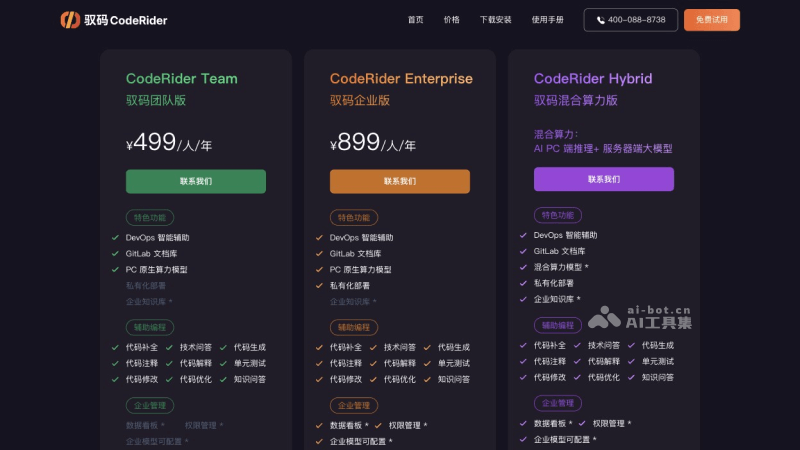
- CodeRider Team: A team-oriented version, priced at 499 RMB per person per year. This version provides a series of featured functions, including DevOps intelligent assistance, GitLab document library, PC-native computing power models, and private deployment. In addition, it includes auxiliary functions such as assisted programming, code completion, technical Q&A, code generation, code comments, code explanation, unit testing, code modification, code optimization, and knowledge Q&A to help team members improve development efficiency.
- CodeRider Enterprise: A more advanced enterprise-level version, priced at 899 RMB per person per year. In addition to including all the functions of the Team version, the Enterprise version also adds advanced functions such as enterprise management, data dashboards, permission management, and configurable enterprise models.
- CodeRider Hybrid: A hybrid computing power version that combines AI PC-side inference and server-side large models. For specific pricing, please contact JiHu GitLab for detailed information. It includes featured functions such as DevOps intelligent assistance, GitLab documentation repository, hybrid computing power models, private deployment, and enterprise knowledge base, and also includes a series of auxiliary functions such as assisted programming, code completion, and technical Q&A. Like the Enterprise Edition, the Hybrid Computing Power Edition also provides advanced functions such as enterprise management, data dashboards, permission management, and configurable enterprise models.
For more product pricing information, please viewthe product pricing page of CodeRider。
Who CodeRider is suitable for
- Software developers: Whether they are junior developers or senior programmers, CodeRider can help them improve coding efficiency and code quality by providing functions such as code completion, code explanation, and code optimization.
- R&D teams: In team collaboration, CodeRider's AI DevSecOps functions can help team members carry out development, security checks, and operations work more efficiently, improving the team's overall R&D efficiency.
- Enterprise IT departments: For an enterprise's IT department, CodeRider's server private deployment and enterprise code documentation security functions can ensure enterprise data security while improving the automation level of the R&D process.
- Freelancers: When freelancers carry out software development projects, CodeRider can serve as a powerful assistant, providing a series of support from coding to testing to help them independently complete project development.
- Technology enthusiasts and beginners: For programming enthusiasts and beginners, CodeRider's intelligent Q&A and code explanation functions can help them learn and understand programming knowledge more quickly.

