

What is Project IDX
Project IDX is an AI-based cloud full-stack development environment and code editor launched by Google, designed to improve programmers' application development efficiency. Thisfree AI programming toolintegrates the AI assistant Gemini, which can generate code, provide coding suggestions, and help developers understand and optimize code. It supports multiple programming languages and frameworks, such as Angular, React, etc., allowing developers to customize the environment or import existing applications from GitHub. Project IDX is committed to simplifying the development process. Through rich collaboration tools, cross-environment synchronization, pair debugging, and other features, it helps teams collaborate efficiently and improves application quality and development speed.
Main features of Project IDX
- AI-assisted development: Project IDX integrates the AI assistant Gemini, which can automatically generate code snippets, provide real-time coding suggestions, and help developers quickly solve coding problems. It can also provide inline coding suggestions to help developers understand complex code structures.
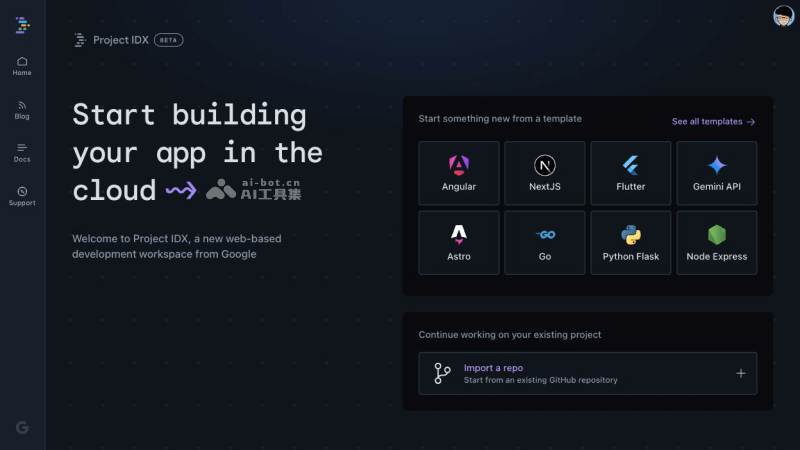
- Multi-language and framework support: Project IDX supports a wide range of programming languages and frameworks, including but not limited to Angular, React, Flutter, Go, Next.js, Python/Flask, Svelte, etc. Developers can choose the appropriate technology stack according to their preferences and project needs.
- One-click integration with Google services: Developers can easily integrate various Google APIs and services, such as Google Maps, Firebase, etc., greatly simplifying the development process and allowing developers to focus on developing the core functions of the application.
- Template and environment customization: Project IDX provides a variety of preset application templates, and developers can choose the appropriate template to quickly start a project according to their needs. At the same time, it also supports importing existing applications from GitHub, allowing developers to seamlessly migrate and continue developing existing projects.
- Cross-platform application preview: The built-in web preview function and Android emulator allow developers to test and preview applications on different devices and platforms, ensuring compatibility and user experience in different environments.
- Extension support: The platform provides a rich extension library, and developers can use these extensions to test and optimize API endpoints, improving the performance and stability of backend services.
- Rich collaboration tools: Project IDX provides a series of collaboration tools, such as real-time code editing, code review, pair programming, etc. These tools can help team members collaborate more efficiently and improve development efficiency.
- Cross-environment synchronization: Supports synchronizing code and settings across different development environments, ensuring consistent work among team members and reducing problems caused by environment differences.
- Pair debugging: Supports two developers working on the same codebase at the same time, which not only improves development efficiency but also helps improve code quality, because code review and feedback can be carried out in real time.
- Code review and quality control: The built-in code review tools can help teams maintain code quality and ensure code consistency and maintainability.
How to use Project IDX
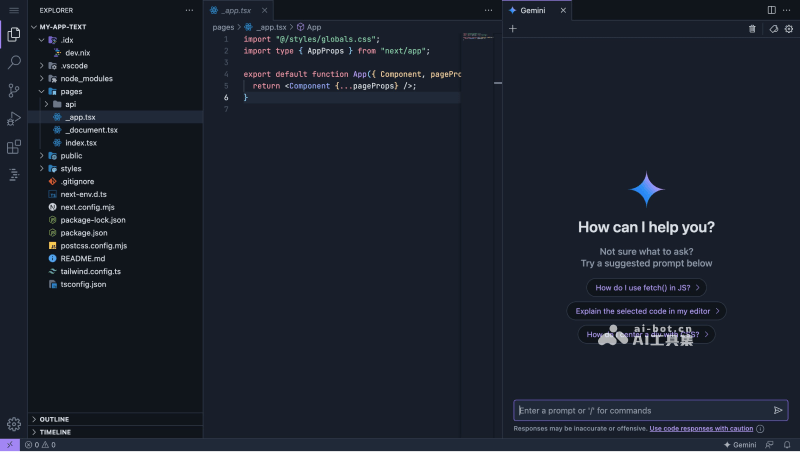
- Visit the Project IDX official website (idx.dev), click Get Started and then log in
- After logging in, choose to create from a template or import an existing GitHub repository
- After filling in the relevant information, wait for IDX to set up the workspace and initialize the development environment
- Click the Gemini icon in the upper right corner to explain, chat about, comment on, etc. the code
- You can also click the Gemini icon at the bottom to open the Gemini sidebar for conversation
The technology behind Project IDX
- Google Cloud Workstations: This is the foundation of the IDX workspace, providing powerful virtual machine services that allow resources to be created and scaled on demand. This configuration is not only fast and secure, but also highly scalable, and resources can be flexibly adjusted according to development needs.
- AI models: IDX's AI features are powered by the advanced AI models Codey and Gemini, which are also used in other Google products such as Studio Bot and Duet. These models are differentiated by function; for example, a 12b model is used for code completion, while a 24b model provides streaming chat and code generation capabilities.
- Managed preview: When an IDX workspace starts, it not only loads the code but also automatically runs the preview environment (if applicable). The preview server runs on the VM, allowing developers to start modifying code immediately after the workspace is created and see the "hot reload" effect in the preview in real time.
- Environment setup: IDX workspaces use Docker containers provided by Google Cloud Workstations. These containers come preinstalled with various system software needed to run services, such as task scheduling tools like Supervisor, as well as other custom scripts, such as the preview server.
- Service account-based authentication: To ensure security, IDX implements secure connections between the VM and other services through service accounts. Each workspace has a unique service account with strictly controlled permissions that only allow communication with authorized services. A custom metadata server on the VM is responsible for securely managing these access permissions.
- Nix: To support diverse development needs, IDX uses Nix as its package management and build system. Nix provides a high degree of reproducibility, atomic upgrades and rollbacks, isolation, sandboxing, and powerful package version control and conflict resolution capabilities. Through Nix, IDX can provide developers with a consistent and predictable build environment while reducing the complexity of learning a new configuration language.
Who Project IDX is for
- Independent developers: For independent developers, Project IDX provides a complete development environment that allows them to quickly set up projects, while the AI assistant Gemini can help them improve development efficiency and solve technical problems.
- Team developers: Project IDX's collaboration tools and cross-environment synchronization features are very suitable for team collaboration. Team members can share code and resources in real time, improving team collaboration efficiency.
- Programming beginners: For programming beginners, Project IDX's AI assistant Gemini can provide real-time coding suggestions and learning guidance to help them quickly master programming skills.
- Enterprise developers: Enterprise developers can leverage Project IDX's multi-language and framework support to quickly develop and deploy enterprise-level applications, while improving application functionality and performance through integration with Google services.
- Cross-platform developers: For developers who need to develop cross-platform applications, Project IDX provides web previews, and Android emulators make it convenient for them to test and optimize applications on different platforms.
- Front-end and full-stack developers: Project IDX supports a variety of front-end frameworks and languages, and front-end developers can use it to quickly build user interfaces. Full-stack developers can use it to complete front-end and back-end development work in one place.
- Technology enthusiasts: For tech enthusiasts who like to try new technologies, Project IDX provides a platform for experimentation and exploration of new technologies, where they can try out various new programming languages and frameworks.

