

What is Spikes Studio
Spikes Studio is an AI-based automatic video editing tool that can automatically analyze and summarize long videos, extract key clips, and generate multiple short videos. It is designed to simplify the editing workflow for video content creators and is very suitable for fast-paced social media platforms. Users can add subtitles and memes and adjust the frame through the tool to achieve personalized editing. Spikes supports output in multiple aspect ratios and is suitable for short video production for podcasts, game livestreams, and conversational interviews. Even novice users can get started quickly, effectively improving work efficiency and content appeal.
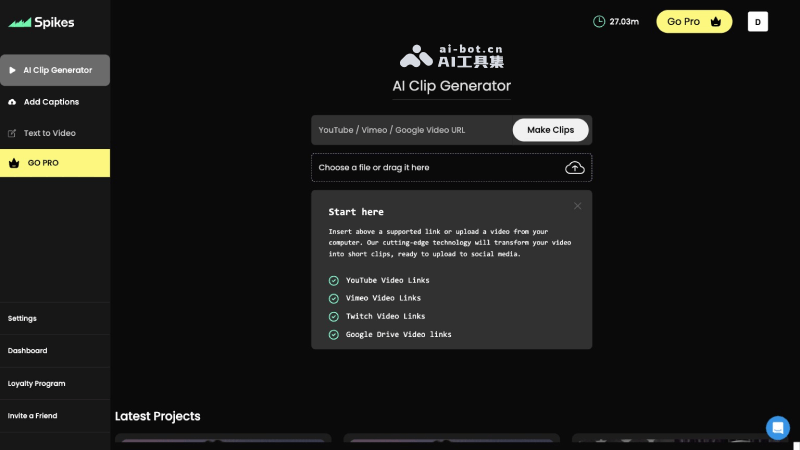
Main features of Spikes Studio
- Automatic short video clipping: Spikes Studio uses AI algorithms to analyze long video content, identify and extract key moments and important information from the video, and condense these highlights into short videos.
- Multi-speaker dynamic subtitles: Spikes supports adding dynamic subtitles to videos, making dialogue or interview videos more vivid, while also providing multi-speaker subtitle functionality to enhance the expressiveness of the video.
- Personalized editing: Users can further edit automatically generated videos, including adding or modifying subtitles and memes, as well as adjusting frame size and position, to meet personalized needs.
- Output in multiple aspect ratios: Spikes Studio provides multiple video resolution options to suit different publishing platforms and viewing habits, such as 1:1, 9:16, etc., making it easy for users to create videos suitable for various social media.
- Multi-camera functionality: Spikes supports displaying multiple cameras at the same time, suitable for interview or dialogue scenes, allowing users to simultaneously show the questioner and the responder in one video, enhancing interactivity and the viewing experience.
- Picture-in-picture effect: Users can set a picture-in-picture effect, for example placing the host's avatar anywhere in the video, suitable for reaction shows and game livestreams, etc.
- Automatic title and description generation: Spikes Studio can automatically generate titles and descriptions based on video content, helping users quickly complete video publishing preparations.
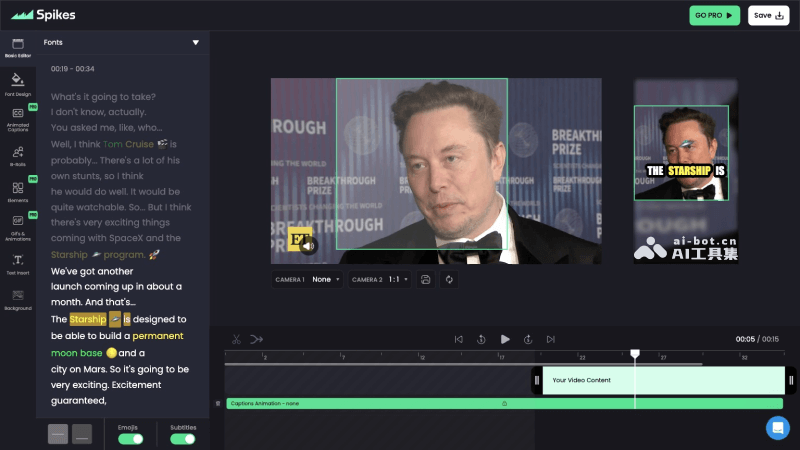
How to use Spikes Studio
- Visit the Spikes Studio official website (spikes.studio) to register/log in
- Paste the URL of the long video or upload a local video, and Spikes will automatically detect the video length
- Choose a subtitle style, then click Generate Clips to generate video clips
- The generated video can be edited and modified
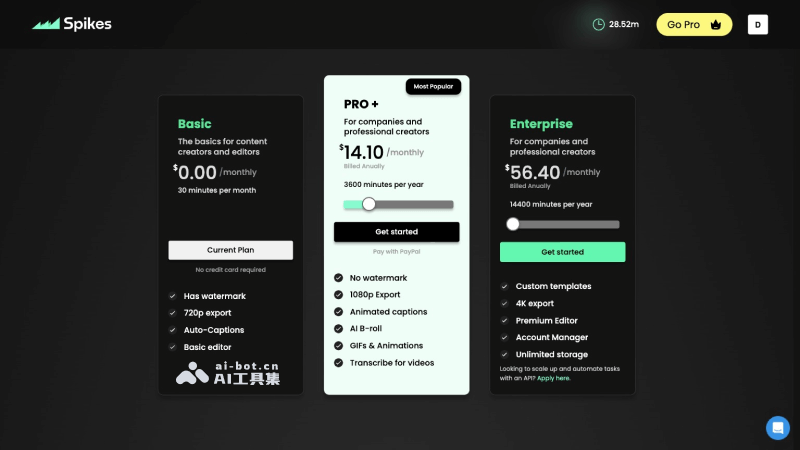
Spikes Studio product pricing
- Basic version: Free to use, can upload 30 minutes of video per month, provides 720P video export, with watermark, automatic subtitles, and basic editing features
- Pro Professional version: Starting at $14.10 per month with annual payment, can upload 300 minutes of video per month, provides 1080P video export, no watermark, AI B-Roll, GIFs and animations, video transcription, 90-day cloud storage, and other benefits
- Enterprise version: Starting at $56.4 per month with annual payment, can upload 1200 minutes of video per month, all Pro features plus 4K video export, advanced video editor, custom templates, unlimited video storage, etc.
Who Spikes Studio is for
- Video bloggers and content creators: Bloggers and creators who frequently need to produce and publish videos can use Spikes Studio to quickly extract highlights from long videos and create short video content suitable for social media.
- Social media operations: Operations personnel responsible for managing brand or corporate social media accounts can use this tool to improve the efficiency and quality of content publishing and attract more attention and interaction.
- Podcast producers: Individuals or teams producing audio and video podcasts can use Spikes Studio to edit and optimize their programs, making them more suitable for sharing on different platforms.
- Game streamers: Game streamers can use Spikes Studio to edit their live stream content and create exciting game highlights or tutorial videos.
- Educational institutions and trainers: Providers of online educational content can use this tool to edit and optimize instructional videos, making them more concise and easier to digest.
- Corporate video production teams: Internal corporate video production teams can use Spikes Studio to process video content for company events, product introductions, or internal training, improving work efficiency.
- News and media organizations: News organizations can use Spikes Studio to quickly produce news summaries or highlights and respond rapidly to current affairs and trending events.
Frequently asked questions
Is Spikes Studio free?
Spikes Studio offers a free version that allows you to edit 30 minutes of video for free each month.
Which platforms' videos does Spikes Studio support importing?
Spikes Studio currently supports importing videos from platforms such as YouTube, Vimeo, Twitch, and Google Drive.
Which languages does Spikes Studio support?
Spikes Studio supports 99 languages, including English, Chinese, French, Spanish, Italian, and more.


