
What is Shotcut
Shotcut is open-source video editing software based on FFmpeg, completely free with no watermark and no time limits. The software supports hundreds of audio and video formats for direct editing without importing, and provides a multi-track timeline, keyframe animation, rich transition effects, and audio noise reduction and equalizer. Shotcut can process 4K footage in real time, customize export resolutions to suit various platforms, and offers a portable version without installation, making it a professional-grade zero-cost solution for self-media and personal editing.
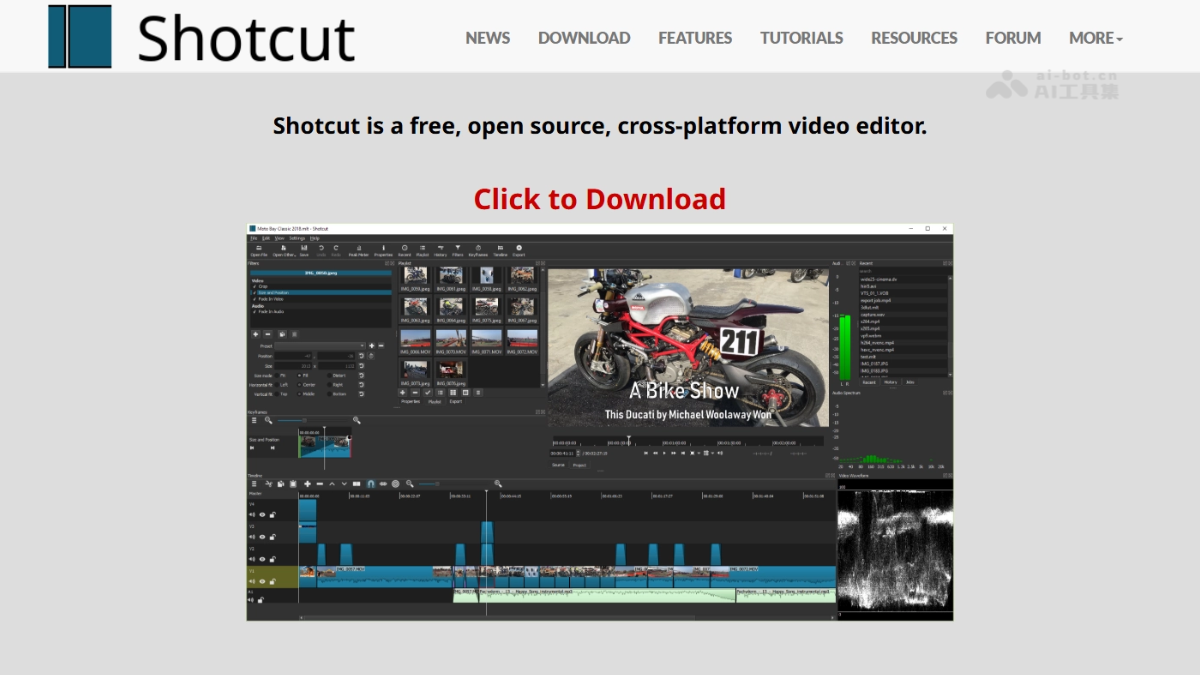
Main features of Shotcut
- Format compatibility: Based on FFmpeg, it supports hundreds of audio and video formats and codecs, and footage can be dragged directly to the timeline for native editing without importing.
- Multi-track editing: It provides a parallel editing system for multiple video, audio, and subtitle tracks. Each track can be freely overlaid, split, and adjusted to meet complex editing needs.
- Visual effects: It includes rich transition effects and video filters, supports keyframe animation creation, and allows frame-by-frame fine control of parameters such as brightness, contrast, and color.
- Audio processing: It integrates audio noise reduction, equalizer, and volume meter functions, enabling professional-grade audio adjustment without external software such as Audition.
- 4K support: It can preview and edit 4K footage in real time, automatically matches the project size according to the footage, and supports manual customization of resolution and aspect ratio.
- Flexible export: It provides multiple presets such as vertical, square, and landscape, adapting to the publishing specifications of different platforms such as Douyin, Bilibili, and YouTube with one click.
- Portable operation: It provides an installation-free portable version that runs immediately after extraction and does not write to the system registry, making it suitable for carrying between multiple devices.
- Hardware capture: It supports Blackmagic Design SDI/HDMI input, screen recording, camera capture, and network stream playback, with up to 4K capture.
Technical principles of Shotcut
- FFmpeg underlying architecture: Shotcut uses FFmpeg as its core multimedia processing engine, responsible for audio and video decoding, encoding, filter processing, and format packaging, ensuring native compatibility with the vast majority of media formats in the industry.
- Native editing pipeline: It adopts a direct editing mode without importing. Footage directly references the original file path, and frame-accurate seeking and preview are achieved through FFmpeg real-time decoding streams, reducing disk usage and improving large-file processing efficiency.
- Multi-format mixed timeline: The timeline engine supports mixing footage of different resolutions, frame rates, and encoding formats in the same project. FFmpeg uniformly transcodes them in the background to the standard format of the project settings for real-time compositing, and re-encodes as needed on output.
- Cross-platform Qt interface: It builds a dockable/floating panel-based interface based on the Qt framework. Through a model-view separation architecture, it manages playlists, filter parameters, and encoding queues, and supports dragging directly from the file manager to trigger FFmpeg media detection and track insertion.

Follow WeChat and reply “Open Source” to join theAI Open Source Project Exchange Group
How to use Shotcut
- Obtain and install: Visit the Shotcut official website shotcut.org to download the version for your system, and choose either the installer version or the installation-free portable version to extract and run directly.
- Start a project: After opening the software, it automatically creates a blank project; you can also load a video directly into preview via "Open File" without specifically importing it into the media library.
- Add Media: Drag videos, audio, and images directly from folders into the playlist or timeline tracks. Shotcut supports native editing without importing.
- Basic Editing: After dragging media into the timeline, use the razor tool to split clips, select unwanted parts and press Delete to remove them; drag clip edges to adjust duration, and drag up or down to switch tracks.
- Visual Adjustments: After selecting a clip, open the "Filters" panel and add filters such as brightness, contrast, crop, and size adjustment; click the keyframe button to add animated changes to parameters.
- Transition Effects: Place two video clips end to end on the same track, or place them on upper and lower tracks to create an overlapping area, then right-click to add transition effects such as dissolve and wipe.
- Subtitle Overlay: Create a new video track, drag text titles or SRT subtitle files into the corresponding track, and adjust position and duration to align them with the picture.
Shotcut's Core Advantages
- Zero-Cost Full Functionality: Completely open source and free, with no watermark, no duration limit, and no export paywall; all professional features can be used directly.
- Extremely Strong Format Compatibility: Built on FFmpeg, it supports direct editing of hundreds of audio and video formats without importing, saving transcoding wait time and disk redundancy.
- Professional-Level Editing Capabilities: Provides a multi-track timeline, keyframe animation, rich transition effects, and 4K real-time preview, with features comparable to paid software.
- Built-in Audio Studio: Integrates noise reduction, equalizer, and volume meters, so professional audio processing can be completed without switching to Audition or Audacity.
- Cross-Platform and Installation-Free: Provides installer and portable versions for Windows, Mac, and Linux; unzip and use, with no writing to the system registry.
- Flexible Export Adaptation: Supports custom resolution and aspect ratio, with one-click switching between vertical, square, and horizontal screens, directly matching publishing specifications for various platforms.
Shotcut's Project Address
- Project Official Website:https://www.shotcut.org/
- GitHub Repository:https://github.com/mltframework/shotcut
Comparison of Shotcut with Similar Competing Products
| Comparison Dimension | Shotcut | Jianying (CapCut) |
|---|---|---|
| Business Model | Completely open source and free, with no watermark, no export restrictions, and no subscription wall. | Basic features are free; AI subtitles, HD export, and some effect templates require a VIP membership. |
| Platform Support | Desktop-first, supporting Win / Mac / Linux platforms, and providing an installation-free portable version. | Mobile-first; desktop version features are aligned with the mobile app, relying on an account system and cloud media library. |
| Editing Logic | Traditional nonlinear multi-track editing, supporting keyframe animation, precise audio waveform trimming, and frame-level control. | Template-based one-click video creation, with automatic subtitles and smart cutout as the core; low barrier to entry but weak in-depth controllability. |
| Format Compatibility | Based on FFmpeg, it supports direct editing of hundreds of formats without importing, with no limits on custom resolution and encoding parameters. | Built-in export presets for social platforms; advanced encoding parameters are hidden or restricted, favoring adaptation to Douyin/Bilibili/YouTube. |
| Asset Ecosystem | Zero built-in assets, relying entirely on users' own files and external resources, with no copyright bundling. | Built-in massive library of licensed music, stickers, filters, and AI digital humans enables fast production but creates platform lock-in. |
| Privacy and Security | Fully local and offline operation, no internet connection required, no account, no data upload, suitable for handling sensitive assets. | Requires account login, AI features rely on cloud processing, and assets involve privacy review and upload bandwidth costs. |
| Hardware Requirements | Based on FFmpeg software decoding, with no hard requirements for a graphics card; runs smoothly even on old devices and USB drives. | Cloud AI rendering can reduce local pressure, but high-definition real-time preview and effects compositing still require certain hardware specifications. |
Shotcut Application Scenarios
- Self-Media Content Creation: Individual bloggers and short video creators use its free, watermark-free feature to directly export vertical/square videos for distribution on Douyin, Bilibili, and YouTube, completing daily updates at zero cost.
- Teaching and Paid Knowledge: Teachers and training instructors use the multi-track feature to overlay courseware screen recordings, webcam footage, and subtitle tracks, combined with built-in audio noise reduction, to quickly produce clear, distraction-free online courses.
- Independent Short Films and Vlogs: Travel and lifestyle documentarians use 4K real-time preview and keyframe color grading to complete the entire process from rough cut to fine-tuning on a laptop, and the portable version enables seamless handoff across multiple devices.
- Podcasts and Audio Visualization: After importing audio, podcast producers use waveform display and equalizer to complete editing, then overlay cover art and dynamic subtitles to generate video versions of episodes, without switching to a professional audio workstation.