
What is ScreenCoder
ScreenCoder is an open-source intelligent UI screenshot-to-code system that supports quickly converting any design screenshot into clean, editable HTML/CSS code. ScreenCoder uses a modular multi-agent architecture, combining visual understanding, layout planning, and code synthesis technologies to generate high-precision, semantic frontend code. Users can easily modify layouts and styles according to their needs, achieving seamless integration between design and development. It is suitable for rapid prototyping and pixel-perfect interface construction, greatly improving frontend development efficiency.
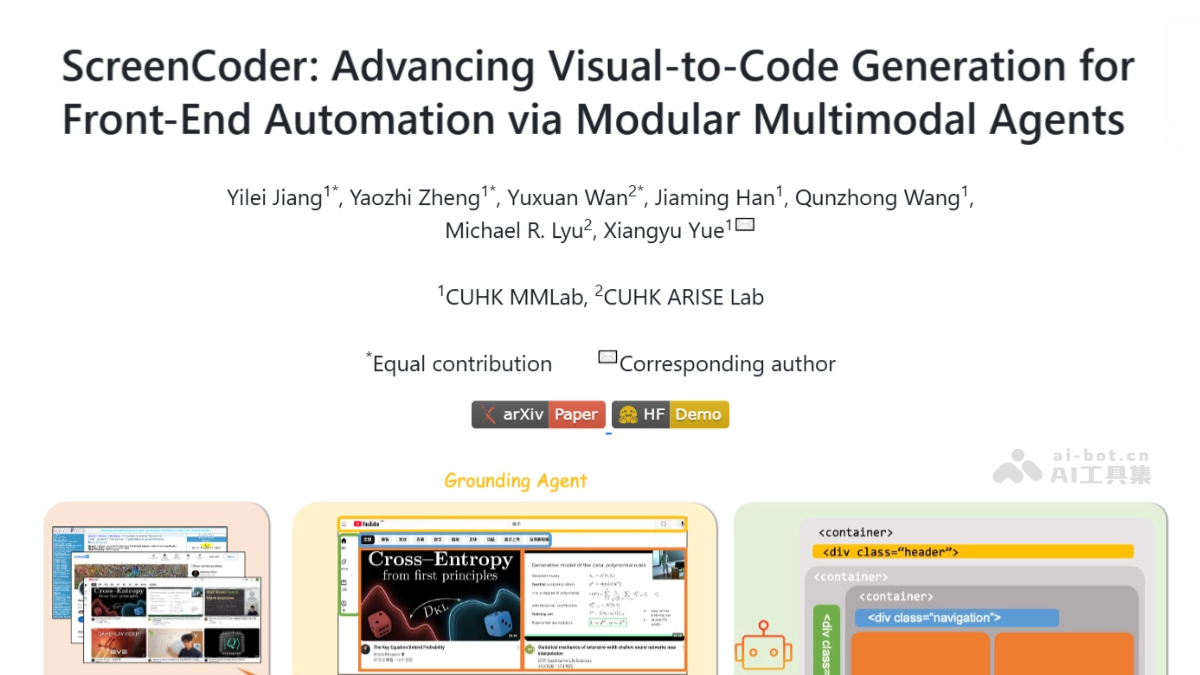
ScreenCoder's Main Features
- UI Screenshot-to-Code: Supports quickly converting any UI screenshot or design prototype into clean, editable HTML/CSS code.
- High-Precision Code Generation: The generated code is highly consistent with the original design, visually aligned, and faithfully restores semantics.
- Custom Modifications: Supports users in adjusting layouts and styles according to their needs, facilitating secondary development.
- Multi-Model Support: Supports Doubao、Qwen、GPT、Gemini and other generation models, allowing users to choose according to their needs.
- Rapid Deployment: The generated code can be directly used in production environments, supporting rapid prototyping and pixel-perfect interface construction.
ScreenCoder's Technical Principles
- Grounding Stage (Grounding Agent): The grounding stage uses a vision-language model (VLM) to identify and mark the main structural components in UI images, such as sidebars, headers, and navigation bars. Text prompts guide the model to detect specific components and return their bounding boxes and semantic labels. To ensure the accuracy and reliability of detection results, the system performs deduplication, conflict resolution, and fallback recovery operations, and infers the main content area. The final output is a layout dictionary, providing foundational information for subsequent layout planning and code generation.
- Planning Stage (Planning Agent): In the planning stage, a hierarchical layout tree is constructed based on the output of the grounding stage, providing structural context for code generation. Simple spatial heuristic rules and composition rules are used to organize the detected components into a tree structure. The system creates a root container that fills the viewport, generates absolutely positioned .box elements for each top-level region, and inserts inner <div class=”container grid”> when necessary to implement CSS Grid layout. Each node is annotated with grid template configuration and ordering metadata, making it easy to directly compile into HTML/CSS code.
- Generation Stage (Generation Agent): The generation stage converts the semantic layout tree into executable HTML/CSS code. ScreenCoder uses a natural language prompt-driven generation process, constructing adaptive prompts for each component in the layout tree and generating corresponding code through a language model. The prompts include the component's semantic labels and layout context, and user instructions (if provided) are appended to the prompts. The generated code is assembled according to the structure of the layout tree, preserving the hierarchy, order, and layout configuration. The system replaces gray placeholders in the generated code with the actual images from the original screenshot, restoring visual and semantic consistency.
ScreenCoder's Official Website Address
- GitHub Repository:https://github.com/leigest519/ScreenCoder
- arXiv Technical Paper:https://arxiv.org/pdf/2507.22827
- Online Experience Demo:https://huggingface.co/spaces/Jimmyzheng-10/ScreenCoder
ScreenCoder's Application Scenarios
- Frontend Development Acceleration: Quickly convert UI design screenshots into high-quality HTML/CSS code, significantly shortening the frontend development cycle, helping development teams improve efficiency and reduce manual coding workload.
- Design and development collaboration: Convert design screenshots directly into operational code, promoting seamless collaboration between design and development teams, reducing communication costs, and ensuring the accurate conveyance of design intent.
- Rapid prototyping: Instantly transform design concepts into interactive front-end prototypes, accelerating the early validation and user testing process of product design, supporting rapid iteration and optimization of the user experience.
- Education and training: As an educational tool, it helps students and novice developers intuitively understand the relationship between UI design and front-end code, accelerating the learning process and improving practical skills.
- Small teams and startups: Provide efficient code generation solutions for small teams and startups with limited resources, helping them quickly launch product prototypes or minimum viable products (MVP), reducing development costs and accelerating market entry.