

What is Qwen Chat
Qwen Chat is the latest model experience platform for Qwen launched by Alibaba Tongyi. Qwen Chat features multi-model side-by-side competition, precise Q&A on uploaded documents, HTML preview, image description, and an Artifacts-like function similar to Claude's, capable of generating code snippets, files, charts, and more. The Qwen Chat team plans to launch web search,AI image generation, voice interaction, and other new features to provide users with a more convenient and efficient AI interaction experience.
Qwen Chat Memory is the latest AI memory feature launched by Tongyi Qianwen. It enables the model to remember users' conversation preferences and key information, achieving continuity across multi-turn interactions. The feature is developed based on Alibaba Cloud's Qwen3-Max model and supports proactively associating context, such as remembering a user's occupation, interests, or specific task background, to avoid repeated questions.
The newly launched Travel Planning Assistant is an intelligent travel planning system based on a Multi-Agent architecture. It can provide users with precise and actionable travel plans, covering all key aspects such as transportation, accommodation, attractions, and dining, and offers total itinerary budget estimates and reminders of important considerations. By calling real third-party interfaces such as Amap and Fliggy, it ensures that information is accurate and traceable.
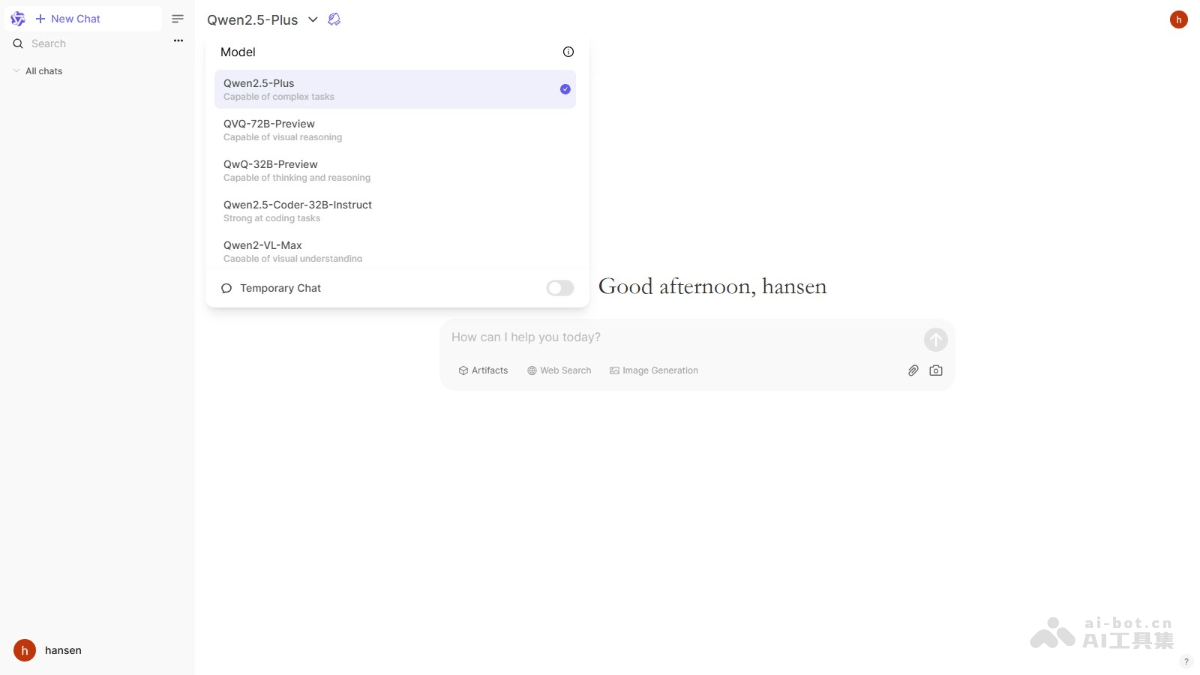
Main Features of Qwen Chat
- Qwen Chat Memory: Long memory feature, developed based on Alibaba Cloud's Qwen3-Max model, supports proactively associating context, and adopts an "explicit memory" mechanism that requires users to actively trigger storage instructions; the system will only retain key information after confirmation. Users can enable memory management on the web to view or delete saved content.
- Multi-model side-by-side competition: Users can select multiple Qwen models in the same interface for conversation and task processing, intuitively compare the performance and characteristics of different models, and conveniently find the model best suited for a specific task.
- Upload documents, precise Q&A: Supports uploading documents in multiple formats and accurately answers questions based on document content, greatly improving the efficiency of extracting specific information from large numbers of documents.
- HTML preview: Answer content supports display in HTML format, including text layout, image insertion, link addition, and more.
- Image description: After users upload images, Qwen Chat can understand the image content and describe it or answer related questions, making it suitable for many fields such as image recognition, content creation, and education.
- Artifacts-like feature: Generates artifacts such as code snippets, files, charts, svg, and interactive React components, providing efficient work support for developers and professionals.
- Travel Planning Assistant: An efficient travel planning system based on a multi-agent architecture. By calling real data interfaces, it accurately plans itineraries covering transportation, accommodation, attractions, dining, and other aspects, with dynamic optimization capabilities to ensure flexible and reliable plans.
How to use Qwen Chat
- Visit the platform: Visit the Qwen Chat official website:chat.qwen.ai, and complete registration and login.
- Choose a model: In the Qwen Chat interface, models from the Qwen family are available for selection, such asQwen3, Qwen2.5-Plus, Qwen2.VL-Max, QwQ & QVQ, Qwen2.5-Coder-32B-Instruct, etc. Choose the appropriate model according to your needs.
- Start a conversation: After selecting a model, start a conversation with the AI. Enter text to ask questions, and the AI will provide answers based on the questions.
- Upload documents: The button to upload documents, select local document files (such as TXT, PDF, Word documents, etc.). After the upload is complete, Qwen Chat automatically parses the document content and gives accurate answers based on the questions.
- Upload Image: Click the upload image button and select a local image file. After uploading, Qwen Chat analyzes the image content and describes or answers based on the question.
- View Artifacts:During the conversation, if you need the AI to generate Artifacts such as code snippets, files, charts, etc., make the corresponding request. Qwen Chat generates the corresponding Artifacts according to the requirements and displays them in the dialog box.
Application Scenarios of Qwen Chat
- Education: Students upload textbooks to ask about knowledge points, language learners practice conversations, and researchers obtain academic analysis.
- Development and Programming: Developers generate code, debug programs, and automatically generate technical documentation, improving development efficiency.
- Content Creation: Writers and creators get creative inspiration, write article drafts, and use the AI drawing feature to generate images.
- Corporate Office Work: Analyze data reports, organize meeting minutes, and plan project progress to improve office efficiency.
- Daily Life: Provide travel planning, health consultation, life tips, etc., helping users solve everyday problems.

