

Recently, the tech world has been flooded by a little crayfish (OpenClaw). Watching countless friends show off AI controlling a computer on its own, writing code... it really is fascinating.
But actually configuring OpenClaw requires not only knowing how to set up a local environment and download huge language model packages, but also keeping your computer on 24 hours a day, ready to go at any time... and even after all that trouble, it might still fail to run in the end.
Getting AI to take over your desktop doesn't need to be this complicated. Alibaba's newly released desktop intelligent work assistant——QoderWork, comes built in with various MCP (Model Context Protocol), and also supports Skills. Through simple conversation, we can have Agents handle various tasks for us, such as:
Organizing files: done in a few minutes, clearly categorized;
Life planning: helped me make a detailed party guide, even arranged the route;
Work stand-in: directly took over part of my repetitive work.
<br /> Work efficiency is much higher than mine, and the key is that it can be used directly in China, no need to spend thousands to tinker with equipment, and data is also secure. It's simply a lifesaver for workers! Many people will wonder, can't Doubao do this too? But QoderWork goes far beyond that. QoderWork's advantage lies in <strong>proactiveness and growth</strong>. It can not only execute tasks on a schedule and automatically, but also learn excellent workflows through Skills, internalize them into its own experience, and accumulate them for repeated use. In this article, let's experience QoderWork together.</p> <h1 style="text-align: center;"><span style="font-size: 24pt;">01. Hands-On Test of QoderWork</span></h1> <p> </p> <p>We open the QoderWork official website, first download and install it. New users get 300 credits for free trial. (The Win version also launched today~)</p> <img decoding="async" class="aligncenter wp-image-72695" data-src="/wp-content/uploads/2026/03/未命名18.png" src="/wp-content/themes/onenav/images/t.png" alt="" width="678" height="354" /> <p>Official website address: <a href="/qoderwork/" target="_blank" rel="noopener">https://qoder.com/qoderwork</a></p> <p>The work interface is very simple. Click in the dialog box to select the <strong>working directory</strong>, and QoderWork will start working in the specified folder, processing and storing files in that folder.</p> <img decoding="async" class="aligncenter wp-image-72696" data-src="/wp-content/uploads/2026/03/未命名18-1.png" src="/wp-content/themes/onenav/images/t.png" alt="" width="678" height="644" /> <h3><strong>File Management</strong></h3> <p>Let's first try a simple request:</p> <p>When writing articles, I usually have many screenshots and various saved images, which look very messy. Let QoderWork organize them.</p> <blockquote><p>Rename the files according to the image content.</p></blockquote> <img decoding="async" class="aligncenter wp-image-72697" data-src="/wp-content/uploads/2026/03/未命名18-2-1.png" src="/wp-content/themes/onenav/images/t.png" alt="" width="678" height="495" /> <p>QoderWork will check the image information one by one in the specified folder:</p> <img decoding="async" class="aligncenter wp-image-72698" data-src="/wp-content/uploads/2026/03/未命名18-3.png" src="/wp-content/themes/onenav/images/t.png" alt="" width="678" height="394" /> <p>A few minutes later, the results are delivered directly. The files are all renamed according to the image content, and the recognition is very accurate.</p> <h3><s<strong>Party Planning</strong></h3> <p>Let's try a more advanced one. Every year during the Chinese New Year, we always find time to get together with friends, but putting together a plan and choosing a location is really a headache. So we just sent the request straight to QoderWork:</p> <p>Create a party activity plan for 10 people, 1 day, and turn it into a PPT.</p> QoderWork didn't just start writing randomly right away. Instead, like a real person, it confirmed with me the type of party, venue requirements, the age range of the participants, and other specific needs. Once it had gathered everything, QoderWork got to work. <img decoding="async" class="aligncenter wp-image-72699" data-src="/wp-content/uploads/2026/03/未命名18-4.png" src="/wp-content/themes/onenav/images/t.png" alt="" width="678" height="647" /> <p>QoderWork gathered relevant images and materials and began automatically calling tools like PPT Skill and Python to directly generate the PPT, with no need for us to worry about anything throughout the process.</p> <img decoding="async" class="aligncenter wp-image-72700" data-src="/wp-content/uploads/2026/03/未命名18-5.png" src="/wp-content/themes/onenav/images/t.png" alt="" width="678" height="647" /> <p>The final result looks like this:</p> <p style="width: 100%; height: 400px;"><iframe style="width: 100%; height: 100%;" src="//player.bilibili.com/player.html?isOutside=true&aid=116169218462023&bvid=BV1AUPKzUEav&cid=36441624536&p=1" frameborder="no" scrolling="no" allowfullscreen="allowfullscreen">
Work efficiency is much higher than mine, and the key is that it can be used directly in China, without spending thousands more to mess around with equipment, and the data is also secure. It's practically a lifesaver for office workers!
Many people wonder, can't Doubao do these things too? But QoderWork goes far beyond that.
QoderWork's advantages lie inproactivityandgrowth. It can not only perform tasks on a schedule and automatically, but also learn excellent workflows through Skills, internalize them into its own experience, accumulate them, and reuse them repeatedly.
In this article, let's experience QoderWork together.
01. Hands-on Test of QoderWork
We open the QoderWork official website, first download and install it. New users get 300 credits for a free trial. (The Win version also launched today~)

Official website address:https://qoder.com/qoderwork
The work interface is very simple. Click the option in the dialog box to select theworking directory, and QoderWork will start working in the specified folder, processing and storing files in that folder.

File management
Let's first try a simple request:
When I usually write articles, I have a lot of screenshots and various saved images, and it looks very messy. Let QoderWork organize them.
Rename the files according to the image content.
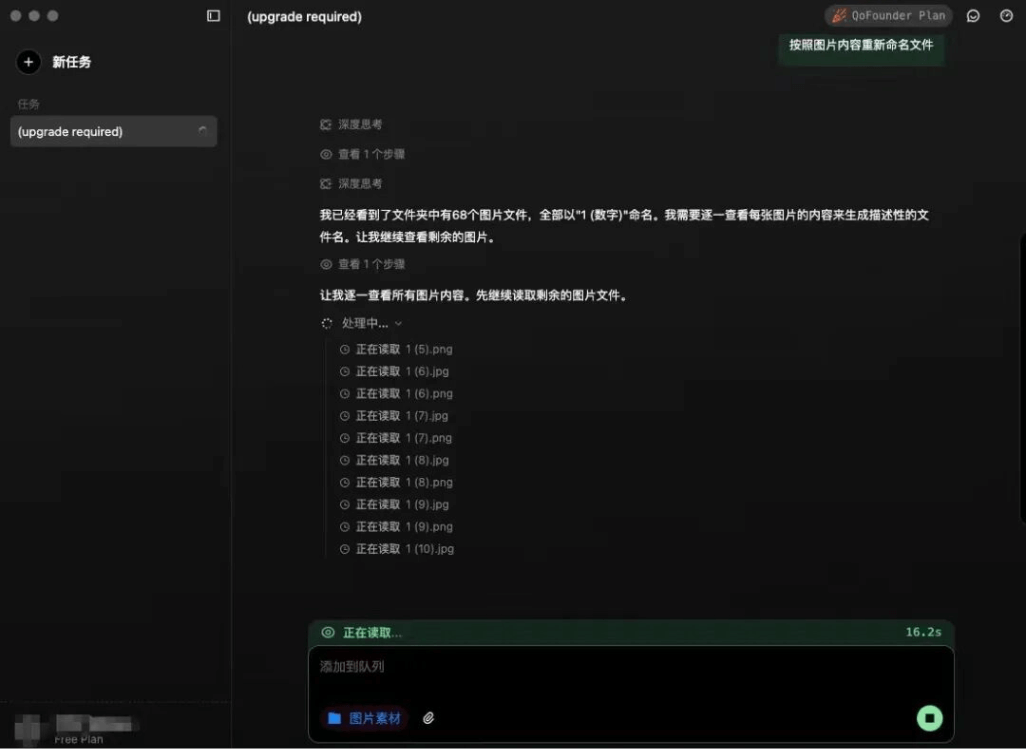
QoderWork will check the image information one by one in the specified folder:

A few minutes later, it delivers the result directly. All files have been renamed according to the image content, and the recognition was very accurate.
Party Planning
Let's try a more advanced one. Every year during the Chinese New Year, we always find time to get together with friends, but putting together a plan and choosing a location is really a headache. So we just sent the request straight to QoderWork:
Create a party activity plan for 10 people, 1 day, and turn it into a PPT.
QoderWork didn't just start writing randomly right away. Instead, like a real person, it confirmed with me the type of party, venue requirements, the age range of the participants, and other specific needs. Once it had gathered everything, QoderWork got to work.

QoderWork gathered relevant images and materials and began automatically calling tools like PPT Skill and Python to directly generate the PPT, with no need for us to worry about anything throughout the process.
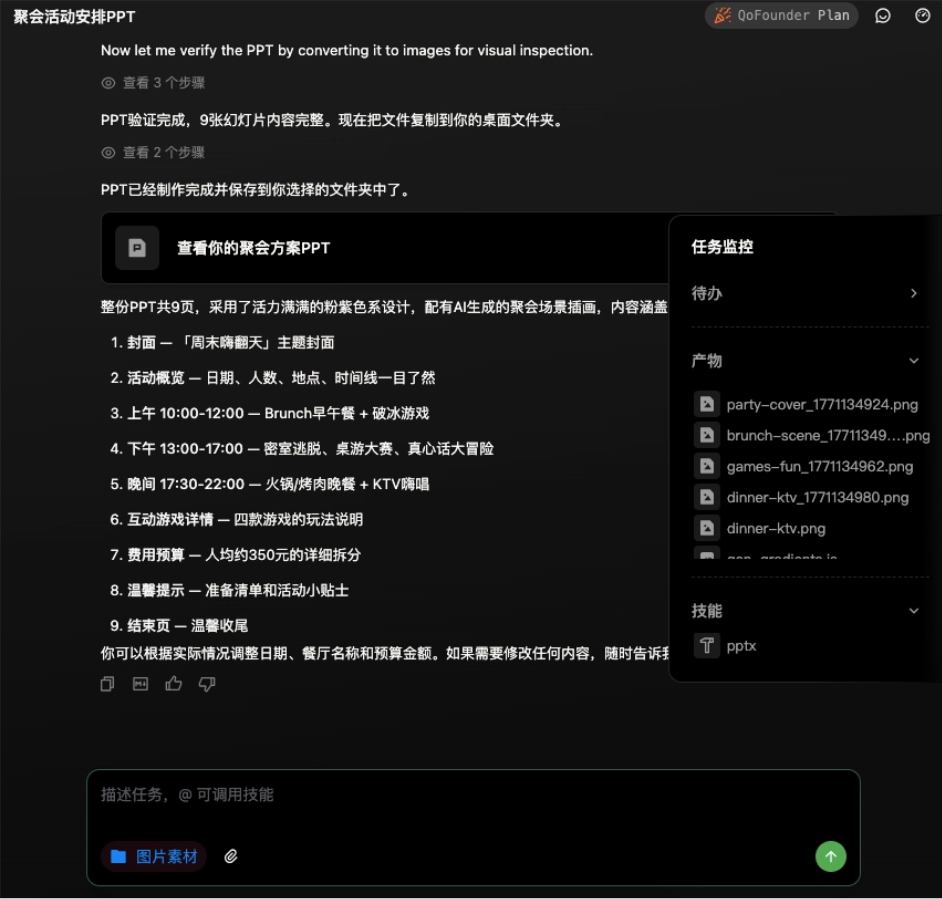
The final generated result is like this:
The content plan is quite exciting, and the activities arranged are all things people our age like to do. But the problem is that the arrangements given by QoderWork are still not specific enough. I want it to directly arrange the route for me, ideally in a way that I can just follow and enjoy. So I continued to enter the request:
Give me a specific and executable plan, near Jianghan Road in Wuhan.

This time QoderWork directly started searching for entertainment information near Jianghan Road in Wuhan, helping us screen shops.
The final itinerary is like this:
It includes what we need to prepare before the event, how to gather on the day, the complete process of the gathering, the budget, and even backup plans. This execution ability is amazing.
Itinerary calendar
By the same logic, I also asked QoderWork to help me plan a short-term itinerary:
I plan to depart from Wuhan around February 20 to go to Hong Kong for 4 days, one person, female, I want to go to Disneyland, and I also want to experience some Hong Kong specialty foods and attractions. Budget 5000, please help me plan the itinerary and make it into a calendar.
<br /> QoderWork not only made a calendar, but also thoughtfully reminded me to get an Octopus card and how to dress. It is simply like having a cyber little butler.</p> <h3><strong>Generate PPT</strong></h3> <p>QoderWork's ability to call tools is very strong. I tried letting it directly make a tutorial for me:</p> <blockquote><p>Create a teaching course about OpenClaw and organize it into a PPT, which should include:</p> <p>What is OpenClaw</p> <p>What can OpenClaw be used for</p> <p>How to configure OpenClaw on Windows</p></blockquote> <p>Through the task monitoring on the right side of the page, we can see that QoderWork is crazily looking up information, generating image materials, and making the PPT.</p> <img decoding="async" class="aligncenter wp-image-72702" data-src="/wp-content/uploads/2026/03/未命名18-7.png" src="/wp-content/themes/onenav/images/t.png" alt="" width="678" height="638" /> <p>The final product not only explains the architecture of OpenClaw in detail, but also includes the code for the configuration steps.</p> <p style="width: 100%; height: 400px;"><iframe style="width: 100%; height: 100%;" src="//player.bilibili.com/player.html?isOutside=true&aid=116169201687531&bvid=BV1wDPKz7EJv&cid=36441622718&p=1" frameborder="no" scrolling="no" allowfullscreen="allowfullscreen">
QoderWork not only made a calendar, but also thoughtfully reminded me to get an Octopus card and how to dress. It is simply like having a cyber little butler.
Generate PPT
QoderWork's ability to call tools is very strong. I tried letting it directly make a tutorial for me:
Create a teaching course about OpenClaw and organize it into a PPT, which should include:
What is OpenClaw
What can OpenClaw be used for
How to configure OpenClaw on Windows
Through the task monitoring on the right side of the page, we can see that QoderWork is crazily looking up information, generating image materials, and making the PPT.

The final product not only explains the architecture of OpenClaw in detail, but also includes the code for the configuration steps.
The only shortcoming is that the generated PPT occasionally has some overlapping text, which needs a bit of manual fine-tuning. However, compared with writing from scratch, this amount of work can be ignored~.
Read through the paper
I think QoderWork's strongest feature is custom Skill. I threw a paper to it and asked it to:
Generate a clearly structured webpage to interpret this paper.
The generated webpage has great aesthetics, the dark theme looks very comfortable, and the data presentation is also very clear. But that's not the main point! The main point is that we can solidify this process.
Turn this entire workflow into a skill.
After QoderWork confirmed a few parameters, it generated an exclusive Skill.

From now on, whenever I throw any paper at it, it will automatically invoke this Skill and generate a webpage with a unified color scheme and structure.
This is teaching someone to fish!

Compatible with Claude Code Skills
QoderWork can also seamlessly support Claude Code's Skills.
For example, I found a Skill on GitHub for extracting web articles, dragged it directly into the dialog box, and entered the link:
Use this skill to extract the article from this webpage
https://blog.csdn.net/weixin_49199926/article/details/158069501
Then turn it into a document and put it in the current folder.
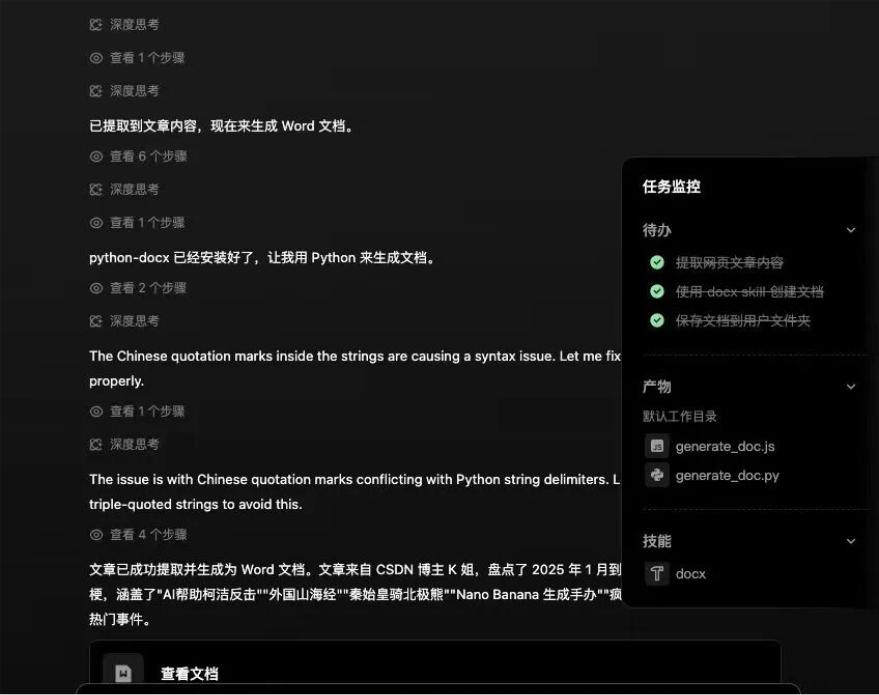
In less than three minutes, the document was generated. The format, chapters, and subheadings were exactly the same as the original webpage.
Hotspot Analysis
Analyze the recent hotspots in AI applications and the latest usage tips.
Look at the quality of this answer:
QoderWork, like a seasoned analyst, precisely captured core trends such as the "golden first year of AI Agents" and "world models," and even pointed out that enterprise-level applications are crossing Gartner's trough of disillusionment—this is very professional industry insight.

Then it directly provided proven advanced prompt frameworks like COSTAR and ICIO. This is not just chatting; this is saving me thousands of dollars in consulting fees.

02. Some Sharing
AI has evolved from a chat tool into an intelligent assistant that can operate a computer and do work for us. Many trivial tasks that originally required me to look up information and perform repetitive operations myself are now steadily taken over by QoderWork.
The value of QoderWork is not just improved efficiency. QoderWork will distill the details of how we handle things into reusable Skills. The next time we encounter a similar task, we can directly use the Skill to complete it quickly.。
In the past, we adapted to the form of tools; now tools are starting to operate around the way people express themselves. Many people without a technical background can also directly hand complex tasks to AI to complete, without needing to understand too many technical details in between. This will make more and more people capable of getting things done, rather than only those who know how to use a certain piece of software being productive.
In the future, when we evaluate a tool, we may no longer look at whether it can complete a single-point function, but at whether it can catch a vague goal and turn it into a path that can be automatically executed.
Original link:The desktop AI assistant for office workers is here: QoderWork runs directly without configuration