
What is QBotClaw
QBotClaw is Tencent's first browser-native AI agent in China, deeply integrated into the QQ Browser. Users don't need to download or install anything; by opening the browser, they can use natural language commands to let the AI automatically control web pages and execute tasks across software, and it supports remotely controlling a computer via WeChat. QBotClaw supports connecting to mainstream large model APIs such as DeepSeek, and is compatible withOpenClawthe skill ecosystem, and is equipped with a secure sandbox isolation mechanism. The Mac version is now available, and the Windows version is coming soon, making "complete complex tasks with one sentence" a reality.
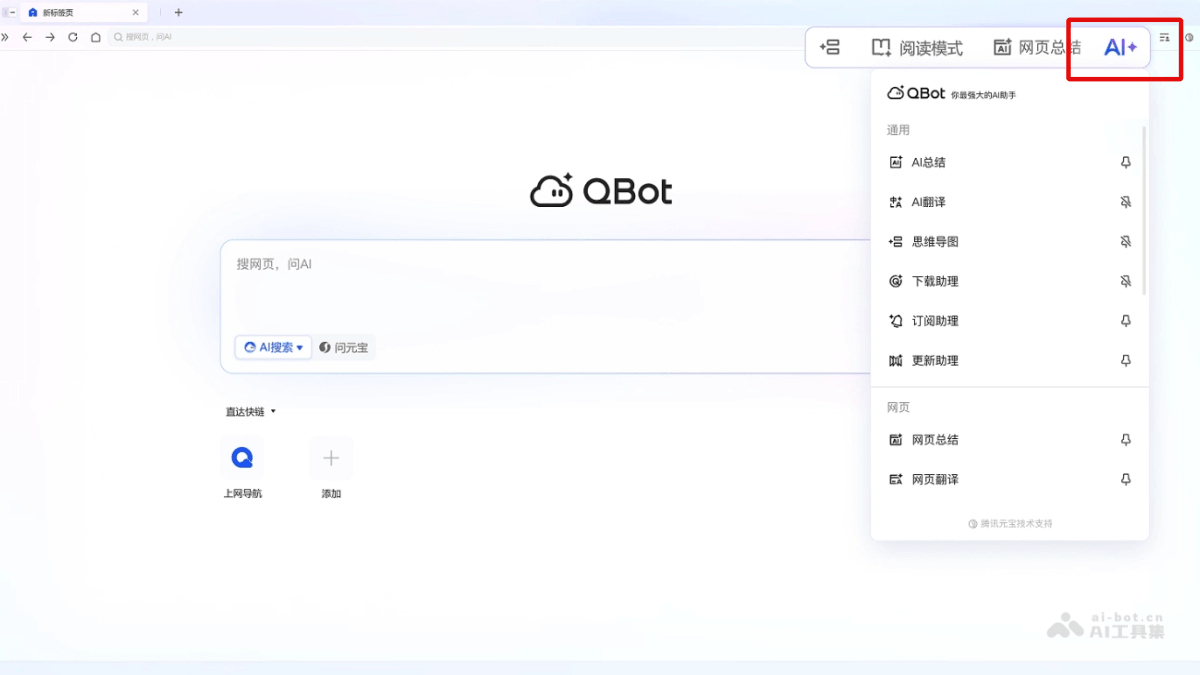
QBotClaw's main features
-
Browser-native AI agent: Integrated into the QQ Browser, zero-threshold and installation-free; just click the "AI" button in the upper right corner to use it.
-
Conversational task execution: Automatically controls web pages, fills out forms, and operates across software via natural language commands, completing complex task chains (such as automatic search -> screenshot -> copywriting generation -> multi-platform publishing).
-
WeChat remote control: After binding WeChat, you can remotely mobilize your computer by sending commands through mobile WeChat, allowing you to complete operations such as file processing and information scraping even when out.
-
Browser context memory: Automatically reads information such as login status, bookmarks, history, and downloaded files, and executes tasks personalized to user habits.
-
High-precision web page recognition: Uses x5use technology to accurately identify complex web page buttons and element structures.
-
Multi-model access: Supports custom API Keys, connecting to mainstream large models such as DeepSeek, Qwen, Zhipu, Kimi, and Minimax.
-
OpenClaw ecosystem compatibility: Third-party skills can be installed through Tencent SkillHub to extend functional boundaries.
-
Three lines of defense: Secure sandbox isolation, secure instruction Markdown constraints, and the Skillhub certification mechanism ensure privacy and asset security.
How to use QBotClaw
- Download and install: Visit the QQ Browser official websitehttps://browser.qq.com/下载最新电脑版。
- Launch Lobster: Open the browser -> click the upper right corner "AI+" button -> select QBotClaw from the drop-down menu to open the sidebar.
- Start the conversation: Describe the task in natural language in the input box.
- Customize large model (optional): Click the "Default Large Model" at the bottom of the input box -> select "Custom Large Model" -> enter the API Key for DeepSeek/Qwen/Kimi, etc.
- Bind WeChat remote control: Click the phone icon next to the input box -> scan the QR code to bind WeChat -> send commands directly through WeChat to control your home computer while out
- Install skill extensions: Visit SkillHub https://skillhub.tencent.com/ -> copy the skill installation command -> paste it into the QBotClaw dialog box to execute the installation.
Key information and usage requirements of QBotClaw
- Product positioning: Tencent's first browser-native AI agent in China (based on OpenClaw technology), deeply integrated into the QQ Browser.
- Core capabilities: Automatically controls the browser via natural language commands, executes tasks across software, remotely controls computers via WeChat, and automatically extracts web page data and generates reports.
- Underlying model: Uses QBotClawRouter by default, and supports user-customized integration with mainstream large model APIs such as DeepSeek, Qwen, Zhipu, and Kimi.
- Platform support: The Mac version is already available, and the Windows version is coming soon.
- Ecosystem compatibility: Fully compatible with the OpenClaw skill ecosystem, and third-party skill extensions can be installed through Tencent SkillHub.
- Entry method: Open QQ Browser → click the "AI+" button in the upper right corner → select QBotClaw.
- Network requirements: An internet connection is required, and the WeChat remote control feature requires binding a WeChat account.
- Optional configuration: If you need to use a custom large model, you must prepare the corresponding vendor's API Key in advance; WeChat remote control requires scanning a QR code to bind.
QBotClaw's core advantages
-
Lowest usage threshold: As abrowser-native Agent, no need to download standalone software or deploy with Docker, ready to use on click.
-
WeChat ecosystem integration: The only browser Agent that supports WeChat remote control; when out and about, you can control your home computer by sending a message.
-
Deep browser awareness: Based on QQ Browser Skill, it can accurately recognize dynamic web page elements and has browser context memory (history, bookmarks, login status).
-
Model openness: Supports freely configuring mainstream domestic large model APIs (DeepSeek, Qwen, etc.), not tied to a single model.
Comparison of QBotClaw with similar competitors
| Comparison dimension | QBotClaw (Tencent) | Claude Computer Use(Anthropic) | AutoGLM (Zhipu) |
|---|---|---|---|
| Product positioning | China's first browser-native AI agent | International benchmark desktop AI agent | Domestic open-source + cloud dual-mode Agent |
| Technical architecture | Browser built-in Skill + x5use web page recognition | Vision model driven (screenshot perception + coordinate positioning) | GLM-5-Turbo specially optimized for Agent |
| Deployment method | Browser-native, zero installation and zero configuration | Requires installing the Claude desktop client | Open source, can be deployed locally or called from the cloud |
| Platform support | Mac is already available, Windows is coming soon | Only supports macOS | Dual platform: desktop + mobile |
| Remote control | WeChat remote control(send messages to control the computer) | Dispatch mobile phone task assignment (requires Anthropic ecosystem) | Supports Feishu integration for remote operation |
| Underlying model | QBotClawRouter,Supports customization DeepSeek/Qwen/Kimi, etc. | Locked to Claude 3.5 Sonnet | GLM series models, can be customized and configured |
| Browser integration | Deep integration, automatically reads history/bookmarks/login status | Recognition through screenshots, no browser context memory | Requires additional authorization to obtain browser information |
| Skill ecosystem | Compatible with OpenClaw, install extensions from SkillHub | Community ecosystem, strong tool-calling capabilities | Open-source ecosystem, supports custom development |
| Security Mechanisms | Secure sandbox + Markdown constraints + Skillhub authentication | Three-tier permission control (view/edit/execute) + users can take over at any time | Open-source and transparent, enterprises can manage it independently |
QBotClaw Application Scenarios
- Content Creation and Social Media Operations: Automatically search for materials, capture webpage screenshots, write copy, and publish to multiple social platforms such as Zhihu, Jike, and Weibo with one click, achieving full-process automation from material collection to content distribution.
- Public Opinion Monitoring and Trend Tracking: Regularly monitor specified keywords on platforms such as Xiaohongshu and Zhihu, automatically collect trending topics and organize them into reports, helping content creators and marketers keep abreast of public opinion dynamics in real time.
- Information Extraction and Research Report Generation: Automatically extract key text data from all open tabs, and after analysis and comparison, generate structured industry track analysis reports, greatly improving information processing efficiency.
- Cross-Platform Shopping Price Comparison: Search for the same product on different e-commerce websites such as JD.com, Taobao, and 1688, automatically capture price information and generate comparison tables, quickly finding the optimal purchasing option.
- Remote Work and File Processing: When away, send text commands via mobile WeChat to remotely control the home computer to complete operations such as sending emails, transferring files, and searching for materials, enabling cross-device work without opening a remote desktop.