
Today I'm sharing something suitable for making PPTs.
Everyone who's made a PPT knows how it feels.
Doing it well doesn't necessarily earn you a reward, but doing it poorly definitely means redoing it. The most annoying part is that writing an outline for many PPTs isn't hard—it's the layout, filling in content, and adjusting the structure that are truly torturous.
Today I'd like to recommend 4 useful PPT Skills on GitHub, so you'll never have to scratch your head and struggle over making PPTs again.
01. The Aesthetics-Focused PPT Skill
The first one I want to introduce is Teacher Guizang's PPT Skill.
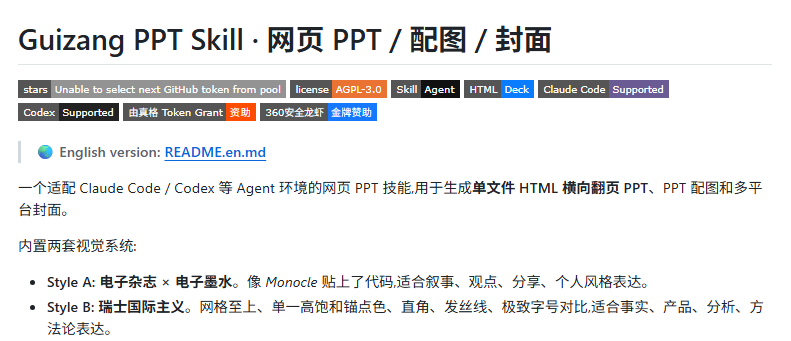
Teacher Guizang's PPT Skillcomes with two built-in visual styles: electronic magazine style and Swiss International style. The overall vibe of the pages is much stronger than ordinary office templates.
Moreover, the PPT can be opened directly in a browser and supports keyboard, scroll wheel, and touch screen swiping.
It's suitable for scenarios where you want to make the PPT feel like a piece of work, such as: offline sharing, AI product launches,Demo Day, private salons, and talks with a personal expressive style.
Project address:https://github.com/op7418/guizang-ppt-skill
02. The Assembly-Line PPT Skill
The second one is called Gorden Super PPT Skills, which works like a PPT production assembly line.
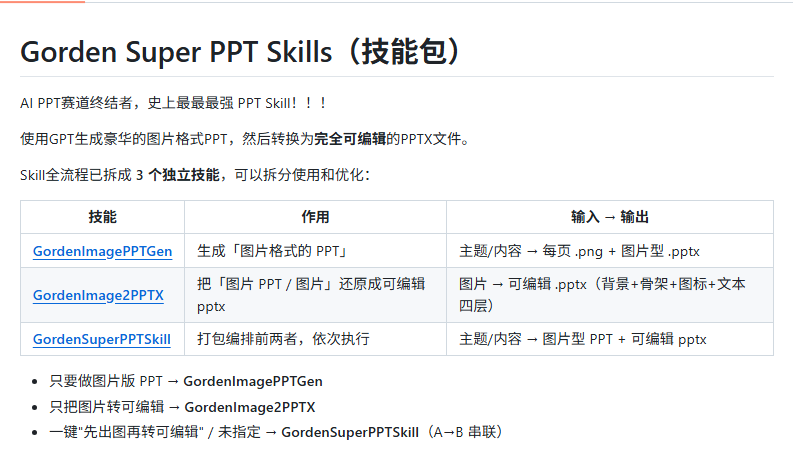
The project breaks PPT production into three stages: first generate image-based slides, then extract the background, framework, icon decorations, and text, and finally reassemble them into a PPTX according to coordinates.
The PPTX can continue to be edited, so it's more suitable for AI product launches, business plans, industry analysis, courseware, consulting reports, and roadshow materials.
Project address:https://github.com/GordenSun/GordenSuperPPTSkills
03. The Native Delivery PPT Skill
The third one is called PPT-Master, and it takes the route of AI Agent generating native PowerPoint.
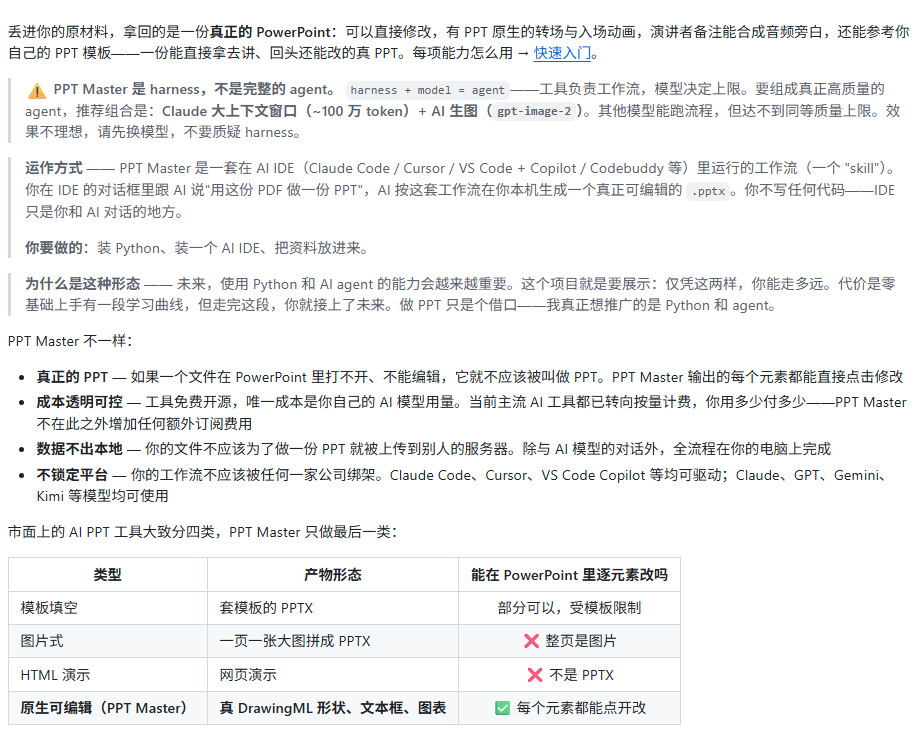
We hand PDFs, DOCX files, images, or text materials to the AI Agent, and the project automatically completes content analysis, visual design, page generation, and .pptx export.
PPT Master It's suitable for tasks with lots of materials and tedious organization, such as: close reading of papers, business reports, research reports, courseware, AI product launches, industry analysis, and templated delivery.
Project address:https://github.com/hugohe3/ppt-master
04. The Toolbox PPT Skill
The fourth one is calledhtml-ppt-skill, a set of HTML PPT generation tools oriented toward AgentSkill.
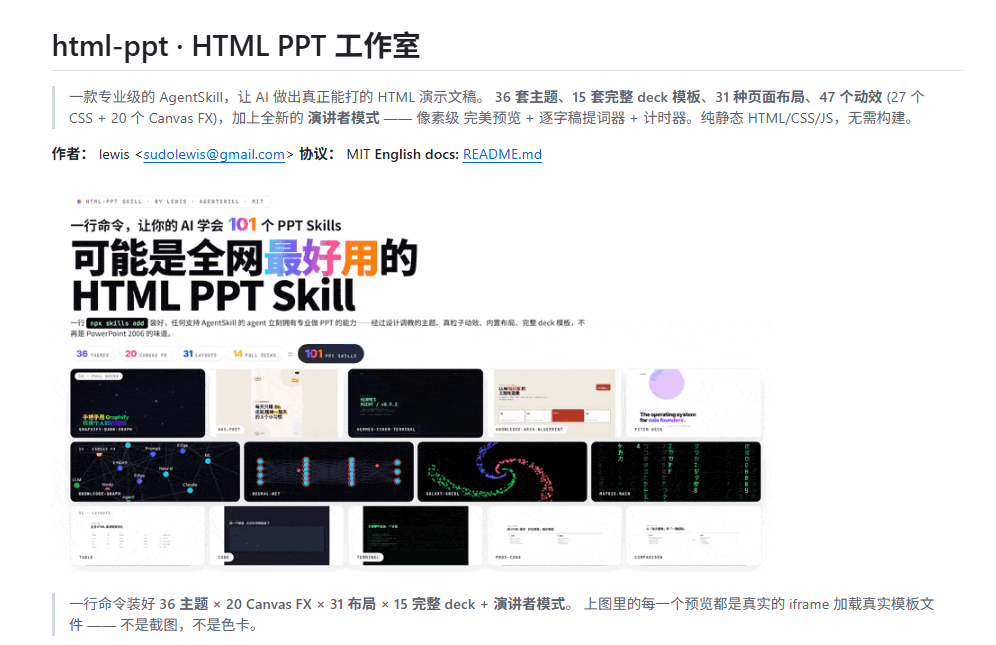
html-ppt-skill includes: 36 themes, 15 complete deck templates, 31 single-page layouts, 27 CSS animations, and 20 Canvas FX motion effects.
One highlight of html-ppt-skill is presenter mode. During a presentation, press the S key and a separate presenter window will open, containing a preview of the current page, a preview of the next page, a verbatim script, and a timer.
html-ppt-skill is suitable for AI product launches, technical sharing and course explanations, and investor pitch decks.
Project address:https://github.com/lewislulu/html-ppt-skill
05. Skill Hands-On Test
All four PPT Skills are suitable for making AI product launches, so I used the following prompt to test all four skills at the same time:
Prompt:
Please help me generate an editable PPTX of about 10 pages, with the theme being an AI product business roadshow plan.
Product name: BriefMind AI
Product positioning: an AI workflow assistant for small and medium-sized content teams, marketing teams, and knowledge-based startups, helping teams quickly turn meetings, materials, competitor information, and user feedback into topics, plans, scripts, reports, and retrospective documents.
Overall requirements:
- Page count: 10 pages
- Aspect ratio: 16:9
– Clear font hierarchy, short titles, and avoid overcrowding the body text
– Each page must have a clear title, core information, and visual focus
Please create it according to the structure below:
Page 1: Cover
Title: BriefMind AI: Give content teams a strategy partner that never gets tired
Subtitle: From meetings, materials, competitors, and user feedback to topic selection, proposals, scripts, and reviews, all in one place
Includes: product logo placeholder, date, speaker, company name
Page 2: Market Problem
Title: What content teams truly lack is not tools, but continuous context
Explain three pain points:
1. Information is scattered across meeting notes, Feishu docs,Notion, WeChat groups, CRM, and competitor websites
2. Every time you write a proposal, you have to find materials again, organize the background, and align the messaging
3. AI tools can generate text, but it is difficult for them to remember team goals, brand tone, and historical decisions
Page 3: Target Users
Title: BriefMind AI first serves three types of high-frequency content teams
User types:
1. Marketing teams: need to quickly produce campaign proposals, communication copy, and review reports
2. Founder teams: need to turn scattered ideas into fundraising materials, product descriptions, and sales pitches
3. Content studios: need continuous topic selection, batch scripts, client delivery, and data reviews
Page 4: Product Solution
Title: An AI workflow assistant that understands team materials, brand tone, and business goals
Core modules:
1. Material library: automatically organizes meetings, documents, web pages, PDFs, and spreadsheets
2. Brand memory: accumulates product positioning, target users, writing style, and prohibited expressions
3. Workflow templates: topic selection, proposals, scripts, reports, sales pitches, and reviews
4. Collaborative review: multi-person comments, version comparison, and output approval
Page 5: Core Workflow
Title: From input materials to delivered documents, the team only needs four steps
Process:
1. Import: upload meeting recordings, documents, competitor links, and user feedback
2. Understand: AI automatically extracts people, goals, constraints, key facts, and to-dos
3. Generate: select a template to generate topic ideas, proposals, scripts, or reports
4. Reuse: team members can save, rewrite, approve, and consolidate them into new knowledge
Page 6: Product Interface Illustration
Title: Not a chat box, but an AI workspace designed around tasks
Interface areas:
Left side: project material library
Center: current task workspace
Right side: brand rules, cited sources, review suggestions
Bottom: one-click generation of topic ideas, proposals, scripts, and reviews
Page 7: Competitive Comparison
Title: BriefMind AI's differentiation lies in team context and a closed-loop workflow
Comparison targets:
– General-purpose AI chat tools
– Traditional knowledge base tools
– Automated writing tools
– BriefMind AI
Comparison dimensions:
1. Whether it understands the team's long-term context
2. Whether it supports material citations
3. Whether it supports fixed business processes
4. Is multi-person review supported?
5. Can it accumulate brand voice and prohibited expressions?
Page 8: Business Model
Title: Pricing by team seats and knowledge base scale
Pricing plans:
Starter: ¥199/month, 3 members, suitable for small teams to try
Team: ¥899/month, 10 members, suitable for content teams and marketing teams
Business: ¥2999/month, 30 members, supports private knowledge bases, approval flows, and advanced permissions
Enterprise: Custom quote, supports private deployment, API, and dedicated model configuration
Page 9: Growth Strategy and Milestones
Title: First fully capture content teams, then enter sales, product, and investment research scenarios
Growth strategy:
1. Start with content teams and marketing teams to establish high-frequency usage scenarios
2. Use the template marketplace to drive self-propagation and encourage users to share workflows
3. Integrate with Feishu, Notion, WeCom,Google Drive for integration
4. Demonstrate time savings and improved delivery stability through a case library
Roadmap:
2026 Q3: Complete MVP and 30 seed customers
2026 Q4: Launch the template marketplace and team approval flows
2027 Q1: Open API and enterprise knowledge base permission system
2027 Q2: Enter sales enablement and product research scenarios
Page 10: Financing Request and Conclusion
Title: We are looking for partners who believe AI workflows will reshape knowledge teams
Financing target:
Financing amount: RMB 8 million
Use of funds:
40% product R&D and model workflow optimization
30% market customer acquisition and customer success
20% enterprise integration and security compliance
10% operations and infrastructure
Closing copy:
BriefMind AI does not want to replace team thinking, but to let teams spend less time repeatedly organizing and more time judging, creating, and deciding.
Guizang-PPT-Skill:

The layout produced by Guizang-PPT-Skill is very stable, with comfortable whitespace, title hierarchy, and card density. The Swiss/magazine feel suits business pitches; it is formal without being tacky and does not immediately look like a PPT template.
GordenSuperPPTSkills:

The PPT generated by GordenSuper PPT Skills uses a dark color scheme and has the strongest tech feel, resembling an AI product launch or demo deck. The visual atmosphere is memorable, suitable for talking about an "AI workspace" and "workflow closed loop."
However, with the dark color scheme, some body text appears too small in thumbnails. It is fine when actually projected, but may be hard to read when quickly browsing on a computer.
PPT Master:

The effect produced by PPT Master looks most like a standard business BP: clean, restrained, and easy for people to quickly scan and understand the general content.
This style is unlikely to go wrong, and it is also easy to revise later. But the overall color scheme has a weaker visual memory point, looks more like a mature consulting document, and does not highlight product personality enough.
html-ppt-skill:

The effect produced by html-ppt-skill looks most like a Web/Keynote-style business plan, with a yellow-blue contrast that is very eye-catching.
But the circles have too strong a presence and easily distract attention from the title and content.
06. Dig a Little
The entry point for PPT creation is shifting forward from software editors to general-purpose Agents.
General-purpose Agent + PPT Skill has replaced traditional PPT creation tools and also swallowed early vertical AI applications.
In the past, the core value of Office, WPS, and iSlide lay in making editing capabilities more complete. Products like AiPPT, Gamma, and Tome, on the other hand, turned "generate slides from an input topic" into a standalone product.
General-purpose Agents connect the two ends. An Agent can both understand materials and call upon files, browsers, image generation, code, and local export tools. Once a PPT Skill is placed into this workflow, making a PPT shifts from "opening a certain tool" to "assigning a task."
Traditional tools hide capabilities in menus, vertical AI applications seal capabilities inside standalone products, while general-purpose Agents break capabilities down into individually callable modules.
Whoever is closer to the task is the one more likely to capture the user entry point.
Original link:Recommending 4 practical PPT generation Skills to free your hands