
What Is OpenWorker
OpenWorker is an open-source AI desktop agent released by Andrew Ng under the MIT license and completely free. It is not a chatbot, but a local-first AI colleague that 'delivers outcomes.' Users state the desired result, and it directly produces usable documents, Slack replies, or calendar arrangements rather than a to-do list. All data runs locally, supports 30+ models (including fully offline Ollama), and integrates 25+ tools such as Slack, Gmail, GitHub, etc. Any action with consequences (sending emails, running commands) requires user confirmation, balancing efficiency and safety.
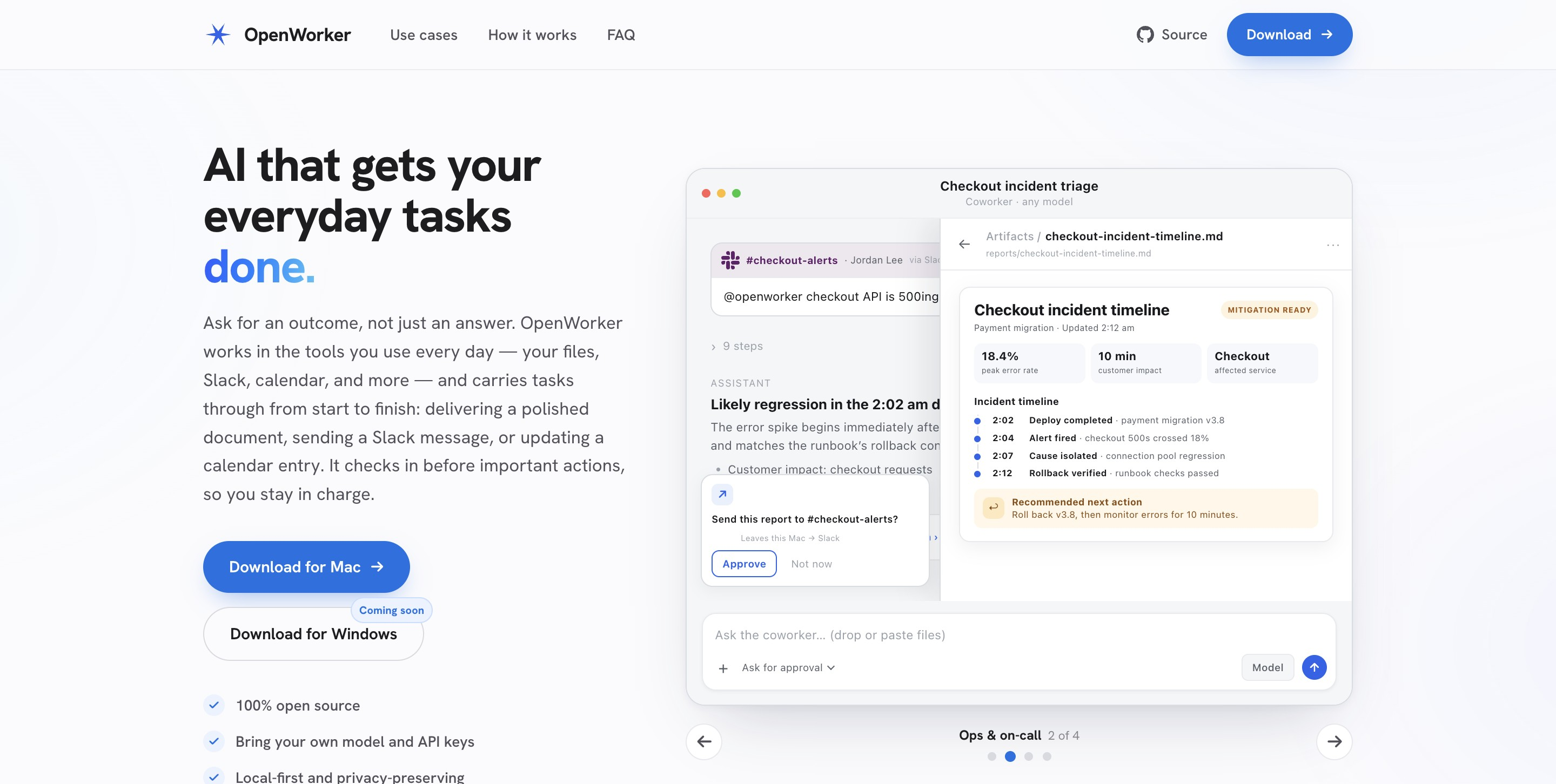
OpenWorker's Main Features
-
Deliverable-Oriented: Does not return a to-do list, but directly produces usable deliverables: polished documents, data reports, Slack replies, calendar arrangements, categorized inboxes, etc.
-
Local-First Architecture: The agent engine, conversation history, connector tokens, and API keys are all stored locally; data does not leave the device by default.
-
Model-Agnostic Support: Based on the unified aisuite interface, compatible with 30+ models including OpenAI, Anthropic, Google, Kimi, DeepSeek, Qwen, etc., and can also run fully offline via Ollama.
-
Multi-Tool Integration: Built-in 25+ connectors, covering daily office tools such as Slack, Gmail, Google Calendar, GitHub, Jira, Notion, Linear, HubSpot, Outlook, etc.
-
Slack Collaborative Work: Mention @OpenWorker in a Slack channel to automatically start a session on the desktop, and after completing the task, send the result back to the original thread.
-
Scheduled Automation: Supports setting periodic tasks (such as morning briefings, weekly report generation, channel monitoring), with run records including complete execution logs.
-
Terminal and File Operations: Can directly read and write local files and execute shell commands, using the desktop environment as a workspace.
-
MCP Ecosystem Access: Supports Model Context Protocol; any tool accessible via MCP can be integrated, and permissions can be controlled individually per tool.
-
Approval Safety Mechanism: All write, send, and execute operations require user confirmation by default; in unattended mode, consequential operations are temporarily placed in an inbox awaiting review.
-
Voice Input Support: Built-in STT bypass written in Rust, supporting voice command input.
How to Use OpenWorker
-
Download and Install the Client: Visit OpenWorker's official website https://openworker.com/ or GitHub Releases to download the installation package for your system, macOS or Windows 10/11.
-
Configure AI Models: After opening the app, paste your own API key in settings, or point to a local Ollama for fully offline operation; supports switching between different models within the same task to balance cost and quality.
-
Connect Office Tools: Authorize commonly used tools in settings, 25+ connectors including Slack, Gmail, Google Calendar, GitHub, Jira, Notion, Linear, HubSpot, Outlook, etc.; any compatible tool can also be integrated via the MCP protocol, and each tool can be individually enabled or disabled.
-
State the desired Outcome: In the chat box, describe the specific deliverable you want, for example "prepare a client meeting brief", "sort out next week's conflicting schedule and provide an adjustment plan", or "check the progress of Monday's release in Jira and GitHub", rather than entering scattered prompts.
-
Approve key operations: OpenWorker automatically breaks down tasks and executes them across apps; before consequential operations such as sending emails, modifying calendars, or running Shell commands, the app will show a confirmation pop-up, and you can approve, reject, or redirect it in the app or in Slack.
-
Get completed deliverables: After the task ends, directly receive usable results, such as Markdown/PDF documents, data reports, sent Slack replies, updated calendar events, categorized inbox summaries, etc., rather than a to-do list.
-
Use collaboratively in Slack: Mention @OpenWorker in a work channel, and it will automatically start a session on the desktop, call your local tools and files to complete the task, and send the final result back to the original channel as a thread reply.
-
Set up scheduled automation: Create recurring tasks in the app (such as a daily morning brief, weekly project progress report, or continuous monitoring of a channel) and set the run time; in unattended mode, consequential operations are automatically staged in the "inbox" for you to review in batches.
-
Build from source (advanced users): If you need secondary development or use on Linux, clone the repository and run
bash packaging/setup_dev_env.shto create a Python virtual environment, then start the local proxy server (.venv/bin/openworker-server) and the frontend interface (npm run tauri dev); requires Python 3.10+, Node 20+, and the Rust toolchain. -
Manage permissions and security: In settings, view the independent permission switches for each connector and MCP tool; by default, all write, send, and execute operations require confirmation, and you can adjust them as needed to
discuss(read-only),interactive(default approval),auto(scoped automatic), orcustom(custom) mode.
OpenWorker's core advantages
-
Local-first, zero compromise on privacy: The agent engine, conversation records, API keys, and connector tokens are all stored in the local key store, data does not leave the device by default, and the cloud only proxies the OAuth handshake.
-
Completely open source and free: MIT license, no subscription required, no feature restrictions, and the community can freely fork and build on it.
-
Zero model lock-in: Based on the aisuite unified interface, it supports more than 30 models including OpenAI, Anthropic, Kimi, DeepSeek, Qwen, etc., and can be switched mid-task to balance cost and quality.
-
Can run completely offline: Connect local models through Ollama, with no API keys or network dependency required, enabling use in a pure intranet environment.
-
Deliver results, not conversation: Directly produce usable documents, reports, Slack replies, and calendar updates, rejecting the pseudo-agent experience of "ending after listing the to-dos".
-
Operation approval safety net: All write, send, and execute operations require user confirmation by default, and in unattended mode consequential operations are automatically staged in the inbox for review.
-
Rich tool ecosystem: Built-in 25+ connectors covering everyday tools such as Slack, Gmail, GitHub, Jira, Notion, etc., while also supporting unlimited extension via the MCP protocol.
-
Slack Native Collaboration: Mention @OpenWorker in a channel to trigger task execution on the desktop, and the results are automatically sent back to the original thread with no need to switch apps.
-
Scheduled Automation: Supports periodic task orchestration (morning briefings, weekly reports, channel monitoring), with run records that include complete execution logs.
-
No Registration Required: No mandatory account system; with an API key and manual credentials, it can run fully offline, lowering the barrier to use.
OpenWorker's official website address
- Official website address:https://openworker.com/
- GitHub repository:https://github.com/andrewyng/openworker
Comparison of OpenWorker with similar competitors
| Comparison Dimension | OpenWorker | Claude Cowork | Manus |
|---|---|---|---|
| Open Source License | MIT, completely free | Closed source | Closed source |
| Runtime Environment | Local-first, native desktop app | Desktop app (macOS / Windows) | Cloud sandbox Linux VM + Chromium browser |
| Model Strategy | Model-agnostic, 30+ models BYOK, supports fully offline Ollama | Claude series models only | Multi-model cloud hosting, users cannot choose their own |
| Data Privacy | Conversations, tokens, and keys are all stored in the local keystore; data never leaves the device | Local file sandbox, conversations stored locally | Data resides in a cloud VM, processed on remote servers |
| File Access | Local file system + terminal + Git | Sandboxed read/write access to specified local folders | Cloud-based independent file system with persistent storage |
| Tool Integration | 25+ connectors + MCP protocol extension | Connectors + MCP + browser extension | Browser, Python/Node execution environment, API calls |
| Slack Collaboration | @OpenWorker mention, executed on desktop and sent back to the thread | Access via connectors | Assign tasks remotely via WhatsApp / Slack / Telegram |
| Scheduled Tasks | Local automation orchestration, requires the device to be online | Supports local scheduled tasks | Supports long periods of unattended autonomous operation |
| Approval Mechanism | Mandatory confirmation before writing/sending/executing; held in an inbox when unattended | Plan-execute approval gating, can be redirected mid-process | Highly autonomous, with fewer intermediate confirmation steps |
| Pricing Model | The app is free; cloud model API costs are paid by the user; Ollama is zero-cost | Bundled with paid Claude plans, from Pro $20/month | Credit system: free / $20 / $40 / $200 tiers |
| Offline Capability | Supported (Ollama local models) | Requires internet connection | Requires internet connection |
OpenWorker's use cases
-
Sales customer preparation: Automatically read Gmail correspondence and Google Calendar schedules, integrate and generate customer meeting briefs, and wait for confirmation before automatically sending follow-up emails.
-
Schedule Conflict Resolution: Scan the calendar to identify time conflicts, propose adjustment plans, and after one-click confirmation, automatically update the schedules of all participants.
-
Project Progress Tracking: Pull the latest issue, PR, and milestone data from Jira and GitHub, and automatically generate a weekly release progress summary report.
-
Slack Collaborative Response: Mention a task with @OpenWorker in a work channel; after the agent executes it by invoking tools on the desktop, the results are sent back to the original channel as a threaded reply.
-
Smart Inbox Classification: Automatically read Gmail emails, classify and organize them by priority and topic, and generate a to-do summary for users to make quick decisions.
-
Operations Incident Response: Monitor the Slack alert channel, consult the local Runbook, draft incident reports, and require manual confirmation before executing any remediation commands.