
What is OpenBot
OpenBot is an CopilotKit open-source enterprise-grade AI Agent platform, positioned as a "digital colleague you dare to entrust with real work." Give each Agent its own dedicated "computer." The independent Docker container includes a Chromium browser, login sessions, and a file workspace; all operations must go through the unique gateway for auditing first and execution after according to CEL policies, with fail-closed default denial; when encountering login or 2FA, a person can "take the wheel" to complete manual steps. The platform is based on the AG-UI protocol, compatible with any framework such as LangGraph, fully self-hosted, and focuses on an Agent governance foundation that is isolated, auditable, and intervenable.
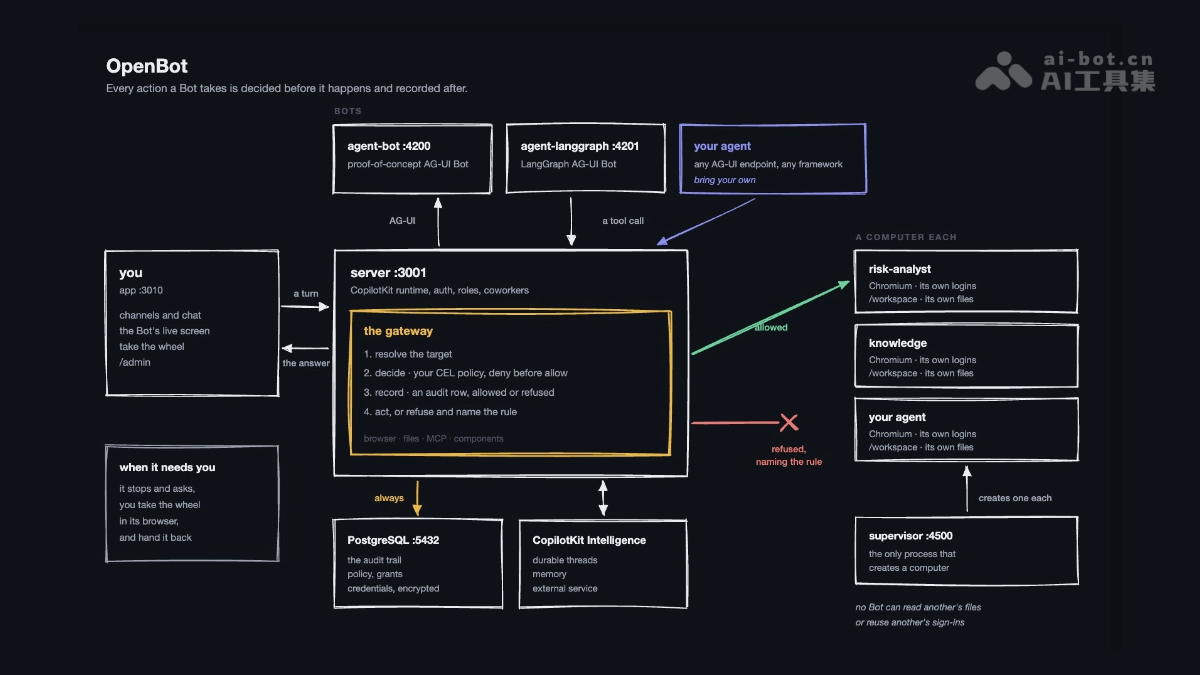
OpenBot's main features
-
Each Agent gets a dedicated computer: The Supervisor creates an independent Docker container for each Bot, containing a Chromium browser (independent login state),
/workspacefile workspace; supports gVisor kernel-level isolation. -
Unified audit gateway: All operations on the browser, files, MCP, and components go through the unique gateway, which first parses the target, evaluates policies, writes an audit log, and then executes or denies—there is no path that bypasses records.
-
CEL policy engine (fail-closed): Rules can be written based on fields such as tool name, Bot, user, URL, page element, file, and MCP operation; deny takes precedence, no policy means deny all by default, and when a rule errors it denies rather than allows.
-
Take the Wheel human takeover: When encountering a login wall or 2FA, the Bot proactively asks for help, a person takes over operations in the same panel, during takeover the Bot's actions are directly denied, and the whole process is recorded.
-
Framework-agnostic (AG-UI protocol): Any endpoint that speaks AG-UI can be connected as a Bot, supporting LangGraph, Mastra, CrewAI, Pydantic AI, Google ADK, or hand-written Agents.
-
Component-based output: Agent replies are not limited to text; they can render interactive React components (built-in components + sandbox components without deployment and publishing), and component permissions can be controlled individually.
-
Shell execution capability: The Bot can execute commands, install dependencies, and handle files in its own workspace, and commands also go through gateway auditing.
-
Secure key management: Credentials are stored encrypted, the API never returns them, auditing only records key length and not content, and keys do not enter conversation records.
-
Governed MCP integration: Built-in Google Drive connector, custom MCP servers must pass URL validation, and tools not explicitly classified as "read" are all treated as "write."
-
Enterprise-grade identity and permissions: Supports Google/Microsoft/Okta login and runtime registration of SAML/OIDC (routed by email domain), and administrators can raise or lower permissions, remove access, and immediately terminate sessions.
-
Readable audit center:
/admin/auditlists all allowed, denied, and failed operations, and each denial includes the specific rule that was triggered. -
Fully self-hosted: Docker Compose starts it with one click, data is stored in your own PostgreSQL, model keys are configured by administrators themselves, and single-container deployment is also supported.

Follow WeChat and reply "open source" to join theAI open-source project exchange group
How to use OpenBot
-
Environment preparation: Install Docker (for the PostgreSQL and Bot containers) and Bun 1.3+ (for the frontend and API server), and prepare an LLM API Key (such as an OpenAI Key).
-
Clone the repository and initialize the configuration: Run
git clone https://github.com/CopilotKit/openbot.git, and after entering the directory,cp .env.example .envcreate the environment variables file. -
Obtain Intelligence credentials: Run
npx --yes copilotkit@latest login、project select、license --write, and fill the generatedcpk-...runtime key into the.envfield ofINTELLIGENCE_API_KEY(Intelligence has a free plan, and can also be self-hosted). -
Fill in the required environment variables: In
.env, fill inOPENAI_API_KEY; for production, useopenssl rand -base64 32to generate your ownKEY_ENCRYPTION_KEY(example values can be used for local testing). -
One-click startup: Run
bun installto install dependencies, thenbash scripts/start.sh—the script will automatically start the Docker services, run database migrations, bring up the API server (port 3001) and the frontend (port 3010), and check the health status of each service. -
Access the main interface: Open
http://localhost:3010in your browser, and you will see the channel list and the three preconfigured "colleagues" (General Assistant, Knowledge, Risk Analyst). -
Hands-on experience: On the
/botpage, have the Bot open Hacker News to read the headlines and fill in the httpbin test form, then go to/admin/auditto view the audit records. -
Test policy controls: Go to
/admin/boundariesand add a deny rule or preset, retry the same browser operation, and observe that the Bot is denied and the triggered rule is indicated. -
Create a custom colleague: On the
/agentspage, create a new Bot, configure its name, role description, and AG-UI endpoint, or declare it inagents.yaml, after which you can start a dedicated channel with it. -
Human takeover collaboration: When the Bot encounters a login wall or proactively asks for help with 2FA, take over its browser in the same panel to complete authentication, then return control to it to continue automated execution.
-
Daily management: Use
/admin/computersto view/reset the Bot's computer,/admin/credentialsto store credentials encrypted,/admin/pluginsto configure MCP servers, and/admin/peopleto manage member permissions.
OpenBot's core advantages
-
Rebuilding the trust model from the ground up: It does not rely on the Agent's "self-discipline", but instead uses computational isolation + mandatory auditing to turn "dare you let an Agent touch production systems" from a trust problem into an engineering problem.
-
True environment isolation: Each Bot has an independent container, independent browser login state, and independent file system. Agents are invisible to one another, so a problem with one will not affect the others, eliminating the risks of cross-account contamination and data leakage caused by shared environments.
-
Audit first, execute later: Unlike the traditional "operate first, log later" approach, all actions are written to the audit record before execution. Even if execution crashes or the Agent tries to bypass it, the intent has already been recorded, and no operation path can skip the record.
-
fail-closed secure defaults: No policy defaults to deny-all; when rules are written incorrectly, deny rather than allow; deny takes precedence over allow. The security posture is reversed from "allow by default then plug the leaks" to "deny by default then open allowlists."
-
Human-machine collaboration without breakpoints: Take the Wheel makes "humans complete one authentication step, then everything is fully automated" a standardized process. During takeover, Bot actions are directly rejected rather than queued, avoiding conflicts between human and machine operations.
-
Framework-agnostic, no lock-in: Based on the open AG-UI protocol, any framework such as LangGraph, CrewAI, Google ADK, or even a hand-written Agent can connect. Governance logic runs at the protocol layer, so switching frameworks does not lose governance capabilities.
-
Fully autonomous and controllable data: Fully self-hosted. Data stays in your own PostgreSQL. Model keys are configured by administrators themselves (encrypted storage, not written to logs, not written to conversation records), with no vendor lock-in.
OpenBot's project address
- GitHub repository:https://github.com/CopilotKit/openbot
Comparison of OpenBot with similar competing products
| Comparison dimension | OpenBot(CopilotKit) | OpenHands(All Hands AI) | E2B |
|---|---|---|---|
| Product positioning | Enterprise-grade AI colleague governance platform: gives each Agent a dedicated computer, with emphasis on "control and auditing" | Open-source AI programming Agent platform: autonomously completes software engineering tasks, with emphasis on "work capability" | Agent code execution sandbox infrastructure: provides isolated runtime environments, with emphasis on "execution primitives" |
| Problem solved | Makes every step of an Agent's operations decidable, auditable, and intervenable, so enterprises dare to use it | Lets Agents autonomously modify code, run commands, and submit PRs, improving engineering efficiency | Gives Agent-generated code a safe place to run, preventing escape |
| Open-source license | MIT | MIT (core), enterprise edition has a separate license | Core SDK is open source, sandbox service is commercially hosted |
| Isolation scheme | Each Bot has an independent Docker container, with optional gVisor kernel-level isolation | Docker sandbox runtime | Firecracker microVM, each sandbox has an independent kernel |
| Auditing and policies | Core capability: a single gateway that records before execution, CEL policies fail-closed, readable audit center | Enterprise edition Agent Control Plane provides auditing, access control, and policy enforcement | Not provided; policies and auditing must be built on the outer layer by yourself |
| Human takeover | Built-in Take the Wheel: humans and machines co-drive the same browser with a full trail | No native human-machine co-driving mechanism | None |
| Agent source | Any AG-UI protocol endpoint (framework-agnostic such as LangGraph, CrewAI, etc.) | Its own Agent system, model-agnostic (100+ model vendors) | Not bound to an Agent, pure execution-layer API |
| Interaction form | Channel-style IM + real-time viewing of the Bot screen + component-based UI output | Agent Canvas visual workspace, multiple Agents in parallel | No UI, SDK/API calls |
| Deployment mode | Fully self-hosted (Docker Compose / single container), data stays yours | Self-hosted (MIT) + official Cloud + enterprise edition (supports VPC/offline deployment) | Hosted only on E2B cloud, does not support BYOC |
OpenBot's application scenarios
-
Enterprise Knowledge Q&A Assistant: Connects to internal company knowledge sources (such as the Google Drive connector), enabling a "knowledgeable colleague" to answer employees' questions about company policies and documents, with all access activities logged and auditable.
-
Risk and Compliance Analysis: The preconfigured Risk Analyst colleague can perform risk monitoring, transaction review, compliance checks, and other tasks, while the policy gateway ensures it can only access authorized data and systems.
-
Automated Operations on Internal Systems: Uses a "human takeover" mode to handle scenarios that require logging into enterprise intranet systems and completing 2FA authentication; after a human completes one authentication step, the Agent automatically executes the subsequent process.
-
Financial/Operational Data Processing: The Bot executes scripts, processes spreadsheet files, and installs required dependencies in its own workspace; all commands and file operations are audited through the gateway (the example package is the fintech tenant scenario).
-
AI Assistant in Sensitive Data Environments: Credentials are stored encrypted, keys do not enter conversation records, and auditing records only length rather than content, making it suitable for industries such as finance and healthcare with strict data security requirements.
-
Multi-Agent Collaboration Workspace: Bots with different functions (general assistant, knowledge base, analyst) each have dedicated channels and independent computers, letting employees collaborate with multiple Agents in parallel just like @-mentioning colleagues.