
OpenAI'sSora 2prompt guide helps users better understand how to use Sora 2 for effective prompting and interaction. By providing specific prompting techniques and examples, it guides users on how to construct more effective inputs and obtain more accurate output results that better meet their needs. For developers and users, it is a very practical reference resource that can improve the efficiency and quality of interaction with Sora 2.
How to Craft a Successful Video Prompt
Crafting the Prompt
Think of the process of designing a prompt as briefing a storyboard artist who has never seen your storyboard. If you leave out details, they will improvise—and you may not get the result you want. By specifying what the "shot" should achieve, you give the model more control and consistency, enabling it to work better.
Leaving some details open works just as well. Giving the model more creative freedom can lead to unexpected variations and unexpected generated results. Both approaches work: detailed prompts give you control over the image and maintain consistency, while brief prompts open up space for creative results. How to balance them depends on your goals and the effect you want to achieve. Think of your prompt as a creative wish list, not a rigid contract. As with usingChatGPT, using the same prompt multiple times produces different results—this is a feature, not a bug. Each generation is a new interpretation, and sometimes the second or third version turns out better.
Most importantly, be prepared to iterate. Small changes to the shot, lighting, or action can dramatically change the final result. Co-create with the model: you provide the direction, and the model provides creative variations.
This is not an exact science—treat the following guidelines as practical advice we have summarized through using the model.
API Parameters
Prompts are used to control video content, but some attributes can only be set through API parameters. You cannot request them through text descriptions; they must be explicitly set in the API call:
- model: sora-2 or sora-2-pro
- size: a string in the format {width}x{height}. The supported resolutions depend on the chosen model:
- sora-2
- 1280×720、720×1280
- sora-2-pro
- 1280×720、720×1280
- 1024×1792、1792×1024
- sora-2
- seconds: the clip duration, with supported values: "4", "8", "12". The default value is "4"
These parameters form the container of the video—resolution, duration, and quality will not change due to text descriptions such as "extend the clip." Set these parameters explicitly through the API call; prompts are used to control everything else (subject, motion, lighting, style).
Video Resolution
Video resolution directly determines the visual fidelity and motion coherence of Sora's generation. Higher resolution can present details, textures, and lighting transitions more precisely, while lower resolution compresses visual information, resulting in softened images or artifacts.
Video Duration
The model usually follows instructions more reliably in short clips. For best results, concise shot language is recommended. If the project allows, splicing two 4-second clips through editing will achieve better results than directly generating an 8-second clip.
Elements of an Effective Prompt
A clear prompt describes the shot like sketching it on a storyboard. It should clearly specify the framing and composition, annotate depth-of-field effects, describe action in rhythmic units, and set the lighting and color tone. Anchor the subject with a few distinctive details to make it easy to identify, and a single reasonable action will make the shot easier to understand.
If you need to present a continuous sequence, describing multiple shots in a single prompt is equally feasible. When using this approach, please keep each shot unit independent: set only one camera position, one subject action, and one lighting recipe at a time. This allows flexible generation of independent short clips or coherent long takes according to project needs.
- Short prompts give the model more creative freedom. Expect unexpected results.
- Detailed and lengthy prompts limit the model's creativity. The model will try to follow your guidance, but the execution may not always be stable and reliable.
Here is an example of a short prompt:
In a 90s documentary-style interview, an old Swedish man sits in a study and says, "I still remember when I was young."
在一部90年代纪录片风格的访谈中,一位瑞典老人坐在书房里说道:"我依然记得年轻时的日子。"
This prompt may generate better results:
- "1990s documentary" sets the video style. The model will choose variables such as camera lens, lighting, and color grading accordingly.
- "An elderly Swedish man sitting in a study" sketches the subject and scene with concise strokes, giving the model creative freedom for the specific appearance of the character and environment.
- "Says: 'I still remember the days when I was young.'" describes specific dialogue. Sora will most likely present this line accurately.
This prompt can reliably generate a video that meets the requirements. However, because many details are left blank, the final product may not fully match your specific vision. For example, the prompt does not specify time of day, weather conditions, clothing, narrative tone, character appearance or age, camera angle, editing pace, scene furnishings, and other elements. Unless you explicitly describe these details, Sora will fill them in automatically.
Ultra-Detailed Prompt Guide
For complex cinematic shots, you can go beyond the standard prompt structure and use professional production terminology to explicitly specify visual style, camera setup, color grading, soundscape design, and even the shot's narrative logic. It is like a director giving a technical briefing to a film crew or VFX team. Detailed guidance on lens focal length, filters, lighting effects, color treatment, and motion trajectory can help the model precisely lock onto a specific aesthetic style.
For example, describe the visual focus the audience notices first, the filming equipment and lens model, the angle of light incidence, the color palette, material texture rendering, in-story sound sources, and shot duration. This method is very effective when you need to replicate a real photographic style (such as IMAX aerial filming, 35mm handheld shooting, or retro 16mm documentary) or maintain strict shot continuity.
Example:
Format & Look
Duration 4s; 180° shutter; digital capture emulating 65 mm photochemical contrast; fine grain; subtle halation on speculars; no gate weave.

Lenses & Filtration
32 mm / 50 mm spherical primes; Black Pro-Mist 1/4; slight CPL rotation to manage glass reflections on train windows.

Grade / Palette
Highlights: clean morning sunlight with amber lift.
Mids: balanced neutrals with slight teal cast in shadows.
Blacks: soft, neutral with mild lift for haze retention.

Lighting & Atmosphere
Natural sunlight from camera left, low angle (07:30 AM).
Bounce: 4×4 ultrabounce silver from trackside.
Negative fill from opposite wall.
Practical: sodium platform lights on dim fade.
Atmos: gentle mist; train exhaust drift through light beam.

Location & Framing
Urban commuter platform, dawn.
Foreground: yellow safety line, coffee cup on bench.
Midground: waiting passengers silhouetted in haze.
Background: arriving train braking to a stop.
Avoid signage or corporate branding.

Wardrobe / Props / Extras
Main subject: mid-30s traveler, navy coat, backpack slung on one shoulder, holding phone loosely at side.
Extras: commuters in muted tones; one cyclist pushing bike.
Props: paper coffee cup, rolling luggage, LED departure board (generic destinations).

Sound
Diegetic only: faint rail screech, train brakes hiss, distant announcement muffled (-20 LUFS), low ambient hum.
Footsteps and paper rustle; no score or added foley.

Optimized Shot List (2 shots / 4 s total)
0.00–2.40 — “Arrival Drift” (32 mm, shoulder-mounted slow dolly left)
Camera slides past platform signage edge; shallow focus reveals traveler mid-frame looking down tracks. Morning light blooms across lens; train headlights flare softly through mist. Purpose: establish setting and tone, hint anticipation.

2.40–4.00 — “Turn and Pause” (50 mm, slow arc in)
Cut to tighter over-shoulder arc as train halts; traveler turns slightly toward camera, catching sunlight rim across cheek and phone screen reflection. Eyes flick up toward something unseen. Purpose: create human focal moment with minimal motion.

Camera Notes (Why It Reads)
Keep eyeline low and close to lens axis for intimacy.
Allow micro flares from train glass as aesthetic texture.
Preserve subtle handheld imperfection for realism.
Do not break silhouette clarity with overexposed flare; retain skin highlight roll-off.

Finishing
Fine-grain overlay with mild chroma noise for realism; restrained halation on practicals; warm-cool LUT for morning split tone.
Mix: prioritize train and ambient detail over footstep transients.
Poster frame: traveler mid-turn, golden rim light, arriving train soft-focus in background haze.

格式与视觉
时长4秒;180°快门;模拟65毫米胶片化学对比度的数字采集;细颗粒度;高光区微妙光晕;无胶片门晃动。

镜头与滤光
32毫米/50毫米球面定焦镜;Black Pro-Mist 1/4柔光镜;轻微CPL旋转以控制列车窗玻璃反光。

调色/色调
高光:干净的晨光配合琥珀色提亮
中间调:平衡的中性色,阴影处微带青绿调
黑场:柔和中性,轻微提亮以保留雾霾质感

光影与氛围
自然日光从摄像机左侧低角度入射(早晨7:30)
补光:轨道侧4×4银面反光板
遮光:对向墙面形成的负补光区
实景光源:月台钠灯渐暗调光
氛围:薄雾轻笼;列车废气在光束中飘散

场景与构图
都市通勤月台,黎明时分
前景:黄色安全线,长椅上的咖啡杯
中景:等待的乘客在雾霭中呈现剪影
背景:进站列车缓缓制动
避免出现标识或商业品牌

服装/道具/群演
主角:35岁左右旅客,海军蓝外套,单肩背包,手机松握垂于身侧
群演:穿着素雅色调的通勤者;推自行车的骑手
道具:纸质咖啡杯,滚轮行李箱,LED发车屏(显示通用目的地)

音效
仅剧情声源:微弱铁轨摩擦声,列车制动嘶鸣,模糊的远处广播(-20 LUFS),低频环境底噪
脚步声与纸制品窸窣声;禁用配乐或附加拟音

优化分镜(2镜头/总4秒)
0.00-2.40——《到站推移》(32毫米,肩扛慢速左移轨)
摄像机滑过月台标识边缘;浅景深凸显轨道尽头张望的旅人。晨光在镜面晕染,列车头灯透过薄雾柔化泛光。用途:建立场景基调,暗示期待。

2.40-4.00——《转身顿息》(50毫米,慢速弧线推进)
切至列车停稳时的紧凑过肩弧移镜头;旅人微转向镜头,脸颊与手机屏掠过阳光轮廓。目光轻抬望向画外未知物。用途:以极简动态创造人物焦点时刻。

拍摄注记(视觉逻辑依据)
保持视平线贴近镜头轴线以强化亲密感
保留列车玻璃产生的微光斑作为美学肌理
维持细微手持瑕疵增强真实感
避免过度曝光破坏剪影清晰度,保留皮肤高光渐变

后期精制
叠加细颗粒与轻度色度噪点增强真实感;实景光源克制使用光晕;应用冷暖调LUT营造晨光分色
混音:优先突出列车与环境细节,弱化脚步瞬态音
海报帧:旅人转身中途,金色轮廓光,到站列车在背景薄雾中柔焦呈现
Visual Guidance Cues
When writing prompts, style is one of the most effective means of guiding the model to achieve the desired effect. Describing the overall aesthetic style—for example, "1970s film texture," "IMAX-level epic scene," or "16mm black-and-white film"—can establish the visual tone and govern all subsequent choices. It is recommended to establish the style at the beginning of the prompt so the model can maintain a consistent visual expression throughout.
The same scene details will be presented completely differently depending on the style setting: whether it is a polished Hollywood drama, a handheld smartphone clip, or a grainy retro commercial. Once the overall tone is established, add specific descriptions of camera, action, and lighting layer by layer.
Precise wording is crucial. Avoid vague descriptions like "a beautiful street"; instead, specify "wet asphalt road, crosswalk, neon sign reflections."
Replace abstract expressions like "moving quickly" with "jogging three steps and stopping by the roadside."
Verbs and nouns that point to visible results always bring clearer and more stable output.
| Vague prompt | Precise prompt |
|---|---|
| "The nighttime street is beautiful" | "Wet asphalt, crosswalk, neon lights reflected in puddles" |
| "The person moves quickly" | "The cyclist pedals three times, brakes, and stops at the crosswalk" |
| "Cinematic look" | "Anamorphic 2.0x lens, shallow depth of field, volumetric light" |
Camera movement and composition determine the mood of the image. A high-angle wide shot emphasizes spatial depth and environmental context, while an eye-level close-up focuses on emotional expression. The use of depth of field adds narrative layers: shallow depth of field makes the subject stand out against a blurred background, while deep depth of field keeps both foreground and background equally sharp. Lighting design also plays a decisive role: soft warm key light creates a cozy atmosphere, while a single hard light with cool-toned rim lighting heightens dramatic tension.
When introducing characters, variability must be anticipated—subtle changes in wording can alter a character's identity, pose, or scene focus. Maintain consistency in descriptions across shots, reuse key phrases to ensure coherence, and avoid conflicting character descriptions.
Vague prompt:
Camera shot: cinematic look
镜头风格:电影感画面
Precise prompt:
Camera shot: wide shot, low angle
Depth of field: shallow (sharp on subject, blurred background)
Lighting + palette: warm backlight with soft rim

镜头构图:广角低机位
景深控制:浅景深(主体清晰,背景虚化)
光影色调:暖调逆光配合柔和轮廓光
The following are examples of high-quality composition instructions:
- Wide establishing shot, eye-level perspective
- Wide shot, tracking from left to right with the charge
- Aerial wide shot, slight high-angle
- Medium close-up shot, slight rear-side angle
The following are examples of high-quality camera movement instructions:
- Slowly tilt the camera
- Shot with a handheld engineering camera
Control dynamics and rhythm
Dynamic presentation is the hardest aspect to control precisely, so always simplify. Each shot should contain one clear camera movement and one clear subject action. Describe action effects best in beats or counts—such as subtle steps, gesture changes, or pauses—to establish a realistic sense of time.
The phrase "the actor crosses the room" lacks actionable detail. But a description like "the actor takes four steps to the window, pauses briefly, and pulls the curtain in the last second" makes the timing precise and achievable.
Vague prompt:
Actor walks across the room.
演员穿过房间。
Precise prompt:
Actor takes four steps to the window, pauses, and pulls the curtain in the final second.
演员四步走至窗边,微顿,最后一秒拉动窗帘。
Consistency of light and color
Lighting shapes mood no less than action and scene. Evenly diffused light creates a calm, neutral atmosphere, while a single strong light source can create strong contrast and tension. When multiple clips need to be stitched together, maintaining consistent lighting logic is key to seamless editing.
Describe both the quality of light and the base color palette that reinforces the mood. Avoid broad statements like "a brightly lit room"; instead, specify: "soft window light with warm desk lamp fill, cool rim light cast into the hallway." Clearly defining three to five dominant colors helps maintain a stable color system across multiple shots.
Vague prompt:
Lighting + palette: brightly lit room
光影色调:光线明亮的房间
Precise prompt:
Lighting + palette: soft window light with warm lamp fill, cool rim from hallway
Palette anchors: amber, cream, walnut brown

光影配置:柔和窗光配合暖调台灯补光,走廊投射冷调轮廓光
基准色系:琥珀色,奶油白,胡桃棕
Use image input for enhanced control
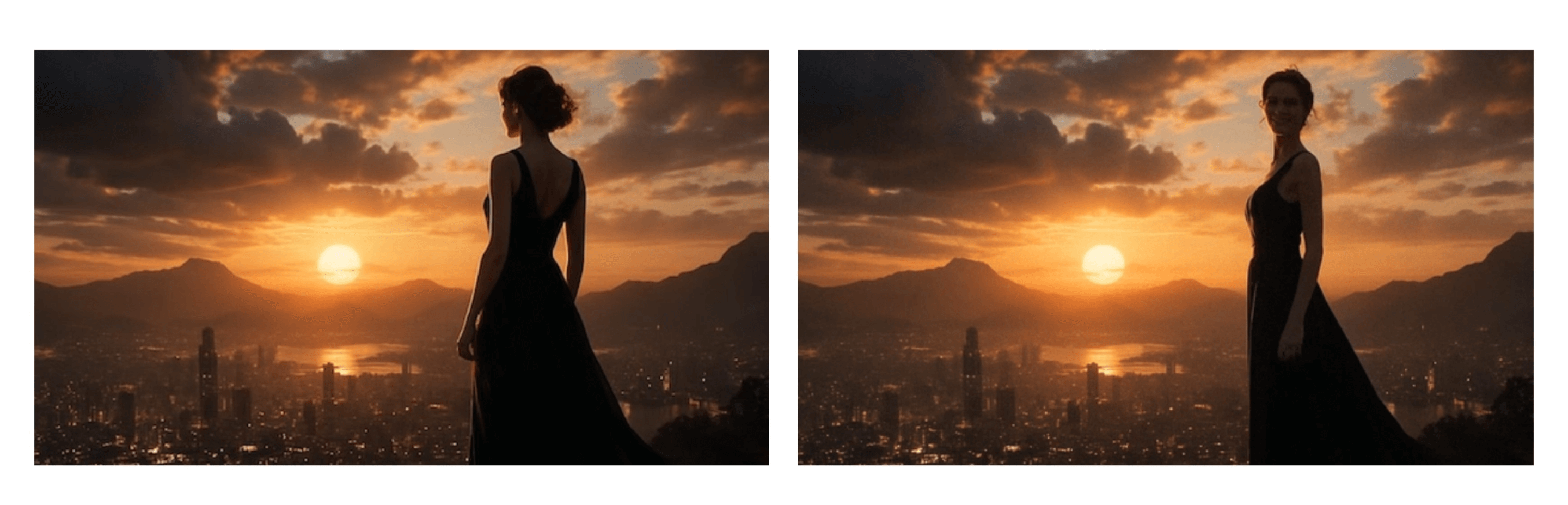
If you need finer control over shot composition and style, you can input an image as a visual reference. You may use photos, digital artwork, or AI-generated images. This method can lock in elements such as character design, costume styling, scene layout, or overall aesthetic style. The model uses the image as an anchor for the first frame, and the text prompt defines subsequent dynamic development.
How to use
Include the input_reference parameter in a POST /videos request and upload the image file:
- The image resolution must match the target video specification (size)
- Supported file formats: image/jpeg, image/png, image/webp
Prompt: “She turns around and smiles, then slowly walks out of the frame.” (“She turns around, smiles, then slowly walks out of the frame.”)
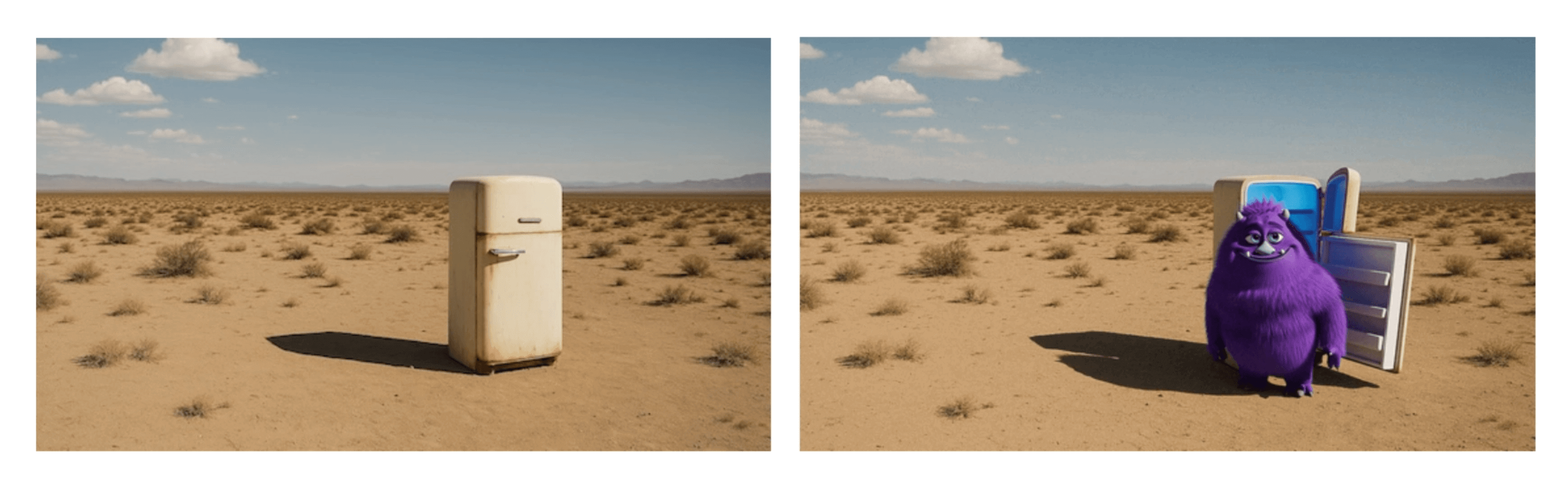
Prompt: “The fridge door opens. A cute, chubby purple monster comes out of it.” (“The fridge door opens. A cute, chubby purple monster comes out of it.”)
Generation Tips
If you don't have ready-made visual assets, you can quickly create them with OpenAI image generation models. You can quickly generate scene environments and composition designs, then use them as reference input for Sora. This is a great way to test aesthetic effects and provide a polished starting point for video generation.
Dialogue and Sound Effect Design
Dialogue content must be explicitly described directly in the prompt. Please place it in a separate module after the text description, so the model can clearly distinguish visual descriptions from spoken lines. Keep lines concise and natural, and try to limit dialogue to a small number of sentences to ensure the duration matches the video clip. In multi-character scenes, speakers must be consistently labeled and an alternating dialogue pattern should be used, which helps the model accurately associate each line with the corresponding character's expression and actions.
Particular attention must be paid to rhythm and timing planning: a 4-second shot usually accommodates 1-2 short exchanges of dialogue, while an 8-second clip can support slightly more dialogue. Long, complex monologues are difficult to synchronize with audio and video, and easily disrupt the rhythm.
For silent shots, subtle ambient sound can suggest rhythm, such as “distant traffic hissing” or “crisp finger snaps.” In this case, treat it as a rhythm cue rather than a complete soundtrack design.
Example prompt with dialogue:
A cramped, windowless room with walls the color of old ash. A single bare bulb dangles from the ceiling, its light pooling onto the scarred metal table at the center. Two chairs face each other across it. On one side sits the Detective, trench coat draped across the back of his chair, eyes sharp and unblinking. Across from him, the Suspect slouches, cigarette smoke curling lazily toward the ceiling. The silence presses in, broken only by the faint hum of the overhead light.
Dialogue:
- Detective: "You’re lying. I can hear it in your silence."
- Suspect: "Or maybe I’m just tired of talking."
- Detective: "Either way, you’ll talk before the night’s over."

场景描述
一间无窗的狭促房间,墙壁是灰烬般的陈旧色调。孤零零的灯泡从天花板垂落,昏黄的光晕聚在中央布满划痕的金属桌面上。两把椅子隔桌相对。侦探坐在一侧,风衣搭在椅背,眼神锐利如鹰隼。对面的嫌疑人佝偻着身子,香烟的雾气慵懒地盘旋升向顶棚。压抑的寂静笼罩四周,唯有顶灯发出持续的微弱嗡鸣。

对话设计
侦探:“你在说谎。我能从你的沉默里听出来。”
嫌疑人:“或许我只是厌倦了空谈。”
侦探:“无论如何,天亮前你都会开口。”
Example background sound effect description:
The hum of espresso machines and the murmur of voices form the background.
意式咖啡机的嗡鸣与人群低语交织成环境背景音。
Use the remix function for iterative optimization
Use the remix function for fine-tuning rather than blind trial and error. Use it to make controlled changes—adjust only a single parameter each time—and clearly state what is being changed: “same shot, switch to an 85mm focal length” or “keep the lighting, update the color palette: cyan-gray, sand beige, rust red.” When the effect is close to what you want, lock it in as a reference baseline and describe only the elements that need fine-tuning. This preserves all settings that are already working.
If a shot continues to perform poorly, simplify the elements: lock the camera position, streamline the action design, and clean up background elements. Once the basic version works, gradually layer in more complexity.
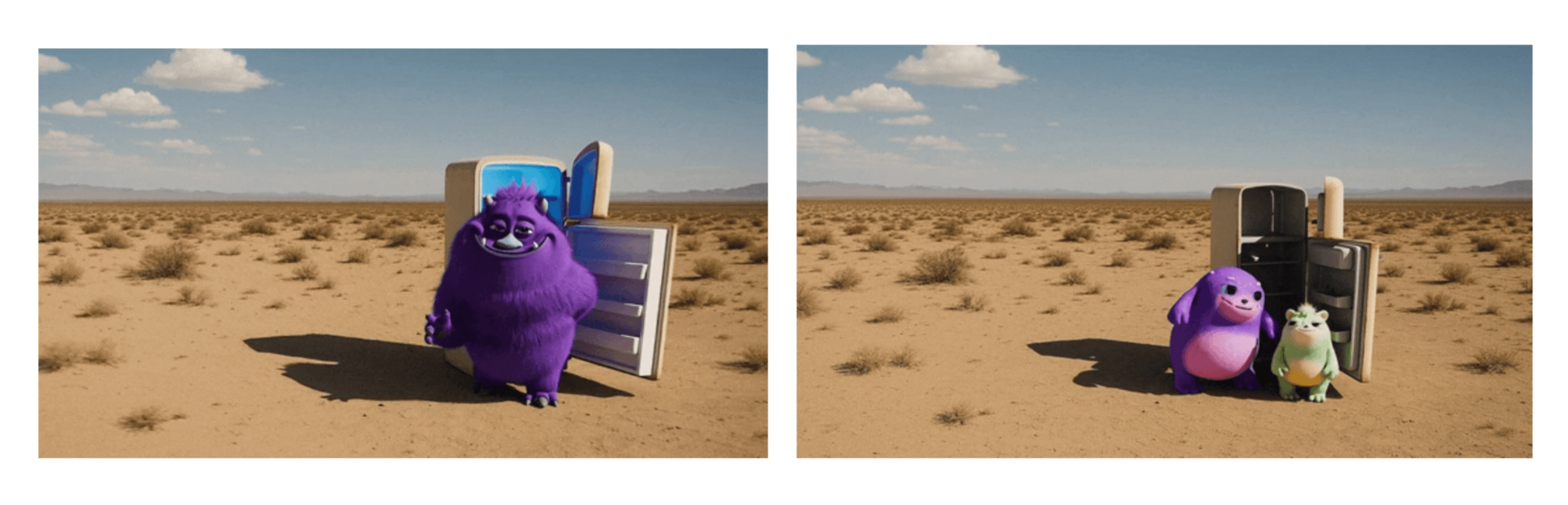
Prompt: “Change the color of the monster to orange” (“Change the color of the monster to orange”)
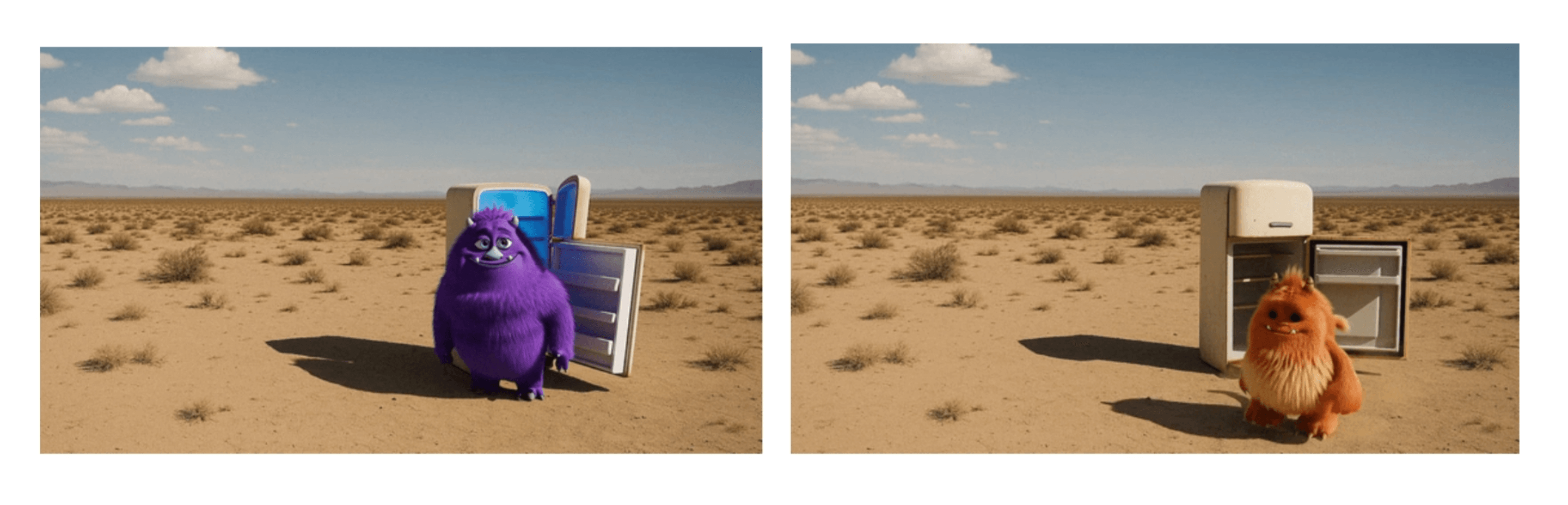
Prompt: “A second monster comes out right after” (“A second monster comes out right after”)
Prompt Templates and Examples
Prompt Structure Design
An effective way to write prompts is to layer different categories of information. This is not the only rule for success, but it provides a clear framework and improves consistency. There is no need to include every detail—if some elements are irrelevant to the shot, they can be omitted.
In practice, retaining an appropriate degree of openness can stimulate the model's creativity. The looser the constraints on visual elements, the more the model can surprise you through interpretation, often producing unexpectedly excellent variations. Highly descriptive prompts produce more stable and controllable results, while concise prompts open up imaginative new possibilities. Descriptive prompt template:
[Prose scene description in plain language. Describe characters, costumes, scenery, weather and other details. Be as descriptive to generate a video that matches your vision.]
Cinematography:
Camera shot: [framing and angle, e.g. wide establishing shot, eye level]
Mood: [overall tone, e.g. cinematic and tense, playful and suspenseful, luxurious anticipation]
Actions:
- [Action 1: a clear, specific beat or gesture]
- [Action 2: another distinct beat within the clip]
- [Action 3: another action or dialogue line]
Dialogue:
[If the shot has dialogue, add short natural lines here or as part of the actions list. Keep them brief so they match the clip length.]

[场景描述]
(请用平实的语言描写场景。需包含人物、服装、环境、天气及其他细节。通过具体细腻的描述,生成符合您构想的视频画面)

[摄影指导]
镜头构图:[请填写景别与角度,示例:广角定场镜头,平视视角]
情绪基调:[请定义整体氛围,示例:电影级紧张感,俏皮中带着悬疑,奢华期待氛围]

[动作设计]
[动作1:请描述一个明确具体的节奏单元或手势]
[动作2:请描述片段内另一个独立的节奏单元]
[动作3:请描述附加动作或对白语句]

[对白配置]
(若镜头包含对白,请在此处或动作列表中添加简短自然的台词。注意控制长度以确保与片段时长匹配)
Prompt Examples
Example One
Style: Hand-painted 2D/3D hybrid animation with soft brush textures, warm tungsten lighting, and a tactile, stop-motion feel. The aesthetic evokes mid-2000s storybook animation — cozy, imperfect, full of mechanical charm. Subtle watercolor wash and painterly textures; warm–cool balance in grade; filmic motion blur for animated realism.
Inside a cluttered workshop, shelves overflow with gears, bolts, and yellowing blueprints. At the center, a small round robot sits on a wooden bench, its dented body patched with mismatched plates and old paint layers. Its large glowing eyes flicker pale blue as it fiddles nervously with a humming light bulb. The air hums with quiet mechanical whirs, rain patters on the window, and the clock ticks steadily in the background.
Cinematography:
Camera: medium close-up, slow push-in with gentle parallax from hanging tools
Lens: 35 mm virtual lens; shallow depth of field to soften background clutter
Lighting: warm key from overhead practical; cool spill from window for contrast
Mood: gentle, whimsical, a touch of suspense
Actions:
- The robot taps the bulb; sparks crackle.
- It flinches, dropping the bulb, eyes widening.
- The bulb tumbles in slow motion; it catches it just in time.
- A puff of steam escapes its chest — relief and pride.
- Robot says quietly: "Almost lost it… but I got it!"
Background Sound:
Rain, ticking clock, soft mechanical hum, faint bulb sizzle.

视觉风格
手绘2D/3D混合动画,带有柔和笔刷肌理、暖调钨丝灯光效以及触感十足的定格动画质感。美学风格复现2000年代中期绘本动画特征——温馨质朴、留有手工痕迹,充满机械装置特有的魅力。运用微妙的水彩晕染与绘画肌理,调色保持冷暖平衡,通过电影级动态模糊增强动画真实感。

场景描述
杂乱的作坊内,货架堆满齿轮、螺栓和泛黄的蓝图。中央木凳上坐着圆形小机器人,凹陷的外壳打满不同规格的补丁,覆盖着斑驳的旧漆层。当它紧张摆弄嗡嗡发光的灯泡时,大眼睛闪烁淡蓝色光芒。空气中萦绕着机械运转的轻鸣,雨点敲打窗棂,背景传来时钟稳健的滴答声。

摄影指导
镜头运动:中近景慢推,利用悬挂工具产生轻柔视差
镜头参数:35毫米虚拟镜头;浅景深虚化背景杂物
光影设计:顶棚实景灯具的暖主光,配合窗外冷调漫射光形成对比
情绪基调:温柔奇幻中略带悬疑感

动作设计
机器人轻敲灯泡,迸发零星电火花
受惊退缩失手掉落,光学镜头瞬间放大
灯泡慢速翻滚坠落,被机械爪及时接住
胸腔排出蒸汽烟缕——释然与自豪交织
机器人轻声自语:“差点就摔碎了…还好接住了!”

环境音效
雨声、钟表滴答、柔和机械嗡鸣、微弱电流滋滋声
Example Two
Style: 1970s romantic drama, shot on 35 mm film with natural flares, soft focus, and warm halation. Slight gate weave and handheld micro-shake evoke vintage intimacy. Warm Kodak-inspired grade; light halation on bulbs; film grain and soft vignette for period authenticity.
At golden hour, a brick tenement rooftop transforms into a small stage. Laundry lines strung with white sheets sway in the wind, catching the last rays of sunlight. Strings of mismatched fairy bulbs hum faintly overhead. A young woman in a flowing red silk dress dances barefoot, curls glowing in the fading light. Her partner — sleeves rolled, suspenders loose — claps along, his smile wide and unguarded. Below, the city hums with car horns, subway tremors, and distant laughter.
Cinematography:
Camera: medium-wide shot, slow dolly-in from eye level
Lens: 40 mm spherical; shallow focus to isolate the couple from skyline
Lighting: golden natural key with tungsten bounce; edge from fairy bulbs
Mood: nostalgic, tender, cinematic
Actions:
- She spins; her dress flares, catching sunlight.
- Woman (laughing): "See? Even the city dances with us tonight."
- He steps in, catches her hand, and dips her into shadow.
- Man (smiling): "Only because you lead."
- Sheets drift across frame, briefly veiling the skyline before parting again.
Background Sound:
Natural ambience only: faint wind, fabric flutter, street noise, muffled music. No added score.

视觉风格
1970年代爱情剧情片质感,采用35毫米胶片拍摄,呈现自然光晕、柔焦效果与温暖泛光。轻微的胶片门晃动与手持微颤营造复古私密感。柯达风格的暖色调调色;灯泡处的轻柔光晕;通过胶片颗粒与柔和暗角强化时代真实感。

场景描述
金色时刻,砖砌公寓屋顶化作一方小小舞台。晾衣绳上的白床单随风摇曳,轻拢着夕阳最后的光芒。头顶参差的仙女灯串发出微弱嗡鸣。一位年轻女子身着流动的红绸裙赤足起舞,发卷在暮色中泛着微光。她的舞伴——袖口卷起、背带松垂——含笑击掌,笑容舒展而毫无保留。城市在下方低吟:车流鸣笛、地铁震颤与远方欢笑交织成背景音。

摄影指导
镜头运动:中广角镜头,眼平高度慢速轨道推进
镜头参数:40毫米球面镜;浅景深分离情侣与城市天际线
光影设计:金色自然主光结合钨丝灯反射光;仙女灯勾勒轮廓光
情绪基调:怀旧温情,电影叙事感

动作设计
她旋转时裙裾绽开,捕捉落日余晖
女子(轻笑):“看,连城市都在今夜与我们共舞”
他趋步上前握住她的手,将她倾入阴影之中
男子(含笑):“只因由你领舞”
床单飘过画面,短暂掩去天际线后又缓缓散开

环境音效
仅保留自然环境声:微风、织物拂动、街道杂响、隐约乐声。不添加额外配乐。
English Original
Crafting a successful video prompt
Before you prompt
Think of prompting like briefing a cinematographer who has never seen your storyboard. If you leave out details, they’ll improvise – and you may not get what you envisioned. By being specific about what the “shot” should achieve, you give the model more control and consistency to work with.
But leaving some details open can be just as powerful. Giving the model more creative freedom can lead to surprising variations and unexpected, beautiful interpretations. Both approaches are valid: detailed prompts give you control and consistency, while lighter prompts open space for creative outcomes. The right balance depends on your goals and the result you’re aiming for. Treat your prompt as a creative wish list, not a contract. Like with ChatGPT, using the same prompt multiple times will lead to different results – this is a feature, not a bug. Each generation is a fresh take, and sometimes the second or third option is better.
Most importantly, be prepared to iterate. Small changes to camera, lighting, or action can shift the outcome dramatically. Collaborate with the model: you provide direction, and the model delivers creative variations.
This isn’t an exact science—think of the guidance below as helpful suggestions we’ve learned from working with the model.
API Parameters
The prompt controls the content of the video, but certain attributes are governed only by API parameters. You cannot request them in prose, they must be set explicitly in your API call:
- model:
sora-2orsora-2-pro. - size: a string in the form {width}x{height}. Supported resolutions are dependent on the model selection:
- sora-2
- 1280×720, 720×1280
- sora-2-pro
- 1280×720, 720×1280
- 1024×1792, 1792×1024
- sora-2
- seconds: the clip length, supported values: “4”, “8”, “12”. Default value is “4”.
These parameters are the video’s container – resolution, duration, and quality will not change based on prose like “make it longer.” Set them explicitly in the API call; your prompt controls everything else (subject, motion, lighting, style).
Video Resolution
Video resolution directly influences visual fidelity and motion consistency in Sora. Higher resolutions generate detail, texture, and lighting transitions more accurately, while lower resolutions compress visual information, often introducing softness or artifacts.
Video Length
The model generally follows instructions more reliably in shorter clips. For best results, aim for concise shots. If your project allows, you may see better results by stitching together two 4 second clips in editing instead of generating a single 8 second clip.
Prompt anatomy that works
A clear prompt describes a shot as if you were sketching it onto a storyboard. State the camera framing, note depth of field, describe the action in beats, and set the lighting and palette. Anchoring your subject with a few distinctive details keeps it recognizable, while a single, plausible action makes the shot easier to follow.
Describing multiple shots in a single prompt is also valid if you need to cover a sequence. When you do this, keep each shot block distinct: one camera setup, one subject action, and one lighting recipe at a time. This gives you flexibility to generate short standalone clips or longer, continuous moments, depending on your project. Treat each shot as a creative unit, and you can either stitch them together in an edit or let them play out as a sequence in one go.
- Shorter prompts give the model more creative freedom. Expect surprising results.
- Longer, more detailed prompts restrict the model’s creativity. It will try to follow your guidance, but might not always do so reliably.
Here’s an example for a short prompt:
In a 90s documentary-style interview, an old Swedish man sits in a study and says, "I still remember when I was young."This prompt will likely work well:
90s documentarysets the style of the video. The model will choose variables like camera lens, lighting and color grade accordingly.an old Swedish man sits in a studydescribes subject and setting in minor detail, letting the model take creative liberties in what the person and setting should look like.and says, "I still remember when I was young."describes the dialogue. Sora will likely be able to follow this exactly.
This prompt will reliably produce videos that match these requirements. However, it might not match your vision exactly as many details are left open. For example, the prompt does not describe the time of day, weather, outfits, tone, look and age of the character, camera angles, cuts, set design and many other factors. Unless you describe these details, Sora will make them up.
Going Ultra-Detailed
For complex, cinematic shots, you can go beyond the standard prompt structure and specify the look, camera setup, grading, soundscape, and even shot rationale in professional production terms. This is similar to how a director briefs a camera crew or VFX team. Detailed cues for lensing, filtration, lighting, grading, and motion help the model lock onto a very specific aesthetic.
For example, you might describe what the viewer notices first, the camera platform and lens, lighting direction, color palette, texture qualities, diegetic sound, and shot timing. This approach works well when you want to match real cinematography styles (e.g., IMAX aerials, 35mm handheld, vintage 16mm documentary) or maintain strict continuity across shots.
Example
Format & Look
Duration 4s; 180° shutter; digital capture emulating 65 mm photochemical contrast; fine grain; subtle halation on speculars; no gate weave.

Lenses & Filtration
32 mm / 50 mm spherical primes; Black Pro-Mist 1/4; slight CPL rotation to manage glass reflections on train windows.

Grade / Palette
Highlights: clean morning sunlight with amber lift.
Mids: balanced neutrals with slight teal cast in shadows.
Blacks: soft, neutral with mild lift for haze retention.

Lighting & Atmosphere
Natural sunlight from camera left, low angle (07:30 AM).
Bounce: 4×4 ultrabounce silver from trackside.
Negative fill from opposite wall.
Practical: sodium platform lights on dim fade.
Atmos: gentle mist; train exhaust drift through light beam.

Location & Framing
Urban commuter platform, dawn.
Foreground: yellow safety line, coffee cup on bench.
Midground: waiting passengers silhouetted in haze.
Background: arriving train braking to a stop.
Avoid signage or corporate branding.

Wardrobe / Props / Extras
Main subject: mid-30s traveler, navy coat, backpack slung on one shoulder, holding phone loosely at side.
Extras: commuters in muted tones; one cyclist pushing bike.
Props: paper coffee cup, rolling luggage, LED departure board (generic destinations).

Sound
Diegetic only: faint rail screech, train brakes hiss, distant announcement muffled (-20 LUFS), low ambient hum.
Footsteps and paper rustle; no score or added foley.

Optimized Shot List (2 shots / 4 s total)

0.00–2.40 — “Arrival Drift” (32 mm, shoulder-mounted slow dolly left)
Camera slides past platform signage edge; shallow focus reveals traveler mid-frame looking down tracks. Morning light blooms across lens; train headlights flare softly through mist. Purpose: establish setting and tone, hint anticipation.

2.40–4.00 — “Turn and Pause” (50 mm, slow arc in)
Cut to tighter over-shoulder arc as train halts; traveler turns slightly toward camera, catching sunlight rim across cheek and phone screen reflection. Eyes flick up toward something unseen. Purpose: create human focal moment with minimal motion.

Camera Notes (Why It Reads)
Keep eyeline low and close to lens axis for intimacy.
Allow micro flares from train glass as aesthetic texture.
Preserve subtle handheld imperfection for realism.
Do not break silhouette clarity with overexposed flare; retain skin highlight roll-off.

Finishing
Fine-grain overlay with mild chroma noise for realism; restrained halation on practicals; warm-cool LUT for morning split tone.
Mix: prioritize train and ambient detail over footstep transients.
Poster frame: traveler mid-turn, golden rim light, arriving train soft-focus in background haze.
Visual cues that steer the look
When writing prompts, style is one of the most powerful levers for guiding the model toward your desired outcome. Describing the overall aesthetic – for example, “1970s film,” “epic, IMAX-scale scene,” or “16mm black-and-white film” – sets a visual tone that frames all other choices. Establish this style early so the model can carry it through consistently.
The same details will read very differently depending on whether you call for a polished Hollywood drama, a handheld smartphone clip, or a grainy vintage commercial. Once the tone is set, layer in specifics with shot, action, and light.
Clarity wins. Instead of vague cues like “a beautiful street,” write “wet asphalt, zebra crosswalk, neon sign reflection.” Instead of “moves quickly,” specify “jogs three steps and stops at the curb.” Verbs and nouns that point to visible results will always give you a clearer, more consistent output.
| Weak prompt | Strong prompt |
|---|---|
| “A beautiful street at night” | “Wet asphalt, zebra crosswalk, neon signs reflecting in puddles” |
| “Person moves quickly” | “Cyclist pedals three times, brakes, and stops at crosswalk” |
| “Cinematic look” | “Anamorphic 2.0x lens, shallow DOF, volumetric light” |
Camera direction and framing shape how a shot feels. A wide shot from above will emphasize space and context, while a close-up at eye level will focus attention on emotion. Depth of field adds another layer: shallow focus can make a subject stand out against a blurred background, while deep focus keeps both foreground and background sharp. Lighting sets tone just as strongly. A soft, warm key creates something inviting, while a single hard light with cool edges pushes toward drama.
When introducing characters, expect some unpredictability—small changes in phrasing can alter identity, pose, or the focus of the scene itself. Keep descriptions consistent across shots, reuse phrasing for continuity, and avoid mixing traits that may compete.
Weak
Camera shot: cinematic lookStrong
Camera shot: wide shot, low angle
Depth of field: shallow (sharp on subject, blurred background)
Lighting + palette: warm backlight with soft rim
Some examples for good framing instructions:
- wide establishing shot, eye level
- wide shot, tracking left to right with the charge
- aerial wide shot, slight downward angle
- medium close-up shot, slight angle from behind
Some examples for good camera motion instructions:
- slowly tilting camera
- handheld eng camera
Control motion and timing
Movement is often the hardest part to get right, so keep it simple. Each shot should have one clear camera move and one clear subject action. Actions work best when described in beats or counts – small steps, gestures, or pauses – so they feel grounded in time.
“Actor walks across the room” doesn’t give much to work with. A line like “Actor takes four steps to the window, pauses, and pulls the curtain in the final second” makes the timing precise and achievable.
Weak
Actor walks across the room.Strong
Actor takes four steps to the window, pauses, and pulls the curtain in the final second.Lighting and color consistency
Light determines mood as much as action or setting. Diffuse light across the frame feels calm and neutral, while a single strong source creates sharp contrast and tension. When you want to cut multiple clips together, keeping lighting logic consistent is what makes the edit seamless.
Describe both the quality of the light and the color anchors that reinforce it. Instead of a broad note like “brightly lit room,” specify the mix of sources and tones: “soft window light with a warm lamp fill and a cool edge from the hallway.” Naming three to five colors helps keep the palette stable across shots.
Weak
Lighting + palette: brightly lit roomStrong
Lighting + palette: soft window light with warm lamp fill, cool rim from hallway
Palette anchors: amber, cream, walnut brown
Use image input for more control
For even more fine-grained control over the composition and style of a shot, you can use an image input as a visual reference. You can use photos, digital artwork or AI generated visuals. This locks in elements like character design, wardrobe, set dressing, or overall aesthetic. The model uses the image as an anchor for the first frame, while your text prompt defines what happens next.
How to use it
Include an image file as the input_reference parameter in your POST /videos request.
- The image must match the target video’s resolution (size).
- Supported file formats are:
image/jpeg,image/png, andimage/webp.
Prompt: “She turns around and smiles, then slowly walks out of the frame.”
Prompt: “The fridge door opens. A cute, chubby purple monster comes out of it.”
Experimentation tip
If you don’t already have visual references, OpenAI’s image generation model is a powerful way to create them. You can quickly produce environments and scene designs and then pass them into Sora as references. This is a great way to test aesthetics and generate beautiful starting points for your videos.
Dialogue and Audio
Dialogue must be described directly in your prompt. Place it in a block below your prose description so the model clearly distinguishes visual description from spoken lines. Keep lines concise and natural, and try to limit exchanges to a handful of sentences so the timing can match your clip length. For multi-character scenes, label speakers consistently and use alternating turns; this helps the model associate each line with the correct character’s gestures and expressions.
You should also think about rhythm and timing: a 4-second shot will usually accommodate one or two short exchanges, while an 8-second clip can support a few more. Long, complex speeches are unlikely to sync well and may break pacing.
If your shot is silent, you can still suggest pacing with one small sound, such as “distant traffic hiss” or “a crisp snap.” Think of it as a rhythm cue rather than a full soundtrack.
Example prompt with dialogue:
A cramped, windowless room with walls the color of old ash. A single bare bulb dangles from the ceiling, its light pooling onto the scarred metal table at the center. Two chairs face each other across it. On one side sits the Detective, trench coat draped across the back of his chair, eyes sharp and unblinking. Across from him, the Suspect slouches, cigarette smoke curling lazily toward the ceiling. The silence presses in, broken only by the faint hum of the overhead light.
Dialogue:
- Detective: "You’re lying. I can hear it in your silence."
- Suspect: "Or maybe I’m just tired of talking."
- Detective: "Either way, you’ll talk before the night’s over."
Example description of background sound:
The hum of espresso machines and the murmur of voices form the background.Iterate with the remix functionality
Remix is for nudging, not gambling. Use it to make controlled changes – one at a time – and say what you’re changing: “same shot, switch to 85 mm,” or “same lighting, new palette: teal, sand, rust.” When a result is close, pin it as a reference and describe only the tweak. That way, everything that already works stays locked.
If a shot keeps misfiring, strip it back: freeze the camera, simplify the action, clear the background. Once it works, layer additional complexity step by step.
Prompt: “Change the color of the monster to orange”
Prompt: “A second monster comes out right after”
Prompt Templates and Examples
Prompt Structure
[Prose scene description in plain language. Describe characters, costumes, scenery, weather and other details. Be as descriptive to generate a video that matches your vision.]
Cinematography:
Camera shot: [framing and angle, e.g. wide establishing shot, eye level]
Mood: [overall tone, e.g. cinematic and tense, playful and suspenseful, luxurious anticipation]
Actions:
- [Action 1: a clear, specific beat or gesture]
- [Action 2: another distinct beat within the clip]
- [Action 3: another action or dialogue line]
Dialogue:
[If the shot has dialogue, add short natural lines here or as part of the actions list. Keep them brief so they match the clip length.]
Prompt Examples
Example 1
Style: Hand-painted 2D/3D hybrid animation with soft brush textures, warm tungsten lighting, and a tactile, stop-motion feel. The aesthetic evokes mid-2000s storybook animation — cozy, imperfect, full of mechanical charm. Subtle watercolor wash and painterly textures; warm–cool balance in grade; filmic motion blur for animated realism.
Inside a cluttered workshop, shelves overflow with gears, bolts, and yellowing blueprints. At the center, a small round robot sits on a wooden bench, its dented body patched with mismatched plates and old paint layers. Its large glowing eyes flicker pale blue as it fiddles nervously with a humming light bulb. The air hums with quiet mechanical whirs, rain patters on the window, and the clock ticks steadily in the background.
Cinematography:
Camera: medium close-up, slow push-in with gentle parallax from hanging tools
Lens: 35 mm virtual lens; shallow depth of field to soften background clutter
Lighting: warm key from overhead practical; cool spill from window for contrast
Mood: gentle, whimsical, a touch of suspense
Actions:
- The robot taps the bulb; sparks crackle.
- It flinches, dropping the bulb, eyes widening.
- The bulb tumbles in slow motion; it catches it just in time.
- A puff of steam escapes its chest — relief and pride.
- Robot says quietly: "Almost lost it… but I got it!"
Background Sound:
Rain, ticking clock, soft mechanical hum, faint bulb sizzle.
Example 2
Style: 1970s romantic drama, shot on 35 mm film with natural flares, soft focus, and warm halation. Slight gate weave and handheld micro-shake evoke vintage intimacy. Warm Kodak-inspired grade; light halation on bulbs; film grain and soft vignette for period authenticity.
At golden hour, a brick tenement rooftop transforms into a small stage. Laundry lines strung with white sheets sway in the wind, catching the last rays of sunlight. Strings of mismatched fairy bulbs hum faintly overhead. A young woman in a flowing red silk dress dances barefoot, curls glowing in the fading light. Her partner — sleeves rolled, suspenders loose — claps along, his smile wide and unguarded. Below, the city hums with car horns, subway tremors, and distant laughter.
Cinematography:
Camera: medium-wide shot, slow dolly-in from eye level
Lens: 40 mm spherical; shallow focus to isolate the couple from skyline
Lighting: golden natural key with tungsten bounce; edge from fairy bulbs
Mood: nostalgic, tender, cinematic
Actions:
- She spins; her dress flares, catching sunlight.
- Woman (laughing): "See? Even the city dances with us tonight."
- He steps in, catches her hand, and dips her into shadow.
- Man (smiling): "Only because you lead."
- Sheets drift across frame, briefly veiling the skyline before parting again.
Background Sound:
Natural ambience only: faint wind, fabric flutter, street noise, muffled music. No added score.