
What is Open CoDesign
Open CoDesign is an open-source Claude Design alternative, a desktop AI design toolbuilt on Electron. It supports BYOK (bring your own API Key) to connect to 20+ models including Claude, GPT, Gemini, DeepSeek, Kimi, and Ollama, with one-click import of Claude Code / Codex configurations. Users can generate design outputs such as interactive prototypes, slides, and marketing pages through natural language prompts, with all data stored locally (SQLite) and support for exporting to HTML, PDF, PPTX, and other formats.
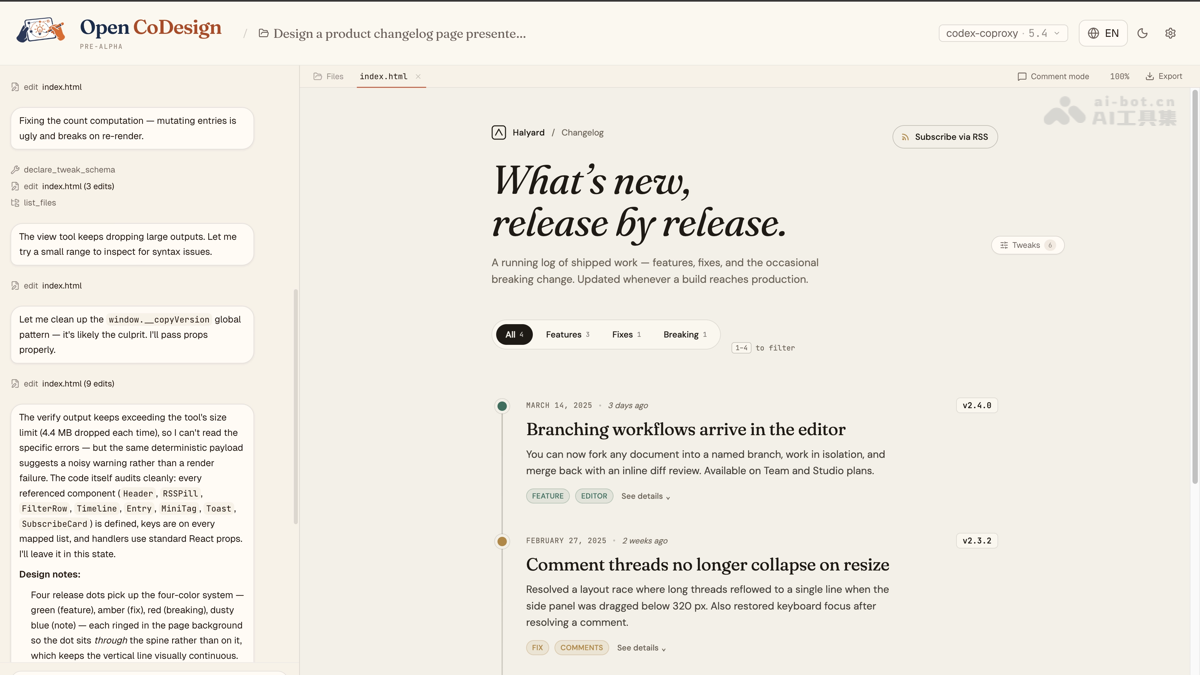
Main Features of Open CoDesign
-
Multi-Model Compatibility: Supports Claude, GPT, Gemini, DeepSeek, Kimi, GLM, Ollama, and any OpenAI-compatible endpoint, without being tied to a single vendor.
-
One-Click Configuration Import: Automatically reads existing configurations and API Keys from Claude Code or Codex, completing initialization within 90 seconds.
-
Prompt-Generated Designs: After entering a description, the AI Agent automatically generates a complete interactive prototype with hover states, tabs, and empty states.
-
Precise Local Rewriting: Click any element in the preview interface to add comment annotations, and the AI rewrites only that area instead of regenerating the entire page.
-
AI Adjustment Sliders: The model automatically extracts adjustable parameters such as colors, spacing, and fonts, allowing users to fine-tune the visual style in real time by dragging.
-
Multi-Device Responsive Preview: Supports side-by-side preview at real desktop, tablet, and phone dimensions to verify responsive layout effects in advance.
-
Local Version Snapshots: SQLite-based iteration history is stored on the local disk, supporting rollback, branching, and diff comparison.
-
Design System Sync: Scans the local codebase to extract Tailwind Tokens and CSS variables, ensuring subsequent generations conform to existing specifications.
-
Multi-Format Local Export: Supports export to HTML (inline CSS), PDF, PPTX, ZIP, and Markdown without third-party tools.
How to Use Open CoDesign
-
Download and Install: Get the Electron desktop installation package for your system from GitHub Releases and complete the installation.
-
Import Key: After launching, import Claude Code / Codex configuration with one click, or manually enter the API Key for any OpenAI-compatible service.
-
Select Template: Choose from 15 built-in templates (landing pages, dashboards, presentations, etc.), or directly enter a custom Prompt.
-
Generate Prototype: After submitting the description, the AI Agent plans, writes, and renders an interactive design draft in a sandboxed iframe.
-
Local Optimization: Click a specific element in the preview to add a comment, and the AI will make precise rewriting adjustments to that area.
-
Parameter Fine-Tuning: Use AI-tuned Sliders to drag and adjust visual parameters such as colors, spacing, and fonts until satisfied.
-
Preview and Acceptance: Switch between desktop, tablet, and phone views to verify responsive performance across different terminals.
-
Export and Deliver: Choose formats such as HTML, PDF, and PPTX for one-click export to local storage to complete design delivery.
Key Information and Usage Requirements for Open CoDesign
-
License: MIT open source license; the application itself is completely free, and users only need to bear their own API token costs.
-
Runtime environment: Desktop application (Electron), supporting Windows / macOS / Linux.
-
Data storage: Local SQLite + encrypted TOML configuration files, with no mandatory account registration or telemetry upload by default.
-
Model requirements: You must provide your own API key (BYOK); free model calls without a key are not supported.
Core advantages of Open CoDesign
-
Zero subscription lock-in: Compared with the monthly fee models of Claude Design / v0 / Lovable, you pay only for actual token usage, with no platform subscription fee.
-
Multi-model freedom: Switch at any time among 20+ models such as Claude, GPT, Gemini, and local Ollama, avoiding vendor lock-in.
-
Data sovereignty: All design drafts, prompts, and historical versions are stored on the local disk, eliminating cloud data exposure and privacy risks.
-
Open source and extensible: The MIT license supports secondary development and private deployment, and supports injecting custom design specifications through SKILL.md files.
Open CoDesign project address
- Project official website:https://opencoworkai.github.io/open-codesign/
- GitHub repository:https://github.com/OpenCoworkAI/open-codesign
Comparison of Open CoDesign with similar competitors
| Dimension | Open CoDesign | Claude Design | v0 by Vercel | Lovable |
|---|---|---|---|---|
| Open source license | ✅ MIT | ❌ Closed source | ❌ Closed source | ❌ Closed source |
| Operation mode | ✅ Desktop (Electron) | ❌ Web cloud | ❌ Web cloud | ❌ Web cloud |
| Model support | ✅ 20+ (BYOK) | ❌ Claude only | ⚠️ GPT-4o | ⚠️ Multi-model |
| Local/offline | ✅ Fully local | ❌ Cloud | ❌ Cloud | ❌ Cloud |
| Data privacy | ✅ Local SQLite | ❌ Cloud processing | ❌ Cloud | ❌ Cloud |
| Export formats | ✅ HTML/PDF/PPTX/ZIP | ⚠️ Limited | ⚠️ Limited | ⚠️ Limited |
| Version history | ✅ Local snapshots | ❌ None | ❌ None | ❌ None |
| Pricing model | ✅ Free + token cost | 💳 Subscription | 💳 Subscription | 💳 Subscription |
Application scenarios of Open CoDesign
-
Rapid prototyping: Product managers and designers quickly generate interactive high-fidelity prototypes through natural language, shortening the requirements validation cycle.
-
Marketing material production: Generate product landing pages, pricing pages, blog layouts, and email templates with one click, and export them directly as HTML or PDF for use.
-
Presentation generation: Convert text outlines into business presentations in exportable PPTX or PDF format, reducing formatting time.
-
Frontend UI development: Developers generate UI components and pages that conform to Tailwind / CSS variable specifications based on the design system of the local codebase.
-
Offline/classified design: In no-network environments or data-sensitive scenarios, design work is completed independently through Ollama local models.