
What is OKKI
OKKI is a foreign trade smart workspace launched by Xiaoman Technology. Based on AI technology, it helps foreign trade enterprises improve customer acquisition efficiency and business growth. OKKI integrates functional modules such as CRM (customer relationship management), independent website building, and intelligent marketing to help enterprises efficiently manage customer information, optimize order processes, and analyze business opportunities. Driven by AI-powered customer insights and automation tools, it improves business efficiency and decision quality. OKKI deeply integrates advanced AI models, such asDeepSeekandQwen 2.5, further enhancing customer analysis and business management capabilities, and helping foreign trade enterprises achieve digital transformation and performance growth in the complex and ever-changing international trade environment.
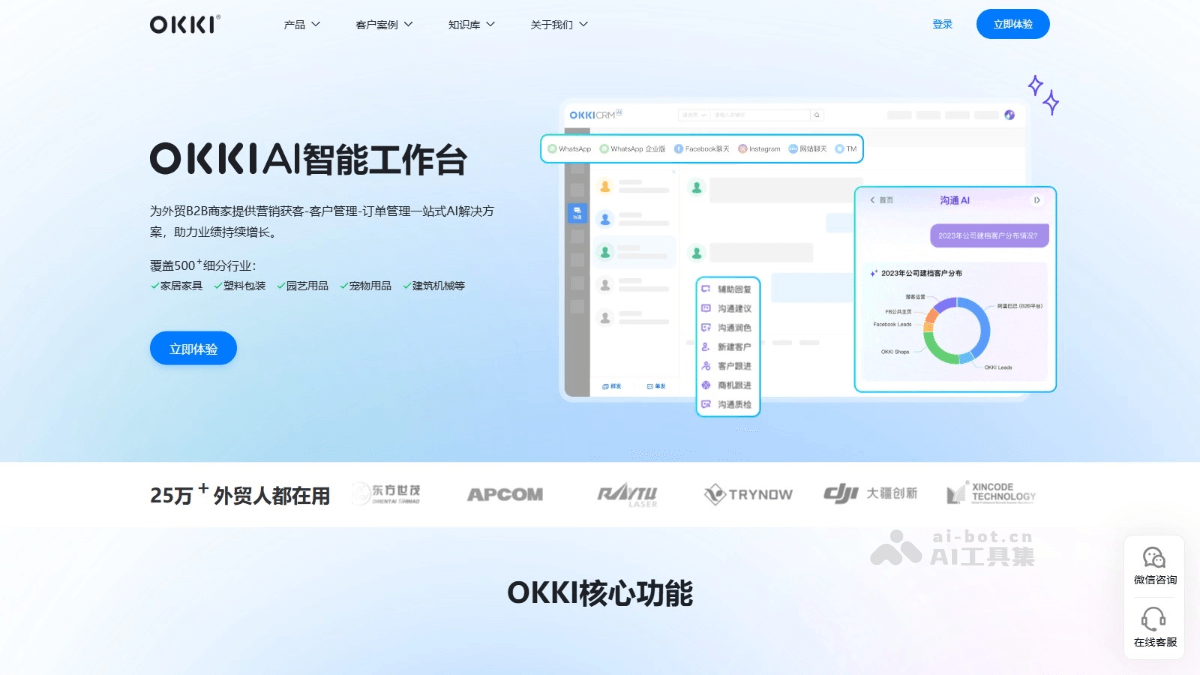
OKKI's main features
- Multi-channel customer development: Integrates multi-channel buyer data across the web, making one-stop customer development more effortless.
- Intelligent marketing conversion: Provides intelligent solutions for the entire foreign trade marketing process, improving marketing efficiency and shortening the customer acquisition cycle.
- Refined private domain customer operations: Intelligently takes stock of customer assets, focuses on high-quality customers, and improves new customer retention and repurchase.
- Data-driven business decisions: Lowers the threshold for data analysis and assists managers in viewing the overall business situation based on data, making decisions more reliable.
- Team business quality inspection: Comprehensively analyzes team performance, intelligently suggests management optimization strategies, and builds a gold-medal foreign trade team.
- Foreign trade independent website: Full-process website building realizes diversified business layouts and helps enterprises establish their own independent sites.
How to use OKKI
- Account registration and login: Visit OKKIofficial website, and complete registration and login as required.
- Main interface basic settings: Includes setting company information, adding team members, assigning permissions, etc.
- Customer management
- Customer information entry: Click the "Add Customer" button and fill in the customer's basic information, or organize customer information into an Excel spreadsheet and import it in batches according to the template format provided by the system. OKKI supports automatically creating files for customers with email exchanges and automatically filling in customer information with the database.
- Customer information classification: Classify customers based on multiple dimensions such as customer status, customer group, public pool group, star rating, etc., or perform more detailed hierarchical grouping, supporting up to 3 levels of subdivision, or tag customers for personalized management.
- Sales opportunity management
- Create sales opportunities: In the sales management module, click "Add Sales Opportunity" and fill in relevant information to track the sales process and forecast sales performance.
- Follow up on sales opportunities: Follow up on each sales opportunity, record follow-up content, follow-up time, follow-up results, etc., and update the status of the sales opportunity in a timely manner.
- Customer interaction tracking
- Record communication records: On the customer details page, record various communication records with customers, including phone calls, emails, interviews, etc., and record the communication time, communication content, communication results, etc. in detail for easy viewing and review at any time.
- Use schedule management: OKKI's "Calendar" feature is closely integrated with business and can associate customers, opportunities, leads, orders, quotations, payment receipts, and other objects, making scheduling and reminders convenient.
- Data Analysis and Report Generation
- Data Analysis: Conduct in-depth analysis of customer data, sales data, etc., and generate various reports and charts, such as customer distribution maps, sales funnel charts, sales performance reports, etc.
- Report Generation: Based on the analysis results, generate detailed reports, including customer analysis reports, sales opportunity analysis reports, sales performance reports, etc.
OKKI Application Scenarios
- Foreign Trade Sales Representative: Develop new customers, maintain existing customers, manage sales opportunities, and follow up on order execution.
- Foreign Trade Team Manager: Manage team tasks, monitor work progress, analyze sales data, and provide decision support.
- Foreign Trade Company Owner: Formulate corporate strategy, optimize resource allocation, manage business risks, and ensure the company's stable development.
- Production and Logistics Department: Execute order production, arrange logistics and shipping, collaborate with business departments, and ensure an efficient supply chain.
- Marketing Personnel: Create marketing content, plan promotional activities, evaluate campaign effectiveness, and enhance brand influence.