
What is Octop
Octop is Tencent's open source self-hosted AI assistant, released under the MIT license. The tool provides a web page, CLI, and messaging platform integrations in a single process, including Feishu, WeCom, DingTalk, QQ, WeChat, Telegram, and more, supporting multiple users simultaneously. The product centers on "experts," where each expert is an independent AI assistant with its own model configuration, skills, knowledge base, and MBTI personality, and can be chatted with directly through messaging apps. All data is stored locally in the ~/.octop/ directory, with no dependence on cloud services.
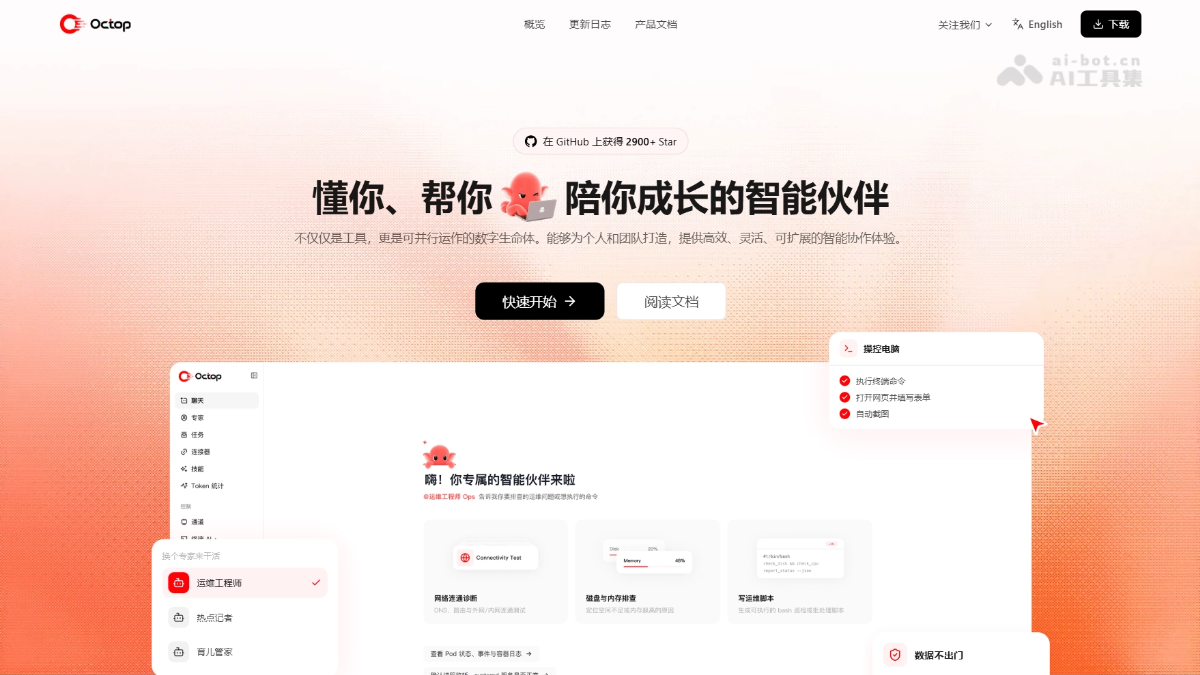
Main Features of Octop
-
Experts (Multi-Agent System): The core unit of work. Each expert is an independently configured AI assistant with its own workspace, model, skills, and conversation history.
-
MBTI Personality: Built-in 16 personality templates with test-based recommendations, capable of shaping each expert's thinking and communication style.
-
IM Channels: Supports 9 platforms including Feishu, WeCom, DingTalk, QQ, WeChat, and Telegram. Conversations can be routed directly to experts.
-
Scheduled Tasks: Create cron automations with natural language, letting experts send reminders, reports, or execute tasks on schedule.
-
Knowledge Base (RAG): Upload documents to build an index. During conversations, relevant passages are automatically retrieved with clickable citation sources.
-
Programming Agent Integration (ACP): Connect programming tools such as Claude Code, Codex, Kimi Code, and Cursor CLI via the Agent Client Protocol.
-
Terminal AI: An interactive terminal in the browser that lets AI recommend commands, explain output, and troubleshoot errors.
-
Browser Automation: Built-in headless browser that can browse web pages, fill forms, and take screenshots based on natural language.
-
Remote Desktop/Remote Phone: Remotely control a computer desktop or a connected phone from the browser.
-
Connectors: Built-in authorized integrations with 23 apps including Tencent Docs, Tencent Meeting, Notion, and Email, callable with a single sentence.
-
Skill Packs: Reusable skill collections that can be installed from the skill marketplace or created yourself, and mounted to any expert.
-
Model Configuration: Built-in with nearly 20 model providers, supporting various models for conversation, image and video generation, voice, search, and more.
-
Token Statistics: Usage statistics summarized by day, by expert, by model, and by user.
-
Desktop Pet: An octopus floating window that stays on the desktop, ready to be summoned for questions at any time.

Follow WeChat and reply "Open Source" to join theAI Open Source Project Exchange Group
How to Use Octop
-
Install: On Mac/Linux, run the one-click script
curl -fsSL https://finnie-1258344699.cos.ap-guangzhou.myqcloud.com/octop/install.sh | bash. On Windows, use the PowerShell script or directly download the client installer package. -
Initialize: Run
octop initto complete the wizard, setting the data directory, administrator account, and initial password. -
Start the Service: Execute
octop run(default port 8088), oroctop service startto register it as a system service. -
Open the Console: Browser access http://127.0.0.1:8088,用管理员账户登录。
-
Configure models: On the "Models" page, select and configure LLM providers (models for chat, image and video, speech, and search can be set separately).
-
Use experts: On the "Experts" page, select or create an expert and enable it, then enter its workspace to chat and give instructions.
-
Configure personality: Assign an MBTI personality template to an expert, or get automatic recommendations through a test questionnaire.
-
Connect IM: On the "Channels" page, configure channels such as Feishu, WeChat, and WeCom for an expert to chat directly within messaging apps.
-
Build a knowledge base: Enable the knowledge base, choose an embedding model (local ONNX or online Embedding), and after uploading files you can reference them in conversations.
-
Set scheduled tasks: Under "Tasks/Automation," create scheduled reminders or scheduled reports in natural language.
-
Connect coding tools: Configure runners such as OpenCode, Claude Code, and Codex via ACP to delegate coding tasks in conversations.
-
Install skills and connectors: Install skill packages from the skill marketplace and authorize connectors such as Tencent Docs/Notion, then mount them for the corresponding expert to use.
-
Daily interaction: Chat with experts anytime via the Web page, CLI (
octop chat) or connected IM platforms, and view the execution process in real time and take over at any time.
Octop's core advantages
-
Fully open source and free: Open sourced under the MIT license, free to use, modify, and distribute, with no vendor lock-in.
-
Local data, controllable privacy: All conversations, workspaces, and credentials are stored in the local ~/.octop/ directory, with no dependence on cloud services.
-
Lightweight single-process deployment: Web, CLI, IM channels, and scheduled tasks all run in a single process; install with one command, and it runs smoothly on an ordinary computer.
-
Multi-user sharing: One machine runs one set of services, while family members and colleagues each have independent accounts and dedicated assistants.
-
Expert multi-agent architecture: Works in parallel with "experts" as the core unit, and capability boundaries can expand infinitely with configuration.
-
Full IM integration: Natively integrates with WeChat, QQ, WeCom, Feishu, DingTalk, Telegram, etc., so you can use it directly in your everyday chat apps.
-
Personalized experience: 16 MBTI personality templates give each expert a unique communication style, making them more like a "partner" than a tool.
-
Strong ecosystem extensibility: Connectors, skill marketplace, plugins, sub-agents, knowledge base RAG, and ACP coding tools are pluggable across the entire chain.
Octop's official project website
- Official project website:https://octop.cloud/
- GitHub repository:https://github.com/TencentCloud/Octop
Comparison of Octop with similar competitors
| Comparison dimension | Octop (Tencent) | Loomy(iFLYTEK) | Doubao Work(ByteDance) |
|---|---|---|---|
| One-sentence positioning | An open source, self-hosted local AI assistant framework | A zero-configuration, out-of-the-box desktop office Agent | An AI office agent platform powered by the Doubao large model |
| Open source/Closed source | MIT open source, freely modifiable | Closed source | Closed source |
| Deployment method | Script/Docker/NAS self-deployment, single process | One-click installation via desktop client | Desktop client + cloud computer |
| Ease of use | High (requires configuring models and experts yourself) | Extremely low (three-step authorization, about 60 seconds to get started) | Low (one-click login with Feishu account) |
| Data storage | Entirely local in ~/.octop/, no reliance on cloud services | Runs locally, directory-level permission sandbox | Combines cloud + local, relies on ByteDance cloud services |
| Models | Self-configured: OpenAI-compatible/Ollama/nearly 20 providers | Built-in multiple switchable models, bring your own Key | Only official Doubao models |
| IM/Remote | 9 channels including WeChat, QQ, Feishu, DingTalk, Telegram (self-configuration required) | Remote control via QQ, Feishu, DingTalk | Remote dispatch from mobile; cloud computer continues running after local shutdown |
| Multi-Agent | Core architecture, parallel multi-expert, deeply customizable | Mainly a single assistant, can attach OpenClaw skills | Multiple Agents form an "intelligent work squad" for collaboration |
| Ecosystem | Fully open: connectors + skill marketplace + plugins + ACP + MCP | Compatible with OpenClaw skill system + SkillHub + MCP | Skill modules + connectors, deeply integrated with the Feishu ecosystem |
| Pricing | Software is free, API costs paid by the user | Client is free | Free version + 68/200/500 yuan/ |
Octop's application scenarios
-
Personal office productivity: Configure an "office automation expert" to automatically handle Excel cleaning and summarization, write weekly reports, organize documents, and regularly push daily to-dos and reports. Suitable for individual knowledge workers.
-
Family shared assistant: Deploy once on a home server, and each family member has an independent account and dedicated experts—the parenting steward records vaccines and baby food, the general assistant looks up information and answers questions, and each person's data is isolated from the others.
-
Team collaborative office work: After a small team self-deploys, tasks can be routed directly to the corresponding experts through Feishu/WeCom/DingTalk channels, automatically organizing meeting minutes and following up on project progress, with Token usage counted by member.
-
Developer coding acceleration: Delegate coding tasks to tools such as Claude Code, Codex, and Kimi Code via ACP, and use the built-in terminal AI to troubleshoot errors and browser automation screenshots for verification, leaving you responsible only for accepting the results.
-
Operations and server management: Configure experts such as "Operations Engineer Ops" and "Cluster Doctor" to monitor disk and memory, diagnose network connectivity, generate inspection scripts, and proactively alert via IM when anomalies occur, achieving lightweight AIOps.