

What is NoCode
NoCode is a zero-codeAI application development platformlaunched by Meituan. Users do not need any programming experience; based on natural language descriptions of requirements, it can quickly generate applications such as website pages, practical tools, mini-games, and event pages. It supports generating 200 lines of code in one second, and through a hybrid strategy of "large model + small model," it intelligently coordinates across multiple systems. Based on Meituan's self-developed hundred-billion-parameter model LongCat, optimized for front-end development, it can understand and generate page content such as HTML, CSS, and JavaScript with high quality. NoCode has powerful features such as natural language programming, real-time preview, localized modifications, and one-click deployment and sharing. It can render pages in real time and supports version management. NoCode lowers the development threshold, helps users easily realize their ideas, and is a powerful tool for turning ideas into reality and efficient development.
The latest version of NoCode launches mini-program functionality, supporting creation, sharing, and management of works on mobile devices without a computer. A new "chat-only mode" has been added, allowing users to communicate with an AI assistant to improve development efficiency. It supports setting the "knowledge" of works to ensure output consistency. Storage capabilities are upgraded (coming soon), intelligently identifying data structures, automatically generating database tables, and enabling visual data operations.
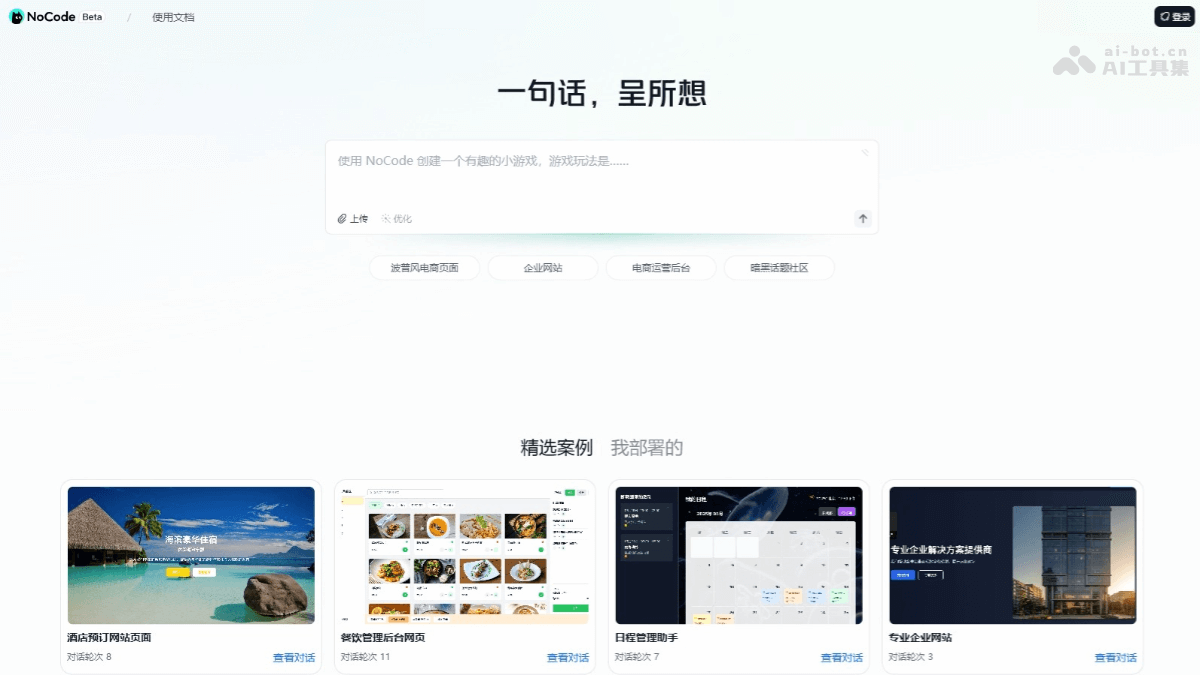
Main features of NoCode
- Natural language programming: Based on natural language descriptions of requirements, generate applications without writing code.
- Real-time preview: Render pages instantly, view effects in real time, and make adjustments.
- Local modifications: Supports local editing of page content, and can compare and roll back versions.
- One-click deployment and sharing: After the application is completed, directly generate a sharing link.
- Database: By connecting to Database, data storage and management are realized, supporting real-time data updates and information storage.
- Automatic SQL execution: Users input requirements through the interface, and NoCode automatically generates SQL and provides a one-click execution function, simplifying the database table creation process.
- Automatic code logic modification: After SQL is executed, the front-end code is automatically modified and automatically adapted to the back-end storage logic, achieving three steps in one.
- File storage function: Supports storage and management of multiple file types such as files, images, and audio, intelligently identifies data structures (coming soon), and automatically generates database tables.
-
Mini-program function: Supports WeChat mini-programs, allowing users to create, share, and manage works on mobile devices without a computer.
-
Chat-only mode: In "chat-only mode," users can communicate with an AI assistant, solve development problems, and improve development efficiency.
-
Knowledge setting function: Supports setting the "knowledge" of works, such as industry terminology and format specifications, to ensure output consistency and reduce repeated prompts.
How to use NoCode
- Log in to your account: Visit the NoCode official website https://nocode.cn/ , and log in by scanning the QR code with the Meituan APP or WeChat.
- Enter the target page scenario: In the input box on the homepage, enter the type of page you want to implement, such as "online form" or "product display page."
- Describe the page framework: Further describe the overall structure of the page, such as "top navigation bar + middle content area + bottom button."
- Upload images: Click the "Upload" button in the input box, select an image, and tell the model where to insert the image.
- Send instruction: Click the send button and wait for NoCode to generate the page.
- Real-time preview and adjustment: After the page is generated, view the result using the real-time preview feature. If changes are needed, make local adjustments directly on the page, or further describe your requirements in the dialog box, and NoCode will optimize the page according to the instructions.
- Save and deploy: After completing the page design, click the save button, and NoCode will automatically upload the code to the repository.
-
Use Database: Make sure you have applied for and connected to NoCode's Database to prepare for the storage feature.
-
Upload files: Find the storage module in the NoCode interface, and select and upload the files you need (such as images, audio, etc.).
-
Use files: After uploading is complete, apply the files to your NoCode work through simple instructions or configuration.
-
Manage files: View, edit, or delete files in the Database management interface to ensure reasonable use of resources.
NoCode application scenarios
- Website page development: Quickly create web pages such as personal blogs and corporate official websites.
- Practical tool creation: Generate tools such as online forms and schedule management.
- Mini-game development: Design simple interactive mini-games.
- Event page building: Create event pages such as lucky draws and promotions.
- Product prototype design: Quickly build product prototypes for display and testing.

