
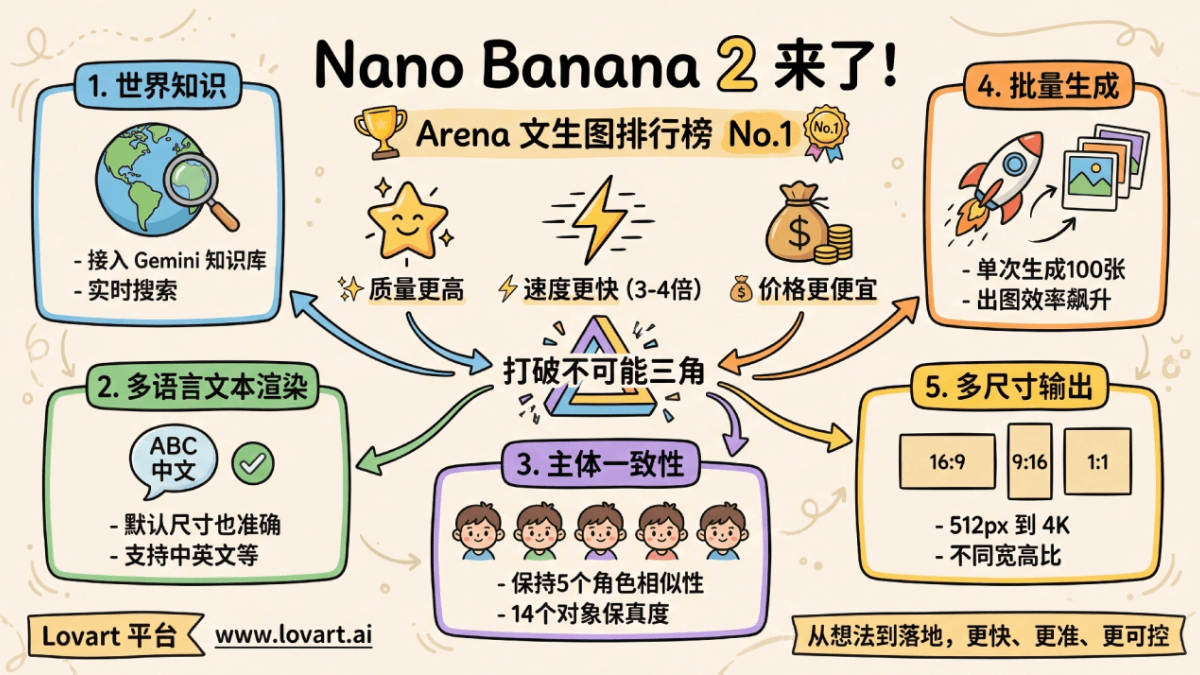
Nano Banana 2 Here it comes.
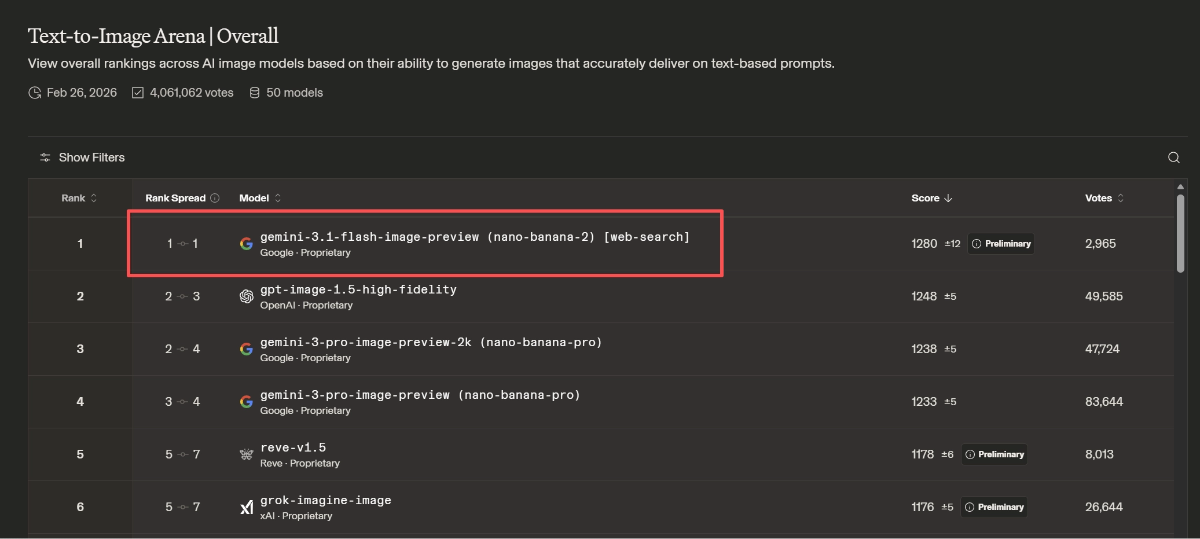
Yesterday, Google launched its latest image model, Nano Banana 2 (Gemini 3.1 Flash Image), and it debuted straight at No. 1 on the Arena text-to-image leaderboard!
Not only is its understanding of and adherence to instructions stronger, but multilingual text rendering is also more accurate, and it can directly output images in different aspect ratios and resolutions.
In one sentence: higher quality, faster, and cheaper too!
Lovart You can try it out right away, and as a Pro member I can even play with Nano Banana 2 for free—it's really worth it.
In this article, I'll share some creative ways to use Nano Banana 2.
01. Hands-On with Nano Banana 2
We open the Lovart official website and select in the image templates Nano Banana 2。
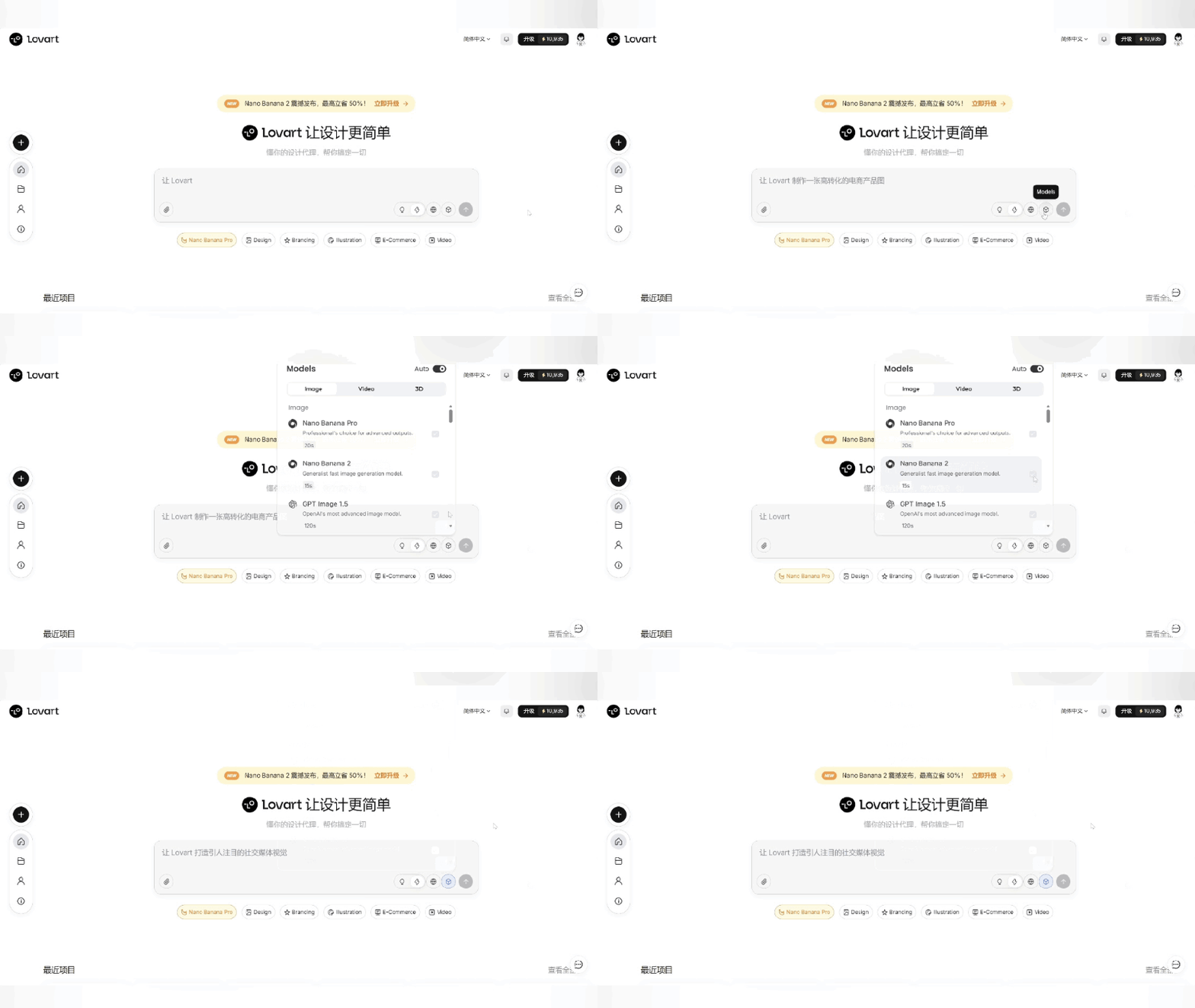
Official Website:https://www.lovart.ai/
World Knowledge
Nano Banana 2 is connected to the Gemini knowledge base and real-time search. For example, if we want Nano Banana 2 to generate a real-world image, it will first search for visual reference information, then render the image according to our requirements.
When generating images, we select Thinking mode, turn on web search。
Prompt: High-definition photography, looking out from the window of [a cozy cafe], directly facing [the Yellow Crane Tower], the weather outside the window [real-time], 4K resolution, aspect ratio 16:9
Nano Banana 2 will search for and reference the architectural features of the Yellow Crane Tower, and query real-time weather information for Wuhan as a reference to generate the image.
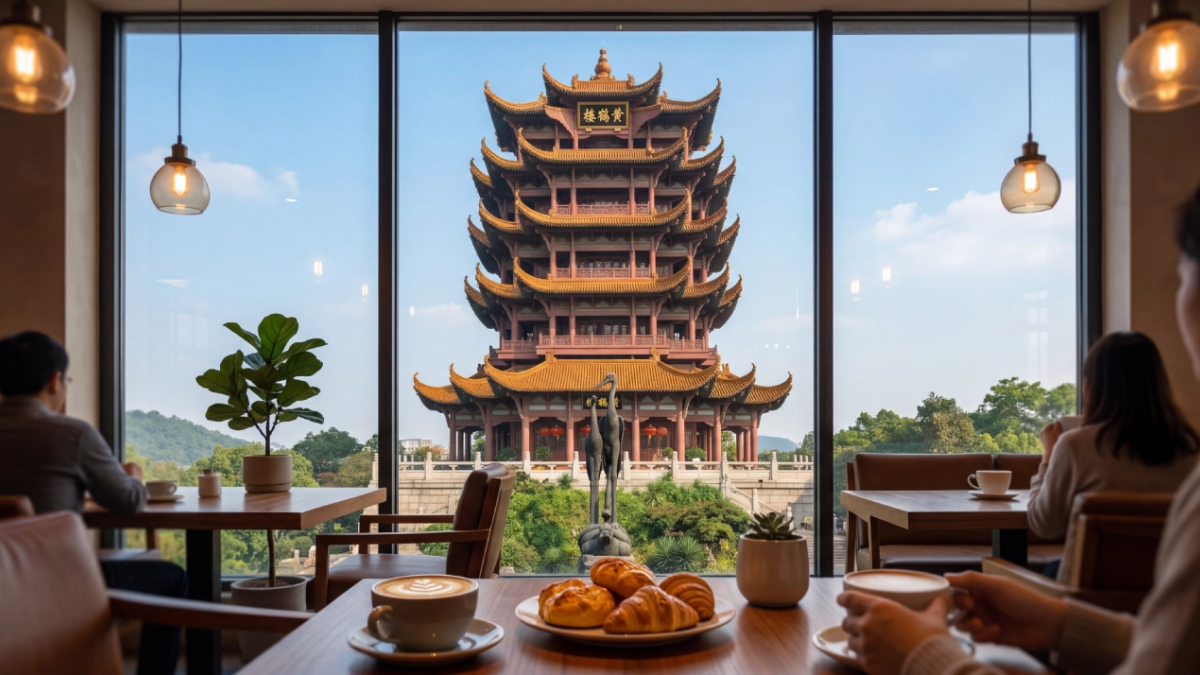
The generated image's texture is excellent. If I didn't know there's no cafe opposite the Yellow Crane Tower, it would really be hard to tell this is an AI-generated image.
By replacing the content in the 【】, you can generate photographic-style images of other regions. This玩法 is especially popular on X~
If you mark a point for Nano Banana 2 on a map, it can also accurately recognize and understand it.
Prompt: Generate a panoramic view of the location marked in red in the reference image, anime style.
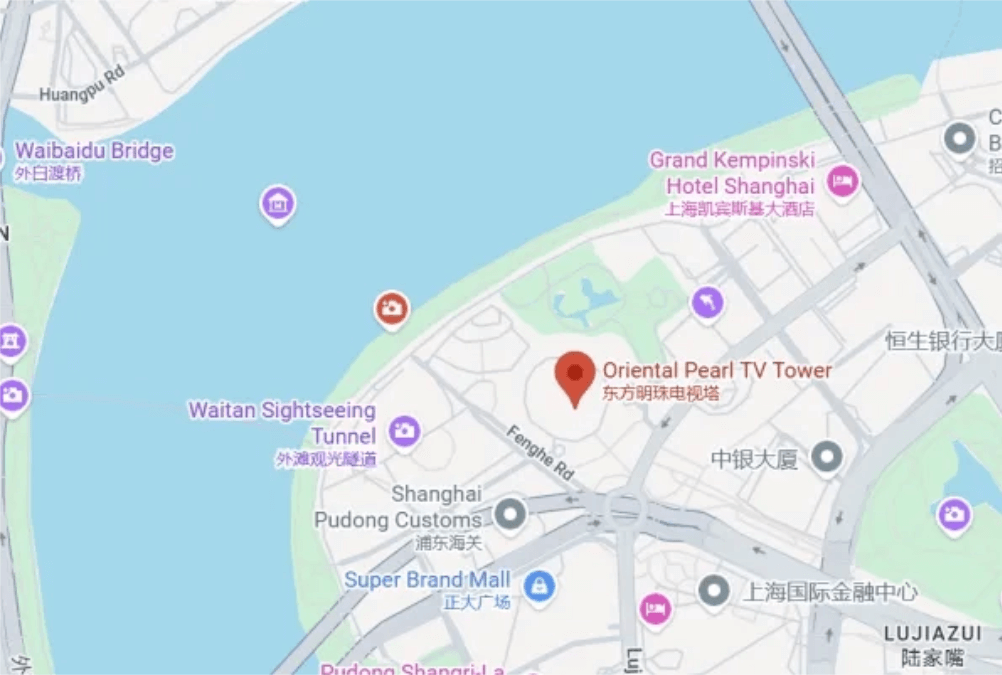
Lovart accurately recognized that the location marked in red is the Oriental Pearl TV Tower, and based on my screenshot, it also fully presented the Huangpu River and the Lujiazui skyline.
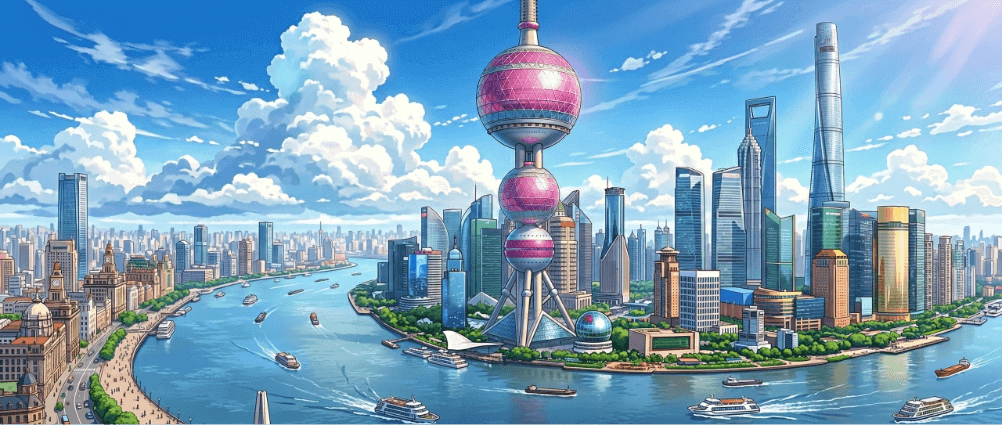
Editing images in Lovart is very convenient. Parameters such as lighting, exposure, contrast, saturation, and so on can be adjusted directly in the image generation interface.
With Lovart's infinite canvas style, the operation is also very simple. We click on an image in the canvas, and it can be added to the conversation as a reference image. Let's try generating a night scene version.
Generate a nighttime panoramic view of the Oriental Pearl TV Tower, anime style, neon lighting effects.
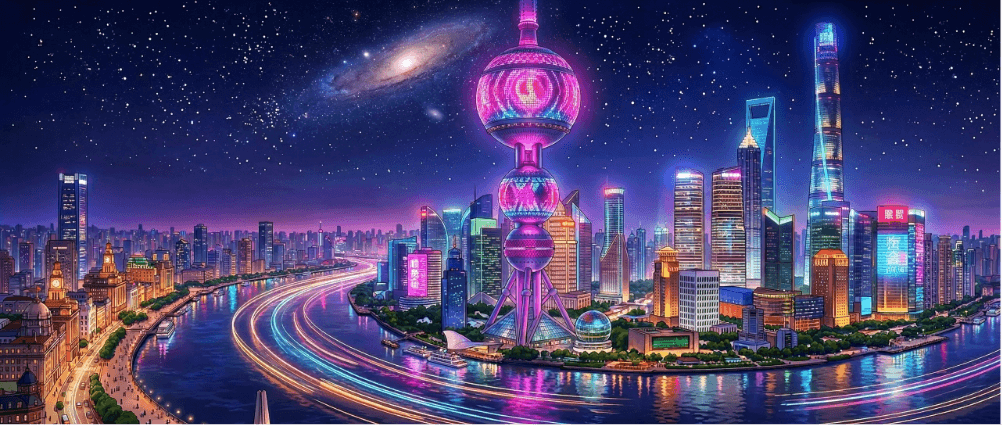
The stylization is done quite well.
Text Rendering
Nano Banana Pro's most viral use case is generating infographics, but with Nano Banana Pro, Chinese text is only relatively accurate at 4K resolution.
For example, let's use Google's official introduction to Nano Banana 2 to generate an infographic.
Convert the content of this article into a cartoon-style infographic, hand-drawn illustration style, using visualization to explain the core concepts, including a few concise cartoon elements, icons, and arrows, highlighting keywords and core concepts to help users understand. Use Chinese by default. Aspect ratio 16:9.
When using Nano Banana Pro to generate infographics, the first choice is 4K; otherwise, some text will always be blurry or garbled. But placing 4K images in an article takes a long time to load, which may affect the reading experience.
My daily workflow is to first generate a 4K infographic, download it locally to resize it, and then use it. It's fine handling one or two images, but if there are many images, it's still quite time-consuming.
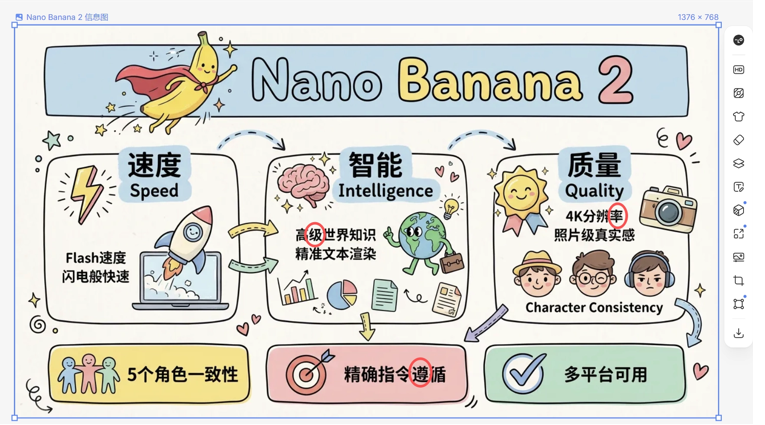
Generated by Nano Banana Pro
Nano Banana 2 upgraded text rendering. Now even if you don't choose 4K resolution, text rendering is much more accurate.
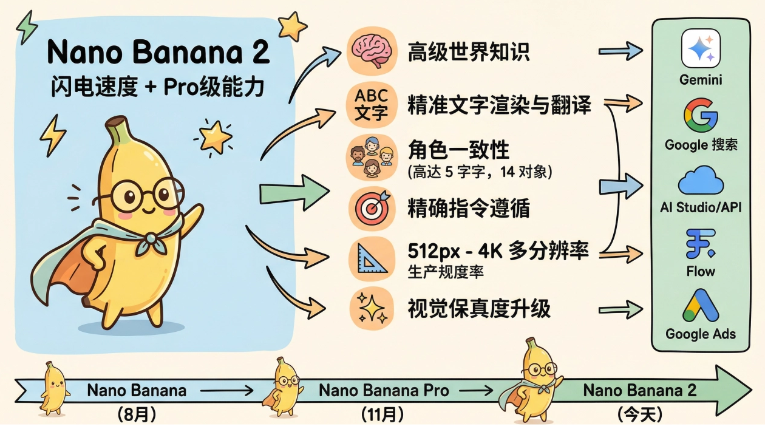
The text generation really no longer has garbled characters, but I found 2 typos. We can press CTRL + left-click to select the location of the typos, and make local edits very accurately.
This time the generated result is fine:
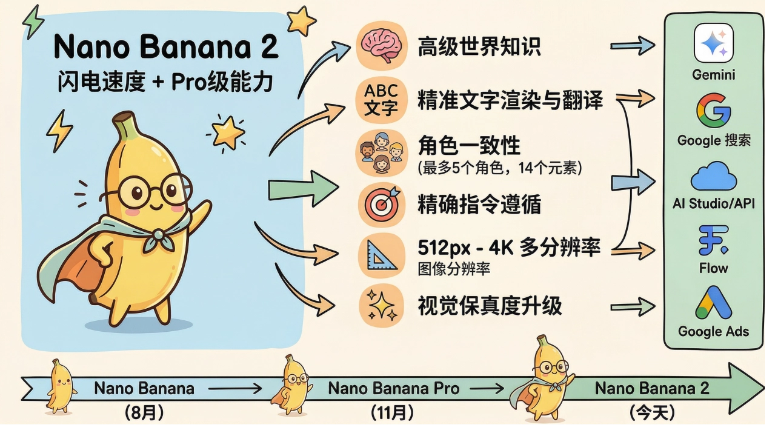
Stronger subject consistency
Nano Banana 2 also has stronger subject consistency compared with Nano Banana Pro, maintaining the similarity of up to 5 characters and the fidelity of up to 14 objects in a single pass.
Analyze the overall composition of the reference image. Identify all key subjects (whether a single person, a group/couple, a vehicle, or a specific object) and their spatial relationships/interactions. Generate a coherent 3×3 "contact sheet" grid showing 9 shots that are exactly the same as the above subjects, taken in the same environment.
Adjust standard cinematic shot types according to the content (for example, if it is a group, keep the group intact; if it is an object, shoot the entire object):
First row (establishing the environment): Extreme Long Shot (ELS): the subject appears small in a vast environment. Long Shot (LS): the subject or group is fully visible from top to bottom (from head to toe/from wheels to roof). Medium Long Shot (American shot/three-quarter view): shot from above the knees (people) or from a three-quarter view (objects).
Second row (core coverage): 4. Medium Shot (MS): shot from above the waist (or shoot the central part of the object). Focus on interaction/action. 5. Medium Close-Up (MCU): framed from above the chest. Create an intimate composition of the main subject. 6. Close-Up (CU): focus on the face or the "front" of the object.
Third row (details and angles): 7. Extreme Close-Up (ECU): highly focused on key features (eyes, hands, logos, textures), presenting macro-like details. 8. Low-angle shot (looking up): look up at the subject from the ground (create an epic/heroic feel). 9. High-angle shot (bird's-eye view): look down at the subject from above.
Ensure strict consistency: the same people/objects, the same clothing, and the same lighting must appear in all 9 storyboard panels. Depth of field should vary realistically (background blur in close-ups).
Create a professional 3×3 cinematic storyboard grid containing 9 storyboard panels. The grid image should present the effect of the specific subject/scene in the input image at all focal lengths.
First row: wide environmental shot, full-body shot, three-quarter side view (above the knees). Second row: above-the-waist view, above-the-chest view, face/front close-up. Third row: macro detail, low angle, high angle.
All frames must have realistic textures, consistent cinematic color grading, and correct composition based on the number and type of analyzed subjects or objects.
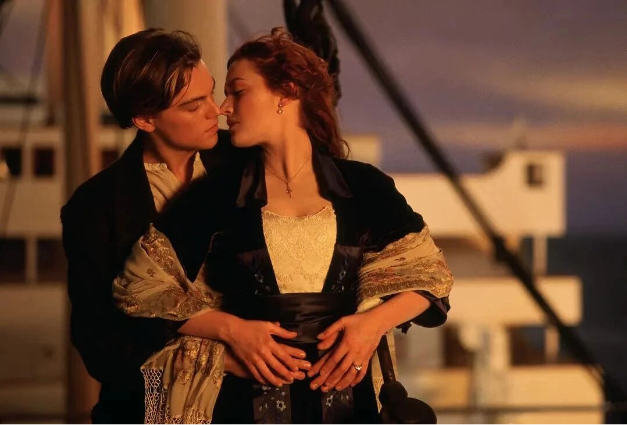
Reference image
Lovart directly recognized that this is the classic shot of the couple in the movie Titanic in a dusk scene, and generated 9 other storyboard images in the same scene. The character consistency is maintained very well.
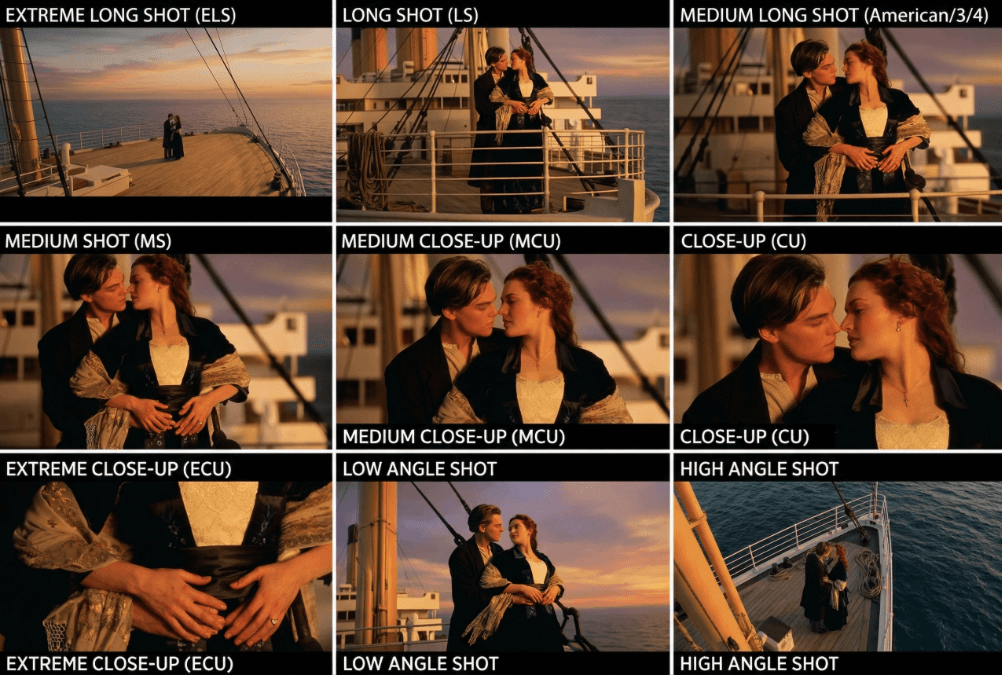
The character's facial features, clothing, and pose are all maintained quite well. However, scene 1 and scene 9 both look pretty good on their own, but when compared side by side, the difference in the same scene... is a bit too big.
However, it has no impact when used for AI comic drama storyboards, and it is very easy to use.
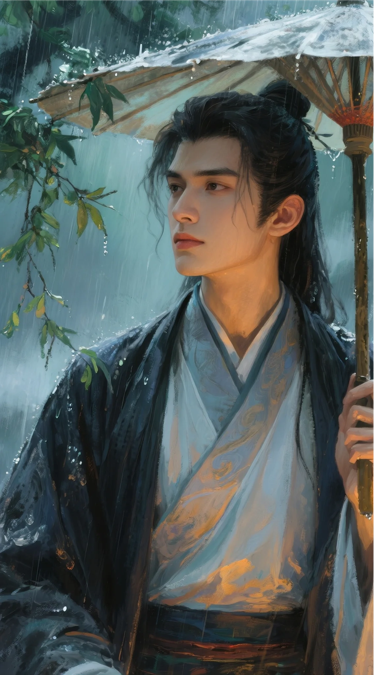
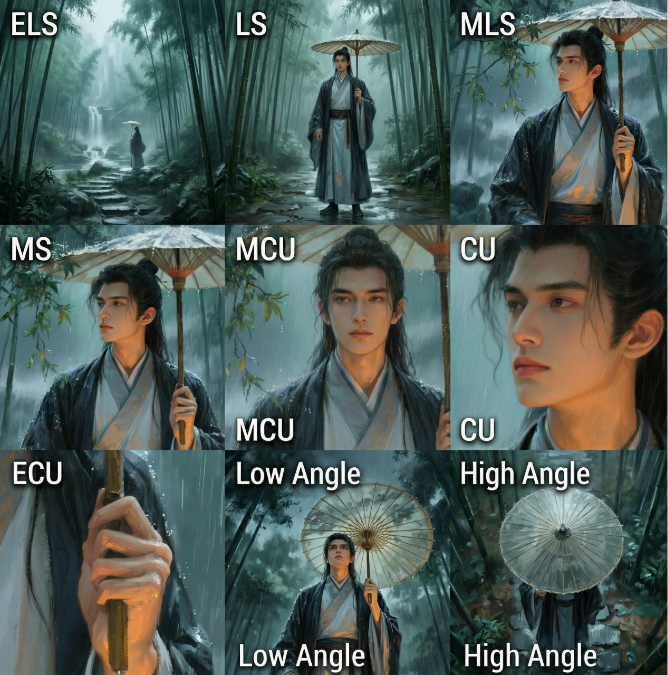
Lovart is integrated with the full lineup of top-tier models, enabling seamless multi-model collaboration. The storyboard images you create can be turned directly into videos in a one-stop process—truly a highly efficient productivity tool for AI short dramas and comic dramas.
Prompt: Generate a video based on the reference image. As soon as the rain falls, the entire bamboo forest seems shrouded in mist. A young man in a blue robe holds an oil-paper umbrella and slowly walks deeper along the wet, slippery stone steps. The water glimmers under his feet, and the sound of a distant waterfall can be heard clearly. The forest is eerily quiet, with only the rain tapping on the umbrella's surface, yet he always seems to be listening for something else. When he reaches the depths of the forest, he stops and looks up at the swaying bamboo shadows, as if someone is waiting for him in the dark, or as if someone is chasing him. His fingers tighten around the umbrella handle, and rainwater runs down along the wood grain. Finally, he takes a deep breath, puts aside his hesitation, and steps into the thicker mist to keep an old appointment.
The rainy weather, bamboo forest, thick fog, and the character's nervous expression as he looks around all create a strong atmosphere. The cuts are also very smooth, and the information progresses naturally.
Batch generation
Lovart can generate 100 images in a single batch. Combined with Nano Banana 2's powerful and fast text-to-image capabilities, image generation efficiency soars.
Please create an interesting comic story based on the story of the girl in the reference image traveling around the world. The story should be full of ups and downs, with emotional highs and lows. Please maintain consistency in the character's clothing and appearance. Please create 10 images in a 3:4 format, one image at a time.
On the infinite canvas, we can see Lovart's image generation process. The dialog box on the right is working away, and the generated images are laid out one by one on the canvas. You can see all the assets very intuitively, making them easy to find.
If you want to change the style or modify details, just click on the image to add it to the dialog box for secondary editing.
Let's take a look at the final generated results:
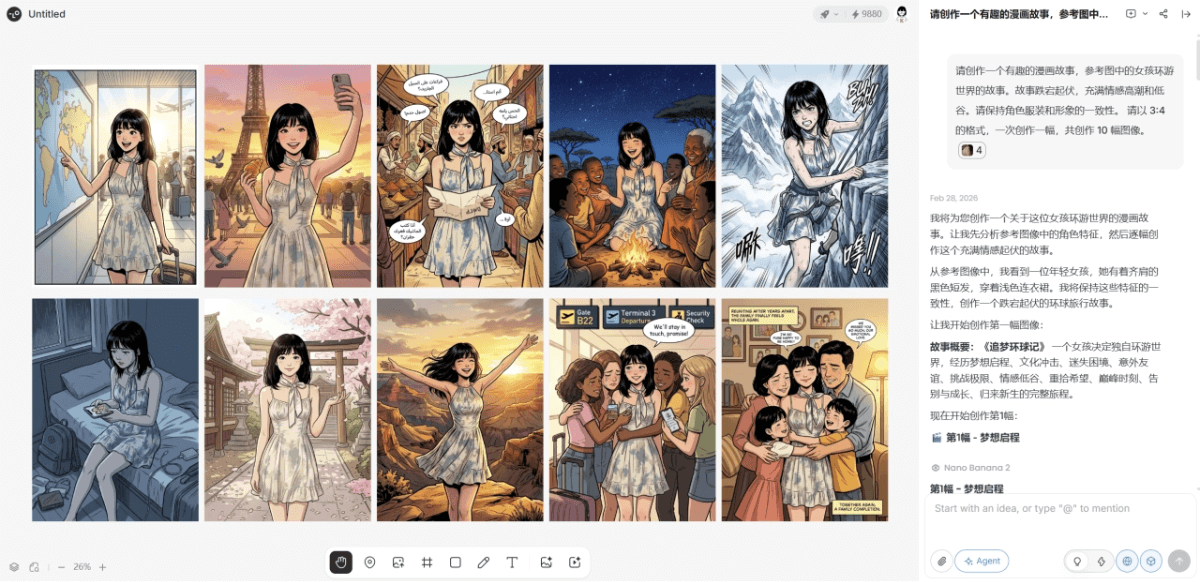
Consistency is maintained very well, and the designed images are full of narrative.
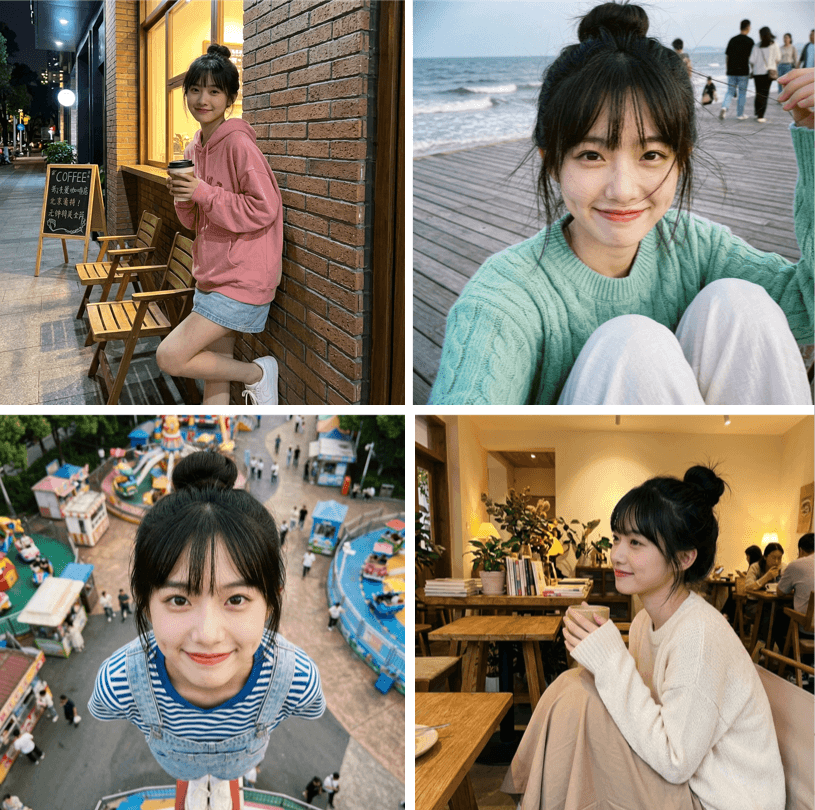
Prompt: Generate 81 stylish outfit images for the character in the reference image, with every 9 images as a group. Within each group, keep the character's outfit and scene consistent, using a combination of long shots, close shots, medium shots, and close-ups. Randomly generate different shooting angles and poses, with the character's posture relaxed and natural, realistic human anatomy, normal proportions, and actions that follow the logic of everyday photography. Natural and harmonious lighting that matches the environment, with an overall realistic and true-to-life style.
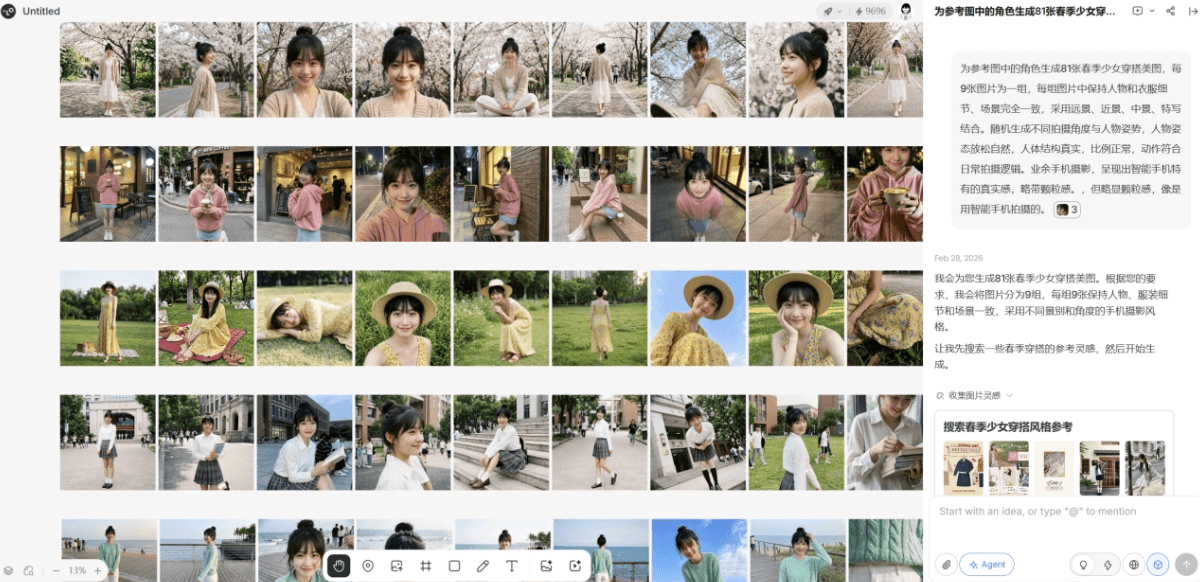
The generated everyday outfits can be published directly~ Lovart's batch image generation is so stable!
Commercial and Product Posters
Nano Banana 2 can generate images from 512px to 4K, with different aspect ratios and resolutions. Designers should understand the importance and convenience of this feature.
In e-commerce scenarios, the same set of assets often needs to be prepared in different specifications for different platforms: banners are better in landscape, store main images need to be square, detail pages need vertical images, and WeChat Moments posters also tend to be vertical. If you crop from one large image, the composition becomes chaotic; if you make each one separately, it takes a lot of time.
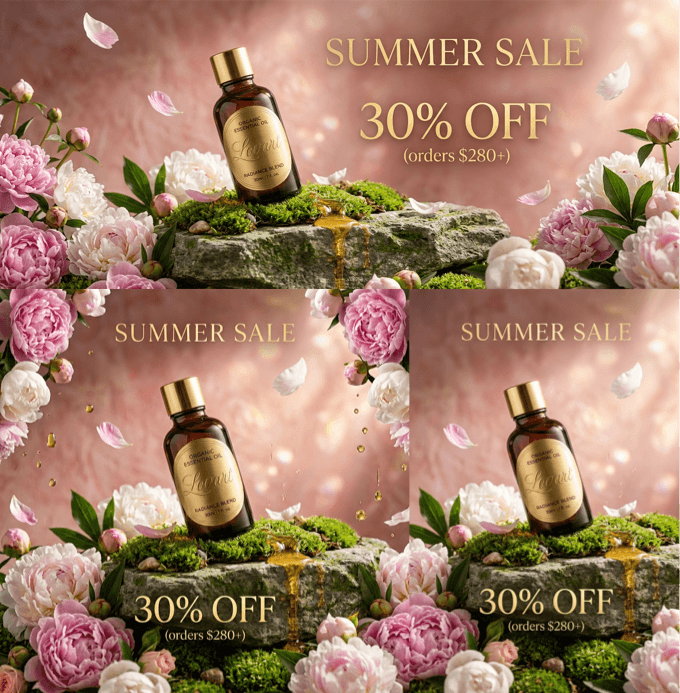
We can directly ask Lovart to generate multiple variants based on a reference image at once:
Prompt: Generate 10 variants of different sizes, respectively for the banner page, store main image, WeChat Moments poster, and detail page display.
Even though the image aspect ratios change, the style and subject consistency remain stable.
After creating an excellent key visual, we can expand it to different scenarios with one click, just like applying a template, which saves a lot of time.
02. Some Sharing
The development of image generation models over the past two years has been evident to all. AI image generation has become increasingly clear and realistic. Nano Banana 2 has a more critical improvement: it can directly capture real-time information and generate images based on real-time data.
Nano Banana 2 is almost three to four times faster than Nano Banana Pro, its comprehension and text rendering are more stable, and it is also cheaper. In business, it is often said that speed, quality, and cost are hard to have at the same time: if you want speed, it is expensive; if you want to save money, it is slow; if you want good quality, it costs money. The emergence of Nano Banana 2 directly breaks this impossible triangle.
Of course, the improvement in design efficiency is not just about generating images faster, but about the entire process being smoother, clearer, and more concise.
Nano Banana 2 in Lovart is even more convenient. Conversational generation plus an infinite canvas lays out all images on the same page, and any reference image or any historical version can be added to the context at hand, making image editing very convenient and accurate. Combined with batch generation, one inspiration can generate countless usable assets.
Individual design capabilities will gradually be amplified by AI, and one person can complete the entire chain from idea to delivery. For teams, collaboration will become lighter, and communication costs will also decrease.
Next, what truly creates a gap may no longer be who can draw more realistically, but who can move from idea to implementation faster, more accurately, and more controllably.
Original link:Lovart integrates Google's new image generation king Nano Banana 2, faster and more economical, here comes a hands-on test!