

What is Mureka
Mureka is an AI music commercial creation platform launched by Kunlun Wanwei, allowing professional artists and music enthusiasts to create personalized music on the platform. Users input lyrics on the Mureka page, add reference music, and use the Style feature to control the music style, creating AI music with stability and controllability. The platform not only supports music style and melody control, but also allows users to freely adjust various parts of the song, such as the intro, verse, chorus, etc. After completing the creation, users can download a creation certificate, apply to display and sell it in the Mureka song store, and earn revenue.
Mureka is equipped with the newly launched Mureka V7.6 and Mureka O2 models, bringing a faster and more stable music generation experience. The new models strengthen the semantic-to-music mapping capability, support the generation of more complex styles, and can optimize sound field modeling to make the sound quality closer to professional production standards. The upgraded models are more suitable for commercial scenarios such as real-time generation, mobile devices, and high-concurrency calls, driving AI music creation into a new stage of "professional quality × real-time experience."
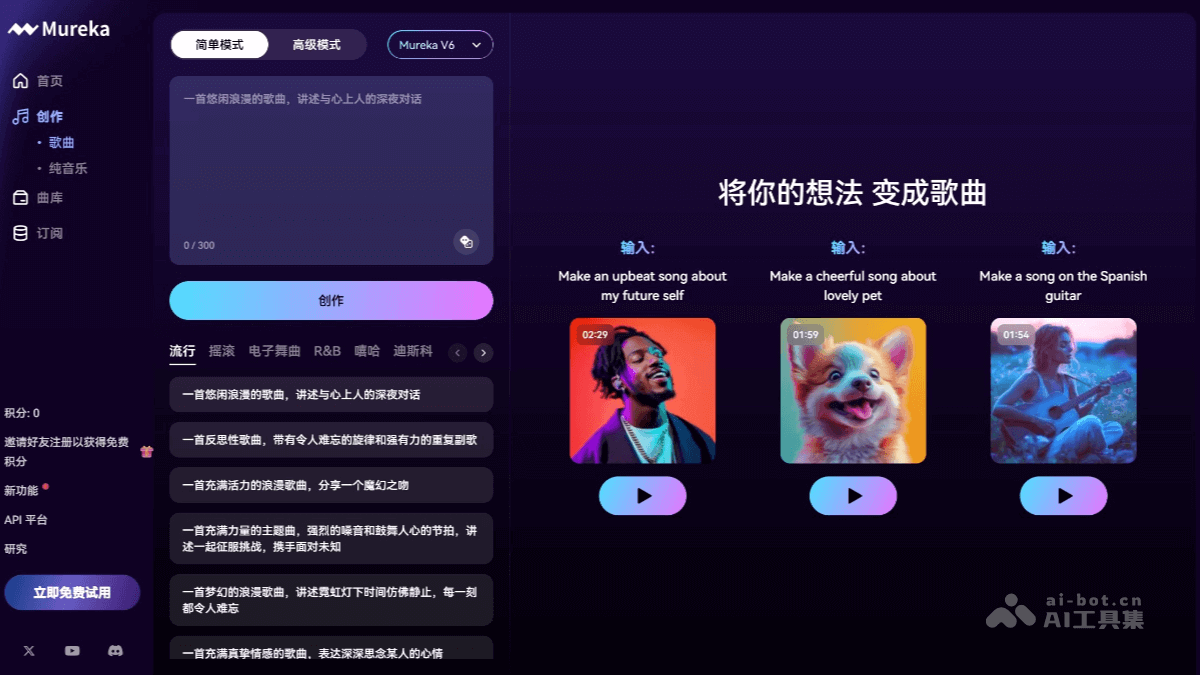
Mureka's main features
- Agent Studio: Users only need to express an idea, such as a sentence, emotion, or meme, and the Agent can automatically generate lyrics, match the style, and output a complete song. There are currently six scenarios, such as creating albums, writing songs based on hot topics, and giving songs as gifts, covering a variety of life scenarios.
- Music creation and editing: Users input lyrics on the Mureka platform, add reference music, and control the music style through the Style feature for music creation. Free adjustment of sections such as the intro, verse, chorus, interlude, and outro provides music style control and melody control functions.
- AI music generation: Based on Skymusic 2.0 technology, Mureka can generate AI music with a high degree of stability and controllability, and supports the generation of two-channel stereo songs up to 6 minutes long.
- Style control: Provides a Style feature to control the music style. Users can choose specific genres, tunes, tempos, chords, and instrumentation to ensure the generated music meets expectations.
- Melody recording: Provides a melody recording tool, allowing users to control the melody part of the music more precisely and supporting the upload of reference music to generate new melodies.
- Song refinement: After music creation is completed, users can use Mureka AI tools to refine it, extending the current song as needed or regenerating unsatisfactory sections.
- Self-developed large model: Equipped with Kunlun Wanwei's self-developed AI music large model Skymusic2.0, it can continuously and stably generate songs in specific styles, support lyrics input of more than 500 characters, and generate two-channel stereo songs up to 6 minutes long.
- Multilingual support:Mureka V6 Supports pure music generation and AI music creation in 10 languages, including English, Chinese, Japanese, Korean, French, Spanish, Portuguese, German, Italian, and Russian.
- Inference optimization:Mureka O1 It is an inference-optimized version based on V6. CoT (chain of thought) is added during the inference process, which can improve music quality, music creation efficiency, and flexibility.
- Work display and sales: Music works created by users can be displayed, listened to, favorited, shared, and downloaded in Mureka's song store. There is also the opportunity to list works for sale and earn revenue.
- Creation certificate and copyright protection: Mureka provides proof for users' creations, allows downloading of creation certificates, and ensures that the copyright of works is protected.
How to use Mureka
- Product official website:mureka.ai, visit the Mureka platform to create an account and log in.
- Enter lyrics: On Mureka's Create page, enter the pre-conceived song title and lyrics in the corresponding input boxes.
- Select reference music: You can choose music from the platform's built-in music library, or upload local music as a reference. This can help the AI more accurately grasp the music style and emotion you want.
- Control music style: Use the Style function to select the music style and mood, such as ancient style, sad, etc., to ensure that the generated music matches your creative intent.
- Generate music: After completing the above steps, click "Create", and Mureka uses its AI technology to generate music. The generated music not only has high stability and controllability, but also supports free adjustment of each music section.
- Adjustment and optimization: If you have specific adjustment needs for the generated music, you can extend the track as needed or regenerate unsatisfactory sections.
Mureka's application scenarios
- Personalized music creation: You can enter lyrics and choose a music style according to your preferences on the Mureka platform, and the AI will generate personalized music works.
- Commercial music production: Mureka provides professional artists and music enthusiasts with a channel for commercial music creation and sales, suitable for music creation in fields such as advertising, film and television, and game soundtracks.
- Music copyright protection and commercialization: Works provided by Mureka have AI music creation certificates, which protect users' copyright interests. Works can be listed on the Mureka platform for sale to generate income.
- Music teaching and learning: Mureka platform's AI music generation technology can be used as a music teaching tool to help learners understand the music creation process, while also providing inspiration and learning materials.


