
What is Mureka V8
Mureka V8 is launched by Kunlun WanweiAI musiclarge model, based on the MusiCoT (Music Chain-of-Thought) technical architecture, achieving a leap from sound splicing to human-like creative logic. The model has been comprehensively upgraded across four major dimensions: melody completeness, vocal expressiveness, arrangement layering, and sound quality spatiality, moving AI music from "generable" to "releasable." Mureka V8 has the ability to create works with complete artistic expressiveness, and is committed to giving everyone a more instant, more personal, and more participatory music creation experience.
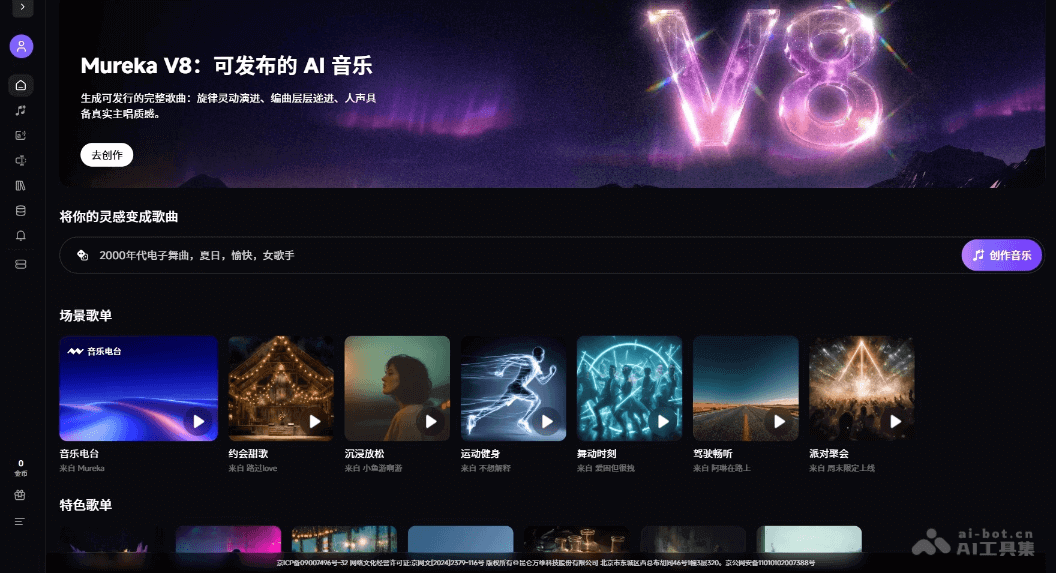
Main features of Mureka V8
-
AI music generation: Users can describe the desired music style, mood, and rhythm in natural language, and the model automatically generates a complete song.
-
Lyric creation: Supports user-customized lyric input or AI-assisted generation, ensuring lyrics and melody are precisely matched and integrated.
-
Vocal synthesis: The model can intelligently match timbre, gender, and singing style to generate vocals that are confident and smooth, with a "lead vocalist presence."
-
Reference song: Supports users in uploading reference tracks, making the generated result align stylistically with the user's creative expectations.
How to use Mureka V8
- Visit the official website: Visit the Mureka official website to enter the creation page.
- Choose a mode: Switch between the top "Simple" or "Custom" tabs to choose the appropriate creation mode.
- Choose a model: Confirm in the upper right corner that the V8 model version has been switched to.
- Add references: Click "Reference Song" to upload a style reference, or "Custom Singer" to create an exclusive timbre, or "Hum a Melody" to input melodic inspiration.
- Enter lyrics: Enter content in the lyrics box, or turn on the "Instrumental" switch to generate a work without lyrics, or click "Generate Lyrics" for AI-assisted creation.
- Describe the style: Enter descriptors such as style, mood, and instruments in the style box, or click the quick tags below (such as Electric Piano, Brooding) to add them quickly.
- Generate music: Click the "Create" button at the bottom to generate a song, and wait for the AI to complete the creation.
Application scenarios of Mureka V8
-
Personal entertainment creation: Music enthusiasts can generate exclusive songs simply by describing them in natural language without a professional foundation, satisfying personal expression and sharing needs.
-
Short video soundtrack: Self-media creators can quickly generate background music that matches the video style, with support for instrumental mode and mood customization.
-
Professional music production: Musicians can quickly generate demos in the early stage of creation, and explore style directions through the reference song and custom singer features.
-
Virtual idol operation: Build AI virtual singers and girl groups, such as the official girl group M:RA, achieving complete IP incubation from image to works.
-
Game audio design: Game developers can generate scene music and character theme songs in batches, and support API integration for automated production.