
What is MotionCtrl
MotionCtrl is a unified and flexible motion controller designed for video generation models, introduced by researchers from institutions including Tencent, the University of Hong Kong, Shanghai AI Laboratory, Tsinghua University, and Guangdong University of Technology. It can independently control camera motion and object motion perspectives in videos. The system consists of two main modules: a camera motion control module and an object motion control module, which can work in coordination with latent video diffusion models to achieve precise control over motion perspectives in generated videos.
MotionCtrl Official Website Entry
- Official project homepage:https://wzhouxiff.github.io/projects/MotionCtrl/
- Arxiv research paper:https://arxiv.org/pdf/2312.03641.pdf
- GitHub code repository:https://github.com/TencentARC/MotionCtrl
- Hugging Face(MotionCtrl + VideoCrafter):https://huggingface.co/spaces/TencentARC/MotionCtrl
- Hugging Face(MotionCtrl + SVD):https://huggingface.co/spaces/TencentARC/MotionCtrl_SVD
MotionCtrl Features
- Video generation with models: MotionCtrl can work with video generation models (such asVideoCrafter, Stable Video Diffusion) to generate videos based on text prompts. These videos not only contain static images but also include coherent and smooth motion effects.
- Control camera motion: Users can specify how the camera moves in the video, such as panning (left/right, up/down movement), zooming (zooming in or out), rotating (clockwise or counterclockwise), etc. MotionCtrl can generate corresponding videos according to these instructions.
- Control object motion: MotionCtrl can control the motion trajectories of objects in videos, such as the movement path, speed, and direction of objects in the scene, so that the object motion matches the text description or user-specified trajectory.
- Combined motion control: MotionCtrl can not only independently control camera and object motion, but also control both simultaneously to achieve complex motion effects, such as the camera panning or rotating while tracking an object.
- Adapt to multiple camera poses and trajectories: After training, MotionCtrl can adapt to various different camera poses and object motion trajectories without needing to retrain the model for each new situation.
How MotionCtrl Works
The working principle of MotionCtrl is mainly based on two core modules: the Camera Motion Control Module (CMCM) and the Object Motion Control Module (OMCM), as well as their coordinated work with the Latent Video Diffusion Model (LVDM).
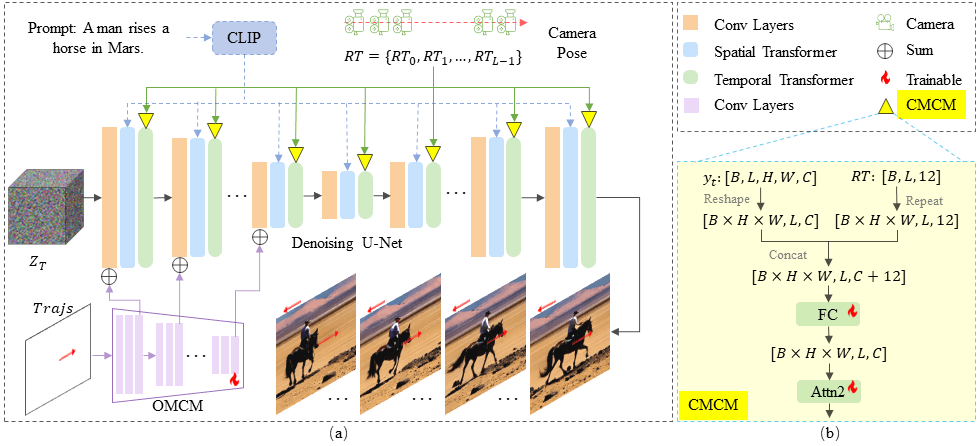
The following are the detailed steps of how MotionCtrl works:
- Camera Motion Control (CMCM):
- CMCM receives a series of camera poses (including rotation matrices and translation matrices), which describe the camera's motion path in the video.
- CMCM interacts with the temporal transformers in LVDM to integrate camera pose information into the video generation process.
- In the second self-attention module of the temporal transformer, the camera pose sequence is expanded and combined with timestep information, then processed through a fully connected layer for use in subsequent temporal transformers.
- In this way, the generated video will follow the specified camera motion, such as panning, zooming, and rotation, thereby achieving control over global scene motion.
- Object Motion Control (OMCM):
- OMCM is responsible for processing the motion trajectories of objects in the video, which are usually represented as the spatial position of the object in each frame.
- OMCM uses convolutional layers and downsampling operations to extract multi-scale features from the trajectories, and spatially integrates these features into the convolutional layers of LVDM.
- In this way, OMCM can indicate the position of an object in each frame of the video, enabling control over the object's local motion.
- Training Strategy:
- The training of MotionCtrl is divided into two stages. First, CMCM is trained using the Realestate10K dataset, which contains video clips and camera pose annotations but lacks object motion trajectories.
- Then, OMCM is trained using the WebVid dataset and object motion trajectories synthesized by the ParticleSfM algorithm. This dataset contains video clips, captions, and object motion trajectories.
- During training, CMCM and OMCM are added to the pretrained LVDM model as adapter-like modules, allowing them to be trained independently without affecting other parts of LVDM.
- Video Generation:
- In the video generation stage, MotionCtrl generates a video consistent with the text description based on the text prompt, combined with the camera pose and object motion trajectories.
- LVDM first generates the latent representation of the video from noise, and then CMCM and OMCM adjust the global and local motion of the video according to the given motion conditions, ultimately generating a video with the specified motion effects.