
What is MiniMax Code
MiniMax Code is a desktop AI Agent MiniMax launched by programming tool, built on the agent-archon architecture, supporting Windows and macOS. The tool is an autonomous development partner with the three-role collaboration capability of Leader/Worker/Verifier. It can autonomously break down tasks, read and write files, execute code, and manage projects, while also supporting remote interaction through IM channels such as Feishu and WeChat.
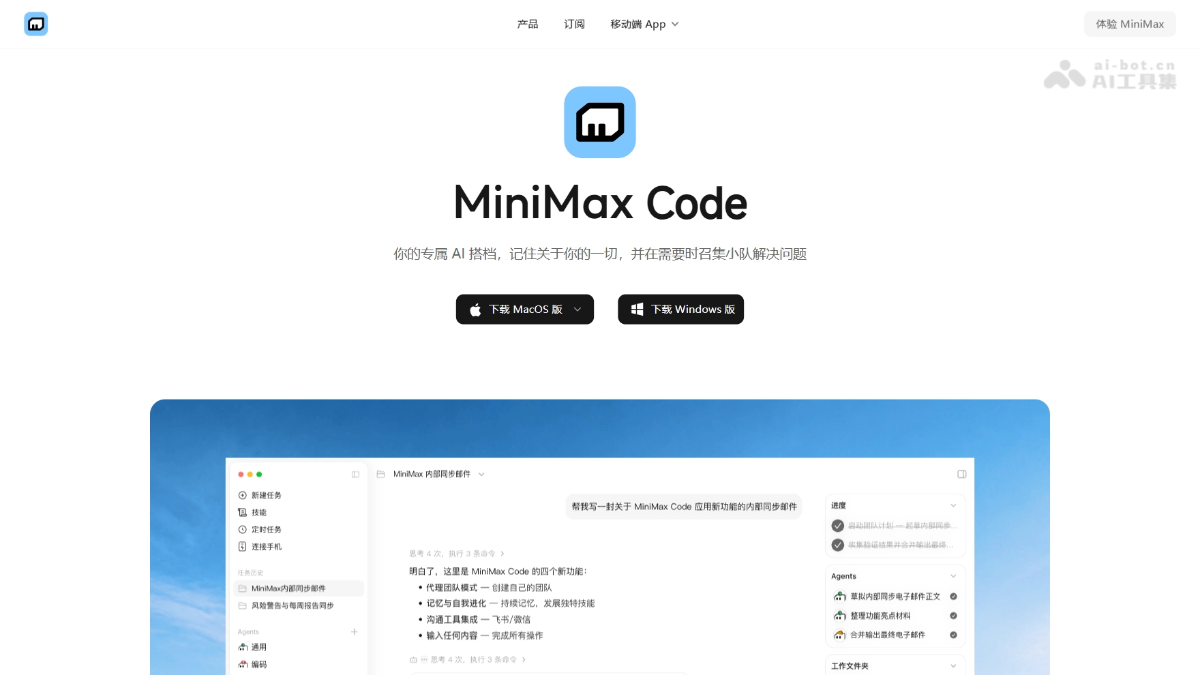
Main features of MiniMax Code
-
Multi-Agent Collaboration (Agent Team): The Leader breaks down tasks, multiple Workers execute in parallel, and the Verifier performs adversarial verification.
-
Three-layer cross-session memory: User-level, Agent-level, and project-level memory, continuously learning coding habits and context.
-
Worktree code isolation: Supports Git Worktree-style branch-isolated development.
-
MCP tool ecosystem: Full support for Model Context Protocol, with built-ins including GitHub, GitLab, Slack, Figma, and more.
-
Deep IDE integration: Open projects in 20+ editors such as Cursor, VS Code, WebStorm, and Zed with one click.
-
Three-level security permissions: An allow/confirm/block three-state model, directly intercepting high-risk commands.
-
Multi-channel IM access: Remote control via Feishu, WeChat, and Telegram, supporting
/stopinterruption. -
Natural language scheduled tasks: Create recurring tasks in natural language and automatically report results.
-
Deep Research: A five-step deep research Skill that automatically searches, analyzes, and outputs technical reports with cited sources.
-
Skill system: Automatically imports Skills such as Claude Code and Codex, supporting batch import from GitHub and automatic archiving.
- MiniMax Code 2.0:
- Remote control: Connect your phone to the desktop Agent as a lightweight control entry point to view replies, terminal output, and code changes, and to send commands and handle permission approvals.
- Built-in browser: Open web pages or HTML outputs directly in the app sidebar to view the actual results of code execution in real time.
- File preview and editing: View and modify code, documents, or configuration files directly in the file preview panel without switching to an external editor.
- Coding / Work dual mode: Coding mode retains code management tools, while Work mode focuses on final delivery, with one-click switching.
- BYOK model configuration: Supports connecting a MiniMax API Key, or adding a custom provider via Base URL, API Key, and Model Name, and switching models at any time based on the task.
How to use MiniMax Code
- Download and install: Visit the MiniMax Code official website https://agent.minimaxi.com/download to download the installer for the corresponding system.
- Register and log in: Register an account with a mobile phone number or email.
- Create a project: Click "+ New Chat" on the homepage, specify the local working directory, and select the run mode and permission mode.
- Chat with the Agent: Describe your requirements in natural language. The Agent automatically analyzes the requirements, reads existing files, creates or modifies code, installs dependencies, runs tests, and displays the diff of code changes.
Core Advantages of MiniMax Code
-
Adversarial Verification Mechanism: Workers and Verifiers iterate through competition, resolving the quality risk of a single Agent being both judge and player.
-
Fully Autonomous Task Execution: The tool can autonomously break down, execute, and verify the complete development process.
-
Native Support for Domestic Models: Based on MiniMax's self-developed M3 / M2.7+ models, with a 1M ultra-long context.
-
Non-Technical Friendly: The GUI interface lowers the barrier to use, with natural language interaction requiring no terminal basics.
-
Multi-Channel IM Integration: Supports remote asynchronous control via Feishu, WeChat, and Telegram, with automatic push notifications after scheduled tasks are completed.
Comparison of MiniMax Code with Similar Competitors
| Comparison Dimension | MiniMax Code | Cursor |
|---|---|---|
| Product Form | Desktop Agent | Code Editor |
| Multi-Agent Collaboration | Leader/Worker/Verifier three roles | Single Agent |
| Task Autonomy | Fully automatic breakdown and execution | Partially automatic |
| Non-Technical Friendly | GUI interface, natural language | Requires programming fundamentals |
Application Scenarios of MiniMax Code
-
Full-Stack Application Development: Describe requirements in natural language, and the Agent automatically completes front-end and back-end architecture design, coding, testing, and deployment.
-
Remote Asynchronous Collaboration: Send task instructions via Feishu or WeChat, and the Agent automatically pushes the results after completing execution in the background.
-
Financial Investment Research Analysis: Integrates the Hundsun financial database and Qichacha to automatically generate industry chain analysis reports and cross-validate financial data.
-
In-Depth Technical Research: Enter a research topic, and the Agent Team retrieves information from multiple sources in parallel and outputs a structured report with cited sources.
-
Scheduled Operations Monitoring: Set periodic tasks in natural language (such as checking build status daily), with automatic execution and multi-channel notifications.