
What is Manus 1.5
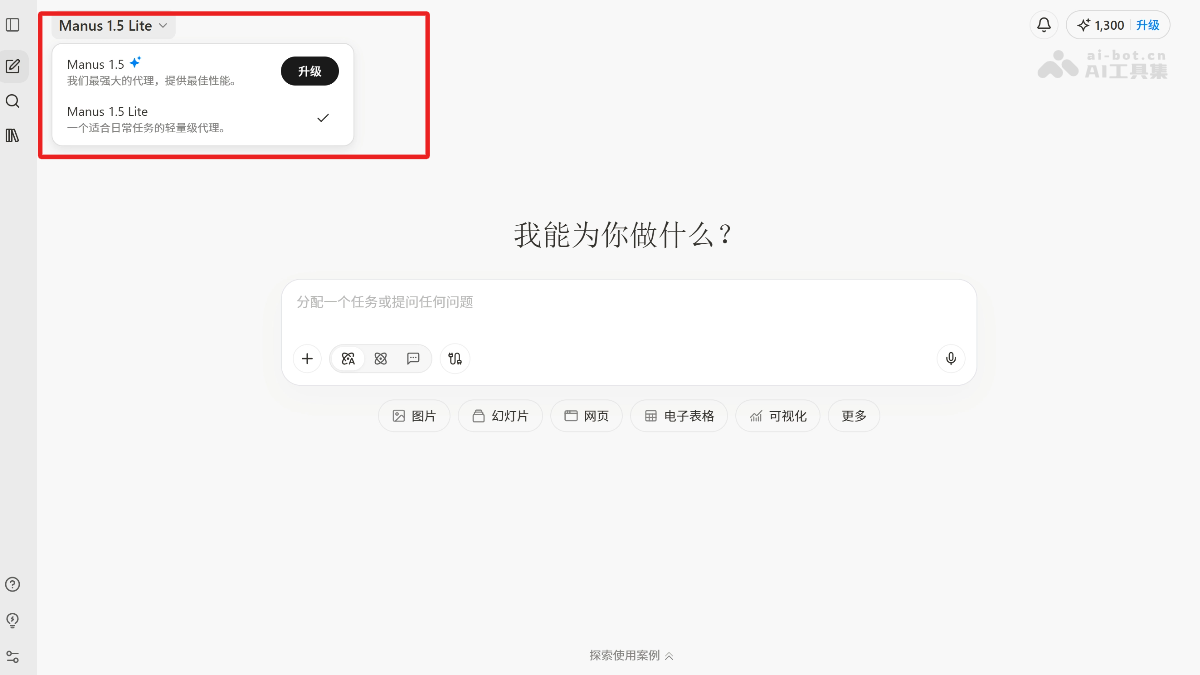
Manus 1.5 isManusthe newly launched powerful AI Agent, comprehensively improving the speed, reliability, and quality of task execution. Manus 1.5 is based on a brand-new architecture, reducing task completion time from 15 minutes to less than 4 minutes, with significantly enhanced complex task processing capabilities. Manus 1.5 provides full-stack web application development features, supporting the creation of complex applications with persistent backends, databases, user authentication, and embedded AI. Manus 1.5 expands the context window, ensuring coherence in long conversations and complex workflows. Manus 1.5 includes two new Agents,Manus-1.5 (providing all the features of the latest architecture)and Manus 1.5-lite (cost-effectiveness optimizedlightweight version).
Main features of Manus 1.5
-
Full-stack scaffolding: supports complete backend server infrastructure, not just frontend code.
-
User authentication: built-in user registration, login, and management features.
-
Integrated database: provides persistent data storage for forms, user data, and application state.
-
Embedded AI features: builds multimodal LLMs and image generation directly into the application.
-
Event-driven notifications: custom email or in-app alerts for user actions and system events.
-
Visual editing: point to any part of the live preview and describe changes in natural language.
-
Custom domain: connect your own domain or subdomain to publish the application.
-
Built-in analytics: track visitors, page views, and traffic sources without external tools.
-
Version control: roll back to any previous version of the application at any time.
-
Permission control: configure public, private, or specific-user access permissions for the application.
How to use Manus 1.5
- Register and log in: visit Manus official website, register an account or log in directly, and subscribe to a membership to unlock full features.
- Choose Agent version: choose Manus 1.5 (powerful, requires membership) or Manus 1.5-lite (lightweight version, economical and affordable) according to your needs.
- Create a new task: click "Create New Task" on the main interface and enter a task description, such as "create a full-stack web application" or "generate a PPT".
- Task execution: after entering the task description, click the "Start" button, and Manus 1.5 will automatically analyze and execute the task.
- Task monitoring and adjustment: monitor task progress through the interface. If needed, interact with Manus 1.5 in the dialog box to adjust task parameters.
- Task completion and result viewing: after the task is completed, Manus 1.5 provides a preview link or download link to view the final result.
Application scenarios of Manus 1.5
- Full-stack web application development: quickly create complex full-stack web applications, supporting persistent backends, databases, user authentication, and embedded AI features, without the need to manually configure servers or debug code.
- Data analysis and research: Efficiently complete data analysis tasks, from data collection and processing to visualization, helping users quickly draw conclusions and generate reports.
- PPT Creation: Users only need to input a topic or content outline, and Manus 1.5 can automatically generate professional PPT presentations, including text, charts, and design elements.
- Content Creation: Generate high-quality articles, blogs, copy, and other content according to user needs, supporting multiple languages and styles.
- Image Generation: Combined with multimodal AI capabilities, generate high-quality images or icons based on natural language descriptions, for use in design and creative projects.