
What is Kage
Kage is an open-source immersive 3D interactive experience project by designer Meng To. The tool uses only a single HTML file, rendering in real time with Three.js and overlaying scene assets generated by GPT Image 2 to build a nighttime stroll through a fictional Kyoto mountain temple. Users control the camera path solely by scrolling the mouse, traveling through five chapters including the mountain gate and the quiet courtyard, experiencing a cinematic atmosphere woven from rain and mist, falling leaves, and a vermilion full moon. Kage runs simply by opening it, and is a front-end design example of the fusion of AI-generated content with real-time WebGL.
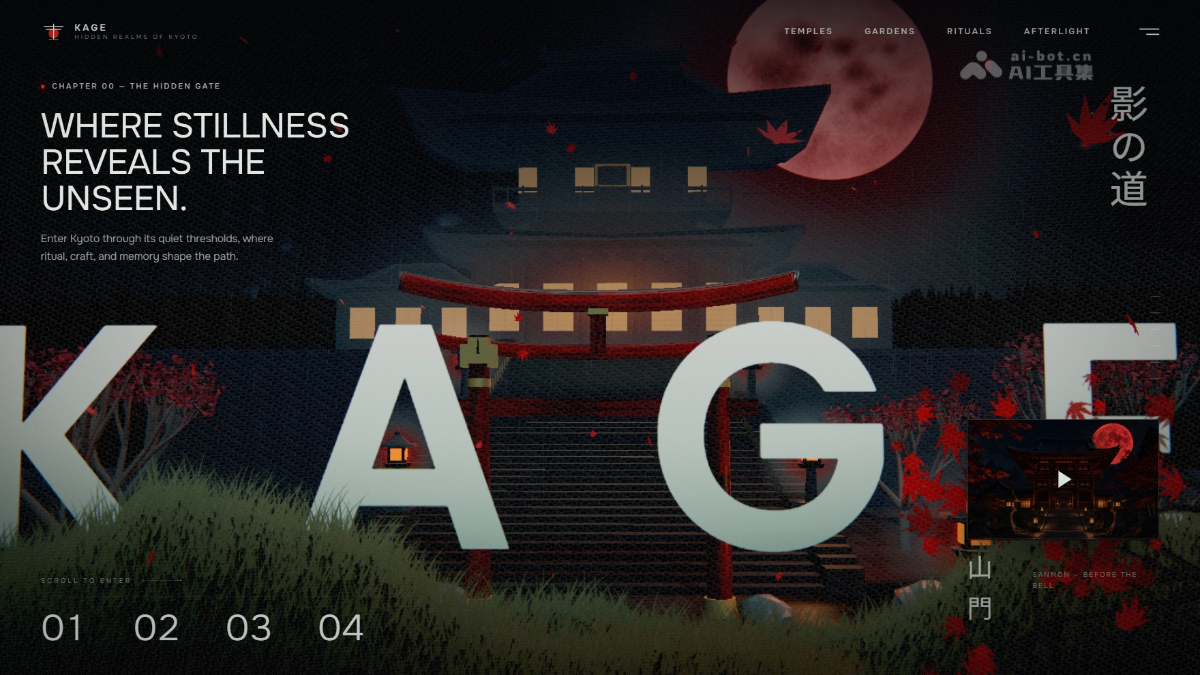
Kage's main features
-
Scroll to navigate: Control the camera with the mouse wheel to travel along a preset path through the mountain temple. Zero buttons, zero menus—scrolling is the only interaction.
-
Real-time 3D rendering: Based on Three.js, it builds dynamic scenes such as the temple, mountain gate, rain and mist, falling leaves, and the vermilion full moon in real time in the browser.
-
AI asset fusion: GPT Image 2-generated scene boards and transparent WebP foreground elements are overlaid onto the real-time 3D world to enhance the cinematic feel.
-
Five-chapter narrative structure: Arranged into five chapters: "Mountain Gate → Quiet Courtyard → Craftsmanship → Afterglow → Manifesto," with each scroll corresponding to a new composition shot.
-
Single file, zero build: All logic, styles, and rendering are concentrated in a single HTML file, with no need for npm, React, or any build tools.
-
Immersive visual atmosphere: Uses a restrained color palette of near-black, navy blue, warm amber, bone white, and vermilion, combined with bloom, film grain, and vignette post-processing.
-
Accessibility adaptation: Includes a reduced-motion option and supports responsive layouts on mobile.

Follow WeChat and reply with "open source" to join theAI open-source project exchange group
How to use Kage
-
Online experience: Visit directly in your browser at https://mengto.github.io/kage/ to enter the Kyoto mountain temple night tour.
-
Local deployment: After cloning the repository, run any static server (such as
python3 -m http.server), with no build step required. -
Interaction: After opening the page, you only need to scroll the mouse, and the camera will automatically travel through the five chapters along the preset path.
-
Browser requirements: Make sure to use a modern browser that supports WebGL, otherwise the visuals cannot render.
-
Derivative creation: For imitation, you must regenerate assets yourself with AI according to
PROMPT.md, and you may not directly reuse the original project's artwork. -
Accessibility settings: When "Reduce motion" is enabled in system preferences, the page automatically lowers animation intensity to prevent dizziness.
Kage's core advantages
-
Single-file architecture: All logic, styling, and 3D rendering are condensed into a single HTML file—zero build, zero dependencies, ready to use out of the box.
-
Minimalist interaction: The camera path is controlled solely by scrolling, with no buttons and no menus, for a zero-learning-curve experience.
-
AI-fused rendering: Scene assets generated by GPT Image 2 are seamlessly layered with real-time 3D rendering from Three.js, combining photographic texture with dynamic lighting and shadows.
-
Cinematic immersion: A five-chapter narrative arrangement, paired with restrained color palettes and post-processing effects, creates the cinematic feel of an interactive night tour of a Kyoto mountain temple.
-
Designer-driven: The author, not originally a programmer, leads creation with prompts, demonstrating a new design-first front-end development paradigm in the AI era.
-
Lightweight and portable: No backend, no analytics scripts, and no runtime network requests; it can be deployed in seconds on any static server.
Kage's project address
- Project website:https://mengto.github.io/kage/
- GitHub repository:https://github.com/MengTo/kage
Comparison of Kage with similar competitors
| Comparison dimensions | Kage | World Labs(Marble) |
|---|---|---|
| Project positioning | A designer-led front-end showcase experiment focused on a single-page immersive narrative experience | An AI unicorn company founded by Fei-Fei Li, building large world model (LWM) infrastructure |
| 3D generation method | No AI 3D generation capability; scenes are produced as 2D assets by GPT Image 2 and then manually layered into Three.js | One-click generation of a complete, persistent, geometrically consistent 3D world from a single image or text prompt |
| Degree of interaction freedom | Linear narrative—only supports scrolling along a preset path, with no free exploration | Open world—supports free camera movement, depth-of-field adjustment, zoom, and real-time interactive exploration |
| Technical architecture | A single HTML file with zero build, directly embedding Three.js r149, with no backend and no dependencies | A large neural network model based on native 3D representations (NeRF/Gaussian Splatting), requiring cloud inference |
| Deployment threshold | Extremely low; it can run on any static server or by opening it locally | Extremely high; requires applying for beta access and depends on cloud computing power and professional workflow integration |
| Output form | A closed experience page in the browser that cannot be exported | Can be exported to standard 3D formats such as Mesh and Gaussian Splatting, compatible with Unreal/Unity |
| Application scenarios | Personal portfolios, brand teaser pages, front-end teaching cases | Game development, film and television previsualization, VR/AR content, digital twins, robot simulation training |
| Core difference | Using "pre-generated assets + minimalist code" to simulate a 3D sense of immersion | Using a "spatial intelligence model" to directly infer from 2D and generate real 3D worlds |
Application Scenarios of Kage
-
Personal Portfolio/Creative Homepage: Designers or developers can replace traditional portfolios with a single-file 3D immersive experience, presenting projects through scroll-based storytelling, with a visual impact far exceeding that of conventional web pages.
-
Digital Tours for Cultural and Tourism Scenic Areas: Migrate Kage's "Night Tour of a Mountain Temple" mode to real scenic spots, traveling through ancient building complexes and natural landscapes via scrolling, replacing static text-and-image introductions.
-
Brand Launch/Product Teaser Pages: Before a new product launch, create atmosphere with a single-page cinematic experience—for example, automobiles, watches, and luxury goods can use chapter-based scrolling to reveal product details and brand stories.
-
Museums/Historical Education Digital Exhibitions: Recreate historical scenes (such as ancient cities and ruins), allowing students or viewers to "walk into" history through scrolling, combined with AI-generated assets to reduce art costs.
-
Front-End Teaching and Three.js Introductory Cases: As a model of single-file, zero-build development, Kage is suitable for teaching by directly dissecting the source code. Students can understand 3D scenes, camera paths, and the core logic of scroll-driven interaction without configuring an npm environment.