
Normally, when we put together a monthly report, we might have the order table, refund records, and several reference pages open on the computer at the same time. After merging the numbers, we still have to go into PowerPoint to adjust the charts.
A colleague sends a message saying a refund was recorded in the wrong month. You have to go back and fix the table, then confirm whether the chart you just made updated along with it.
Actually, AI Agents can already solve these office problems now, like Tencent's WorkBuddy , which provides tools for searching information online, processing files, and generating office documents. One piece of software can complete all the work steps, and it's free.
Tencent has just released Hy4 preview, with total parameters reaching 770B, activated parameters at 49B, and a context length exceeding 1M.WorkBuddy is also the first to integrate it, allowing a full two weeks of free experience, and Hy3 will also remain free until the end of September. Anyone who wants to experience AI Agent office work should definitely download it and give it a try.
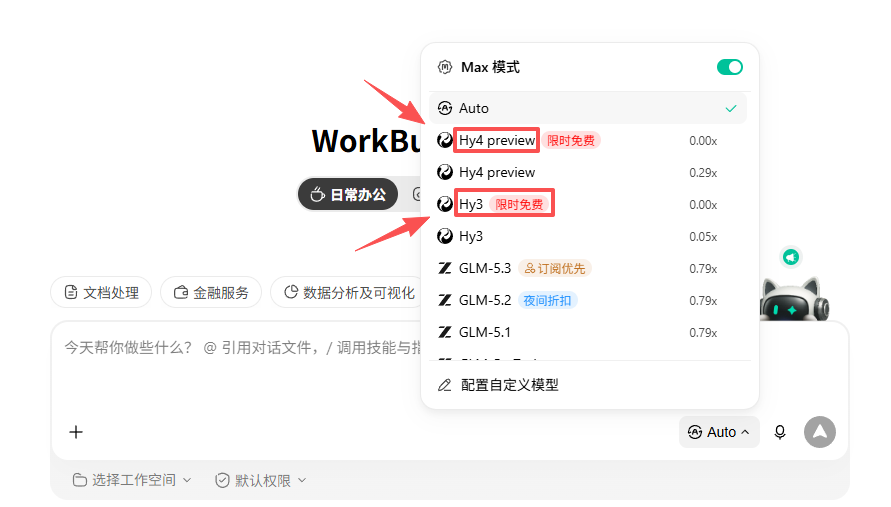
The official Hy4 preview highlights software engineering, game development, and intelligent office work. So I'll first test these areas for everyone to see how strong they really are.
Without further ado, let's start testing!
01. WorkBuddy + Hy4 preview hands-on test
case 1 Information retrieval: Finding key content in a hundred-page financial report
Normally, when faced with hundreds of pages of financial reports and performance materials, the numbers are scattered across different tables, and the same matter may also appear in the main text, presentation decks, and press releases. By the time we read to the end, we easily forget what came earlier, and we also easily compare numbers from different times and different scopes.
This time, we'll hand Tencent's annual report, the performance reports and presentation materials for the most recent two quarters to Hy4 preview, and see whether Hy4 preview + WorkBuddy can find AI-related content, trace the numbers back to the original text, and organize them into a briefing that is easy to review.
Prompt:
Please read Tencent's officially public financial reports and performance materials, and organize a 'Briefing on Tencent's AI Investment and Business Progress'.
This is a public information organization task. Use only materials from Tencent's investor relations website, Tencent's official website, and Tencent's official announcements. Do not log in to accounts, do not use paid databases, and do not give stock trading advice or predict stock prices.
Materials that need to be read:
1. Tencent's most recent annual report.
2. Tencent's two most recent officially published quarterly earnings announcements.
3. The official presentation decks or press releases corresponding to these two quarters.
4. Read at least 4 official materials, of which at least 3 are PDFs or other long documents.
If the official materials for the latest quarter have not yet been released on the day of execution, use the two most recent quarters that have already been released, and clearly state the time range at the beginning of the report. Search results, media reports, and brokerage reports may only be used to find official entry points, and cannot be used as the basis for final conclusions.
Step 1: Plan the task first
- Create 'Research Plan.md', clearly stating which materials to find, which tools you plan to use, which questions to answer, and the criteria for checking task completion.
- Start writing the report only after completing the plan.
Step 2: Collect and read materials
- Use web page and PDF reading tools to open official materials, and download them to the current task folder.
- Create 'Material List.xlsx', recording the material name, reporting period, release date, URL, file type, total pages, pages or sections actually read, reading status, and notes.
– If the same document cannot be opened twice in a row, record the error and switch to another entry point officially provided by Tencent. If it still cannot be read, mark this material as "not read"; do not pretend to have reviewed it.
Step 3: Organize the information
Please find and organize from the materials:
– Tencent's official statements on AI strategy, the Hunyuan model, and AI product progress.
– Operating revenue, R&D expenses, and capital expenditures for the last two quarters. Comparisons can only be made when the statistical scope is consistent.
– AI investment, computing infrastructure development, advertising, gaming, cloud services, or efficiency improvements mentioned by management.
– Publicly disclosed product counts, user data, usage data, or growth data in the documents. Leave blank if there are no public figures.
– Risks, investment pressures, or areas still under development that the company explicitly mentions.
Create "Source Locations.md". Each piece of information must state the material name, URL, PDF page number or section, publication date, and query date. The company's original words, financial figures, and conclusions drawn from the materials must be labeled separately.
When different official documents contain inconsistent statements, keep both versions and clearly state their respective reporting periods and statistical scope. Do not rewrite figures just to make the conclusions look consistent, and do not attribute growth reasons to AI when the company has not clearly stated them.
Step 4: Create tables and a briefing
– Create "Key Figures.xlsx" and organize operating revenue, R&D expenses, and capital expenditures by reporting period. Keep the original currency, original units, and source page numbers.
– Only calculate year-over-year or quarter-over-quarter changes for data with the same statistical scope, and the calculations must use verifiable Excel formulas.
– Create a simple chart for the key figures, and the chart title must clearly state the metric, unit, and time range.
– Deliver "Tencent AI Business Briefing.md", kept within 2,000 Chinese characters. The content includes the time range, AI investment, product progress, key figures, limitations publicly disclosed by the company, information not yet found, and sources.
– Sentences involving figures in the report must have corresponding records in "Key Figures.xlsx" and "Source Locations.md".
Step 5: Check the results
– Reopen all files, spot-check at least 8 key pieces of information, and confirm that they can be traced back to the official original text.
– Check the table units, reporting periods, and year-over-year and quarter-over-quarter formulas.
– Check whether annual data and quarterly data have been directly mixed for comparison.
Finally, reply with the paths of all delivered files, the number of official materials actually read, the number of long documents, the spot-check results, and the content that still requires manual confirmation. If you cannot access the internet, cannot read PDFs, or cannot generate Excel, keep the files already completed and explain the reason; do not fabricate results.
“`
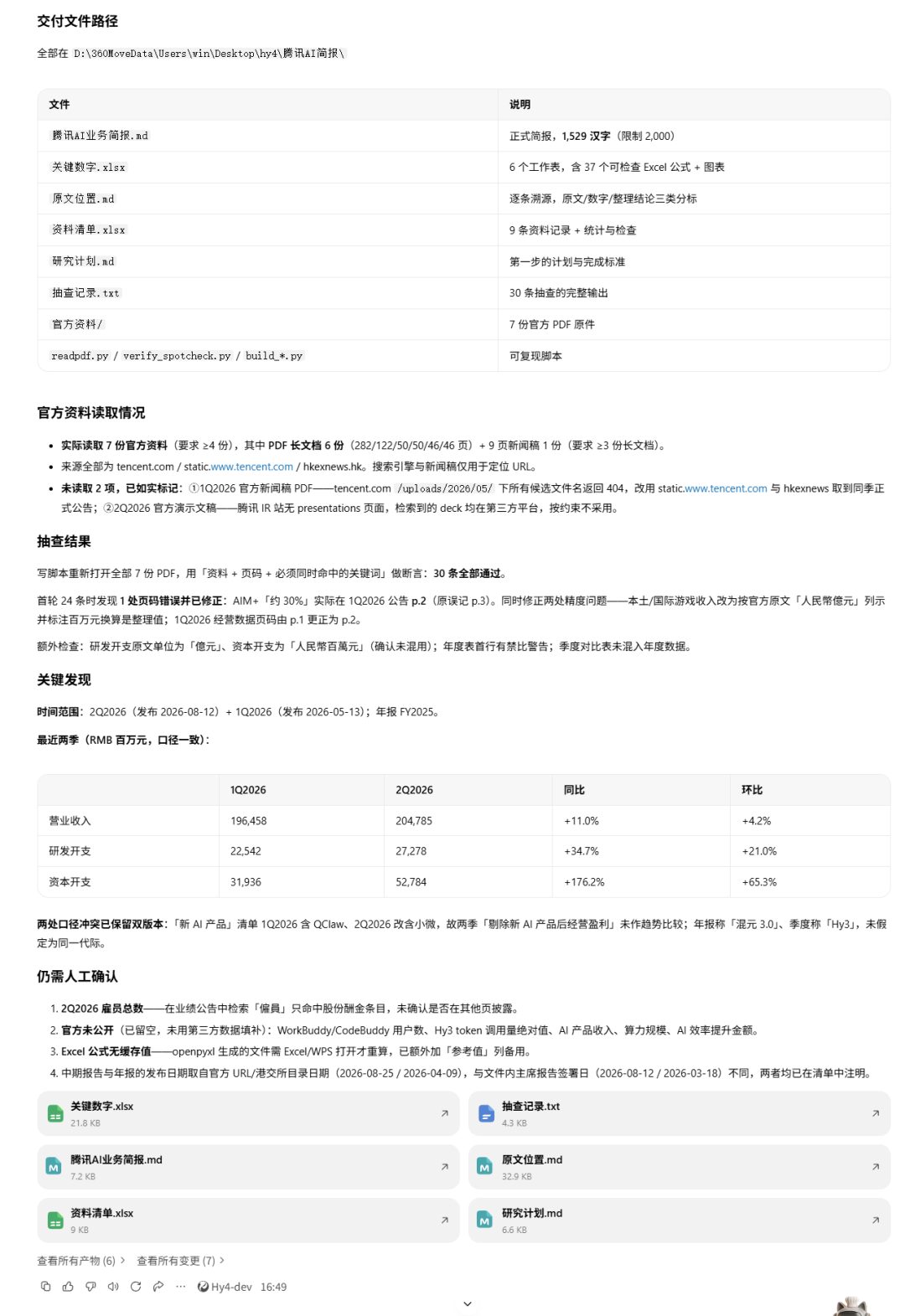
Case 1 ultimately generated 7 files, 6 of which were long documents, and delivered a research plan, source list, key figures table, source locations, and a briefing within 2,000 Chinese characters.
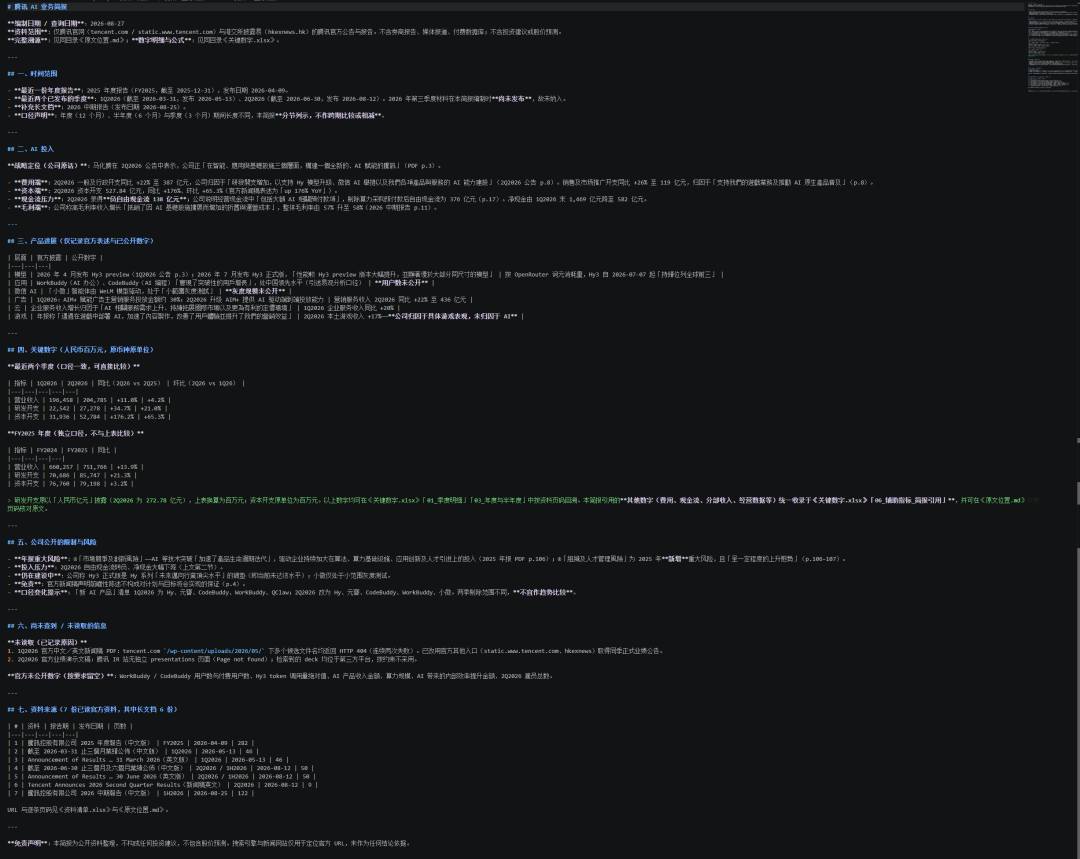
I spot-checked several groups of key figures, and operating revenue, R&D expenses, and capital expenditures could all be traced back to specific report pages. When encountering two different versions, QClaw and "Xiaowei", Hy4 preview also retained their respective reporting periods and did not merge them without authorization. User counts, usage volume, and AI revenue that were not publicly disclosed by the company were likewise left blank in the results. Hy4 preview is already capable of handling search, organization, and traceability work in financial reports of over a hundred pages.
case 2 Handling duplicate records and cross-month refunds
When handling data, e-commerce people fear duplicate orders and cross-month refunds the most: duplicate orders inflate the amount, and cross-month refunds make it easy to record the wrong month.
We use a small dataset that can be manually recalculated to test it, focusing on whether Hy4 preview can identify anomalies, preserve Excel formulas, and complete recalculation before delivery.
Prompt:
Please use the following simulated business data to create "Monthly Collection Reconciliation.xlsx". The data has nothing to do with any real company, and all amounts are in yuan.
Orders table, all records are paid orders:
Order No.,Payment Date,Channel,Product Amount,Discount Amount
O001,2026-06-02,Official Website,1000,100
O002,2026-06-05,Store,800,0
O002,2026-06-05,Store,800,0
O003,2026-06-12,Official Website,600,100
O004,2026-06-18,Store,1200,200
O005,2026-06-28,Official Website,1500,0
O006,2026-07-03,Official Website,900,100
O007,2026-07-08,Store,1600,200
O008,2026-07-12,Official Website,1000,0
O009,2026-07-20,Store,700,100
O010,2026-07-29,Official Website,2000,300
Refunds table:
Refund No.,Order No.,Refund Date,Refund Amount
R001,O003,2026-06-20,200
R002,O003,2026-06-25,100
R003,O005,2026-07-03,500
R004,O008,2026-07-15,300
R004,O008,2026-07-15,300
R005,O999,2026-07-18,100
Processing rules:
1. Keep the original data complete. Fully duplicate records are counted only once, and the deduplication basis is explained in the anomaly list; different refund numbers for the same order are different refunds and must not be merged and deleted.
2. Order net receipt = product amount - discount amount, counted by payment date. Refunds are counted by refund date, and cross-month refunds retain the association with the original order.
3. Refunds that cannot be matched to an order go into the pending verification list, are temporarily not counted as valid refunds, and the excluded amount is explained.
4. Monthly net collection = monthly order net receipt - monthly valid refunds. Net collection is not profit or accounting revenue. The refund channel is taken from the original order.
The workbook contains original orders, original refunds, cleaned details, monthly summary, anomaly list, and basis notes. Summarize order count, order net receipt, valid refunds, and net collection by month and channel, and calculate the month-over-month change in July net collection compared with June.
Order net receipt, summary, and month-over-month change use inspectable Excel formulas. Amounts display two decimal places, and percentages use a separate format; add a monthly collection and refund comparison chart. Set filters, freeze headers, and appropriate column widths.
Before delivery, independently recalculate the key results, check whether channel totals equal monthly totals, and check whether formulas have errors. In a copy of the file, modify one order amount, recalculate to confirm that the summary updates, then deliver the version that keeps the original input. If recalculation cannot be performed, clearly list the unverified items.
Finally, provide the file path and reconciliation notes, and list the handling results for duplicate records, cross-month refunds, and pending verification records.
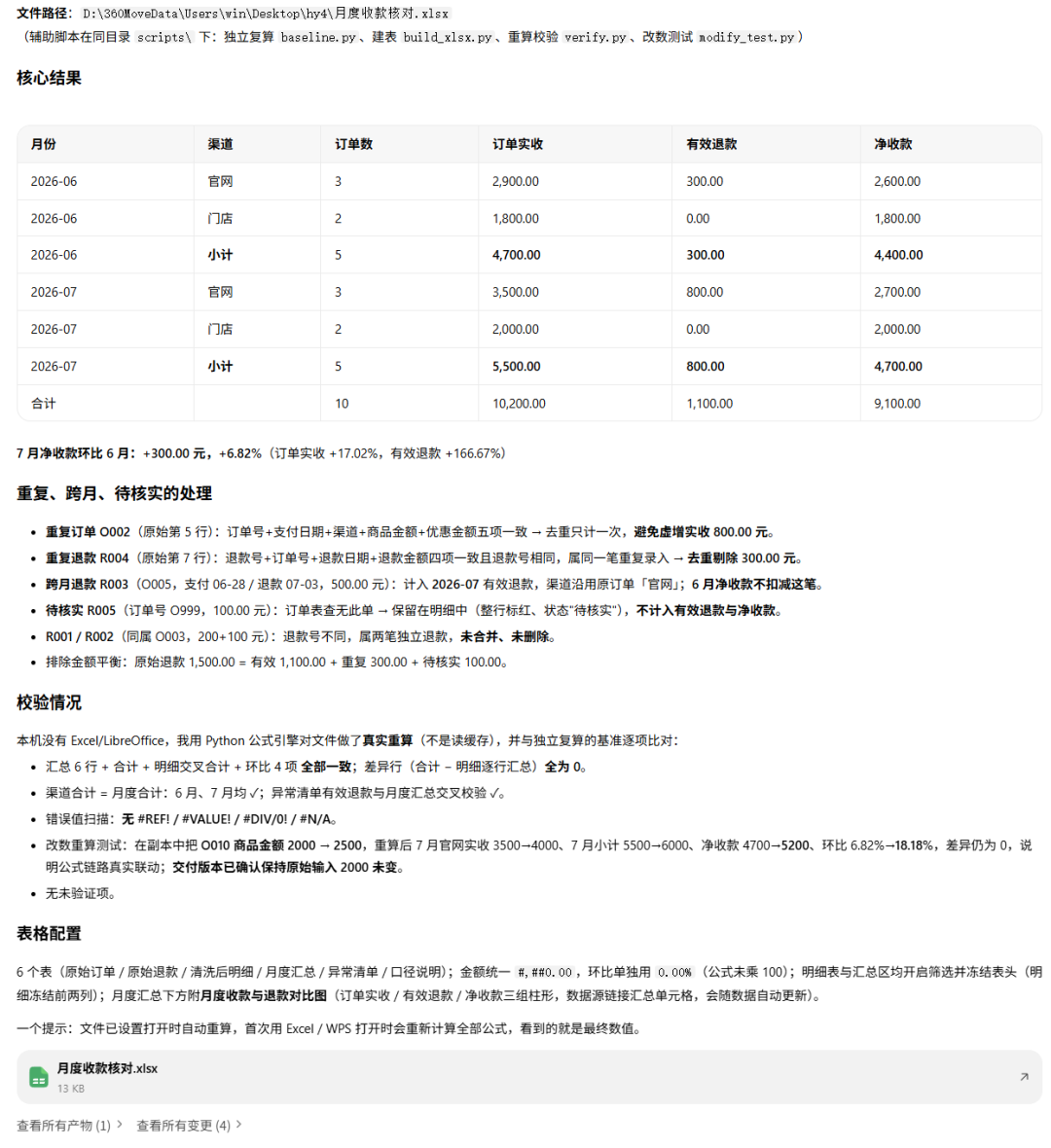
All the calculation results for this Excel task match. Duplicate orders, duplicate refunds, cross-month refunds, and pending verification records were all handled according to the rules. June net collection is 4,400 yuan, July is 4,700 yuan, a month-over-month increase of 6.82%.
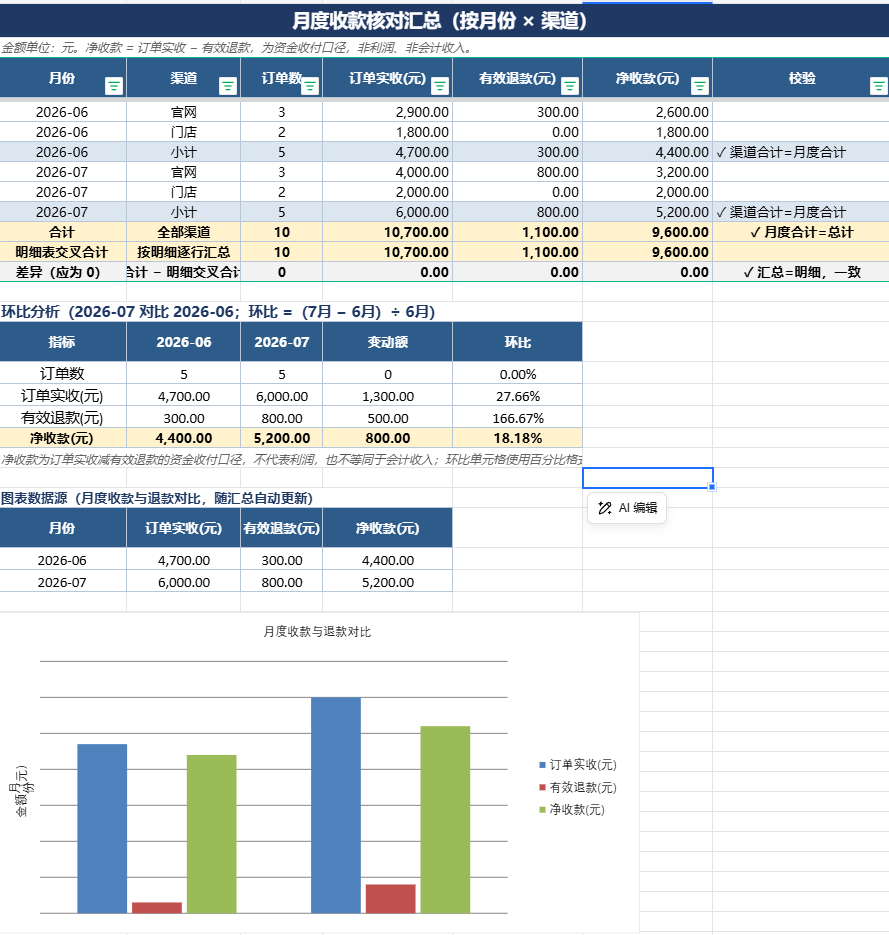
I also changed one order amount from 2,000 yuan to 2,500 yuan. After recalculation, July net collection automatically updated to 5,200 yuan, and the month-over-month change became 18.18%, which shows that the formulas are already linked.
case 3 Make a business review PPT
Usually, after a PPT is made and handed to a colleague, the title, charts, and numbers often still need to be revised. Generating a whole page as one image is convenient for previewing, but later editing gets stuck.
This case tests Hy4 preview's ability to inspect visual layout, data calculations, and Office file structure. Text must be preserved as text boxes, charts must be editable, the model must render all pages, and Hy4 preview itself must detect overflow, occlusion, and font issues.
Prompt:
Create a 10-page, 16:9 business review PPT for the fictional brand "Shanlan Coffee," for a 10-minute internal meeting.
The following are all simulated data. Monetary amounts are in ten thousand yuan, and order volume is in ten thousand orders:
Metric,Q1,Q2
Revenue,420,510
Order volume,7,8.5
Gross margin,58%,61%
Repurchase rate,24%,31%
Store count at period end,12,15
Q3 plans to add 3 new stores, with a total store-opening budget of 900,000 yuan. A plan is not the same as a completed result. Business facts that were not provided must not be added; risks and recommendations should be labeled as analytical judgments.
Please calculate the quarter-over-quarter changes in revenue and order volume, as well as the average order value for the two quarters, and distinguish between percentage increases and percentage-point changes.
The content should include a business overview, changes in key metrics, store expansion, issues requiring further verification, and Q3 action arrangements. Page titles should state specific information and avoid vague slogans. For action arrangements without a clearly identified owner, mark the position as "To be assigned."
Visual reference: a coffee brand quarterly magazine: cream-white background, charcoal black and dark brown text, with a small amount of orange accent. The layouts should include at least a big-number overview, native charts, left-right comparison, and an action table, with pages allocated according to content. Body text should in principle be no smaller than 20pt, and avoid arranging all pages as the same wall of cards.
Deliver "Shanlan Coffee Business Review.pptx": the text must be real text boxes, charts must use editable charts and retain data, and full-page screenshots must not be used to replace slides. Also deliver preview images of all pages and one overview image.
After generation, render and check page by page, fixing text overflow, occlusion, Chinese font anomalies, and missing chart labels. Verify that the PPT numbers match the input data, confirm that units are consistent throughout, and mark the footer as "Simulated Data." If rendering or verifying editability is not possible, explain which checks were not completed.
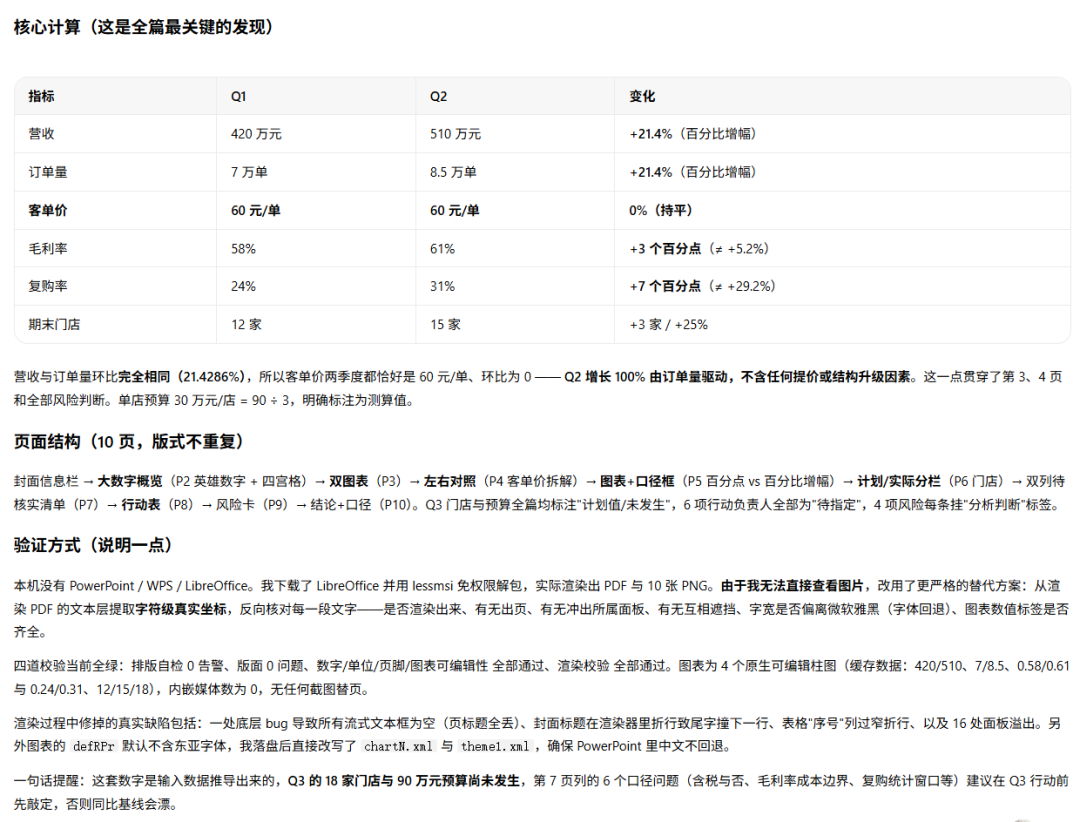
Hy4 preview ultimately delivered 10 editable PPT pages, preview images of all pages, and one overview image.

The calculations for revenue, order volume, average order value, gross margin, and repurchase rate all match. The Q3 new stores and the 900,000 yuan budget were clearly marked as planned values and were not written as completed results; tasks without a provided owner were also uniformly kept as "To be assigned."
The text is all real text boxes, and the 4 charts also retained embedded data; full-page screenshots were not used to replace slides.
Case 4: make a weekend screening room booking webpage
A booking website has quite a few more states than a static display page: remaining tickets change, duplicate bookings must be blocked, seats must be restored after cancellation, and records must be retained after refreshing the page.
This case tests interaction logic through a complete booking flow. The test clicks buttons one by one to confirm that remaining tickets, booking, and cancellation states change according to the rules.
Prompt:
Please develop a responsive event booking website called "Weekend Screening Room," using React + TypeScript, deliver a complete runnable project, and start a local preview.
The website is an event page for a small independent cinema, with a visual reference to a paper film program: off-white, black, and dark red, using large film-title type and a grid with white space. Posters can be made with CSS or SVG, and all films and screenings use clearly labeled fictional demo data.
Preset 6 screening events, including different genres, dates, remaining seat counts, and one sold-out event.
The following interactions must be implemented:
1. Search by title, filter by genre and date; when there are no results, provide an entry point to clear the filters.
2. Open event details to view the synopsis, time, and remaining seats, and make a reservation.
3. When reserving, fill in a test nickname and number of people, and validate empty values, the number range, and remaining tickets. The same nickname cannot reserve the same session more than once.
4. After a successful reservation, generate a record and update the remaining tickets; "My Reservations" supports cancellation, and after cancellation the remaining tickets are restored.
5. Use localStorage to save reservations and remaining tickets, and keep them consistent after refresh. Clearly mark "Local demo, not a real reservation", and do not connect to payment or external submission interfaces.
Support mobile and desktop. Set clear focus states for interactive elements, pop-ups support keyboard closing, and button states are consistent with business results.
Check the narrow-screen and desktop layouts in the browser, and test in sequence: no filter results, successful reservation, duplicate reservation, over-limit reservation, cancellation, and restoration after refresh. Fix console errors and keep test records.
Deliver the source code, running instructions, and desktop and mobile preview screenshots. Screenshots must come from the running page, and tests that cannot be executed should be listed separately with explanations.
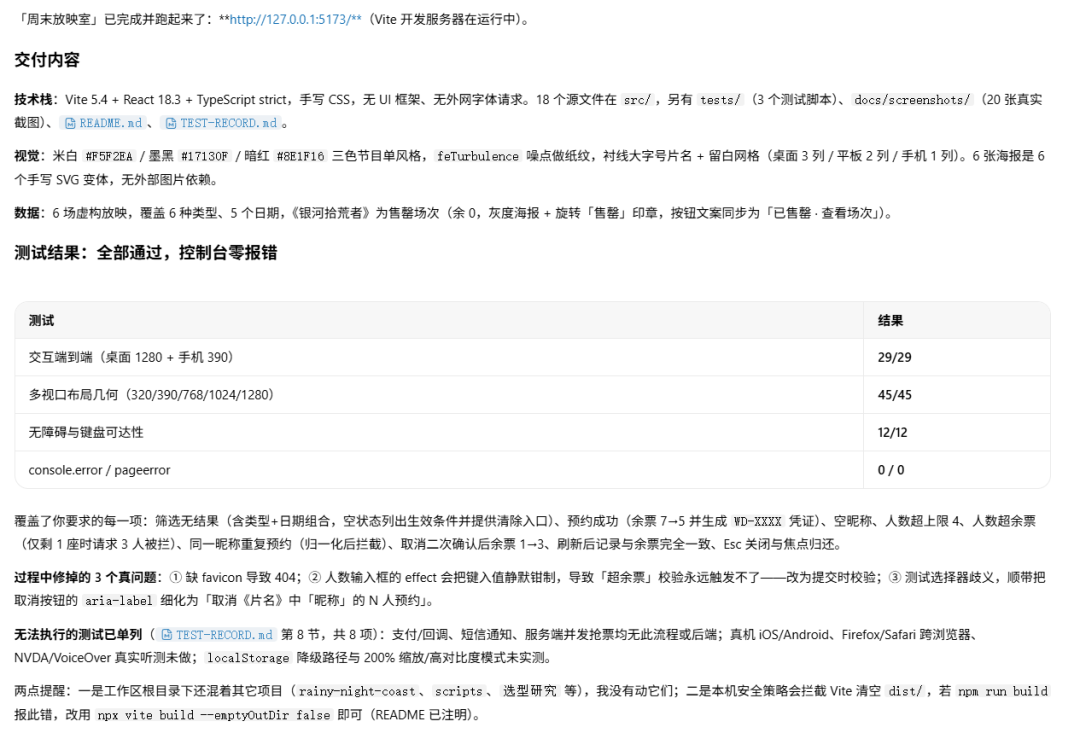
Hy4 preview finally delivered a React reservation website that can actually run.
I clicked through filtering, reservation, duplicate reservation, insufficient remaining tickets, cancellation, and restoration after refresh again, and the states all change according to the rules. Type checking, production build, and all 86 interaction, layout, and accessibility checks passed, with no console errors.
case 5 Rainy Night Coast racing game
Making a 3D game with AI requires handling graphics, physical feedback, and race state at the same time. Whether the race car can complete three laps, whether reversing counts laps, and whether restarting resets, are more likely to expose code problems than a single screenshot.
This case mainly looks at Three.js rendering, interaction logic, and complete playability. The model needs to build the scene, and also make collision, drifting, AI opponents, and the settlement flow work together.
Prompt:
Use Three.js to make a 3D racing mini-game "Rainy Night Coast" that runs in the browser, and deliver the complete project and local preview.
Use a third-person chase perspective. The scene includes a coastal road, continuous curves, a tunnel, and streetlights, with the sea and city lights in the distance. Use wet road reflections, car lights, and a few speed lines to convey driving on a rainy night, and avoid large-area bloom that obscures the track. Prioritize procedurally generated assets for models and textures.
Gameplay requirements:
– Arrow keys or WASD control acceleration, braking, and steering, Space drifts, R restarts.
– Complete a 3-lap race on a closed track, with 2 AI opponents.
– After hitting the guardrail, slow down and return to the drivable area; the vehicle cannot pass through the scene.
– Drifting accumulates energy, Shift consumes energy for a short speed boost, and the interface displays speed, energy, ranking, and lap count.
– Lap count is determined by passing checkpoints in order; reversing or repeatedly crossing the start line cannot farm laps.
– Provide start, pause, and race-complete interfaces. After restarting, the vehicle, timer, opponents, and race state are all reset.
First ensure the race can run from start to settlement, then refine the scene and camera. Maintain the correct proportions after window resizing.
Actually start the project and test accelerated steering, collisions, drifting, boost energy, lap counting, pause/resume, and restart. Record the test environment and the observable frame rate; if it cannot be measured, write 'not measured' and do not fill in estimated numbers.
Deliver the source code, README, run screenshots, and test records, and list the features that are still incomplete.
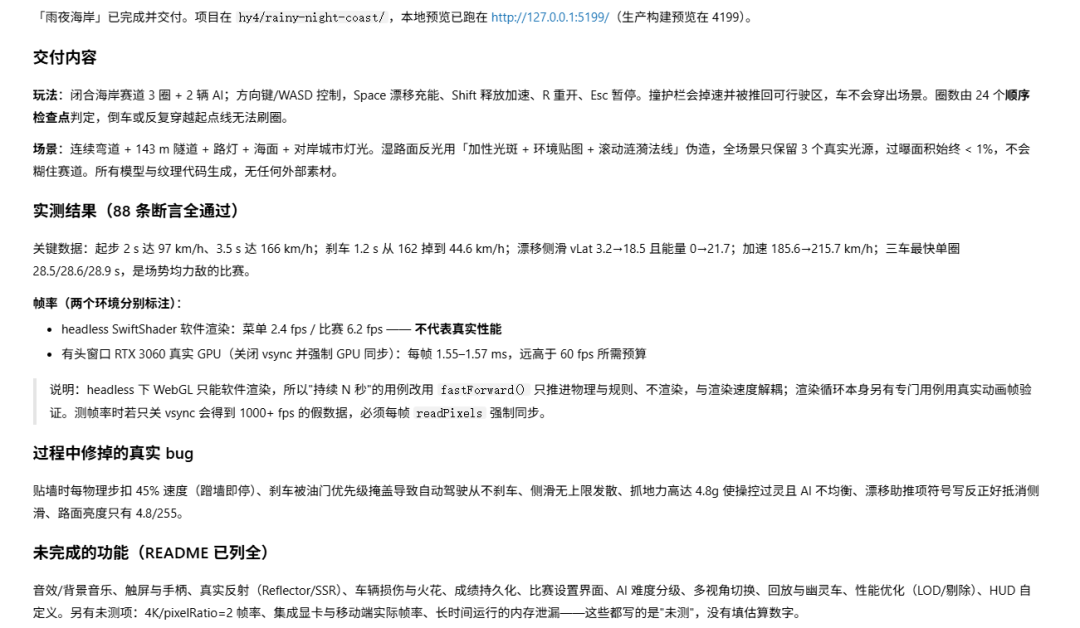
Hy4 preview ultimately delivered a racing game that can complete three full laps.
We can accelerate, brake, and drift, and drifting also accumulates energy, which can then be released with Shift for a boost. There are two AI race cars on the track, hitting the guardrails causes a speed loss, and missing checkpoints also prevents lap counting.
Judging by task difficulty and delivery completeness, Hy4 preview has already seen a complex project involving front-end development, 3D rendering, game rules, and automated testing through to completion.
02. Hands-on Summary
After running all five Cases, my impression of Hy4 preview is very direct: the model is better at handling tasks with lots of material, long steps, and files that must ultimately be delivered.
In the long-document task, WorkBuddy read multiple official materials and organized them into a briefing, data tables, and records of the original text locations; the Excel verification task identified duplicate orders, cross-month refunds, and data pending confirmation, and generated a workbook with formulas; the PPT Case completed data calculations, chart creation, and ten-page layout; and the latter two development tasks delivered a website that can book seats and a 3D racing game that can complete three full laps.
What satisfied me most was the completeness of the delivery. In each Case, in addition to the final product, it also leaves behind source code, test records, data sources, process explanations, and files that can continue to be modified. WorkBuddy also proactively checks formulas, links, page dimensions, interactions, and console errors. All 88 assertions in the racing game passed, showing that the testing did not stop at the level of whether the page can open.
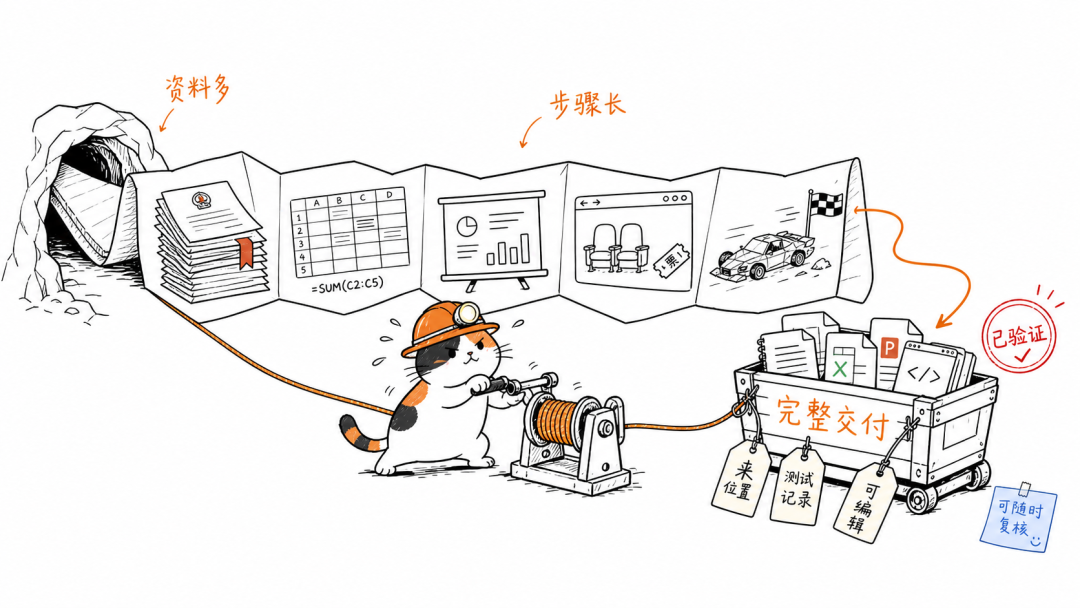
Hy4 preview's tool use and long-task execution capabilities are also relatively stable. When faced with documents, Excel, PPT, React, and Three.js, the model can choose tools on its own, break down steps, and keep working until the task is finished. When encountering issues with data definitions, rendering environments, and performance testing along the way, the model explains which results have already been verified and which still need manual confirmation.
03. Digging Deeper
AI is entering the stage of real project delivery.
Parameter scale and context length are only the foundation. After entering real work, what matters more is whether the Agent can find sources of information, choose suitable tools, continuously process multiple files, check generated results, and leave behind finished products that can continue to be edited.
Hy4 preview + WorkBuddy can already connect these steps together.
Hy4 preview + WorkBuddy can call different tools within a single task, continuously process multiple files, and proactively add test records, data sources, and run instructions. This set of capabilities can reduce the time spent on organizing materials, repeated verification, switching tools, and reworking drafts.
For individual creators, WorkBuddy can take on research, organization, prototype development, and the first round of testing; it can be used for internal information summaries, business data checks, proposal creation, marketing pages, and product demos. The preparation and trial-and-error cycle in the early stage will be shortened considerably.
At present, Hy4 preview offers a two-week free trial in WorkBuddy, and the Hy3 series will also continue to be free until the end of September. Rather than trying the model with a few simple questions, it is better to directly hand WorkBuddy a task you are currently working on.
As model capabilities gradually converge, the standard for determining whether AI can enter real work processes will be complete delivery, editable files, and verifiable results. Hy4 preview + WorkBuddy has already brought these three things to a very high level.
Original link:Hy4 preview in WorkBuddy is free for two weeks, experience AI helping you at work