
What is HiCAD
HiCAD is an open-source AI parametric 3D CAD modeling platform designed for 3D printing enthusiasts. Users describe their requirements in natural language, and the AI can generate editable JSCAD parametric code in seconds. Combined with real-time 3D preview, the Monaco code editor, and a parametric slider panel, it delivers a one-stop workflow from idea to printable STL model.
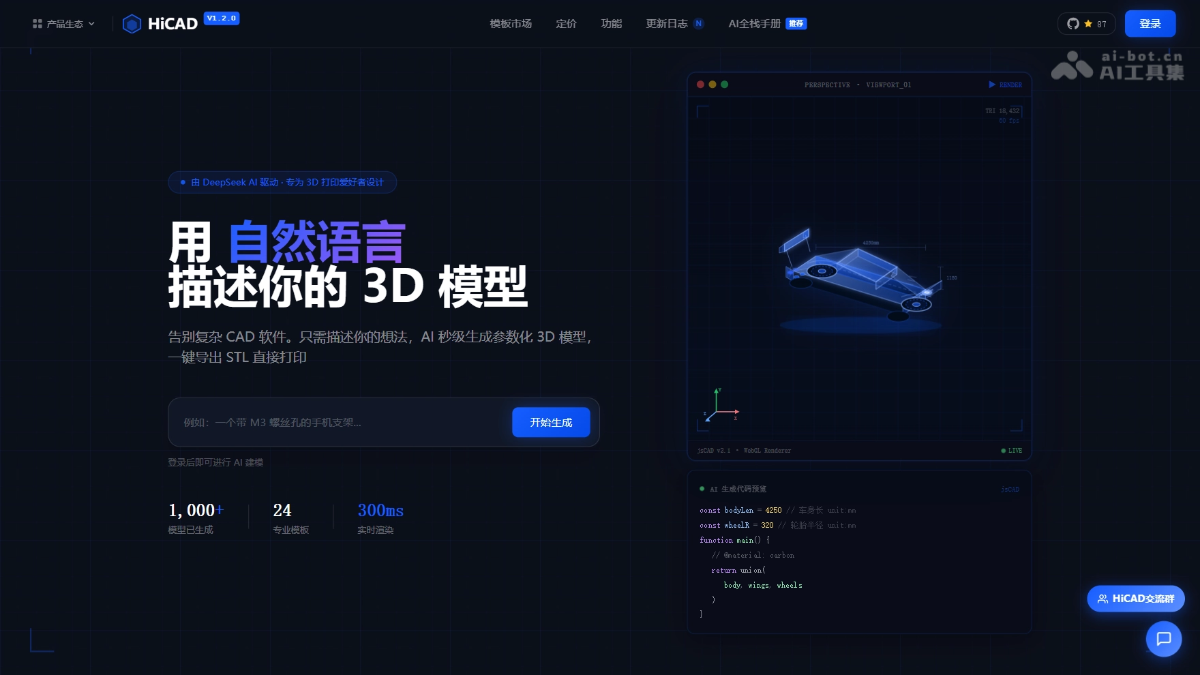
HiCAD's Main Features
-
AI Intelligent Modeling: Automatically generates parametric JSCAD 3D code based on natural language input, supporting complex model intent analysis and deterministic generation.
-
Real-Time 3D Preview: WebWorker-isolated execution combined with Three.js rendering presents results within 300ms of code changes, supporting 360° interactive rotation.
-
Monaco Code Editor: Built-in editor identical to VS Code, providing syntax highlighting, intelligent completion, and an AI follow-up modification mode that precisely locates and preserves modifications to the original structure.
-
Parametric Control Panel: Automatically extracts code variables to generate visual slider controls, allowing real-time adjustment of model dimension parameters without modifying code.
-
STL / OBJ Import and Export: Supports online preview of external STL files, and one-click export to standard formats once the model is complete, directly interfacing with slicing software and 3D printers.
-
Template Marketplace: Built-in 24 free templates covering industries such as phone stands, robotic arms, and jewelry, supporting AI secondary editing and community sharing and publishing.
-
Multi-AI Adapters: Supports large models such as DeepSeek, OpenAI, and Qwen, switching between different AI backends through
.enva single line of configuration. -
Model Sharing: Generates independent sharing links, allowing others to preview parametric 3D models online without logging in.
HiCAD's Technical Principles
- Two-Stage Precision Modeling Engine: For complex models such as robotic arms and tanks, the system first performs Intent Analysis through a large model to understand the spatial structure and functional requirements described by the user; it calls a deterministic code generator (jscad-codegen) to convert the analysis results into precise JSCAD parametric scripts, achieving modeling output with zero positioning error.
- Front-End Real-Time Rendering Architecture: The front end is built with Vue 3 + Vite, the 3D rendering layer is implemented based on Three.js WebGL, the JSCAD code execution environment is isolated through WebWorker, and Transferable Objects are used to achieve zero-copy data transfer, ensuring 60fps smooth preview and 300ms-level real-time response.
- AI Streaming Response and Multi-Adapter Design: The back end is built on NestJS, pushing AI-generated streaming code snippets to the client through SSE (Server-Sent Events); the AI layer encapsulates unified adapter interfaces for DeepSeek, OpenAI, and Qwen, dynamically injecting the corresponding model client according to
.envconfiguration, enabling hot switching between multiple models.
HiCAD's Core Advantages
-
Zero-Barrier Natural Language Modeling: No need to master complex CAD software operations; describe in Chinese or English to generate professional-grade parametric 3D models.
-
Open Source and Privatizable Deployment: Open-sourced under the GPL v3 license, providing complete front-end and back-end source code, supporting one-click deployment with Docker/PM2 and secondary development.
-
Ultimate Real-Time Interactive Experience: WebWorker isolated computation + Three.js hardware-accelerated rendering, parameter adjustments and code modifications are synchronized to the 3D view within 300ms.
-
Native 3D printing adaptation: Generated models can be directly exported as ASCII/Binary STL or OBJ, with dimensions precise to the millimeter, seamlessly connecting with slicing software such as Cura and PrusaSlicer.
-
Flexible switching between multiple models: A single line of configuration can switch between DeepSeek V3、GPT-4oand Qwen-Max, balancing cost-effectiveness, quality, and network stability.
How to use HiCAD
- Online experience:
-
Visit the official website: Visit the HiCAD official website https://hicad.mvtable.com/。
-
Describe your requirements: In the input box on the homepage, describe the desired 3D model in natural language, for example, "a phone stand with an M3 screw hole".
-
AI generation: The AI automatically outputs JSCAD parametric code and renders a real-time 3D preview on the right.
-
Parameter fine-tuning: Adjust the model dimensions through the visual sliders in the left panel, and observe changes in the 3D view in real time.
-
Export for printing: After confirming everything is correct, export the STL file with one click, and directly import it into slicing software such as Cura for 3D printing.
-
- Local deployment:
-
Environment preparation: Ensure that Node.js >= 18.0.0 and pnpm >= 9.0.0 are installed locally.
-
Clone the project: Run
git clone git@github.com:MrXujiang/HiCAD.gitand enter the HiCAD directory. -
Configure the key: Copy
.env.exampleas.env, and fill inDEEPSEEK_API_KEYor the API Key of another AI model. -
Install and start: Run
pnpm install && pnpm start, and after the service starts, visithttp://localhost:3000。 -
Switch models: Modify
.envinAI_ADAPTERfield todeepseek、openaiorqwen, and restart the service to switch the AI backend.
-
Comparison of HiCAD with similar competitors
| Comparison dimension | HiCAD | Text-to-CAD (Zoo) |
|---|---|---|
| AI-driven approach | Natural language generates JSCAD parametric code, supporting intent analysis and code-level editing | Text descriptions generate standard CAD models, output in STEP/GLB format |
| Open source and deployment | Fully open source under GPL v3, supporting private deployment and secondary development | Partially open source, with core APIs billed by usage |
| Real-time interaction | WebWorker + Three.js 300ms real-time rendering, with instant adjustment via parameter sliders | Asynchronous generation, no support for real-time preview or parametric interaction |
| Editing capability | Monaco code editor, allowing manual modification of JSCAD source code and further AI edits | The underlying code cannot be edited directly after generation |
| Export formats | STL / OBJ, natively adapted for 3D printing slicing software | STEP / GLB / OBJ, geared toward engineering manufacturing |
| Multi-AI support | Supports one-click switching between DeepSeek / OpenAI / Qwen | Uses only the self-developed Zoo model |
| Template ecosystem | 24+ industry template marketplace, supporting community sharing and secondary AI editing | No Template Marketplace |
| Target Users | 3D printing enthusiasts, makers, educational users | Mechanical engineers, professional product designers |
HiCAD Application Scenarios
-
Personal 3D printing creation: 3D printing enthusiasts quickly turn ideas into printable models without learning traditional CAD software.
-
STEM education initiation: Used in the education field for STEM teaching, students understand parametric design and 3D modeling principles through natural language.
-
Hardware prototype iteration: Makers and hardware developers rapidly iterate mechanical structure prototypes, such as phone stands, robotic arm joints, housing accessories, etc.
-
Jewelry and industrial design customization: Jewelry and industrial design practitioners use the template marketplace for secondary customization, shortening the time from concept to physical object.
-
Enterprise private model library: Enterprise teams privately deploy internal 3D model libraries to achieve secure management and collaborative sharing of design assets.