
What is Hermes Desktop
Hermes Desktop is a developer sir1st launched Hermes Agent community edition desktop app. It packages the Python runtime, the hermes-agent core, and the hermes-web-ui visual interface into a single executable file, so users do not need to manually install dependencies such as Python and Node; just double-click to launch. The app is built on Electron and supports all platforms including macOS (Apple Silicon/Intel), Windows x64, and Linux (x64/arm64). It works out of the box, freeing non-technical users entirely from terminal command lines and browser tabs.
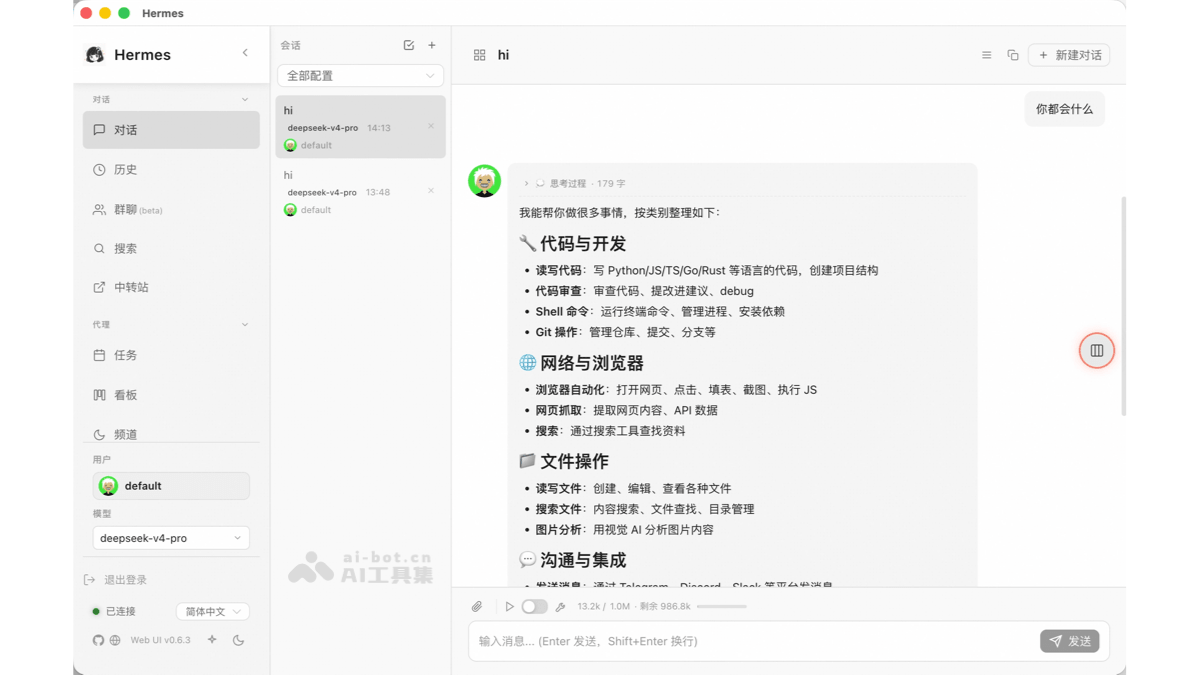
Main features of Hermes Desktop
-
Out-of-the-box operation: Built-in Python 3.12.13 and hermes-agent v0.14.0. Users do not need to manually install dependencies such as Python, uv, or Node.js; just download the installer and double-click to launch.
-
Cross-platform native app: Provides
.dmg(macOS Apple Silicon/Intel)、.exe(Windows x64)、.AppImage/.deb(Linux x64/arm64) and other installation formats, with a higher degree of system integration than browser tabs. -
Full Web UI capabilities: Built on hermes-web-ui, it supports all visualization features such as session management, model switching, skill management, memory viewing, and usage monitoring.
-
Quick Profile switching: Switch between different agent configurations (such as copywriting mode/code mode) with one click through the user menu in the lower-left corner, with no need to memorize complex command-line parameters.
-
Multi-LLM provider access: Supports 11+ model providers including OpenRouter, Anthropic, OpenAI, Google Gemini, xAI Grok, Qwen, MiniMax, Ollama, LM Studio, and more.
-
Streaming chat and slash commands: Real-time SSE streaming rendering of replies, supports
/new、/web、/code、/shell、/memoryand other shortcut commands. -
Rich toolset: Built-in 14+ tool categories, covering web search, browser automation, terminal commands, file operations, code execution, visual analysis, image generation, TTS voice, and more.
-
Memory and persona management: Supports a persistent memory system (can connect to providers such as Honcho and Mem0), and allows direct editing of the SOUL.md persona file.
-
Skill management: Browse, install, and edit Skills in the GUI, covering 28+ categories, with support for visualizing skill learning trajectories.
-
Scheduled task orchestration: Built-in Cron builder, allowing you to create automated tasks and configure 15 delivery targets (such as daily reports and nightly backups).
-
Messaging gateway integration: Supports configuring gateways for 15+ messaging platforms including Telegram, Discord, Slack, WhatsApp, Feishu, WeCom, and more.
-
Seamless switching between terminal and GUI: Shares the
~/.hermesdata directory with Hermes installed via the command line, so sessions and memory are interoperable, and you can switch between the desktop app and the terminal at any time. -
Automatic update mechanism: Integrates
electron-updater, automatically checks for new versions at startup and prompts for updates; you can also manually go to GitHub Releases to download and overwrite-install.
How to use Hermes Desktop
-
Download the installer: Visit GitHub Releases and select the installation file for your platform (choose
.dmgfor macOS, choose.exefor Windows, choose.AppImageor.deb) -
First-run authorization:
-
macOS: Drag the app into
ApplicationsAfterwards, in the terminal runxattr -cr "/Applications/Hermes Desktop.app"to bypass Gatekeeper's "damaged" warning (v0.x is not yet code-signed) -
Windows: SmartScreen will show "unrecognized"; just click "More info → Run anyway"
-
-
Launch the app: Double-click the icon to launch; the Electron main process will automatically start the hermes-web-ui Koa service in the background (
127.0.0.1:8648), and the renderer window loads the local page directly -
Configure the LLM provider: After the first launch, follow the wizard to configure the API Key (supports OpenRouter, Anthropic, OpenAI, Ollama, etc.), or choose a local model endpoint
-
Start chatting: Once in the main interface, you can have streaming conversations with the Hermes Agent, using all features such as slash commands, tool calls, and skill management.
Hermes Desktop's project address
- Github repository:https://github.com/sir1st/hermes-desktop
Hermes Desktop's core advantages
-
Zero environment barrier: Traditional Hermes Agent requires users to install dependencies such as Python 3.11+, uv, Node.js, and Git themselves; the desktop version solves this all at once with a built-in runtime, greatly reducing the cost of use for non-developers.
-
More stable than the browser: The web version hermes-web-ui runs in the browser and suffers from cumbersome permission configuration, gateway dependencies, unexpected crashes, and other issues; as an independent process, the desktop app has more controllable system resource usage and stability.
-
Free switching between terminal and GUI: The desktop version shares the same data directory with the command-line-installed Hermes (
~/.hermes), so users can seamlessly switch between the desktop app and the terminal at any time without losing sessions or memory. -
Community-driven rapid iteration: As an unofficial community project, the sir1st version keeps pace with updates to the upstream hermes-agent and hermes-web-ui, automatically building multi-platform release packages via CI.
-
Open source and auditable: The project itself uses the MIT license, with fully public code, so users can review the packaging logic and security themselves.
Hermes Desktop's application scenarios
-
Local AI assistant for daily office work: A replacement for the ChatGPT web version, continuously conversing with the Hermes Agent on the desktop to handle tasks such as copy organization, code writing, and file management.
-
Visual configuration of IM gateways: Configure gateways for 15+ messaging platforms such as Telegram, Discord, Slack, Feishu, and WeCom through the desktop interface, with no need to memorize command-line parameters.
-
Skill and memory management: Browse, install, and edit Skills in the GUI, view and modify persistent memory entries, and manage user profiles.
-
Scheduled task orchestration: Use the Cron builder to create automated tasks (such as daily reports and nightly backups), and manage delivery targets through the interface.
-
Multi-Profile workflow isolation: Create independent Profiles for different projects or roles, switch contexts with one click, and avoid memory confusion.