
What is Half_illustration
Half_illustration is a LoRA image creative model based on theFlux.1 model, combining elements of photographic realism and illustration art to create unique visual effects. This style simultaneously presents realistic people or scenes along with imaginative illustration elements, such as abstract lines and decorative patterns, in an image. The Half_illustration model is widely used in fashion, advertising, and concept art. It supports rapid image generation via API and is compatible with the Diffusers library, making it easy for developers to use. Users guide the model through detailed descriptions and specific keywords to create artworks that meet their expectations.
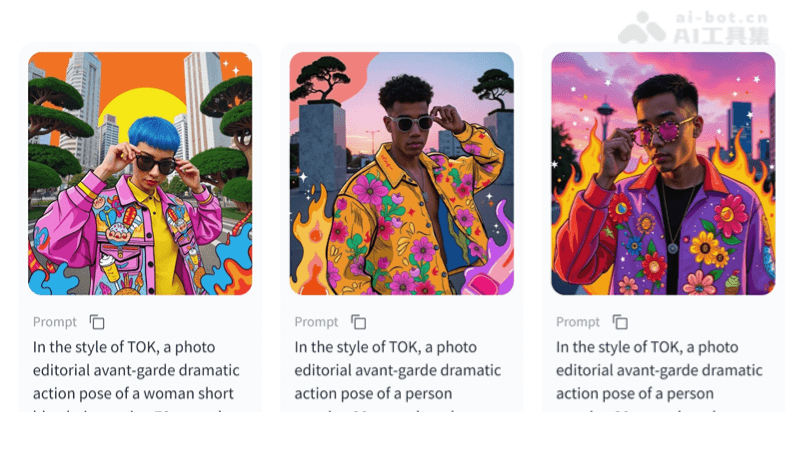
Main features of Half_illustration
- Fusion style: Half_illustration can combine photographic realism with illustration elements to generate images with unique visual effects.
- Creative expression: Supports users in guiding the model through detailed descriptions and specific prompts to achieve personalized artistic creation.
- Wide application: Suitable for multiple fields such as fashion editorials, advertising design, and concept art, providing diverse visual solutions.
- Technical interface: Provides an API interface to facilitate users in quickly generating images and meeting different technical needs.
Project address of Half_illustration
- HuggingFace link:https://huggingface.co/davisbro/half_illustration
- Online experience:https://replicate.com/p/s42zmf3nqnrj60cha219j80244
How to use Half_illustration
- Get the model: First, you need to download the Half_illustration model. Visit theHuggingFace linkto get the model files.
- Install dependencies: Ensure that all necessary dependencies are installed in the system, such as a Python environment and related deep learning libraries, such as PyTorch or TensorFlow.
- Set up the environment: According to the model's documentation, set up the development environment, including installing the necessary libraries and configuring the parameters required by the model.
- Write a description: Prepare a detailed description of the image you want to generate. Include elements such as the scene, character features, actions, and clothing. Make sure the description contains the key phrase "in the style of TOK" to help the model capture the desired semi-realistic style.
- Use the API: The model provides an API interface. By writing code to call the API, pass your description as a parameter to generate an image.
- Run locally: If you choose to run the model locally, you can use the model's configuration file and your description as input to run the model and generate an image.
- Online experience: You can also use theonline experience platformto directly enter a description and generate an image on the web page, without complex setup.
Application scenarios of Half_illustration
- Artistic creation: Artists and illustrators can use Half_illustration to create works with personalized styles, combining realistic and fantasy elements.
- Advertising design: The advertising industry can use the model to generate eye-catching advertising images and attract consumers through unique visual effects.
- Fashion editorials: Fashion magazines or blogs can use Half_illustration to create novel visual displays for products such as clothing and accessories.
- Concept art: In the early stages of film, game, or product design, Half_illustration can be used to quickly generate concept art and prototype designs.