
What is FLUX.1
FLUX.1 is an open-sourceAI image generation modellaunched by the founding team of Stable Diffusion. With 12B parameters, it is the largest text-to-image model to date. It includes three variants: the top-performance FLUX.1 [pro], the open-source non-commercial FLUX.1 [dev], and the fast and efficient FLUX.1 [schnell]. FLUX.1 stands out with excellent image quality, highly realistic human anatomy, and advanced prompt-following capabilities, setting a new industry standard for AI image generation.
Features of FLUX.1
- Large-scale parameters: With 12B (12 billion) parameters, it is one of the largest open-source text-to-image models to date.
- Multimodal architecture: Based on a hybrid architecture of multimodal and parallel diffusion transformer blocks, it provides powerful image generation capabilities.
- High-performance variants: It provides three model variants with different performance levels and uses, including the professional version (FLUX.1 [pro]), the development version (FLUX.1 [dev]), and the fast version (FLUX.1 [schnell]).
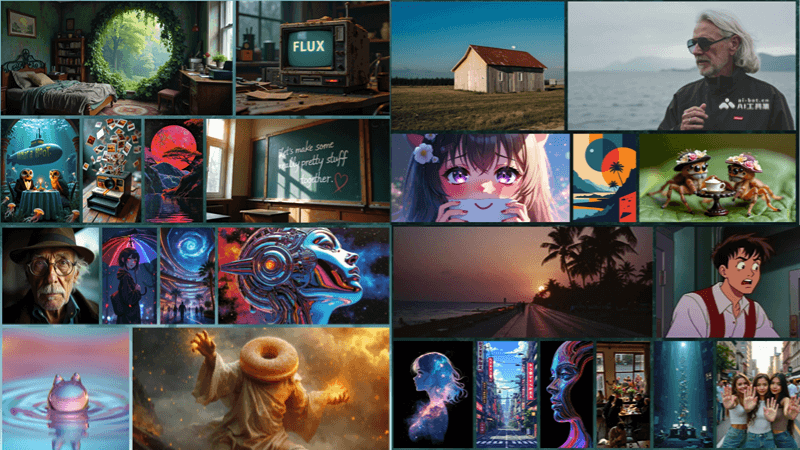
- Image quality: It surpasses other popular models in visual quality, prompt following, size/aspect ratio variability, typography, and output diversity.
- Open source and accessibility: Some model variants, such as FLUX.1 [dev] and FLUX.1 [schnell], are open source and easy to use for research and non-commercial applications.
- Technical innovation: It introduces flow matching training methods, rotary position embeddings, and parallel attention layers, improving model performance and hardware efficiency.
Technical principles of FLUX.1
- Multimodal architecture: FLUX.1 adopts a multimodal architecture, which means the model can simultaneously process and understand multiple types of data, such as text and images, thereby better capturing the correlations between different data types.
- Parallel diffusion transformer blocks: The model uses a parallel diffusion transformer structure, which is an advanced neural network component that can efficiently process sequence data and enhance the model's ability to encode and decode information.
- Flow matching training method: FLUX.1 improves upon traditional diffusion models through the flow matching method. This method is a general technique for training generative models that can simplify the training process and improve the model's generation quality.
- Rotary position embeddings: The model introduces rotary position embedding technology, which is a special encoding method that can enhance the model's ability to recognize features at different positions in an image, thereby improving image detail representation.
- Parallel attention layers: Through the parallel attention mechanism, the model can simultaneously focus on multiple parts of the input sequence, which helps capture long-range dependencies and improve the accuracy of generated images.
Project addresses of FLUX.1
- Project official website:https://blackforestlabs.ai/#get-flux
- Online Demo:
- GitHub repository:https://github.com/black-forest-labs/flux
- HuggingFace model library:https://huggingface.co/black-forest-labs/FLUX.1-schnell
How to use FLUX.1
- Choose the appropriate model variant:
- FLUX.1 [pro]: Suitable for commercial applications that require top-tier performance and requires API access.
- FLUX.1 [dev]: Suitable for non-commercial use. It is an open-source, guidance-distilled model available on HuggingFace.
- FLUX.1 [schnell]: Suitable for local development and personal use. It is the fastest model and is also available on HuggingFace.
- Setting Up the Environment:If deploying locally, you need to set up a Python environment and install the necessary dependency libraries.
- Installing FLUX.1:You can clone the official GitHub repository to your local environment via Git and install the required Python packages according to the guide.
- Using the API:For FLUX.1 [pro], you need to register and obtain an API key to access the model.
- Writing Code:Based on the official documentation or sample code, write a script to interact with the model and generate images.
- Generating Images:Using the interface provided by the model, input a text prompt, and the model will generate an image based on the text.
Below is a simple usage example, assuming you have already set up the environment and installed the necessary dependencies:
# 克隆FLUX.1 GitHub仓库
git clone https://github.com/black-forest-labs/flux

# 进入仓库目录
cd flux

# 创建并激活Python虚拟环境
python3.10 -m venv .venv
source .venv/bin/activate

# 安装依赖
pip install -e '.[all]'

# 根据需要设置环境变量,例如指定模型权重路径
export FLUX_SCHNELL=path_to_flux_schnell_sft_file

# 使用提供的脚本进行图像生成
python -m flux --name 'FLUX.1 [schnell]' --loop
Application Scenarios of FLUX.1
- Media and Entertainment: In film, game, and animation production, FLUX.1 can be used to create realistic backgrounds, characters, and scenes.
- Artistic Creation and Design: Use FLUX.1 to generate high-quality images, helping artists and designers quickly realize creative ideas.
- Advertising and Marketing: Generate attractive advertising images and marketing materials to improve promotional effectiveness.
- Education and Research: In academic research, FLUX.1 can serve as a tool to explore new technologies and theories of image generation.
- Content Creation: Provide unique images for social media, blogs, and online content creation, increasing the appeal of the content.